


In an era where everything can be digitized, everyone has accumulated a vast digital footprint online. A survey by cybersecurity company Bitdefender found that most people actively use about 3 to 10 accounts in their daily lives; but if “one-time accounts” that are registered and then forgotten are included, the total grows several times over. Password management platform NordPass estimates this number at about 187, and privacy service provider Yorba even believes it far exceeds 200. Whatever the exact number, the digital assets we own are far larger than we imagine.
When life comes to an end, what’s left on your iPhone? A one-article guide to understanding Apple’s “Digital Legacy” settings and permission boundaries.
Among the many accounts people have, email, online banking, and Google and Apple accounts are undoubtedly core infrastructure for modern life. Google and Apple in particular are not only “operating-system-level” accounts, deeply tied to hardware through biometrics; they are also ecosystem keys to entertainment, digital wallets, and cloud storage, and are even often used as “single sign-on (SSO)” credentials for third-party websites (although security experts often advise against relying too heavily on this feature).
Precisely because these accounts carry our close connection to the digital world, a real yet often overlooked question arises: after we pass away, what should happen to these digital assets? Compared with Google’s handling mechanisms, Apple has a stricter and more distinctive set of “Digital Legacy” rules for what happens after a user’s death.

The harsh digital reality: accounts come with only the “right to use,” not the “right to inherit.”
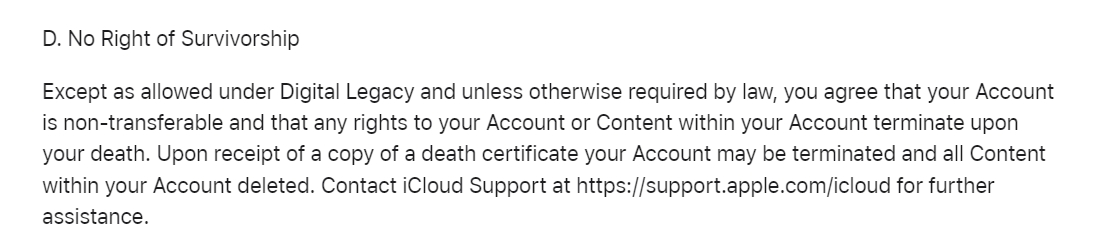
Many people intuitively assume that as long as they have a family member’s phone or computer, they can smoothly retrieve the photos and documents inside. However, in legal terms, digital accounts do not fall under the traditional “Right of Survivorship”; what you have is merely a license to use granted by the platform, and once the account holder dies, that license terminates with them.

Apple in《iCloud Terms of ServicePart 4, Clause D states quite clearly: “Unless the digital legacy policy permits or the law provides otherwise, you agree that your account is non-transferable and that any rights to your account or the content within it will terminate upon your death.” In other words, if no planning is done during one’s lifetime, family members, while grieving, must also face cumbersome legal procedures and may even have to apply for a court order before they have a chance to unlock the digital memories of their deceased loved one.
To avoid this predicament, Apple allows users to designate up to 5 Legacy Contacts during their lifetime. This mechanism does not let family members permanently take over the account; rather, it is more like a time-limited data recovery tool: within 3 years after receiving Apple’s approval, Legacy Contacts can download and back up most of the data in the account; once the 3-year period ends, the Apple account will be permanently deleted by the system.
Access permission boundaries for legacy contacts:
| Accessible data | Inaccessible data |
|
• iCloud Photos, Notes, Mail, Contacts • Calendar, Reminders, and Messages backups • Files stored in iCloud Drive • Backup data for downloaded apps |
• Media purchase history (e.g., movies, music, books) • Payment information and subscription items • Passwords and sensitive credentials stored in iCloud Keychain |
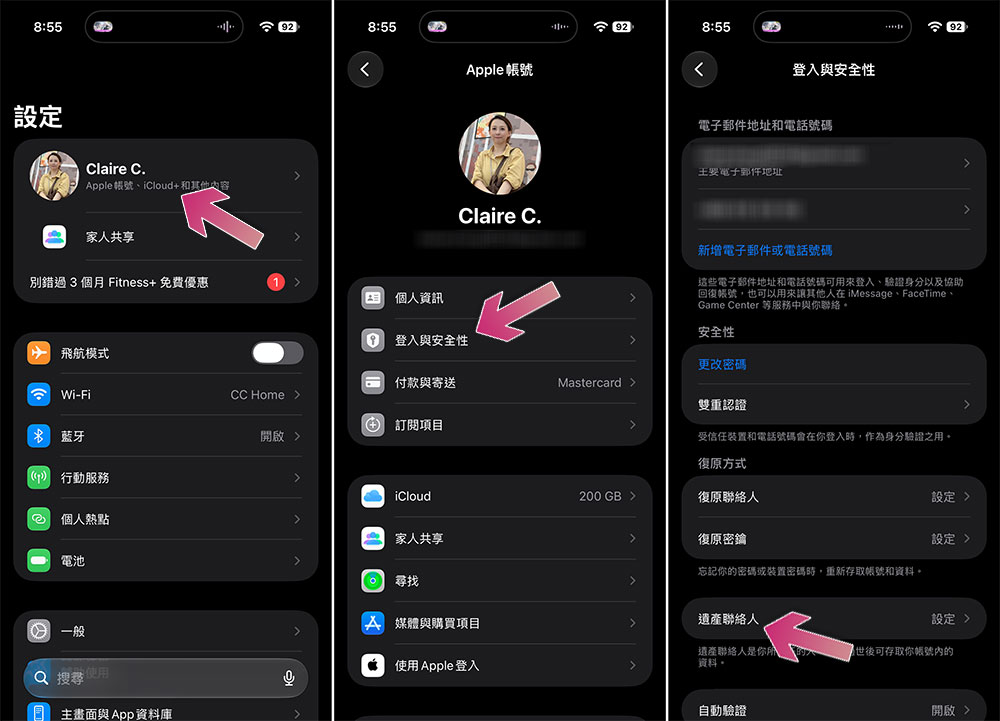
Set up a Legacy Contact for your Apple Account in just 3 steps
The threshold for setting up a legacy contact is extremely low—the person doesn’t even need to have an Apple Account or any Apple device. Once setup is complete, the system generates a unique “Access Key,” which you can send to them directly via message or print out and keep safe. In the future, family members can simply use this key along with a death certificate to apply to Apple for access to the data.
List of settings paths:
- iPhone / iPad: Open “Settings” > Tap your profile picture (Apple ID) at the top > “Sign-In & Security” > “Legacy Contact.”
- Mac: Click the Apple menu in the top-left corner > System Settings > Click your profile picture (Apple ID) > Sign-In & Security > Legacy Contact.
(If you want to change the selected person later, simply follow the same path, click that contact, and select “Remove Contact.”)
After the application is approved, what will Apple do? And what will it “absolutely never” do?
Once a Legacy Contact submits the access key and death certificate and Apple approves it, the platform will carry out a series of specific measures regarding the account and hardware, while also upholding the bottom line of privacy and security:
- What Apple would do
- Grant access to the dedicated website so contacts can download the cloud data they are permitted to access.
- Assist with removing Activation Lock from a deceased user’s device so family members can reuse or resell the hardware.
- After the 3-year access period expires (or upon an earlier request from the family), permanently close and delete the Apple account.
- What Apple won’t do:
- Never bypass the device passcode: Apple cannot unlock the screen passcode on your iPhone or Mac without erasing data. If you want to retain the data stored locally on the device, you still need to first remove the lock via “Reset and Erase All Content.”
- No guarantee that inactive accounts will be retained permanently: If the account has been completely inactive for more than one year before the person’s death or before the request is made, Apple will not deliberately keep it active, and the system may still purge inactive data in accordance with established policies.

Digital legacy planning is like buying insurance for your life. Take a few minutes now to set up a legacy contact—not only can you safeguard your own privacy boundaries, but you can also leave the gentlest consideration for your loved ones in the future.
Source: KOCPC Chinese