


A drawer full of identical-looking USB-C cables—which one can handle full 100W fast charging, and which is just the “slow charging cable” that came in the box? Since there’s almost no visible difference, it’s impossible to tell a cable’s supported protocols and rated power with the naked eye, and often you only discover the painfully slow charging speed after plugging in a device.
Instead of spending extra money on a hardware USB current tester, you can now easily solve this pain point with smartphone software. Among the many testing tools, an Android app called USB-C Tester: Cable & Charger stands out for its clean interface and powerful depth of detection.

Free Android tool “USB-C Tester: Cable & Charger” reveals the true details of the USB-C cable in your hand in one second.
Unlike many free apps of the same type that pop up full-screen ads every few seconds, USB-C Tester: Cable & Charger not only has a clear, well-categorized interface where information is easy to see at a glance, but its installation package is also extremely lightweight at only 5MB (supports Android 9 and above), and the developer maintains it quite actively (the most recent update was November 4, 2026). Users only need to download it from the Google Play Store and grant notification and network permissions; after connecting a charger and cable, the system will immediately start real-time monitoring and supports cloud syncing of test data or exporting it as CSV and PDF diagnostic reports.
★ Download “USB-C Testing: Chargers and Cables”:Click here
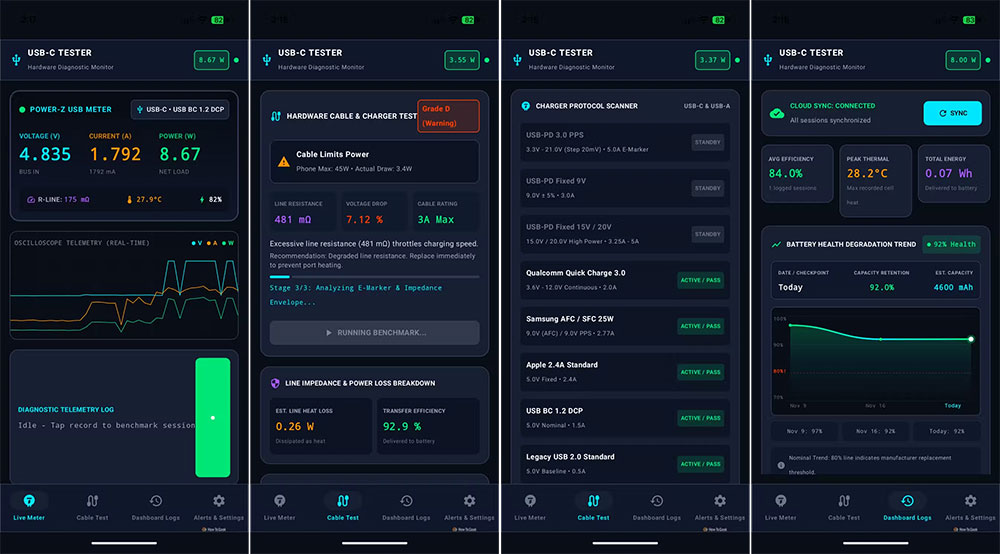
Four main tabs persist at the bottom of the app, transforming complex electricity information into intuitive data metrics:
- Live Meter: A portable mini oscilloscope
As the app’s main screen, this directly displays real-time voltage, current, power, impedance, and battery health status. For electronic engineering students or hardware enthusiasts, the built-in “real-time oscilloscope telemetry feature” can also plot dynamic waveforms of voltage over time and supports recording benchmarks to retain complete telemetry logs. - Cable Test: One click reveals the cable’s true identity.
This core feature deeply analyzes the hardware specifications of the cable you have, not only identifying whether the cable has a built-in E-Marker chip, but also comprehensively testing its support for USB PD (Power Delivery), Qualcomm QC (Quick Charge), PPS, and fast-charging protocols from Samsung, Apple, and others, along with the corresponding voltage and current profiles. With the built-in cable pairing assistant comparing historical records, it can also quickly identify faulty cables that are aged, have poor contact, or are internally broken. - Dashboard Logs: Monitor long-term battery and charging health.
The system aggregates all historical test data to help evaluate the phone’s overall heat performance during charging, conversion efficiency, energy consumption, and degree of battery degradation. If certain test runs had abnormal environmental conditions, you can also manually exclude those records to ensure the accuracy of long-term statistics. - Alerts & Settings: Proactive protection for charging safety
Users can customize device temperature thresholds. If the system detects overheating, unstable power supply, high resistance, connector abnormalities, or declining battery health, it immediately sends a push alert, turning cold data into real safety protection.
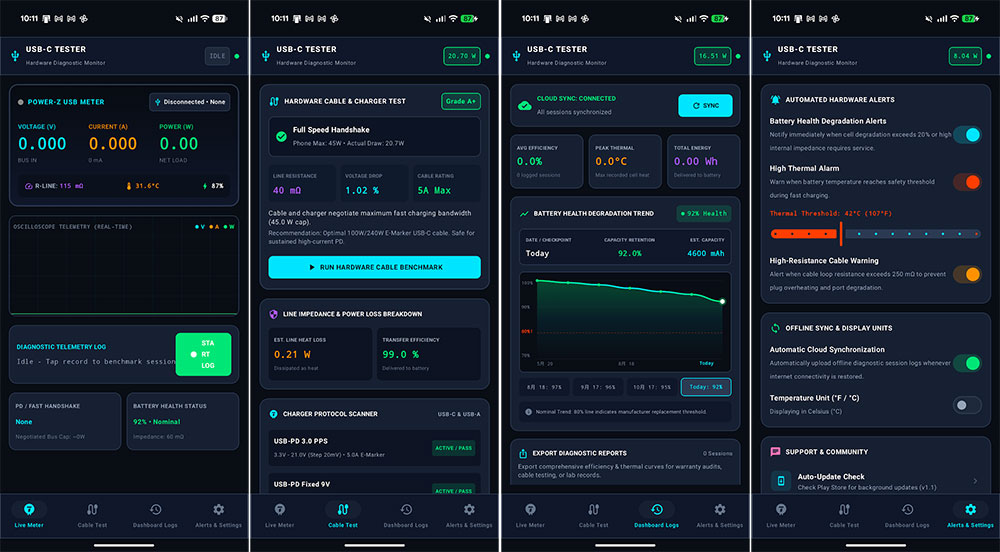
Currently, USB-C Tester: Cable & Charger is only available on Android. If you use another system, you can also check cable specifications with the following similar tools:
| Operating system | Recommend alternative tools | Acquisition Channel / Remarks |
| iOS | WattCheck | Available for download on the Apple App Store. |
| macOS | WhatCable | A cable specification testing tool built specifically for Mac |
| Windows | USB Device Tree Viewer | Enables in-depth inspection of port and USB cable communication protocols. |
Source: KOCPC Chinese