


Apple announced the new Mac Studio with M5 Max and the all-new M5 Ultra on August 25. Preorders opened in Taiwan at 9 a.m. on August 27, with official availability on September 22. The M5 Ultra model starts at NT$199,900, or NT$185,390 with education pricing; the M5 Max version starts at NT$84,900. MacStories, a foreign publication specializing in Mac coverage, got an M5 Ultra test unit with 256GB of unified memory before availability and spent four days comparing it with the previous-generation M3 Ultra (512GB) and its own desktop equipped with an RTX 5090, with measurements spanning prompt lengths from 4K to 256K, four quantization precisions, and concurrent requests. The conclusion was direct: this machine pushes local AI Agents from “barely able to run” to “ready to be a daily driver.”
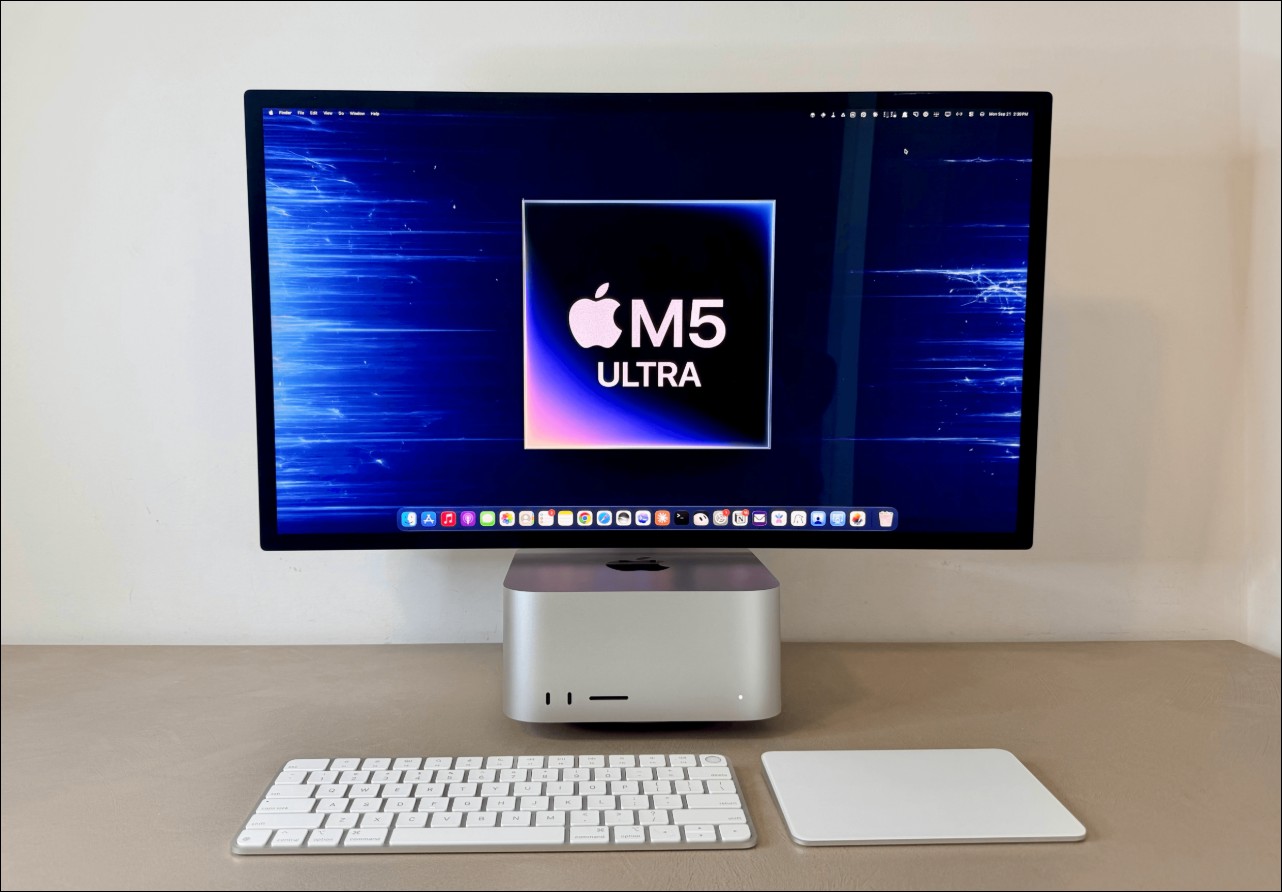
Specs and pricing: Bandwidth is the key focus of this generation.
M5 Ultra version of Mac Studio Configurable with up to a 36-core CPU and 80-core GPU, each GPU core has a built-in neural network accelerator specifically for accelerating matrix multiplication operations. Unified memory remains at a maximum of 512GB, while bandwidth increases from 819GB/s on M3 Ultra to 1.2TB/s, a 50% increase. Apple’s official data claims AI peak computing performance up to 4.3 times that of M3 Ultra and 9.8 times that of M1 Ultra.
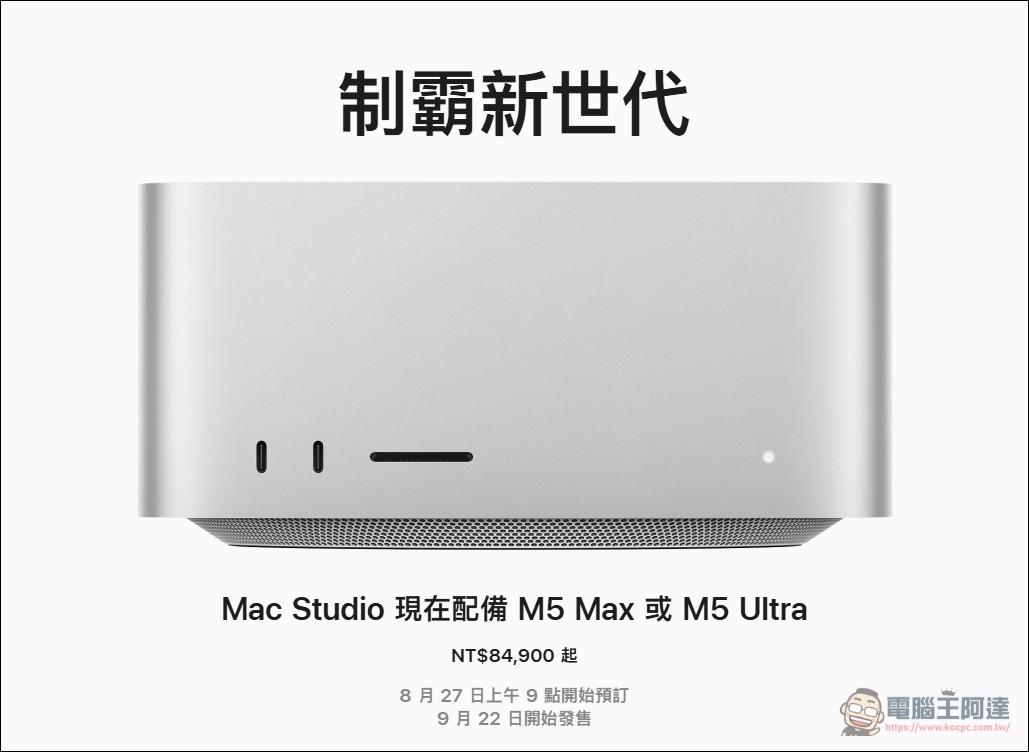
The new Mac Studio supports Wi-Fi 7 and Bluetooth 6 for the first time, and features Thunderbolt 5. Apple has also added support for RDMA (Remote Direct Memory Access), allowing multiple Mac Studios to be linked into a shared memory pool; the company says a cluster of four machines can achieve AI compute speeds up to 3x that of a single system. MacStories tested the 256GB model; the 512GB version won’t launch until late October.
How much faster than M3 Ultra: prompt processing is 2.5x faster
For people running AI Agents, the most agonizing part is the blank stretch while waiting for the model to finish reading the prompt (Prefill and TTFT; time to first TOKEN). A modern Agent sends system prompts, personalization settings, session memory, skill and MCP descriptions every turn, so the opening context is already a big stack. MacStories says that in the past, when running this kind of Agent with local models, you could only stare at the loading indicator, and the longer the conversation, the slower it got.
The improvements in this measurement are mainly in prompt processing. Taking Qwen3.8-Flash-Next as an example, M5 Ultra is on average 150% faster than M3 Ultra, about 2.5x. The specific numbers are as follows:
- 4K promptM5 Ultra writes at 90.7 tok/s, while M3 Ultra is 59.0 tok/s.
- 256K promptM5 Ultra 74.7 tok/s, M3 Ultra 38.6 tok/s. The M5 Ultra’s write speed at 256K is still higher than the M3 Ultra’s performance at 4K.
- Time To First Token (TTFT)With a 256K cold cache, the M3 Ultra takes 246 seconds to output its first token, while the M5 Ultra takes 104 seconds.
- 256K read speed:M5 Ultra 2,544 tok/s,M3 Ultra 1,070 tok/s
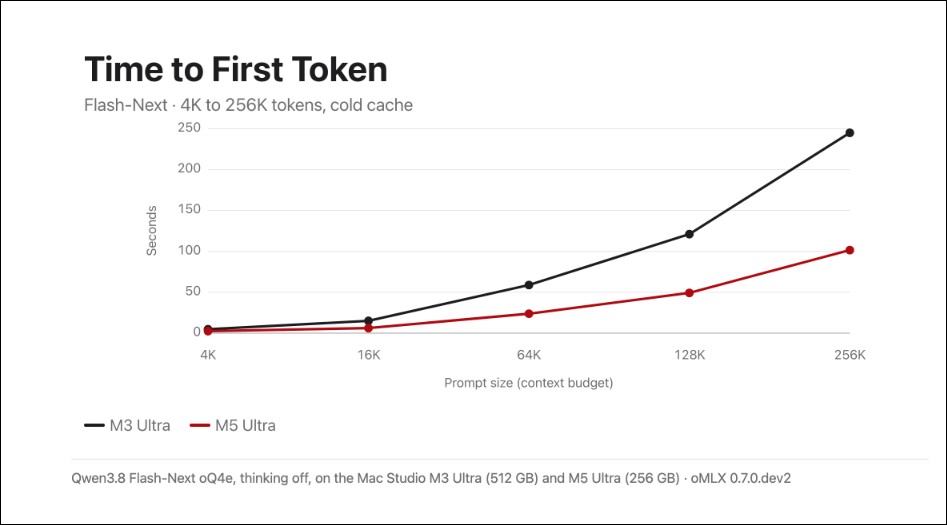
With short prompts, this model can exceed 100 tok/s; even with context packed to 64K to 256K, it still delivers 60 to 85 tok/s. MacStories says this finally makes local models viable in applications like Open Minis and Hermes Agent that require repeated tool calls.
Against the RTX 5090: faster in individual tests, but stuck at 32GB
RTX 5090 still leads the M5 Ultra in most categories. For example, with a 6,091-token prompt run on Qwen3.8 27B, the 5090 reads at 3,031 tok/s and writes at 59 tok/s; the M5 Ultra reads at 1,701 tok/s and writes at 48 tok/s; the M3 Ultra comes in at 414 tok/s and 31 tok/s.
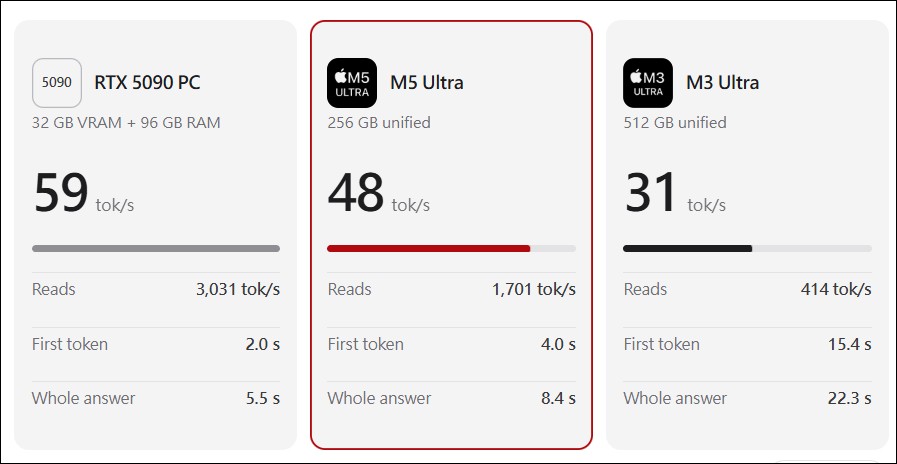
The gap comes from two stages. Prompt processing relies on matrix operations, which is exactly where NVIDIA Tensor Cores excel; Apple’s neural network accelerator narrows the gap but does not catch up. Generation speed depends on memory bandwidth, since every token the model writes requires pulling the entire model from memory once. The 5090’s 1.79TB/s versus the M5 Ultra’s 1.2TB/s gives it a steady lead of about 25%.
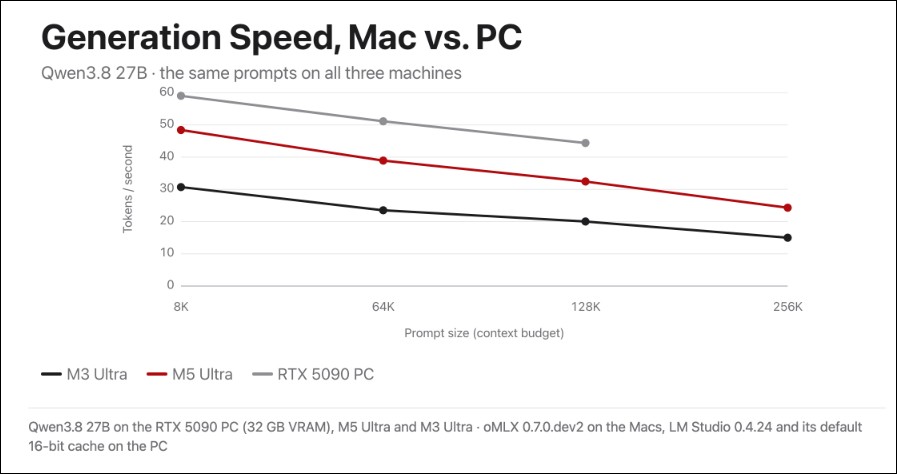
The 5090’s problem is capacity. It has only 32GB of VRAM, and once a model exceeds that, layers have to be offloaded over PCIe to much slower system memory. MacStories found that after switching to borrowing system RAM, the 5090’s write speed at 64K, 128K, and 256K dropped to 4.6, 2.9, and 1.5 tok/s. By contrast, the Mac Studio has a single unified memory pool, so 256GB or 512GB won’t spill over.
Size and cooling are also things reviewers care about. MacStories described that after running high-context tests and walking into the office, the entire room was noticeably hotter and stuffier than other spaces; by contrast, the Mac Studio on the desk was only warm to the touch, and its fan speed and noise were much lower. When running 4-bit quantized models day to day, you can’t hear the fan unless you put your ear right up against the machine.
Quantization and Memory: 5-bit Is the Sweet Spot
MacStories tested four quantized versions of Qwen’s latest 3.8 Flash-Next model on a 256GB machine, and found that the 4-bit and 5-bit versions fit entirely in memory, while the 6-bit and 8-bit versions had to offload the n-gram embedding table to SSD.
- oQ4ePeak usage: 155GB, all in memory
- oQ5e179GB, all in memory
- oQ6e: After placing the embedding table on SSD, 156GB. When loading directly into memory, macOS terminated the server at 176.6GB due to memory pressure.
- oQ8eThe embedding table is 187GB after being placed on SSD. When loading directly, oMLX refuses to run; the loading process is estimated to require 244.2GB, exceeding its allowed 200.4GB.
In the control group, the M3 Ultra’s 512GB of memory can hold all four quantizations entirely in RAM. MacStories considers 5-bit on the 256GB model to be the sweet spot among intelligence, performance, and memory usage, and notes that if it can test the 512GB version in the future, what it most wants to measure is 8-bit performance without relying on SSD offloading.
Parallelism and subagents: running three at once is actually more cost-effective.
MacStories also tested the scenario of sending three requests simultaneously. With a single request, the M5 Ultra produced a total of 66.2 tok/s; with three simultaneous requests, it rose to 81.5 tok/s, amounting to 23% more total throughput; the M3 Ultra edged up from 38.4 to 39.9 tok/s, only 4%. Each individual request slows down, but the machine as a whole completes more work.
On the 5090 PC, the reviewer had the main model split an accounting task into three parts and hand them to subagents; sequential execution took 44.8 seconds, but switching to parallel cut it to 32.1 seconds. Each subagent’s write speed dropped from 63 tok/s to 44 tok/s, yet the overall task still finished earlier.
Practical use: 99 days non-stop at 0 cost.
MacStories says it is not an AI developer and does not train or fine-tune models. This summer, for its review of iOS and iPadOS 27, it built an internal app called Desk to organize hundreds of notes, sessions, PDFs, and web clippings. The project eventually accumulated 310 documents. A set of agents based on DeepSeek V4 Flash plus olmOCR for processing PDFs ran continuously 24 hours a day for 99 days, responsible for transcribing WWDC sessions, extracting features from various sources, cross-referencing them, and organizing the database via the Notion API.
He mentioned that if this kind of long-running, always-on background work were switched to OpenAI or Anthropic APIs, the cost would be too high to afford, so he turned to local models, and in the end the total cost of this research workflow was 0. The article itself was still written by him word for word; the AI AGENT was responsible for research, interlinking notes, and tracking new features.
In addition, he used Qwen-Image-2.1 Generating wallpaper locally took 180 seconds, with peak memory usage of 78GB. He also set Qwen3.8-Flash-Next as the default model for Open Minis for iOS and Hermes Agent, and used local models in Codex, letting the main cloud model direct the local sub-agents.
Conclusion
MacStories concluded that the M5 Ultra’s performance gains are concretely measurable and reflect that Apple’s investment in its own chips and unified memory architecture is starting to deliver real returns for local AI users. The reviewer admitted that four days of testing only scratched the surface and that there hadn’t yet been time to try projects such as DwarfStar, Inco Splash, and Exo, among which Exo’s RDMA implementation could in theory use Thunderbolt 5 to distribute compute across two machines: an M3 Ultra and an M5 Ultra.
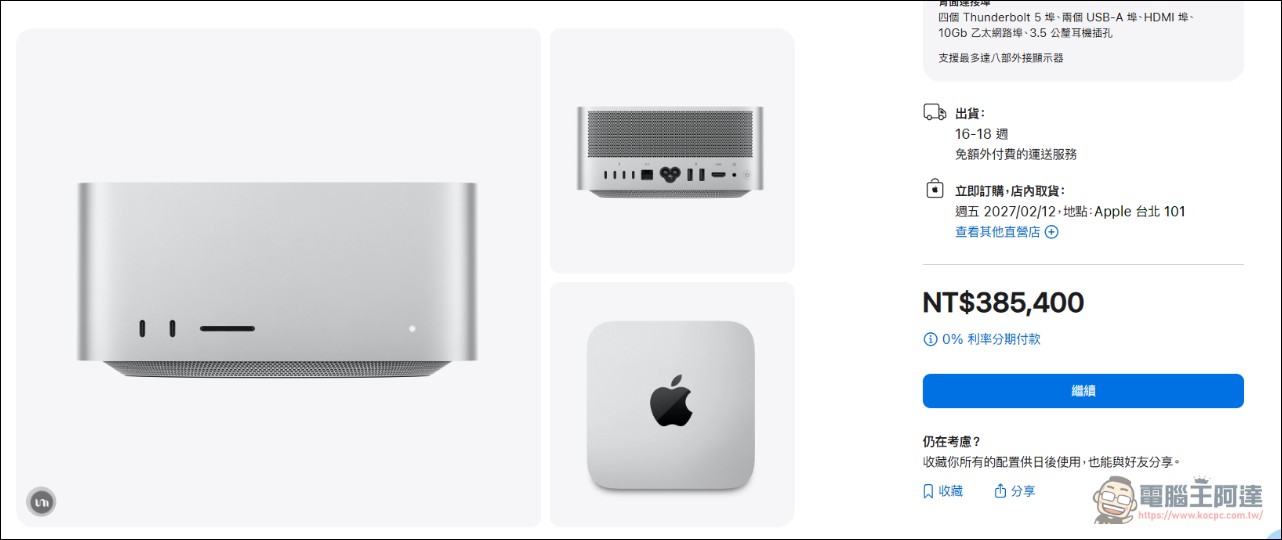
As for what the 512GB version can achieve, he is equally hopeful. For Taiwanese users,M5 Ultra version from NT$199,900The barrier to entry is not low (and the configuration in this article costs at least NT$385,400), and the case for this machine rests on one premise: you really intend to keep long-duration, high-frequency AI work on your own desktop, rather than paying a monthly fee to hand it off to the cloud.
Source: KOCPC Chinese