


The Steam Machine has been on sale since the end of June, and underpowered graphics performance has been one of the most common complaints from players. The built-in GPU is roughly on par with a desktop RX 7600, which isn’t exactly impressive for a starting price of $1,049, and you’ll start to feel the strain when running big titles at 1440p or higher. Recently, some players overseas have found a workaround: hooking up an external GPU. After modding it with a Radeon RX 9070 XT, *Crimson Desert* easily topped 100 FPS on the high preset. Of course, there’s a catch.
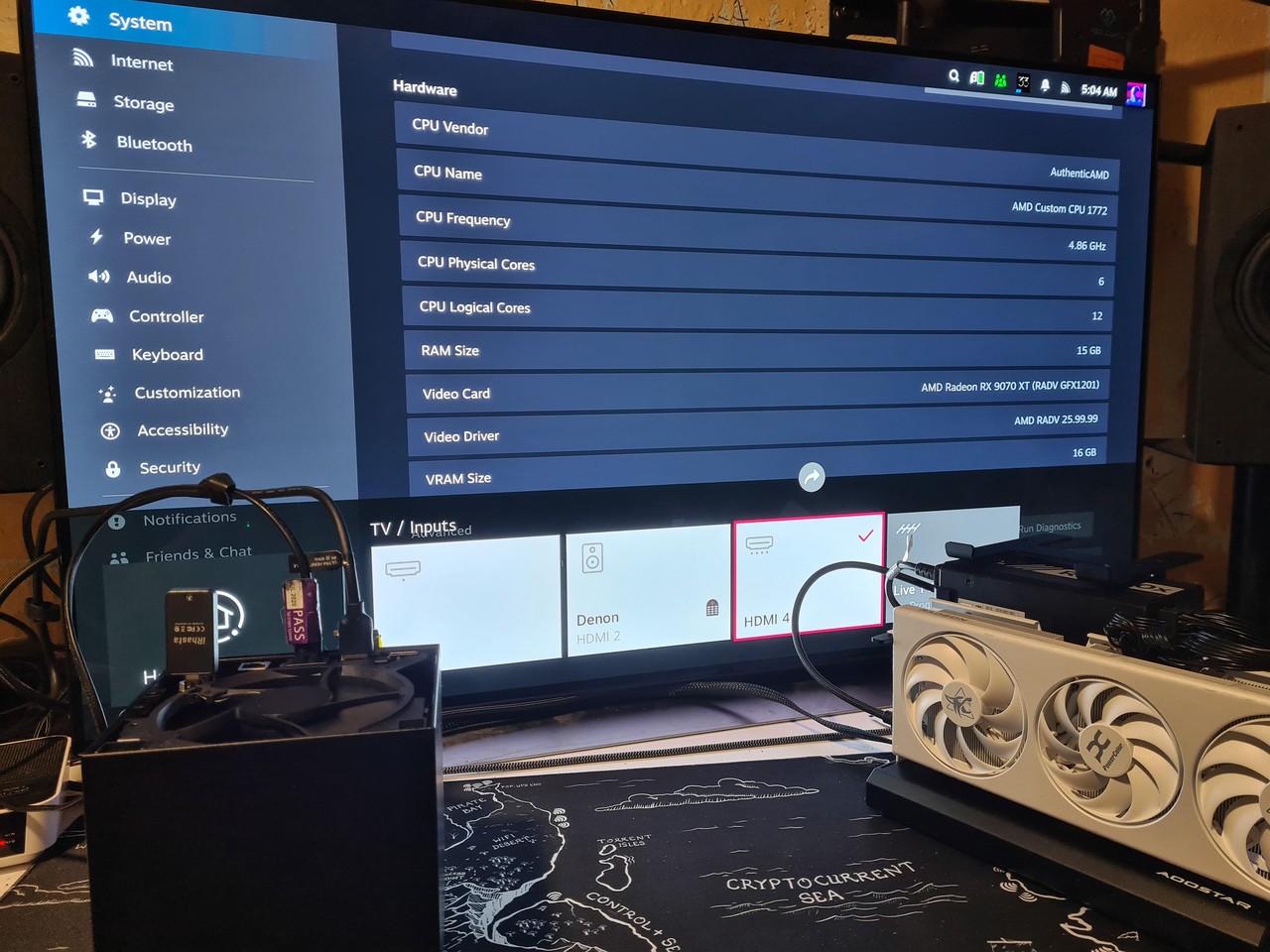
Gamer externally connects RX 9070 XT to Steam Machine: Crimson Desert breaks 100 FPS at high settings, at the cost of moving the system drive to USB-C.
According to Tom’s HardwareA user named Large_Customer_3840 recently shared on Reddit’s r/steammachine that he added an external graphics card to his Steam Machine.
His approach, when broken down, is actually just three steps. Step one is to open up the machine and install an M.2-to-OCuLink adapter card into the M.2 slot inside. Step two is to run an OCuLink cable out to an Aoostar EG01 external graphics card dock. Step three is to plug in the RX 9070 XT and hook up an external power supply.
Added an egpu to my valve steam machine.
byu/Large_Customer_3840 insteammachine
During initial testing, the software side went more smoothly than expected. After boot, the RX 9070 XT immediately became the primary display output, with no need to manually select the graphics card in settings—SteamOS recognized it on its own. However, subsequent testing also revealed a few minor issues, including that the Steam Machine itself needs to maintain an HDMI connection, otherwise the external graphics card may show a black screen.
OCuLink is the key to this entire setup. For those who aren’t too familiar with it, in simple terms, it’s a cable that “extends PCIe signals out of the chassis.” Most people are probably more familiar with Thunderbolt or USB4 eGPUs, where the signal has to be packaged and then unpacked, with an extra layer of conversion in between. OCuLink skips that layer, connecting the PCIe lanes on the motherboard directly to the external GPU.
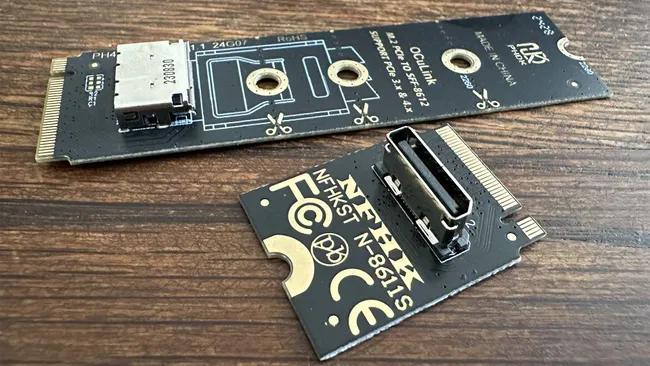
Image source: Tom’s Hardware
However, this method doesn’t support hot-swapping, nor does it have power delivery capability.
The Aoostar EG01 uses PCIe 4.0 x4, with a theoretical bandwidth of 64 Gbps, priced at around USD 109. With only x4 bandwidth, some might wonder whether it will bottleneck performance? The answer is yes, and the more powerful the graphics card, the more performance you lose.
The most troublesome point of all is that the system drive ends up with nowhere to go. The Steam Machine only has one M.2 PCIe 4.0 slot inside, so after installing the adapter card, there’s no spot left for the system drive.
Large_Customer_3840’s solution is also quite hacky: he took out the NVMe system drive, put it into a USB-C external enclosure, and connected it to the USB 3.2 Gen 2 port on the back of the machine, which has 10 Gbps speed and supports DP-Alt and PD power delivery.
After this mod, the Steam Machine case obviously won’t close, unless you cut holes in the backplate or rear to route the OCuLink cable. He hasn’t done that step yet, so he’s just running the whole machine bare, and he says he can live with that for now.
So how much does the performance actually improve? With the Steam Machine’s integrated graphics, it lands around 50 FPS in Crimson Desert on the high preset. After adding an external RX 9070 XT, Large_Customer_3840 says it reaches over 100 FPS:
| configuration | Crimson Desert’s performance | Source |
|---|---|---|
| RX 7600-class desktop graphics card | High preset approximately 50 FPS | Tom’s Hardware cites online testing. |
| Steam Machine integrated graphics (1080p Ultra + RT shadows) | Approximately 60 FPS | WIRED Hands-On Test |
| Steam Machine + External RX 9070 XT (OCuLink) | High preset, 100 FPS or higher. | Large_Customer_3840’s Self-Description |
| RX 9070 XT Desktop Native (1440p High) | Approximately 80-100 FPS | GamersNexus |
One final reminder: this kind of mod isn’t really recommended for general users, since it involves the internal M.2 slot and could void your warranty. Also, since hot-swapping isn’t supported, you’ll need to shut down the system before plugging or unplugging the graphics card, which makes it a bit of a hassle in daily use.
Source: KOCPC Chinese