


Having AI directly operate phones to solve everyday problems has always been the holy grail for applications in this industry—from the “Doubao Phone,” whose early bold attempts ended up being completely blocked by China’s internet giants, to the recently unveiledStepX NeoA couple of days ago, someone used Codex to control an iPhone and operate apps. Now, a developer has also open-sourced a project called phone-harness on GitHub for Claude Code, touting “a thin, rewritable harness that connects a large language model directly to a real iPhone.” The key part: it doesn’t require jailbreaking, Xcode, or WebDriverAgent—it relies on the existing iPhone mirroring feature on Mac.
Claude Code can use your iPhone! 📲
Introducing: phone-harness
> Automate any iOS app like a human
> native iPhone control → no API, no jailbreak
> Connect once, control anytimeSetup in one prompt.
Try it now! ↓ pic.twitter.com/vMeB0AudUo— shawn (@shawn_pana) August 8, 2026
phone-harness principle: iPhone mirrored screenshots with OCR as eyes, CGEvent as hands.
The engineering logic of phone-harness is straightforward: it treats the iPhone mirroring window as the entire transmission channel. For “eyes,” it uses screenshots paired with the Vision framework’s OCR; for “hands,” it uses system-level CGEvent to simulate real touches—with nothing sitting between the AI Agent and the phone. macOS’s iPhone Mirroring renders the iPhone screen as a window on the Mac while converting the Mac’s mouse and keyboard input into touches, effectively turning that window into the agent’s eyes and hands.
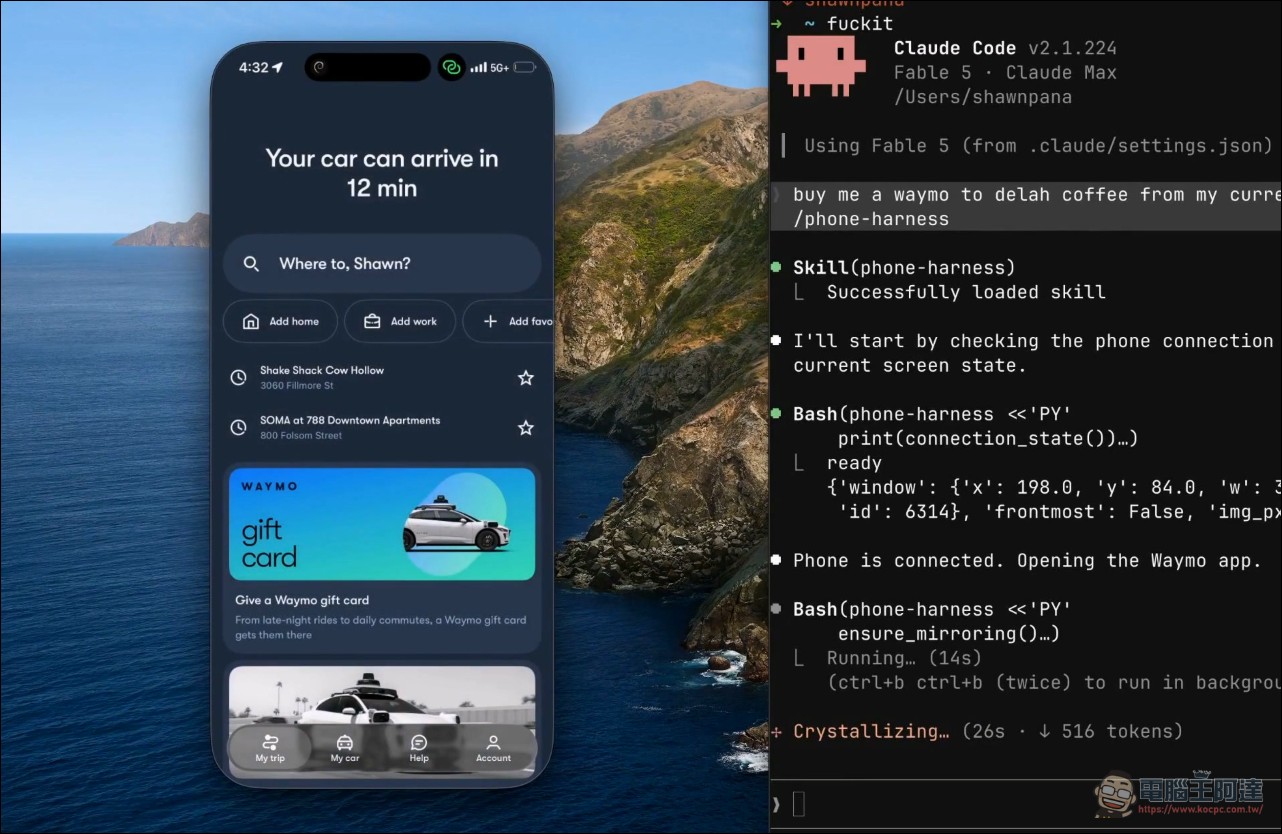
As for this “look” part, first use screencapture Capture the mirrored window, then use Apple’s Vision framework for text recognition, turning every visible string on the screen into content with coordinates. The author jokingly calls this a “poor man’s DOM.” So the agent can recognize the word “weather” on the screen and know its coordinates.
For the “action” part, it relies on CGEvent to send events at the HID level. The supported actions include clicking, long-pressing, dragging, swiping, scrolling gestures, text input, and app-specific shortcuts (like Cmd+1 to return to the home screen, Cmd+2 to open the App Switcher, Cmd+3 to open Spotlight). After performing the action, another screenshot is taken to verify the result — since there’s no DOM, the screenshot is the ground truth.
The entire mirror transmission is stateless — every call re-queries the window position and screen, so there’s no need for a resident daemon; each execution is a complete, self-contained run. The core code is roughly 500 lines, split into several modules: mirror (window and input), ocr (text recognition), helpers (preloaded base functions), admin (doctor health check), and run (CLI).
The installation barrier is low, and it supports Claude Code and Codex. The requirements are macOS Sequoia or later, Python 3.12 or later, and pairing iPhone Mirroring with your phone once. You’ll need to grant the terminal two system permissions: Accessibility (responsible for clicks and keystrokes) and Screen Recording (responsible for viewing the phone screen). The former takes effect immediately, while the latter only kicks in after you restart the terminal. Once installed, use… phone-harness --doctor Check the whole chain; if it all passes, that means the entire flow from screenshot to click is working.
Will ask before acting and avoid touching sensitive content.
Since it’s operating a real phone, the author has drawn clear boundaries in the SKILL. Any external or hard-to-reverse action—such as sending messages, posting, purchasing, deleting, or changing settings—must pause and ask the user first. Navigating and reading the user’s own task content is fine, but it won’t linger in personal content like “messages, photos, or emails” longer than the task requires.
Technically, there are acknowledged limits. Only one phone and one session at a time; unlocking the physical phone pauses the mirroring; there’s no multi-touch (no pinch-to-zoom), and you can’t run the camera or Face ID flows — DRM-protected video just shows a black screen. OCR only recognizes text, not semantics, so for unlabeled icons you still need to take a screenshot and pair it with a vision-capable model to identify them.
phone-harness – GitHub
Compared to that codex-ios-assistant from yesterday, the approach is completely different.
Speaking of letting AI agents operate the iPhone, there’s actually been another open-source solution recently — the one covered previously. codex-ios-assistantBoth have the same goal, but their technical approaches differ greatly.
codex-ios-assistant takes the “software bridge” route, using iMessage plus Shortcuts as the command channel: Codex on the Mac packages instructions into a single line of text and sends it via iMessage to the iPhone. The iPhone uses a 95-step shortcut to perform actions like opening apps, taking screenshots, and reading the clipboard, then sends the results back via Cloudflare Tunnel. It mainly relies on deep links to open apps, and can do whatever actions Shortcuts supports.
phone-harness, on the other hand, treats the iPhone mirroring window as a terminal screen, letting the agent directly “see the screen and actually tap,” without the limitations of the shortcut layer. This allows for gestures closer to real human operation, such as dragging, scrolling, and typing. In terms of setup, it doesn’t require building any shortcuts on the iPhone—just a one-time mirror pairing and granting terminal permissions, which is much simpler than assembling a 95-step shortcut.
Both have their pros and cons. The advantage of codex-ios-assistant is that it can be controlled remotely via a cloud tunnel, so you don’t need to be at the computer, and the shortcuts are a public API with more stable support; the downside is that the range of actions is tied to Shortcuts. The advantage of phone-harness is that it operates more like a real person, has simple setup, and is stateless with no daemon, but the downside is that it relies on iPhone mirroring, the Mac must be running Sequoia or later, the mirroring window has to stay open, and you must be near the Mac to connect.
Interestingly, there are actually already products on the market like mirroir-mcp These MCP servers also rely on iPhone mirroring plus OCR to let AI control phones, and some have even used Claude’s Computer Use with iPhone mirroring to achieve scheduled automation. In this battleground of “getting AI agents to physically operate phones,” the approaches have become increasingly diverse.
Conclusion
phone-harness’s value lies in proving an alternative path: no jailbreak, no touching Apple’s closed interface—just using iPhone Mirroring, a native feature, along with screenshots, OCR, and CGEvent, to build a channel that lets AI agents operate a phone “just like a human.” It pushes the setup barrier down to the minimum while clearly drawing ethical and technical boundaries. For anyone who wants an AI agent to genuinely operate their phone for them, this newly released, rapidly growing open-source project is worth spending some time investigating.
Source: KOCPC Chinese