


The iPhone 17 series has been experiencing many disasters recently. One issue that has been discussed by many people recently is that when the iPhone battery is completely exhausted, it cannot be turned on even if it is connected to a USB-C cable for charging, and the device will fall into a completely unresponsive “death” (bricked) state. According to user reports on multiple forums and social platforms, this problem affects the entire iPhone 17 series, including iPhone 17, iPhone 17 Pro, iPhone 17 Pro Max, and iPhone 17 Air.

iPhone 17 series suffers from “death” failure after battery exhaustion
According to reports by media person Meayo, he bought an iPhone Air in September 2025. Since then, the battery has been completely drained 2 to 3 times, but only the most recent time, it could not be turned on at all after charging. He tried several different USB-C cables, but none of them would charge the device. After connecting iPhone Air to Mac via USB-C, Mac’s Finder cannot recognize the device.
Don’t drain your iPhone 17 Pro Max to 0%. It’s been 20 minutes and the device still hasn’t turned on. Some users are saying you need to keep it on charge for 30 minutes to an hour before it even starts charging again. Many users are reporting the same issue, and Apple still… pic.twitter.com/5yZXz11tn3
— TechDroider (@techdroider) December 11, 2025
This problem is not an isolated case. exist Reddit and maintenance forum iFixit On the forum, many users reported similar situations. Some people said “My iPhone 17 Air is dead and cannot be turned on”; others said “My iPhone 17 Pro Max crash, it cannot be started at all.”
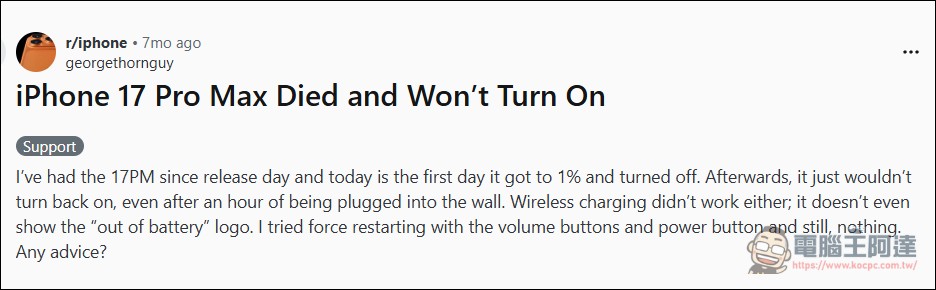
However, so far, it is still unclear how many users this problem affects and how frequently it occurs. This may be a random hardware or firmware issue, rather than a “common problem” encountered by all iPhone 17s.
MagSafe is the only savior
The most recognized solution currently is to place your iPhone on a MagSafe charging dock and charge it for about 15 minutes. Mayo himself also successfully restored operation of his iPhone Air through this method.

Why doesn’t wired USB-C charge, but MagSafe does? This may be related to Deep Discharge status. When the battery power drops to an extremely low level, certain protection mechanisms are activated to prevent over-discharge from damaging the battery. Wired charging may trigger these protection mechanisms due to transient current or voltage issues, while MagSafe’s magnetic charging method provides a more stable, lower-power charging path, giving the system time to gradually recover.
In fact, MagSafe’s success stories are not uncommon. According to reports from multiple users on
iphone 17 series is terrible. Apparently when your phone is completely dead only certain chargers can restart it like a macbook charger or a magsafe charger
— Eon (@atlloveforever) April 15, 2026
Apple Store engineers also recommend MagSafe
According to media reports, when users brought their iPhones to an Apple Store for assistance, Apple engineers also recommended that they use a MagSafe charging stand to charge the device instead of a wired USB-C cable. This further confirms the effectiveness of MagSafe on this issue.
This suggests that Apple may be aware of the issue internally and have adopted MagSafe as the official recommended response. If the problem involves firmware or low-level power management, a software update should fix it. But so far, Apple has not officially responded to the issue.
Apple Watch has also reported similar disasters
Some netizens also shared that a similar situation occurred with their Apple Watch, and it was restored through Magsafe charging: “I also encountered the same problem with my Apple Watch Ultra 2. After the battery is exhausted and the charger is connected, it will take 30 to 45 minutes to turn on and start charging. This problem has continued to occur since January 2026. I think it may be a new problem caused by software updates.”
If the Apple Watch is also affected, this could point to a broader systemic issue rather than a hardware flaw specific to the iPhone 17. Considering the Apple Watch Ultra 2 was released more than a year before the iPhone 17 series, this issue may be related to a recent iOS or watchOS update.
Other self-rescue methods
In addition to MagSafe, users on the community also shared other possible solutions:
- force restart: After waiting for about 30 minutes, try pressing and holding the side button and the volume down button at the same time for 20 to 30 seconds. Even if the screen is still black, keep charging for a while and then try to turn it on again.
- Use a high-power USB-C adapter: Some people suggest using a 20W or higher USB-C PD adapter directly to connect the MagSafe charging stand for power instead of relying on the computer’s USB port. High-power charging may help wake up deeply discharged devices faster (Editor’s note: I personally do not recommend this method).
- Avoid letting the battery return to zero frequently: Many users suggested that they try not to let the battery of iPhone 17 drop to 0% too often. Deep discharge may not only trigger this “death” problem, but will also affect battery health in the long run.
Other known issues for iPhone 17 series
In addition to this “death” failure, according to Taiwan’s professional maintenance team 3Cvip According to the review, the iPhone 17 series also has a number of known common problems, including unstable Wi-Fi, network interruption after locking the screen, black blocks or white lines on the camera, and the body getting hot when recording for a long time or playing high-load games. Among them, battery and charging issues are listed as items that require special attention, including short battery life, intermittent wireless charging, and charging stuck at a certain percentage.

What should I do if I still can’t boot?
If you have tried all the above methods and your iPhone 17 still cannot be turned on, it is recommended to go to an Apple Store or authorized repair center for testing. Based on discussions on the community, if the issue involves battery health, replacing the battery may be a necessary solution. Taking the U.S. market as an example, the official battery replacement cost for iPhone 17 is about $119 to $165, depending on the model and region (repairs under warranty are free). It’s unclear whether this issue will be fixed in a future iOS update, or whether it will require official explanation and action from Apple.
Source: KOCPC Chinese