


Over the Halloween holiday weekend, a group of Grok Bot users woke up in the morning to find their weekly usage had already run out. TechCrunch reported that some users said on X that their usage jumped straight from 50% to 100%, even though they hadn’t run any tasks with Grok Bot the night before. When asked whether Musk would reset the quotas, he replied on November 1: “The cost of providing Grok Bot services is too high to bear relative to the revenue.” Someone in the comments said the usage limit had been cut in half without warning.
@DogecoinNorway The cost of serving Grok Bot was unsustainably high relative to revenue
— Elon Musk (@elonmusk) November 1, 2026
As Grok Bot users around the world are suffering widespread misery, Hermes, currently the most popular AI Agent, has launched a brand-new feature that lets you migrate all of Grok Bot’s features to Hermes with just one command.
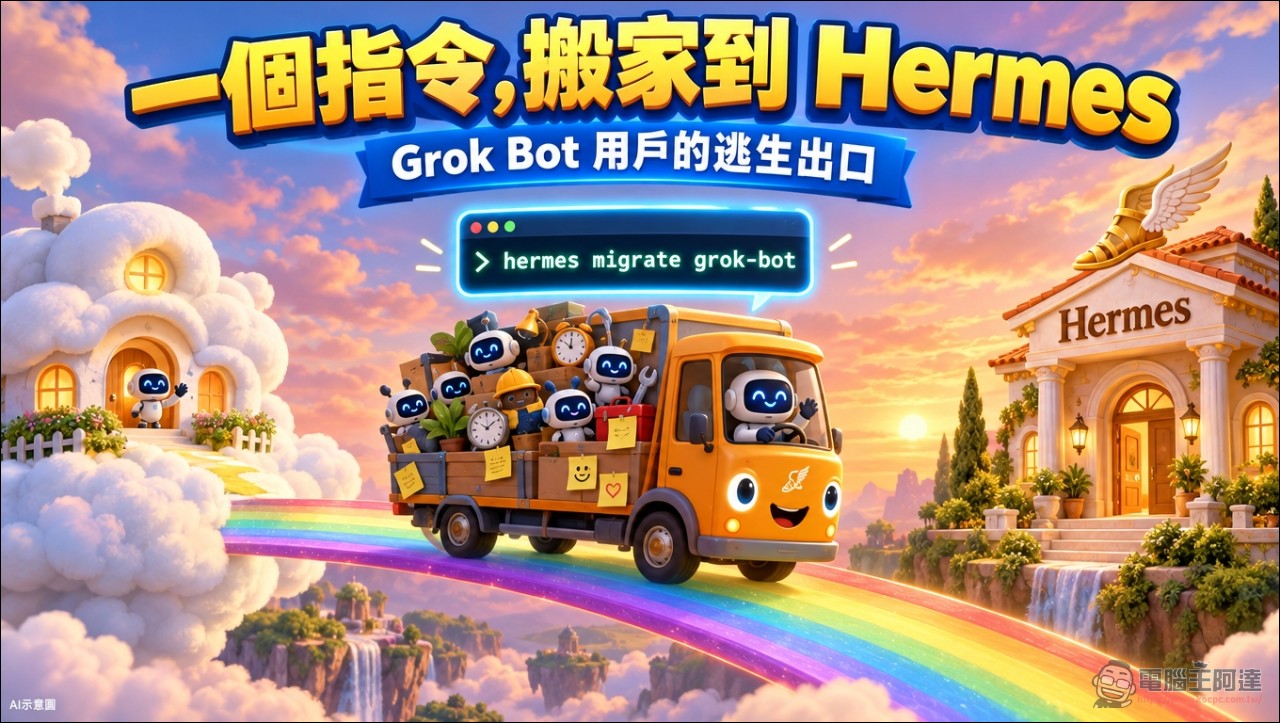
What is Grok Bot? Why do so many people use it?
Grok Bot is xAI’s latest personal AI assistant. It can run routine tasks in the background in the cloud and coordinate tasks across multiple models and services. It has been quite popular with users since its launch and has been cited as a success story following SpaceX’s public listing. SpaceX’s financial filings last month stated that AI already accounts for 52% of the company’s revenue; the renamed “Super Intelligence” division generated $431 million, and the figure would be higher without the $1.2 billion one-time cost associated with the Cursor acquisition. Musk recently also said Grok Bot is “the fastest-growing product he has seen in his life.”
So the phrase “the cost is too high to afford” appearing in connection with a product whose revenue wasn’t bad to begin with surprised quite a lot of people. It suggests the underlying costs must be staggering, because every Grok Bot has a cloud computer; I believe SpaceXAI is also currently taking a loss just to make a splash (Meta’s Muse is probably in the same situation, though frankly Musk is stingier than Zuckerberg). But Musk has yet to explain how subscriber usage limits will be adjusted going forward. He hasn’t responded in his own tweets to the controversy over the limit adjustments; instead, he keeps promoting Grok Bot for helping people buy Christmas gifts.
What exactly does Grok Bot’s one-click migration to Hermes do?
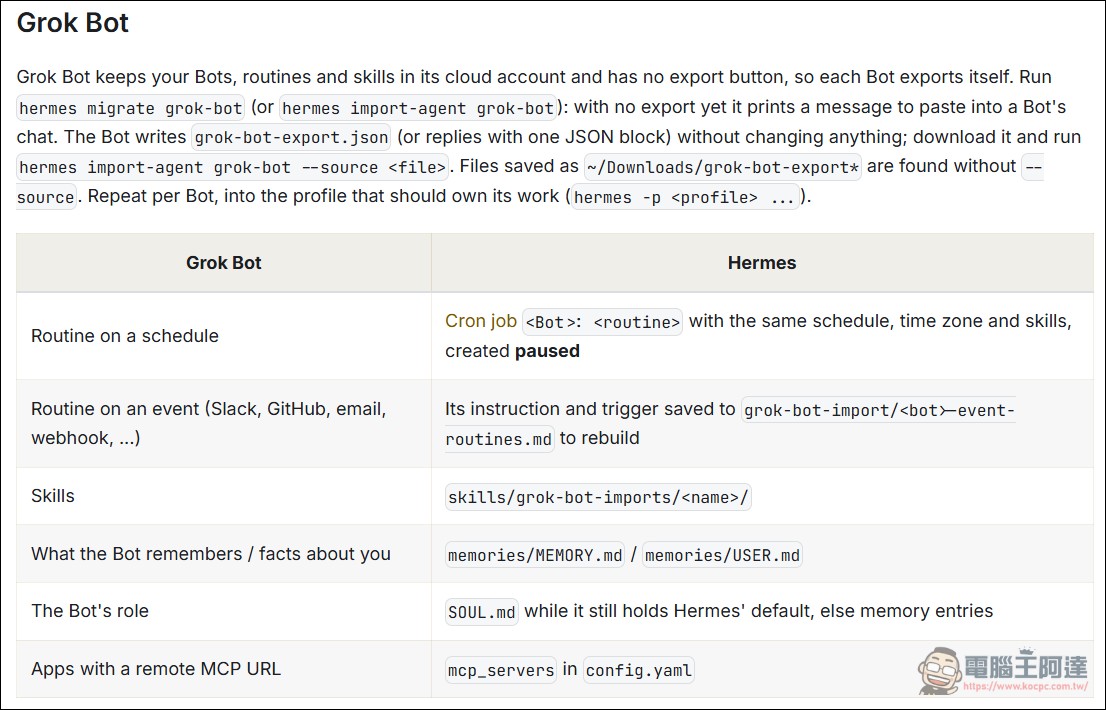
Hermes official documentationIt’s clearly stated: Grok Bot keeps Bots, routines, and skills in the cloud account, and there is no export button, so each Bot has to be exported and transferred on its own. The actual process is as follows. Execute. hermes migrate grok-bot(or hermes import-agent grok-bot), when there is no export file yet, Hermes will print a message asking you to paste it into that Grok Bot’s conversation. Each Grok Bot reads its own configuration and then writes out grok-bot-export.json, this action will not change anything on the Grok side. After downloading, run the import again, and Hermes will pick it up. It is saved in the Downloads directory with the filename grok-bot-export* The files will be found automatically; there is no need to specify the path separately.
If the agent-importers plugin is not installed yet, Hermes will automatically install it from the plugin directory. The corresponding source code commit message says that Grok Bot was added to the setup’s “Are you coming from another agent?” step, and during a new installation it will detect from the desktop application or an export file in Downloads.
What can be moved over?
The official documentation lists a mapping table, in which each Grok Bot component has a clear corresponding location in Hermes:
- Scheduled routine tasksTurn it into a Hermes cron job named “Bot Name: Job Name,” and carry over the schedule, time zone, and skills as-is.
- Event-triggered routine tasks(Slack, GitHub, email, webhook): Write the commands and trigger conditions as a markdown note, stored in
grok-bot-import/Directory: you need to rebuild the trigger yourself. - Skill: become
skills/grok-bot-imports/名稱/Skills in the directory - What the Bot remembers and what it knows about you: merged separately
memories/MEMORY.mdandmemories/USER.md, and deduplicate against existing content - The bot’s personaWrite into
SOUL.md, provided that the file still has the Hermes default value; otherwise, save it as a memory entry instead. - Applications with a remote MCP URL: written into config.yaml
mcp_serversBlock
Several design details show that the developers thought carefully. The export prompt asks the Bot to list items it cannot read, never to guess. Long exports can be split into multiple code blocks, and Hermes will merge them per Bot. Curly quotes and trailing commas produced during copying are fixed. If an export appears truncated, Hermes will say so directly. Version 1.2.1 adds another layer of comparison: Hermes compares the exported content against the local cache of the Grok Bot desktop app and lists which Bots were not covered by the export and which tasks were missed by the Bot.
There are also clear rules on the security side. If exported content contains a key that looks like a credential, the entire export will be rejected, and text that looks like a token will be redacted. The official documentation states clearly that credentials are never imported. This logic can be verified directly on this machine, in the local Hermes source code. hermes_cli/setup_agent_import.py The file clearly lists Grok Bot’s detection paths, including those for macOS Library/Application Support/Grok Bot and /Applications/Grok Bot.app, as well as the Windows AppData path.

What can’t be kept?
The migration only moves some items; several categories definitely stay on the Grok Bot side. Chat history is not in the mapping table. Past conversations will not come along, as stated in the official documentation and multiple how-to guides. Event-triggered jobs will only leave notes, and the trigger conditions must be rebuilt using Hermes hooks or webhooks. API keys and login status also will not migrate; developers use hermes setup Or directly edit the .env file to reconfigure it.
After scheduled tasks are migrated over, they are paused by default. The official documentation states that this is to prevent the same task from running twice while the copy on the Grok side is still enabled. Users must first disable that task in Grok Bot, then run it. hermes cron resume <id> Open the corresponding job, or add it directly during import. --activate-routines Parameters. Before importing, Hermes will first print an itemized plan and will only write after confirmation. Also, before modifying config.yaml, it will leave a copy of the file as it was at that time in the backups directory under the Hermes home.
The command-line options are detailed enough as well.--dry-run Preview only, do not write,--bot 名稱 Only import the specified Bot,--source Specify the export file location,--overwrite Overwrite skills or MCP servers with the same name,-y Skip confirmation prompts. In non-interactive environments, Hermes will stop at the preview stage and not proceed. Each Bot can be imported into a different Hermes profile, using hermes -p <profile> Specify this so that the research Bot and the customer service Bot each maintain independent memory, skills, and scheduled tasks.
Simply put, this migration just lets you painlessly move your painstakingly configured Grok Bot team and daily work to the Hermes environment, but the actual experience will vary depending on the model you attach to Hermes. If you use a local model or a cheap general-purpose model, its performance may not be as good as Grok Bot’s. But if quotas have already affected your existing work, you can give this moving service launched by Hermes a try.
Source: KOCPC Chinese