


We have previously reported 5 websites that collect tons of prompts、A master called out the Prompt commands of several GPTs robots., these are very helpful for people who want to improve the Prompt command. But if you still think not, or want to improve further, OpenAI also released 6 Prompt development strategies a few days ago. Although they are relatively general directions, they can at least give you a clearer idea of what aspects to think about in development. I will summarize them for you below.

OpenAI releases 6 major prompts to formulate strategies to help you move towards the path of master
1. Provide clear instructions
OpenAI mentioned that if the Prompt you place is too redundant and verbose, the AI model will not be able to understand what your needs are, so please be brief. If the Prompt is relatively simple, remember that it must have a professional description. Also, if you don’t like the existing answer format, remember to add the one you want.
Simply put, the less the model guesses your needs, the higher the chance of getting the answer you want.
2. Provide references
It is easy for current AI language models to fabricate false answers, especially if you are asking something more profound or requiring quotes. If you want to reduce the occurrence of such situations, just as notes can help students score higher on exams, providing references will also allow the AI model to reduce nonsense and false answers.
3. Break down complex tasks
Many people want to get the complete content with just one prompt, which is unrealistic. OpenAI mentioned that when dealing with AI language model tasks, it should be like software engineering, dismantling complex systems into multiple modules. The reason is also very simple. The probability of errors in complex tasks must be higher than simple tasks. Therefore, it is recommended to complete the answer you want step by step.
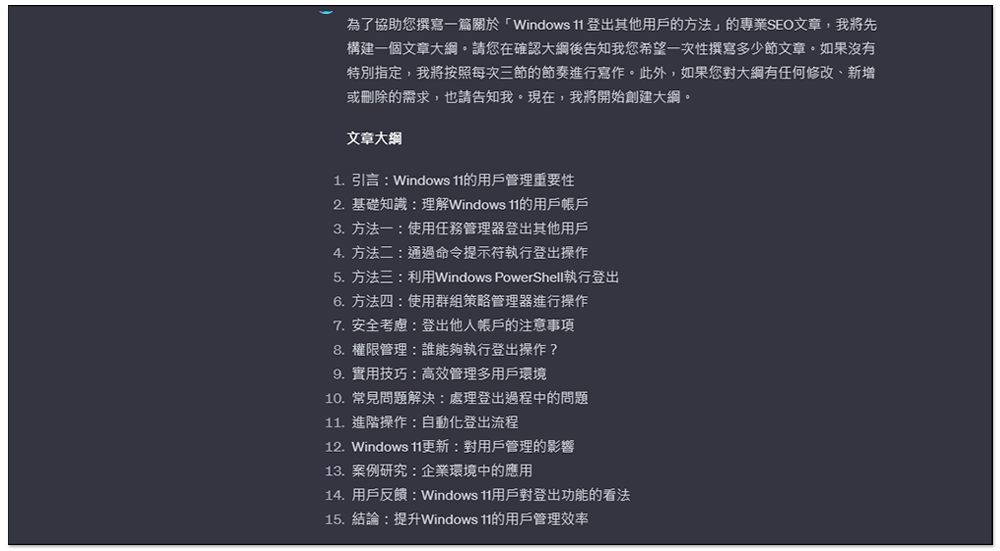
I can also give you a sequence that I often use. For example, when I want to write an article, I will ask ChatGPT to generate about 15 topics related to this article, and then select from them what I think is good, and then ask ChatGPT to write the content separately, and not write them all at once. For example: I select 8, please write 2 or 3 first, which can not only reduce ChatGPT The probability of stopping in the middle of the answer. If I have other ideas for each topic or want to add more, I can deal with it immediately. After everything is processed, I can continue writing the content of the next 2 or 3 topics.
Compared to directly calling ChatGPT to write the entire article, this approach will yield better, more accurate, and richer content.
4. Give the model time to think
When you are asked how much 17×28 is, few people can give an answer immediately, but you can calculate it if you give it a little more time. The same is true for AI models. It is easy to make mistakes if you try to get the answer to the question immediately. In contrast, if you give it more time to think about the problem, you can reliably get the correct answer.
Therefore, before asking for an answer, you can first show the thinking process of the AI model, which will help you find the answer more accurately.

5. Use external tools
External tools can complement the deficiencies of the AI model. For example, text retrieval systems (such as RAG) can provide relevant information about documents to the model. OpenAI’s Code Interpreter can help the model perform mathematical operations and execute program codes. If a task is handled more efficiently or reliably by another tool than a language model, use an external tool.
6. Systematic test changes
If you want to improve results, please continue to test and modify to find the best prompt. If possible, it is recommended to establish a comprehensive testing process, also called evaluation.

Summarize
The following is just a general direction. OpenAI this articleThere are also detailed explanations and examples for each strategy to help you better understand what to do. Take the prompt below as an example:
- How do I add numbers in Excel? -> This is a prompt that OpenAI thinks is bad
- How do I add up a row of dollar amounts in Excel? I want to do this automatically for a whole sheet of rows with all the totals ending up on the right in a column called “Total”. -> This is a better prompt
Source: KOCPC Chinese