


Five years after Windows 11’s release, if you had to pick the most frequently mentioned item on users’ complaint list, the context menu would probably rank in the top two. Cut, copy, paste, rename, delete, and share—which were neatly arranged in a vertical list during the Windows 10 era—were changed to a row of horizontal icons at the top. The “Properties” option disappeared from the bottom of the menu, now tucked away behind “Show more options.” Worse still, every time you right-click, the menu contents shift downward due to asynchronous loading of third-party app plugins. Your cursor might be aimed squarely at “Copy,” but when you click, you hit “Delete” instead. On forums, someone recorded delays of up to eight seconds.
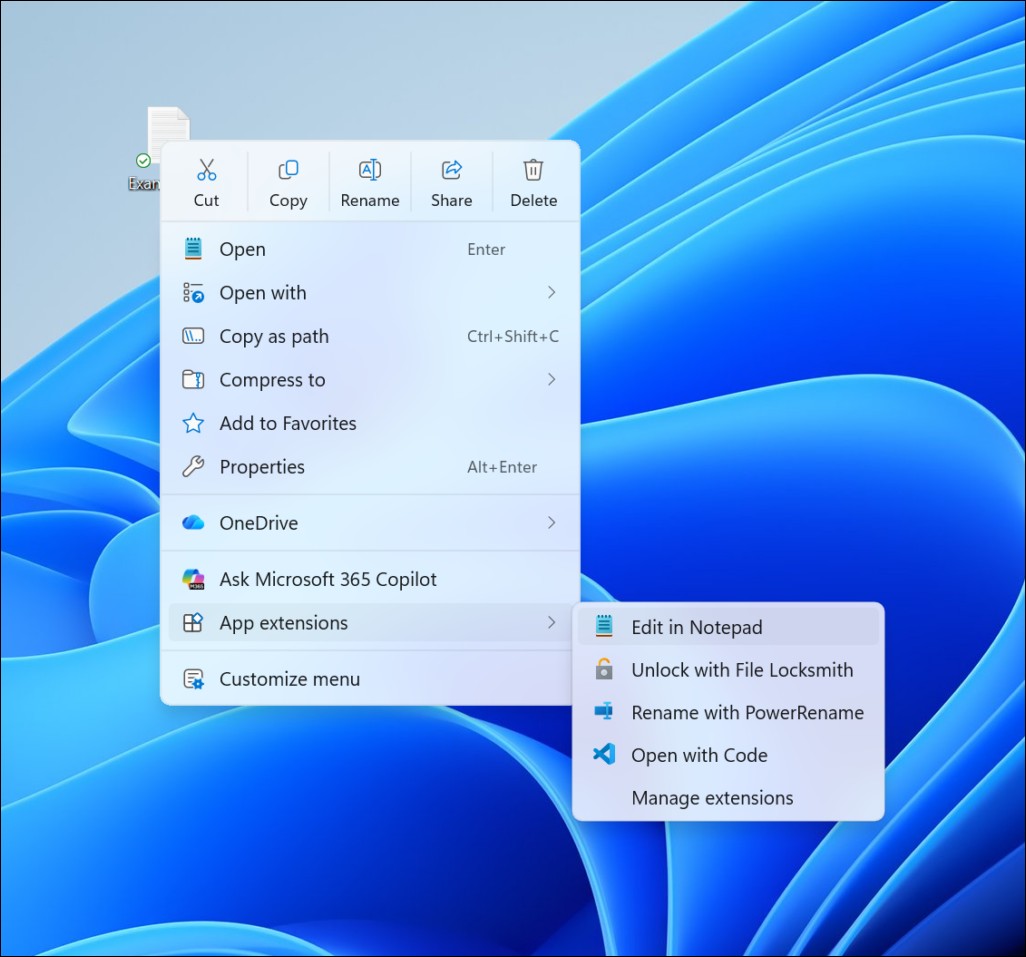
This time, Microsoft didn’t just end things with another “We are listening” statement. Recently, Microsoft engineer Michael Novak posted on the Windows Insider blog.Publish articledirectly acknowledged that the right-click menu has become “cluttered and sluggish,” and announced a complete restructuring plan. The new menu has begun rolling out to users on Build 26340.9212 in the Experimental Channel, with the official version expected to be released in fall 2026.
Why Menus Are Slow: An Architectural Design Flaw
The right-click menu’s sluggishness isn’t because Microsoft doesn’t know the cause. When Windows 11 launched in 2021, it redesigned how application plugins integrate with the context menu, grouping items from various software (antivirus, cloud storage, compression tools, AI integrations) into a managed structure. The problem lies at the implementation level: the menu framework appears first, but plugin items only fill in after being loaded asynchronously.
This triggers a chain reaction. After the user right-clicks, the cursor quickly moves toward “Copy” or “Rename,” but plugin items are still being inserted at the top of the menu, pushing the originally targeted option downward—so the user ends up clicking the wrong command. On low-end machines with many plugins, this shifting process can last several seconds. TechTimes notes that multiple users on Microsoft forums have reported delays of up to eight seconds.
The new design decouples core commands (cut, copy, paste, rename, delete, share) from add-on loading: core commands render immediately, while add-on items load on a separate layer, no longer affecting the menu content already displayed. Microsoft’s goal is clear: the menu is fully usable the moment it appears.
Windows 11’s first-ever native customization page
The most eye-catching feature of this refactor is the new “Customize menu” entry at the bottom of the menu. Clicking it takes you to a dedicated page for “Personalization > Right-click menu” in the Settings app. This is the first time since Windows 11 launched that native context menu customization has been offered without going through the registry.
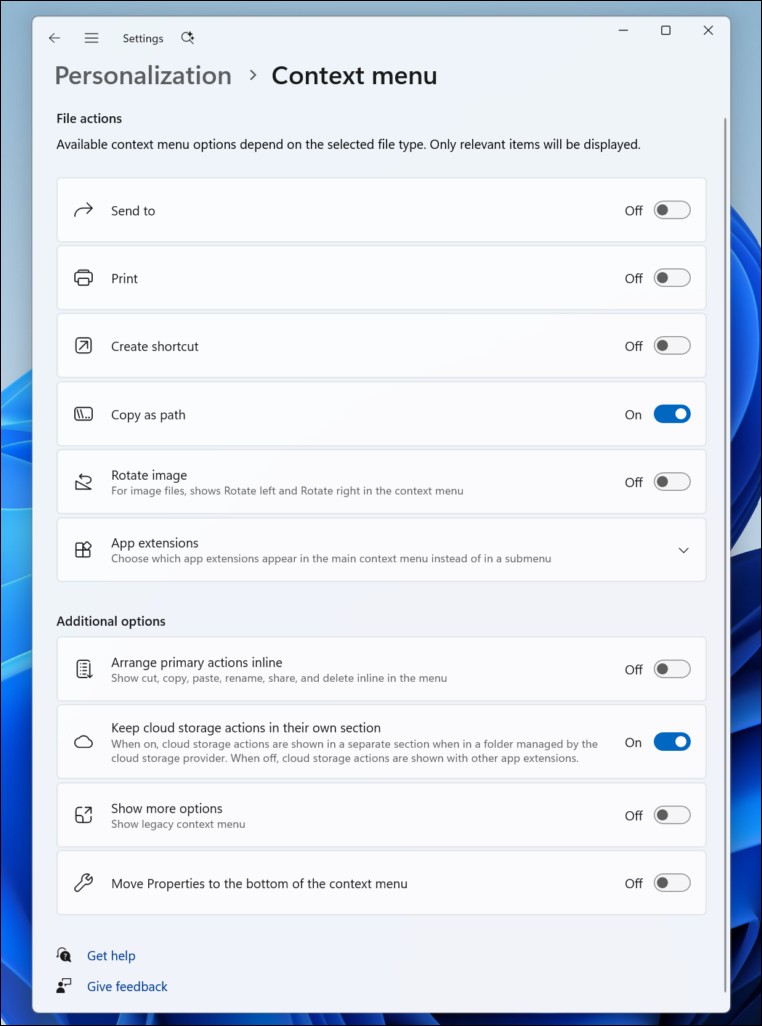
The settings page is divided into three sections:
Built-in command switchBuilt-in commands such as “Send to,” “Print,” “Create shortcut,” “Copy as path,” and “Rotate picture” can each be toggled on or off. Among them, “Print” does not exist at all in Windows 11’s default right-click menu, but can now finally be enabled through this page. By default, “Copy as path” is the only item turned on, while most of the others are turned off.
Application Plugin ControlThe menu plugins for each piece of software can now be individually selected to show in the main menu, be tucked into a submenu, or be completely hidden. No longer is an entire bundle forced into the menu; users have full discretion.
Layout OptionsThis is a nod to Windows 10 muscle memory. Users can choose to arrange the main commands—cut, copy, paste, rename, delete, share—in a vertical list (instead of the default horizontal icon bar), and move “Properties” back to the very bottom of the menu.
File Explorer’s overall performance has been upgraded in sync.
The context menu is not the only change this time. Microsoft stated that the team conducted a systematic analysis of File Explorer’s lag, freezes, and delays, eliminating dozens of potential issues that could cause interruptions. Specific improvements include:
File renaming is no longer interrupted by background sync processes; case-only filename changes are now reflected immediately; the address bar supports more input formats, including paths with quotation marks and double backslashes; the home folder supports middle-click to open in a new tab; file size display now automatically chooses an appropriate unit (KB, MB, GB) instead of always using KB.
The editor of Windows Latest tested it on a low-end machine and said that even though the hardware specs barely meet the requirements, the new menu’s response speed is still near-instant.
Current status and subsequent schedule
These changes are currently only being pushed to users in the Windows Insider experimental channel, and Microsoft is using Controlled Feature Rollout technology, so even Insiders on the same build may not see the new menu right away. Users of the official Windows 11 release will need to wait for the autumn rollout.
For users who have complained on forums for five years, Microsoft at least got one thing right this time: they didn’t blame the issue on “users not adapting to the new design,” and directly acknowledged that the menu had indeed become slower and more cluttered, providing a concrete solution with a settings page users could actually work with. The right-click menu is one of the most frequently used interactive elements on Windows—users may right-click dozens of times in a single computing session. When this action hesitates or shifts, the cost isn’t just annoyance; accidentally clicking “Delete” could directly cause file loss.
The next thing to observe is whether, after the stable release is rolled out, third-party software vendors will adjust their menu items to align with the new plugin loading mechanism, and how well Group Policy supports the “Custom Menu” setting in enterprise environments. These details will determine the actual impact of this refactoring on regular users and IT administrators.
Source: KOCPC Chinese