


From time to time, we will share information about Starbucks-related promotions with you, and Starbucks will also launch exclusive LINE Pay promotions from time to time. Earlier today (5th), Starbucks also officially announced that it would cooperate with LINE Pay to launch the “LINE Pay Starbucks Travel Card”!
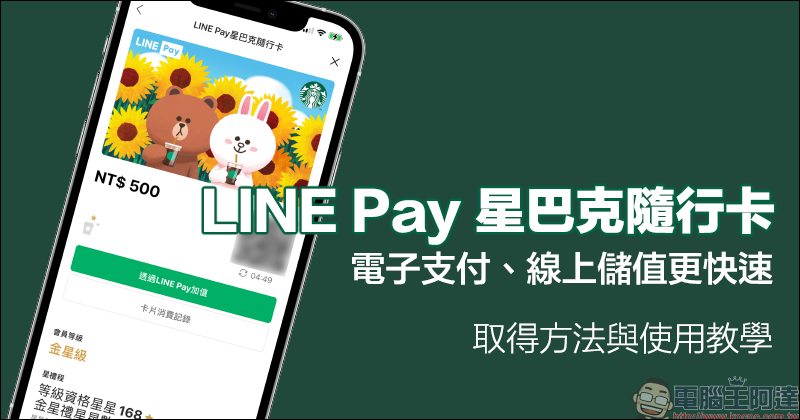
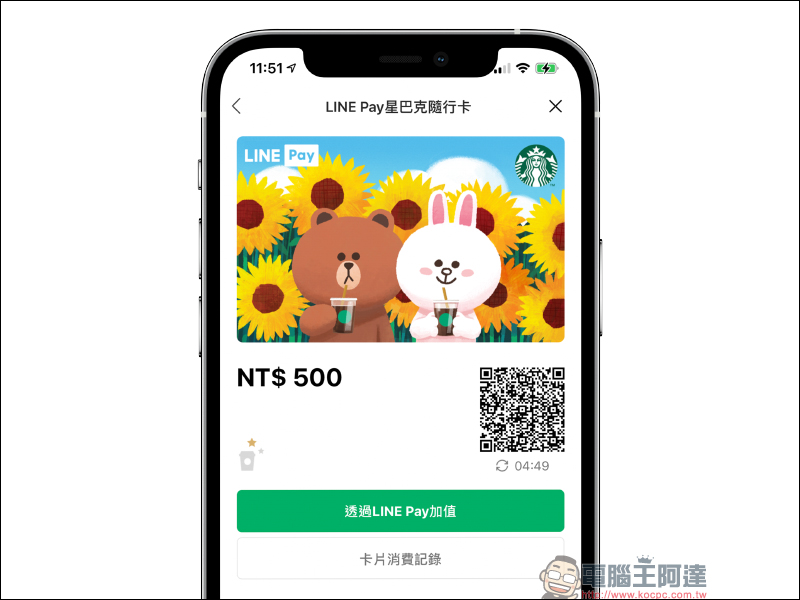
This electronic travel card, co-operated by Starbucks and LINE Pay, not only has the super cute card face of Xiong Da and Tutu, but it is also faster in binding, electronic payment, and online recharging! Of course, like other Starbucks accompanying cards, you can also enjoy Star Reward membership services such as Star Reward Star Collection, Level Accumulation, and Reward Redemption. Continue reading this article to learn how to obtain the LINE Pay Starbucks Card, how to store value, and the tips you must learn to use it!
LINE Pay Starbucks travel card is officially launched: electronic payment, online recharging is faster, and you can enjoy up to 15% points rebate for a limited time! (How to obtain and use instructions)
Earlier today (5th), Starbucks announced the official launch of the LINE Pay Starbucks Companion Card with LINE Pay. In addition to being able to make purchases at all Starbucks stores in Taiwan like other Starbucks Companion Cards in the past, it can also enjoy Star Rewards membership services such as collecting stars, accumulating levels, and redeeming rewards. The difference is that it can also be opened and used directly in the LINE Pay membership card, including electronic payments and online recharging, making it more convenient.
How to “obtain (bind)” the LINE Pay Starbucks Card?
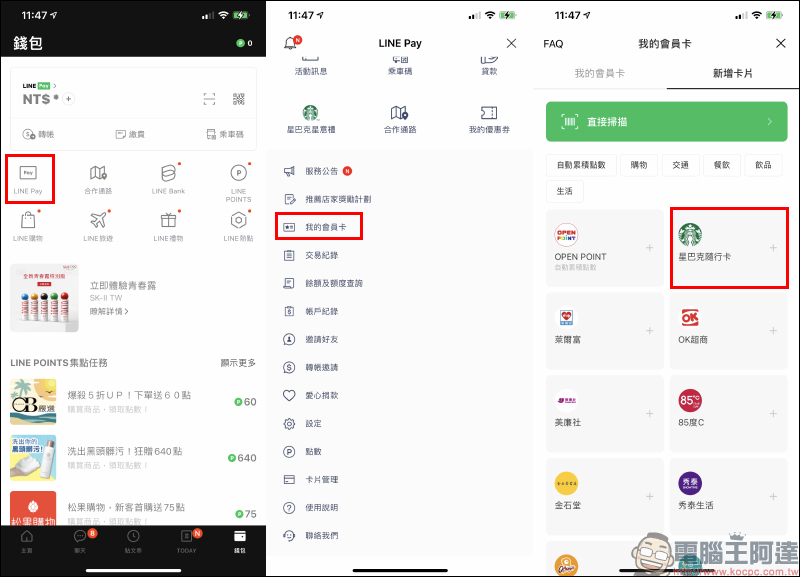
The LINE Pay Starbucks Card is “free to obtain”. There is no fee to apply for it, and the method of obtaining it is very simple. First, open the LINE App, enter the “Wallet” tab, and click “LINE Pay”. Then click “My Membership Card” on the LINE Pay page, and then select “Starbucks Travel Card” on the “My Membership Card” page:
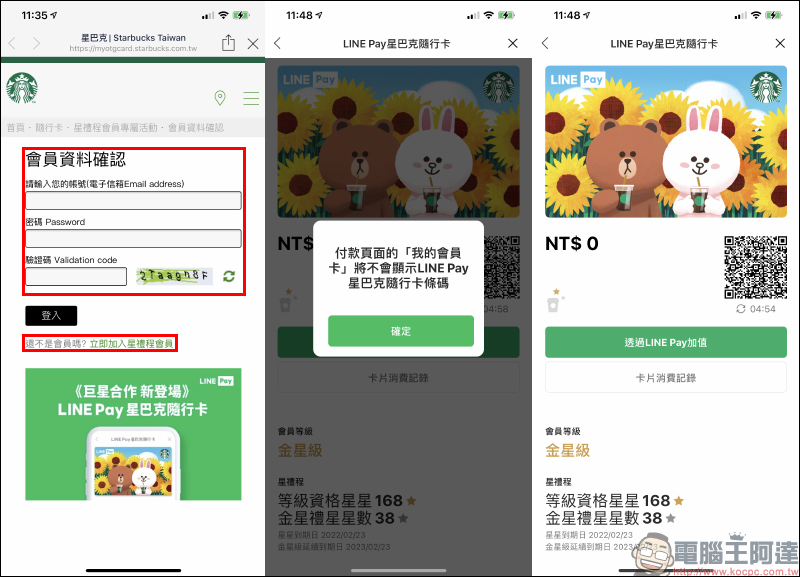
At this time, you need to log in to your Starbucks Rewards membership account to bind it. If you have not joined before, you can first click “New Membership” to register. After the binding is completed, the LINE Pay Starbucks accompanying card page will open.
How to “recharge” LINE Pay Starbucks Card?
The LINE Pay Starbucks Travel Card is the same as the general Starbucks Travel Card. The stored value can be stored through the Starbucks App, Starbucks stores, and Starbucks official website. However, the LINE Pay Starbucks Travel Card can also use LINE Pay to directly store value online.
LINE Pay online recharge
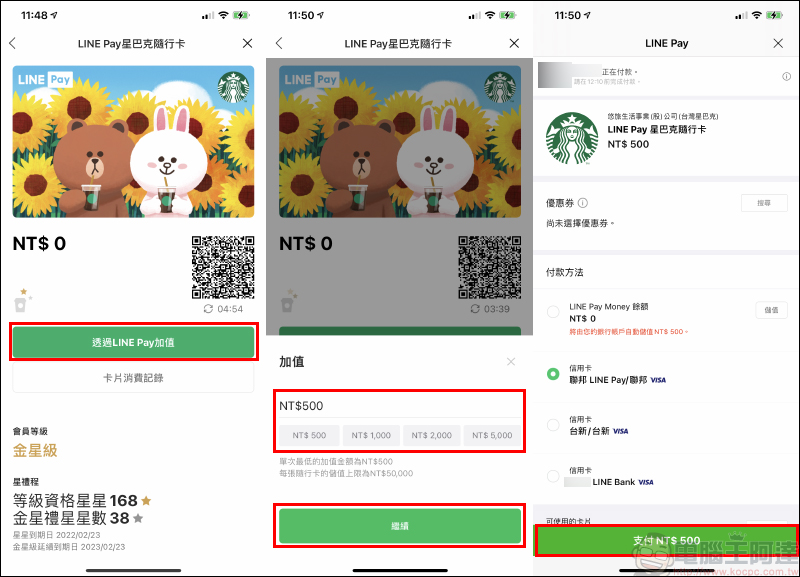
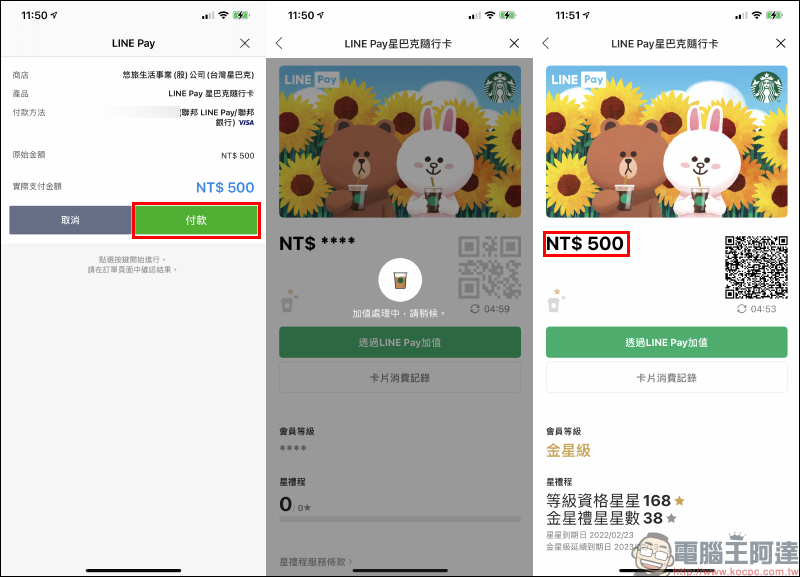
Click “Add value through LINE Pay” on the LINE Pay Starbucks Card page, and then you can enter the amount you want to add (the minimum recharge amount for a single time is NT$500). You can then use the credit card bound to LINE Pay or LINE Pay Money to add value to the LINE Pay Starbucks Card.
After the top-up is completed, the balance will be updated immediately on the LINE Pay Starbucks Card and Starbucks App.
Starbucks App online recharge
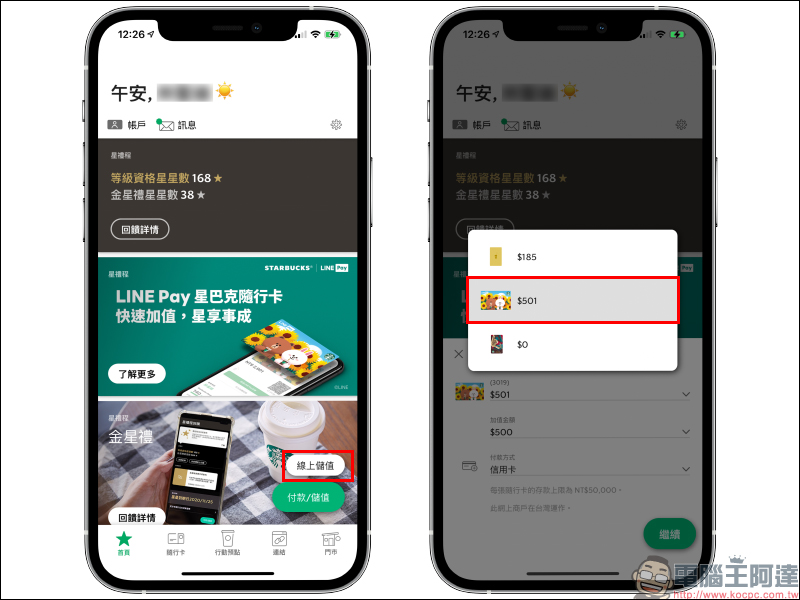
Open the Starbucks App and click “Online Recharge” in the lower right corner of the main screen, then select LINE Pay Starbucks Travel Card to use your credit card to recharge online.
Starbucks official website online recharge
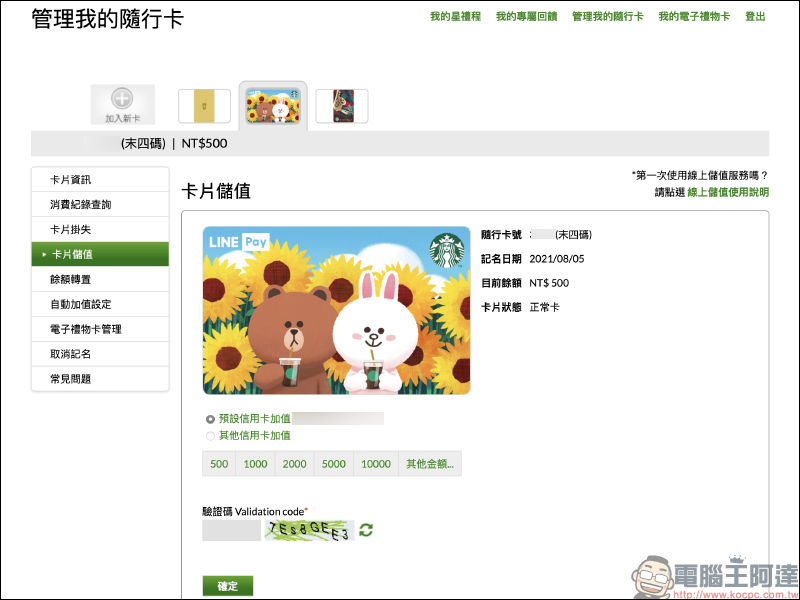
existStarbucks official website (click here to go)Log in as a Starbucks Rewards member and use your credit card to add value online on the card recharge page.
Starbucks store stored value
Present the LINE Pay Starbucks Card at Starbucks stores across Taiwan, and you can use cash, credit card and other payment methods to top up the LINE Pay Starbucks Card. Users can activate the LINE Pay card recharge QR Code through LINE Pay “My Membership Card” or the Starbucks App.
How to “use” LINE Pay Starbucks Card?
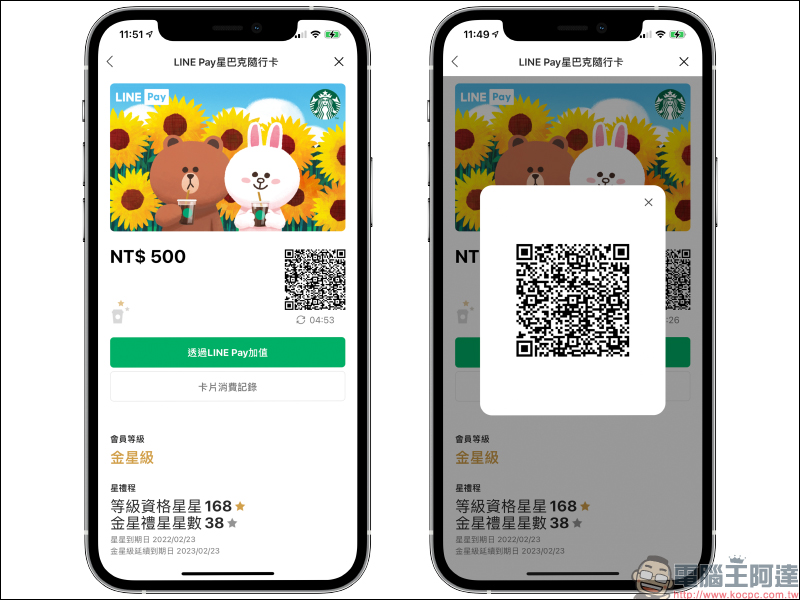
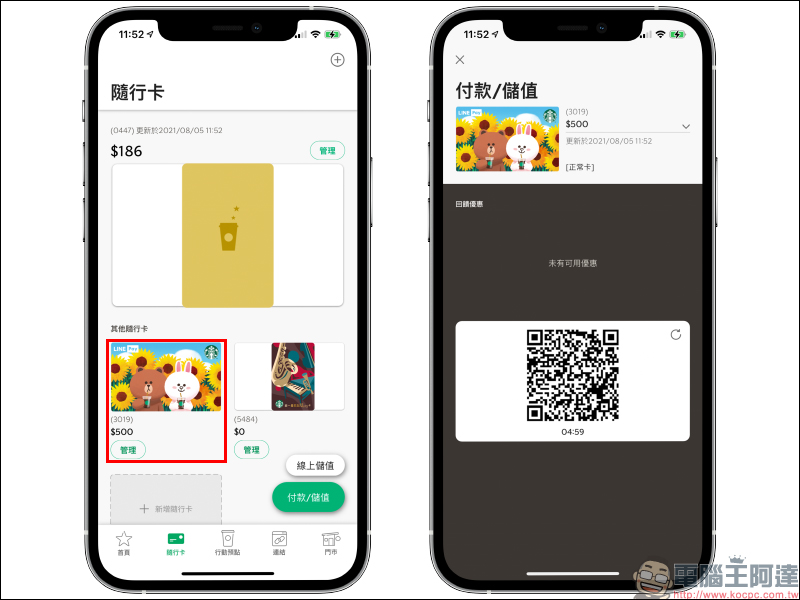
The LINE Pay Starbucks Card can be opened and used through the following three channels: LINE Pay My Membership Card, Starbucks Official Account and Starbucks App.
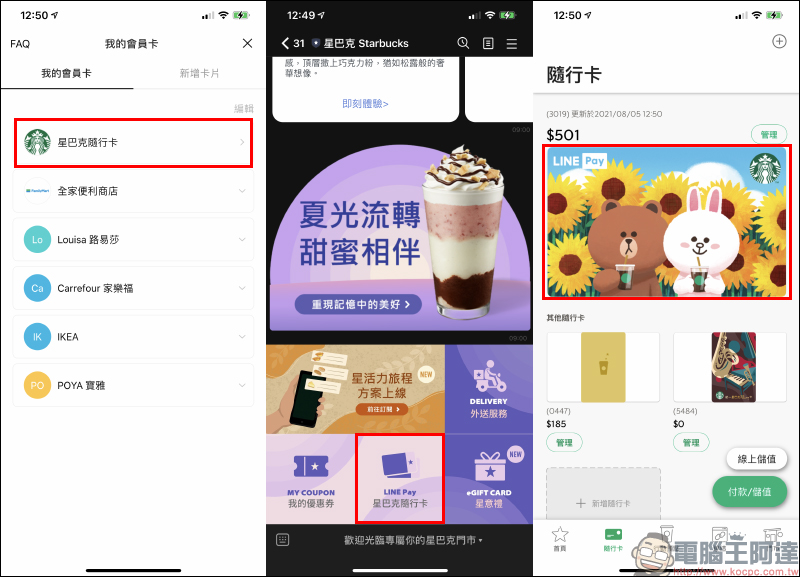
You can open the “LINE Pay Starbucks Travel Card” through your LINE Pay membership card or Starbucks LINE official account:
If it is opened through the Starbucks App, the steps for using the Starbucks Travel Card are the same as those for ordinary Starbucks cards.
Discount and feedback activities (8/5-9/10)
To celebrate the limit of LINE Pay Starbucks Travel Card, you can also enjoy the following discounts when you go to Starbucks stores across Taiwan from the 5th to September 10, 2021.
Get 20 stars for free with LINE Pay Starbucks Card
From August 5, 2021 to September 10, 2021, Starbucks Rewards members can open the “LINE Pay Starbucks Travel Card” from LINE Pay’s “My Membership Card” and use this card to make a single purchase of more than NT$1,000 , can receive gifts 20 stars. (The consumption amount does not accumulate stars, and each star gift membership account can only receive one reward)
Things to note:
- Bonus Stars for this event will be calculated based on the checkout amount, and the full amount must be paid with any accompanying card or mobile APP in the Star Rewards account to enjoy this reward. Stars are not accumulated, and each Star Rewards member account can only receive one reward.
- The stars received from the activity will be effective in the Starbucks Rewards account within 24 hours after consumption. Please log in to the Starbucks website or APP to check.
- Detailed activity methods are subject to Starbucks announcements. Anyone who participates in this event is deemed to have acknowledged and accepted the precautions and related regulations of this event. Starbucks reserves the right to amend, suspend or terminate this event at any time. If there are any outstanding matters, please follow the relevant announcements of Starbucks; Starbucks reserves the right to final interpretation and decision.
LINE Pay Starbucks card top-up consumption, you can enjoy up to 15% LINE POINTS points reward when you spend the full amount
From August 5, 2021 to September 10, 2021, use the “Add value through LINE Pay” function to recharge more than NT$500 on the LINE Pay Starbucks card page, and “accumulate” payments of more than NT$500 during the event period, you will enjoy LINE POINTS 15% points reward (the upper limit is 75 LINE POINTS, which is the consumption NT$500).
Things to note:
- The total amount paid using the stored value in the LINE Pay Starbucks card during the event period x 15% will be rounded to the nearest whole number.
- Each LINE Pay account can earn up to 75 LINE POINTS.
- This feedback point is not given immediately. The feedback points will be distributed gradually starting from September 25, 2021, and will be distributed no later than October 1, 2021. Please wait patiently.
- This activity and LINE POINTS gift rules are based on LINE Pay Announcement shall prevail.
(Additional tips) Make good use of the “Balance Transfer” function to make up for the difference in spending on the LINE Pay Starbucks Card
Whether you are using the LINE Pay Starbucks card now or in the future, you may encounter activities such as the above-mentioned activities that accumulate rewards when you spend enough. If you just want to buy specific Starbucks products but the balance of your LINE Pay card is only a little short of money, then if you recharge through LINE Pay, you must meet the minimum recharge threshold of NT$500, which is still a bit burdensome for consumers who only use it once in a while.
If you originally have other Starbucks cards, you can make use of the “balance transfer” function of the card in the Starbucks App to transfer the balances of other cards to “LINE Pay Starbucks Card”.
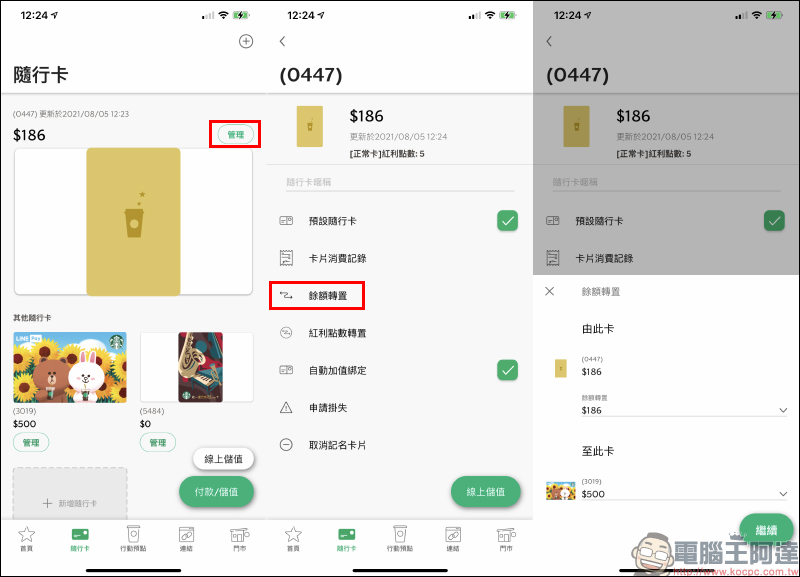
Just enter the amount you want to transfer, and you can quickly transfer the balance of other cards to the LINE Pay Starbucks card. Since the minimum amount of the balance transfer function can be transferred is NT$1, there is no need to add NT$500 or more to the card at one time in LINE Pay to make up for the consumption difference!
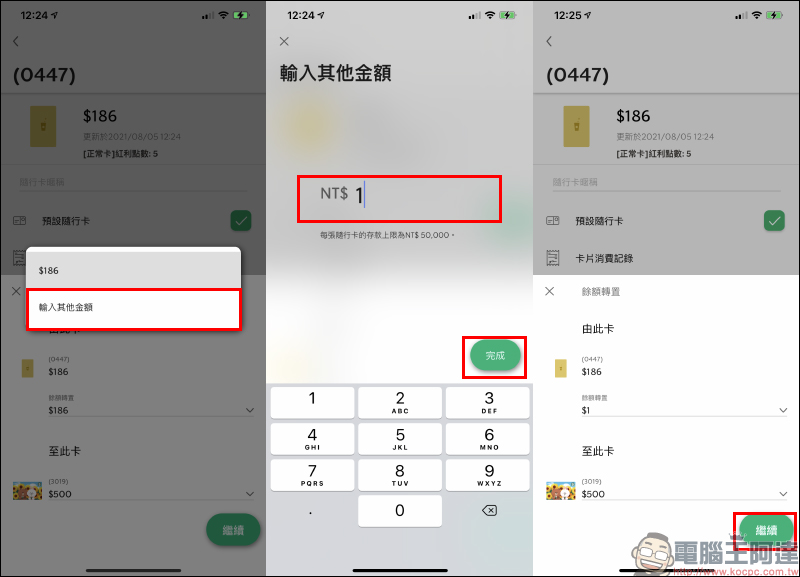
After transferring the balance of other accompanying cards, the system will also update the balance immediately.
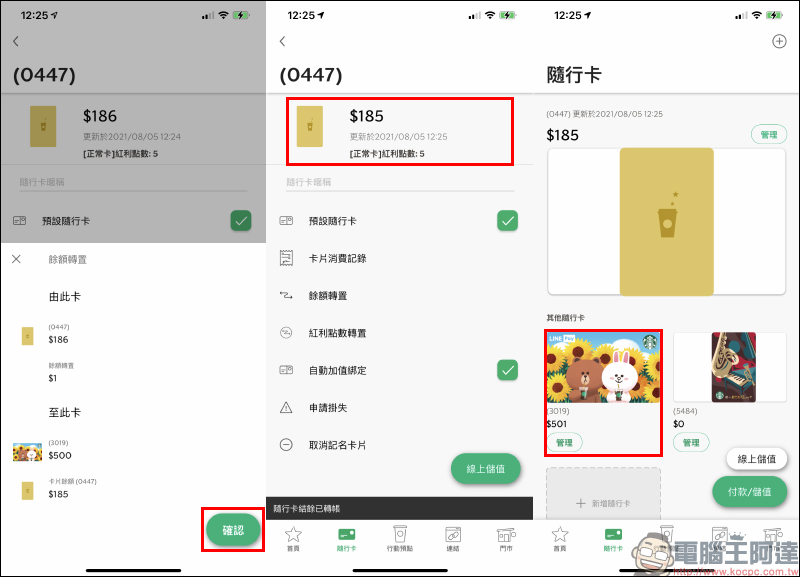
Source:Starbucks
Further reading:
LINE’s “Chat Room Emoticons” are available in all chat rooms: long press the dialog box to send cute emoticons!
Source: KOCPC Chinese