

• About Us
King of Computer Media
  • Home
  • Tech News
  • AI News
  • Apps & Tutorials
  • Mobile & Telecom
  • Lifestyle
  • About Us
No Result
View All Result
  • Home
  • Tech News
  • AI News
  • Apps & Tutorials
  • Mobile & Telecom
  • Lifestyle
  • About Us
No Result
View All Result
King of Computer Media
No Result
View All Result

Home - Internet and software applications - Chrome’s latest “Add to Reading List” feature, this article teaches you how to use and close it

Chrome’s latest “Add to Reading List” feature, this article teaches you how to use and close it

Rocky by Rocky
March 17, 2021 - Updated on August 4, 2026
in Internet and software applications

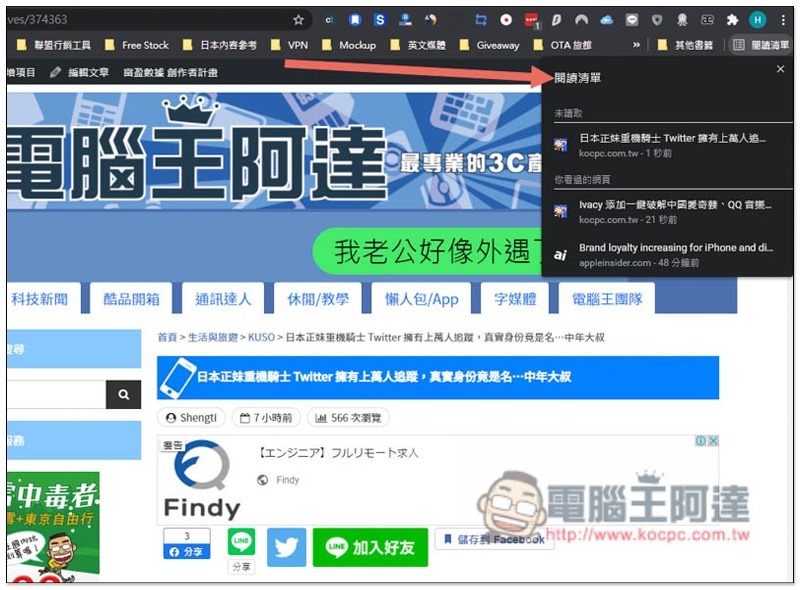
In recent years, Chrome can be said to have been trying to solve the problem of users opening more and more pages, thereby reducing memory usage. Following the previous paging group function, the latest Chrome 89 version adds a very convenient “Add to Reading List” function, which can save web content that you don’t have time to read or process at the moment so that you can open it again later. This article will teach you how to use it.

In addition, this function is integrated with the previous bookmarking, so for those who don’t use it, you may want to turn it off, which is also attached below.
Cropro-2021-03-17-11-04-26

Steps to add the latest features to your reading list in Chrome

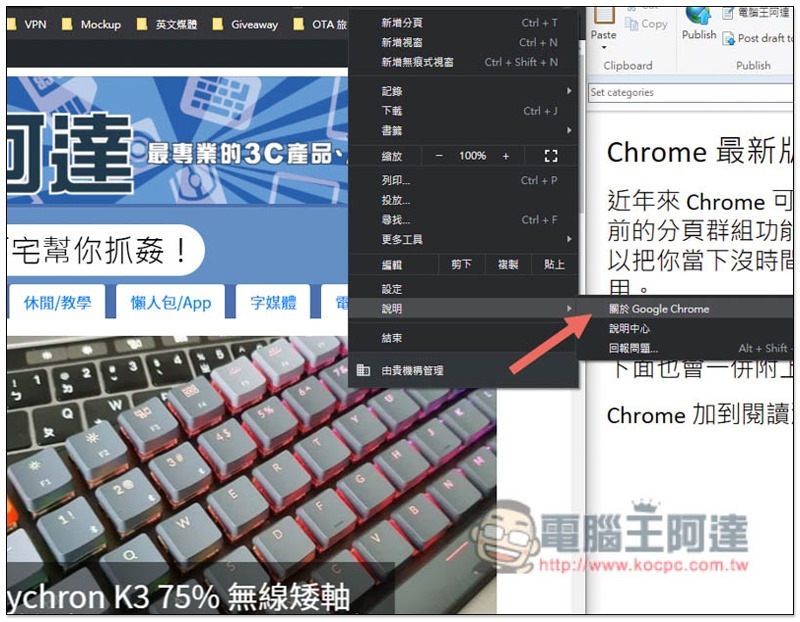
First of all, please make sure that your Chrome has been upgraded to version 89. If you are not sure, you can open the menu in the upper right corner and go to Help –> About Google Chrome:
Cropro-2021-03-17-10-55-18

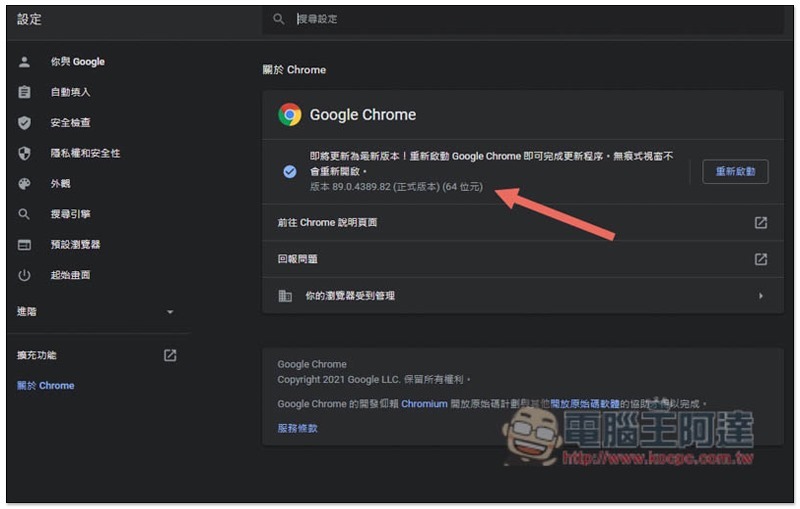
You can see your current Chrome version under About Chrome. If there is a new update, it will be automatically enabled. After the update is completed, restart it and it will take effect:
Cropro-2021-03-17-10-55-36

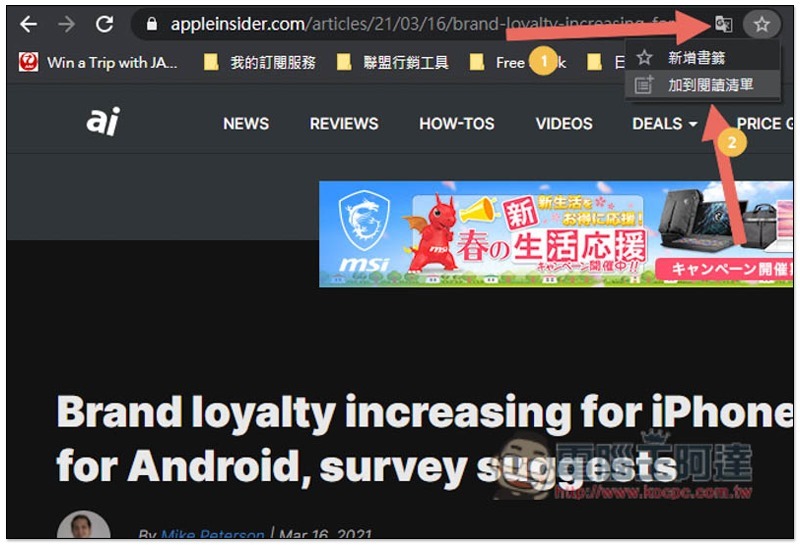
After confirming that you have upgraded to Chrome 89, open the tab you want to add to your reading list, and then click the “star” icon on the right side of the URL. You will see the new “Add to Reading List” feature:
Cropro-2021-03-17-10-15-03

In the reading list option on the right, you can find all the web pages you have added. Click to open it again:
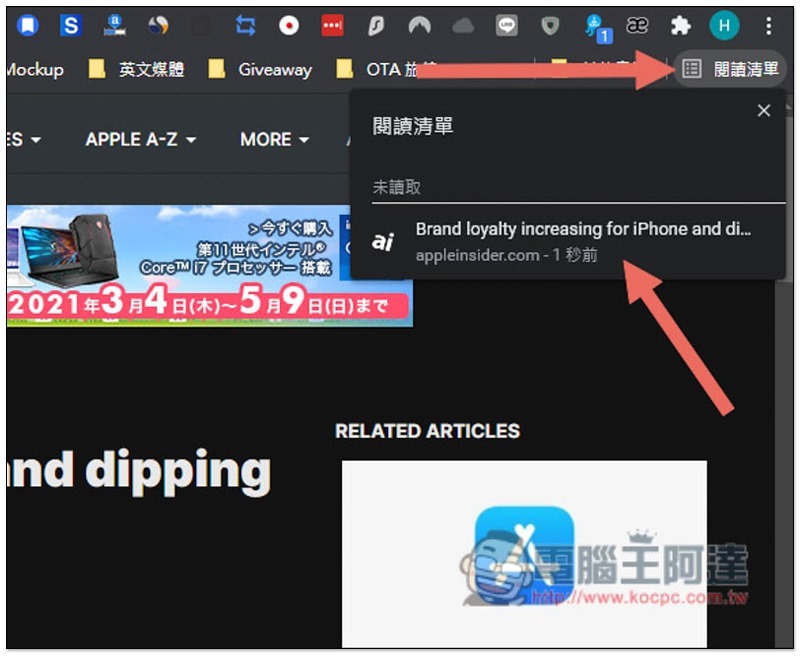
Cropro-2021-03-17-10-15-16

In addition, web pages that have been read can be marked as read, so that the reading list will automatically help you categorize them. The bottom is the web pages that have been read, and the top is the web pages that have not yet been read:
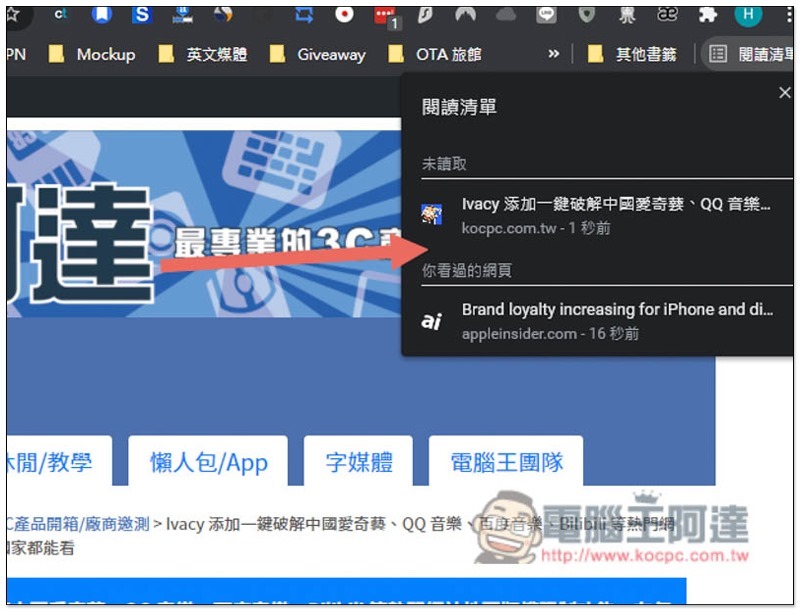
Cropro-2021-03-17-10-17-06

How to turn off the “Add to Reading List” feature

The add to reading list function is currently integrated with adding bookmarks, so for some people, you may still prefer the operation method of adding bookmarks directly after clicking on a favorite webpage. If this is the case for you, you can turn it off.

The closing method is very simple, enter in the address bar chrome://flags/#read-later, change Default on the right side of Reading List to Disabled, and reopen Chrome:
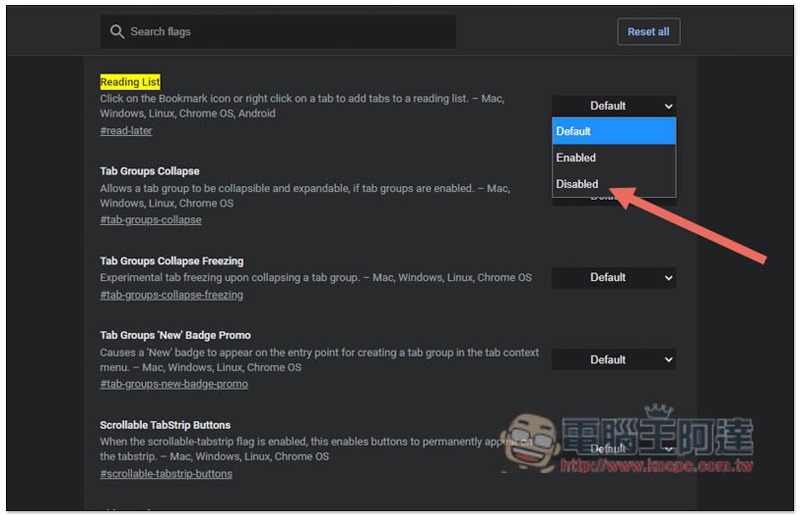
Cropro-2021-03-17-10-11-49

Android 的 Chrome 現在也能預覽網頁,開啟連結時免跳出!這篇教你怎麼使用

Source: KOCPC Chinese

Tags: ChromeChrome new features

Recent Posts

  • The Xiaomi Pad 8S Pro has passed network access certification and will debut with the self-developed XRING O3 chip.
  • The entire Google Pixel 11 lineup has been leaked! Official promotional renders of the Pixel 11 Pro XL have also surfaced
  • Are Chinese phone battery capacities falsely labeled? A brief look at the “capacity locking” phenomenon in Chinese silicon-carbon batteries.
  • NCC is leaderless, recklessly sending out national-level alert messages!?
  • What does “QR” in QR Code mean?

Recent Comments

No comments to show.
  • About Us

We welcome partnership inquiries and product review opportunities from smartphone manufacturers, iPhone accessory brands, and app developers.koc kocpc.com.tw|Privacy Policy |Hosting & Maintenance: Fast Line Taiwan, A-Chang Digital Technology

No Result
View All Result
  • Home
  • Tech News
  • AI News
  • Apps & Tutorials
  • Mobile & Telecom
  • Lifestyle
  • About Us

We welcome partnership inquiries and product review opportunities from smartphone manufacturers, iPhone accessory brands, and app developers.koc kocpc.com.tw|Privacy Policy |Hosting & Maintenance: Fast Line Taiwan, A-Chang Digital Technology