

• About Us
King of Computer Media
  • Home
  • Tech News
  • AI News
  • Apps & Tutorials
  • Mobile & Telecom
  • Lifestyle
  • About Us
No Result
View All Result
  • Home
  • Tech News
  • AI News
  • Apps & Tutorials
  • Mobile & Telecom
  • Lifestyle
  • About Us
No Result
View All Result
King of Computer Media
No Result
View All Result

Home - Internet and software applications - Chrome 88’s new and useful hidden feature: Tab Search. This article teaches you how to open it.

Chrome 88’s new and useful hidden feature: Tab Search. This article teaches you how to open it.

Rocky by Rocky
January 23, 2021 - Updated on August 4, 2026
in Internet and software applications

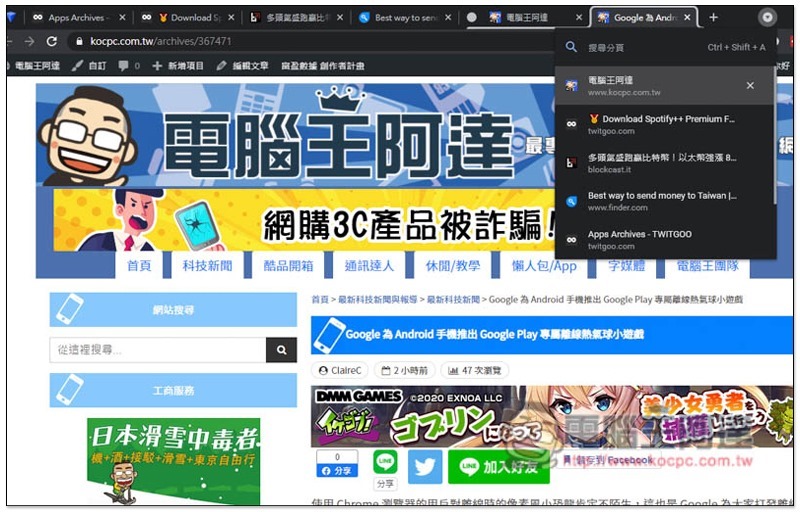
Google’s latest launch a few days ago Chrome version 88, in addition to officially canceling support for Adobe Flash Player, it also quietly added a very practical tab search function “Tab Search”, which allows you to quickly find open web page tabs by entering keywords, which is very convenient for users who often open many tabs. However, this function is turned off by default. Let’s teach you how to turn it on.
2021-01-23_171839

Chrome 88’s new and useful hidden feature: Tab Search introduction to paginated search

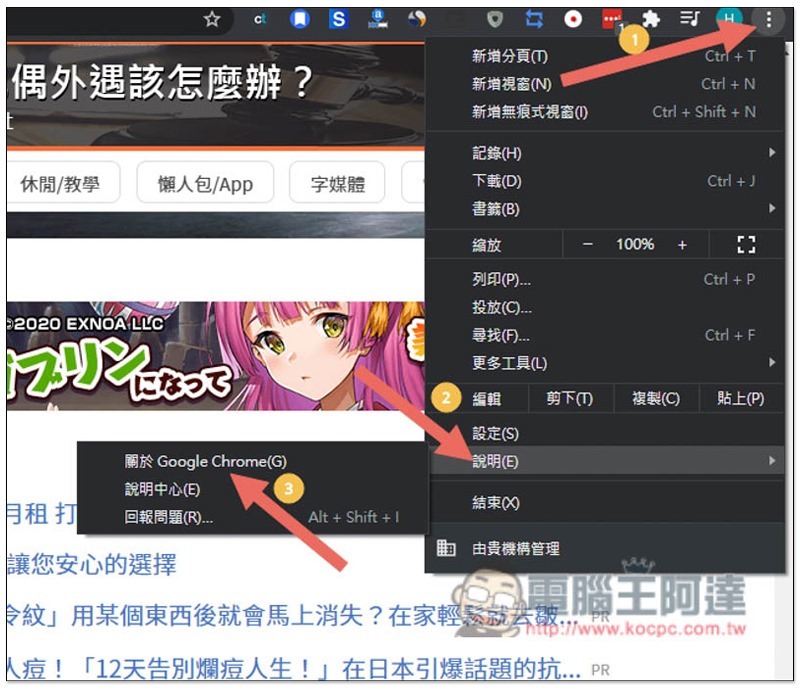
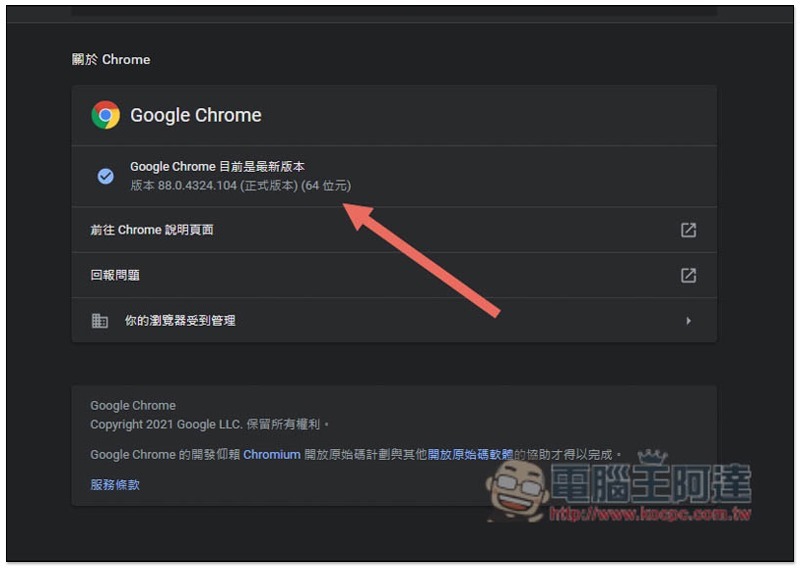
First, you must confirm that Chrome has been upgraded to the latest Chrome 88 version. Those who don’t know can open the menu in the upper right corner and click Help –> About Google Chrome:
Cropro-2021-01-23-16-25-17

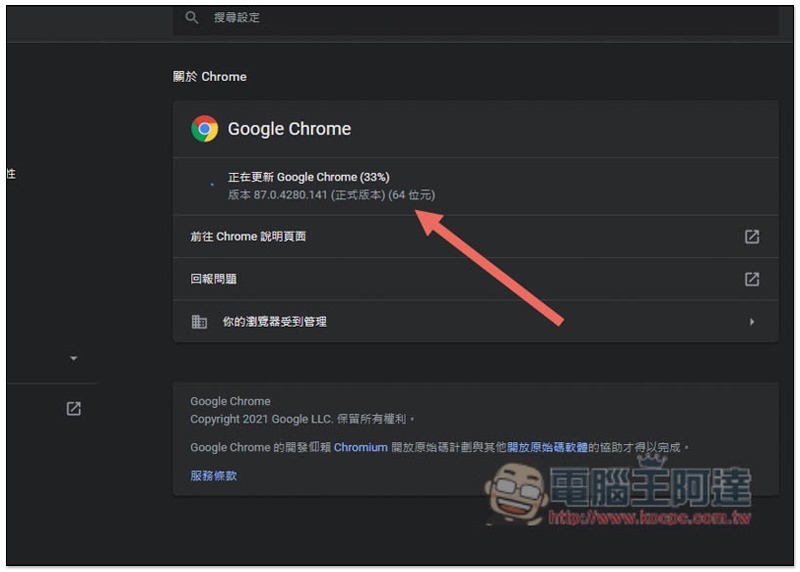
This page will open automatically. If you haven’t updated like me, Google Chrome will automatically enable updates below:
Cropro-2021-01-23-16-25-36

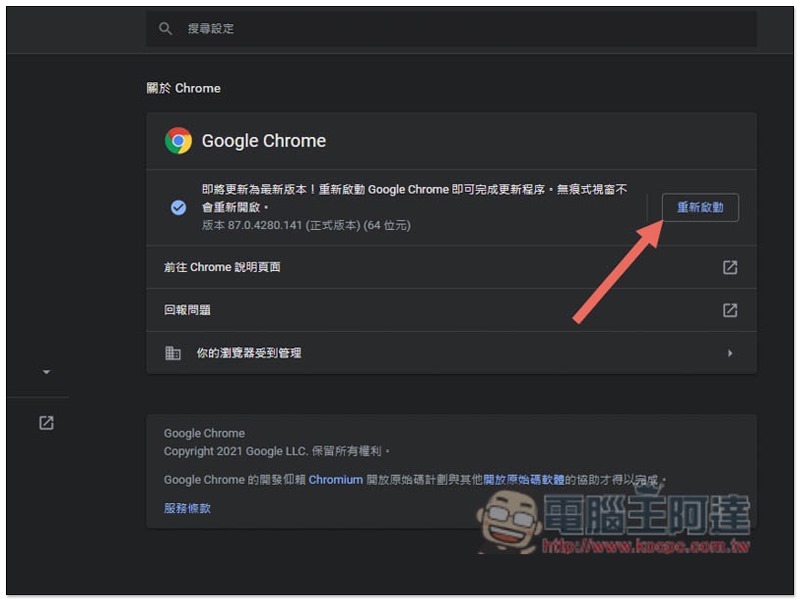
After the update is completed, you need to restart Google Chrome, click Restart on the right:
Cropro-2021-01-23-16-25-48

It will open until your Chrome version changes to 88:
Cropro-2021-01-23-16-26-16

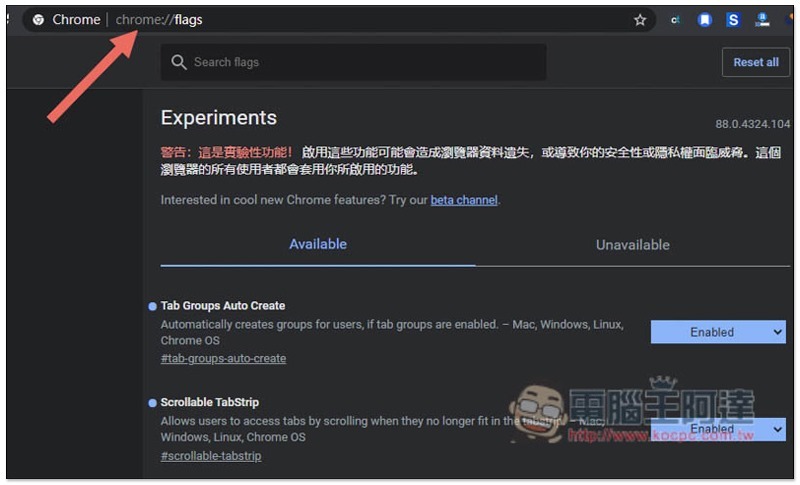
At this time, please enter “chrome://flags/” in Chrome’s address bar to enter the implementation page:
Cropro-2021-01-23-16-26-51

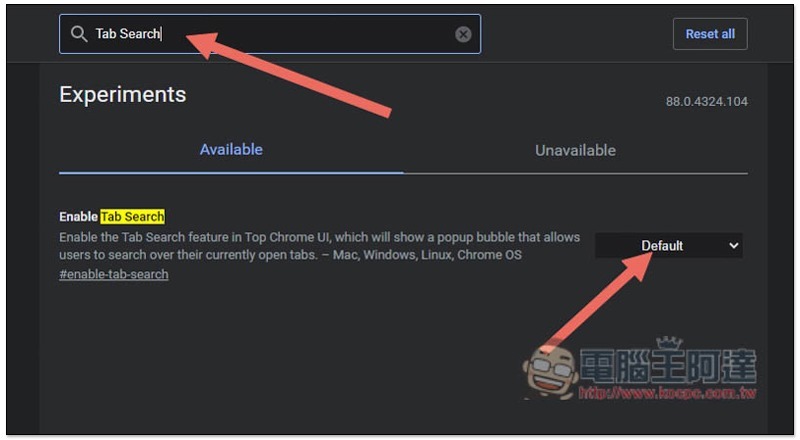
Enter the Tab Search keyword, and the Available menu below will display this function. Click the Default option on the right:
Cropro-2021-01-23-16-27-07

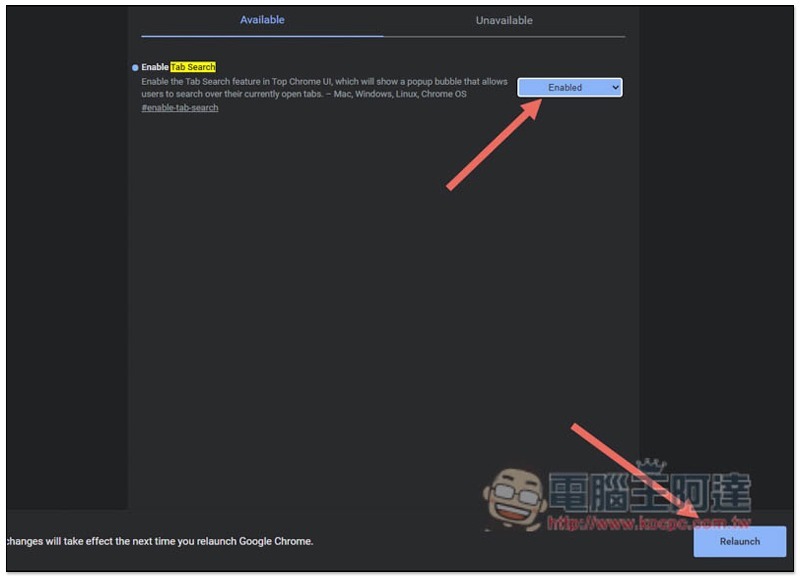
Change to Enabled to start, and then click the Relaunch function in the lower right corner:
Cropro-2021-01-23-16-27-26

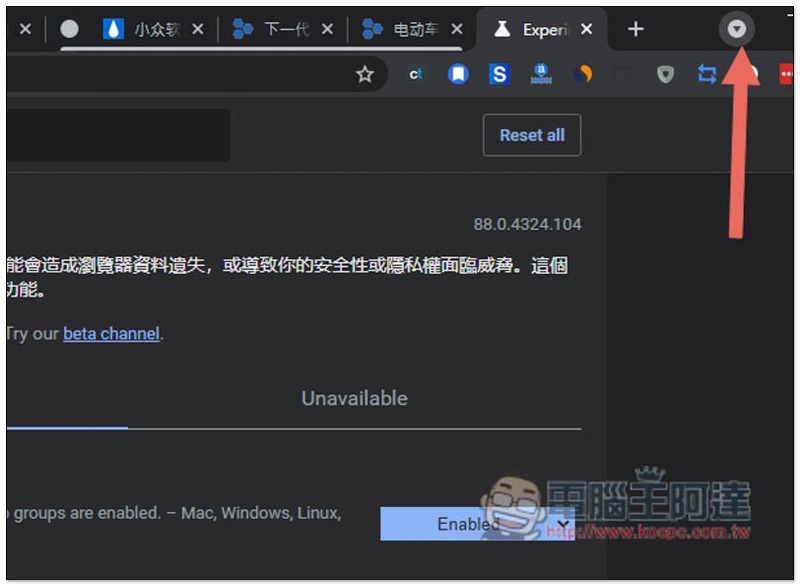
After Chrome restarts, there will be an inverted triangle on the far right side of the web page:
Cropro-2021-01-23-16-28-49

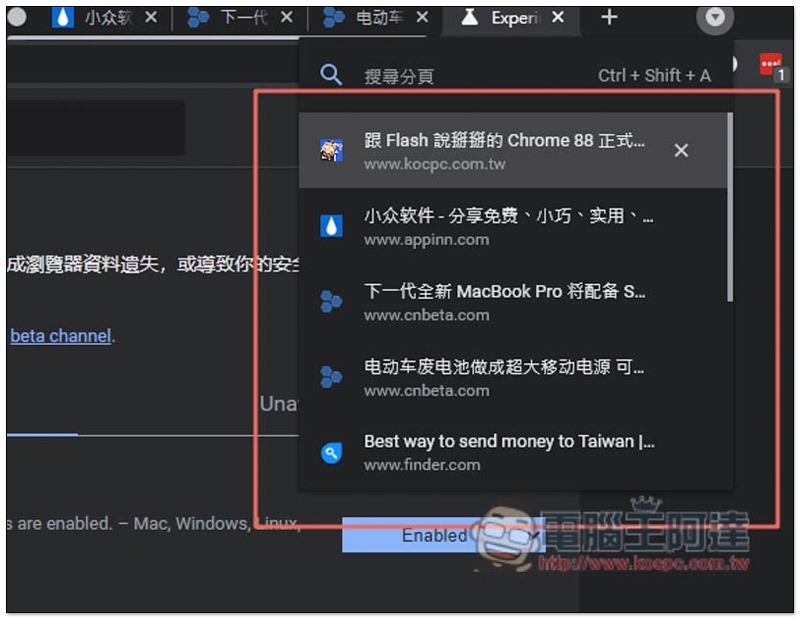
All web page tabs you currently have open will be displayed in list form:
Cropro-2021-01-23-16-29-04

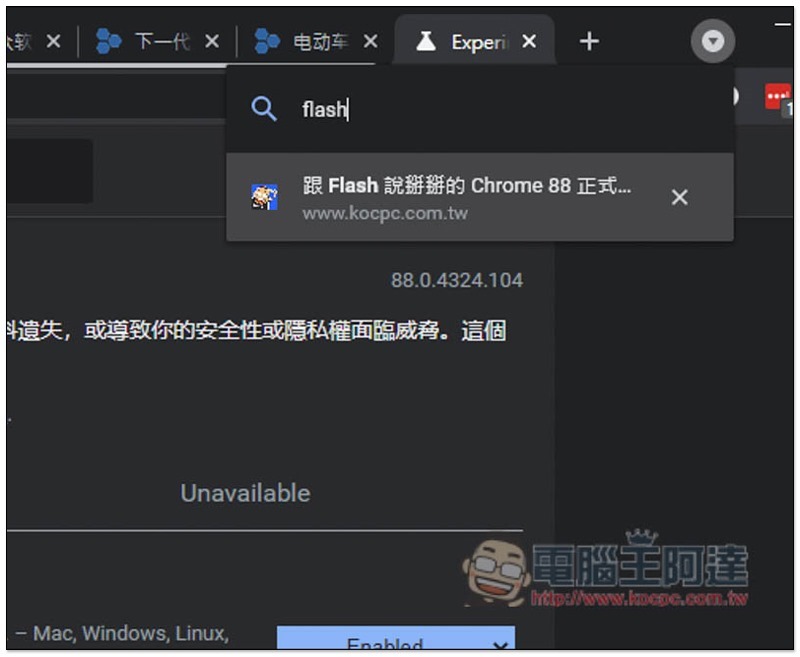
There is a search function at the top. Entering keywords will only display matching web pages. This means that even if you open 30 or 50 pages, as long as you remember the name of the page, you can quickly find and continue browsing:
Cropro-2021-01-23-16-29-20

In addition to the Tab Search tab search function, Chrome 87 also has a highly recommended “Automatically Create Tab Group” function, which will automatically help you group tabs on the same website. If you don’t know how to use it yet, you canRead this tutorial。

Windows 10 再傳用 Chrome 訪問一個指定路徑,就會立刻出現藍白當機畫面 Bug

Source: KOCPC Chinese

Tags: ChromeChrome 88Chrome pagination

Recent Posts

  • The Xiaomi Pad 8S Pro has passed network access certification and will debut with the self-developed XRING O3 chip.
  • The entire Google Pixel 11 lineup has been leaked! Official promotional renders of the Pixel 11 Pro XL have also surfaced
  • Are Chinese phone battery capacities falsely labeled? A brief look at the “capacity locking” phenomenon in Chinese silicon-carbon batteries.
  • NCC is leaderless, recklessly sending out national-level alert messages!?
  • What does “QR” in QR Code mean?

Recent Comments

No comments to show.
  • About Us

We welcome partnership inquiries and product review opportunities from smartphone manufacturers, iPhone accessory brands, and app developers.koc kocpc.com.tw|Privacy Policy |Hosting & Maintenance: Fast Line Taiwan, A-Chang Digital Technology

No Result
View All Result
  • Home
  • Tech News
  • AI News
  • Apps & Tutorials
  • Mobile & Telecom
  • Lifestyle
  • About Us

We welcome partnership inquiries and product review opportunities from smartphone manufacturers, iPhone accessory brands, and app developers.koc kocpc.com.tw|Privacy Policy |Hosting & Maintenance: Fast Line Taiwan, A-Chang Digital Technology