


For many users who like to use LINE to connect emotionally, many people will create “groups” to meet the needs of multiple people chatting. LINE officially announced today (7th) that it will soon launch a new “LINE Community” function. This new function is somewhat similar to the current use of LINE groups, but it provides more complete functions and an administrator mechanism to make community management more complete. LINE communities also have a business concept similar to Facebook communities. Like-minded users can gather in specific communities to discuss topics of concern, share new knowledge and other community exchanges.
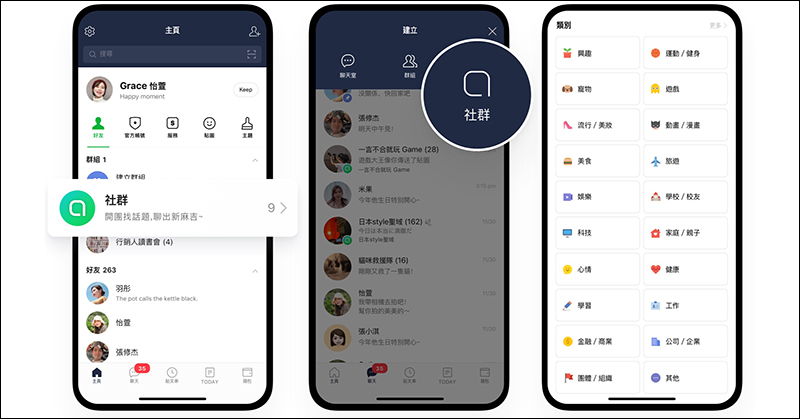
LINE official trailer will launch the “LINE Community” function, take a sneak peek at related functions!

Although from a certain perspective, “LINE Community” is similar to the commonly used “Group” function, LINE Community not only has more upper limits on the number of people, but also can set the upper limit of the number of participants in the social chat room in the settings. The maximum number of people in a LINE community is 5,000:

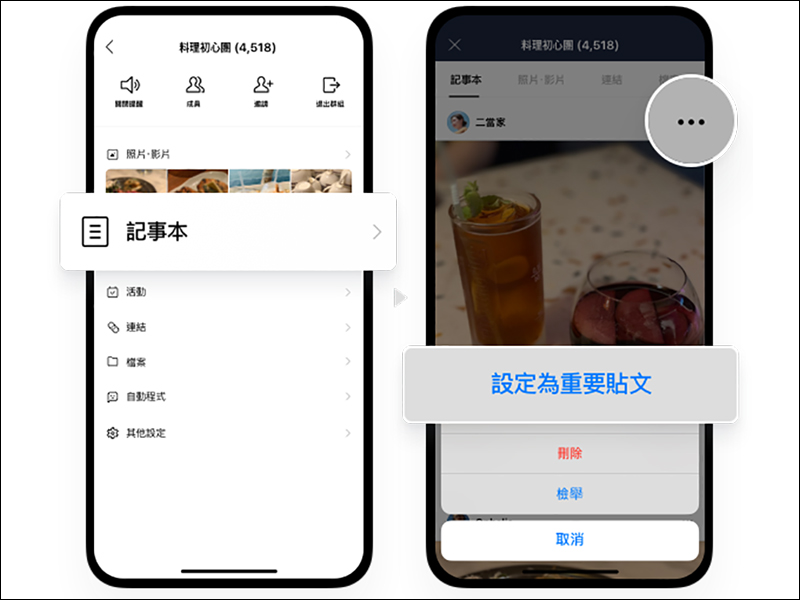
The notepad function of LINE communities allows all members in the community to post posts (notepad content) by default. The community administrator can choose one of the posts to set as an “Important Post” and pin the post to the top of the notepad page. When an important post is set to the top, all chat members in the community will receive a reminder notification (only once):
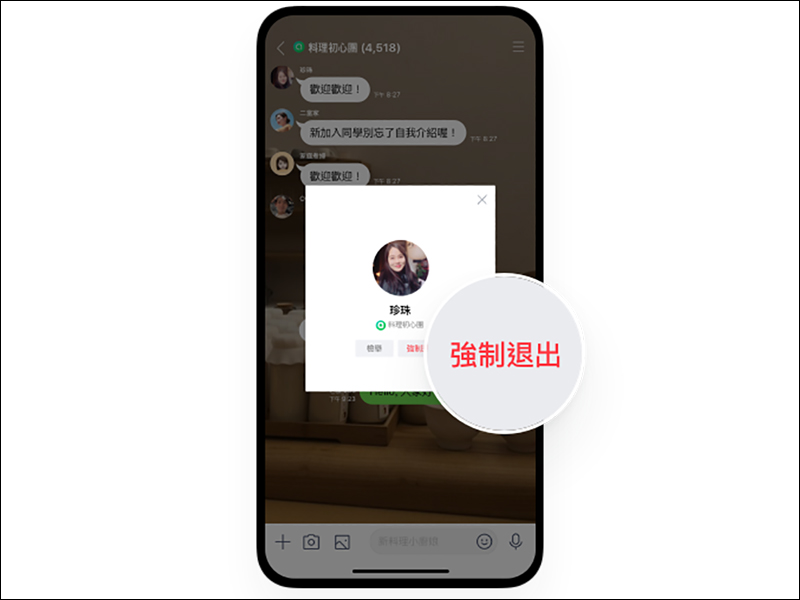
In terms of chat member management, it is also one of the most obvious functional differences between “LINE Community” and current LINE groups. In “LINE Community”, only administrators and co-administrators who have been granted permission can forcibly quit chat members in the community. Other ordinary members cannot kick people randomly, so there will be no “group switching” problem like the one that often occurs in LINE groups.
If the administrator or authorized co-administrator wants to remove a chat member from the community, he or she only needs to select the member’s photo in the community chat room and click “Force Exit”.
The most important thing is that members who are forced to quit cannot join the group again even if they change their nickname, and will be blacklisted. If you want to join again, the administrator must first remove him from the blacklist set by the community.
The above-mentioned “co-administrator” permissions for LINE communities also help community administrators share management responsibilities with other members of the community. Administrators only need to click on the member’s profile photo in the member list, and then click on the small crown icon to grant co-administrator permissions.

In addition, related items for managing member permissions are also provided in the community settings:
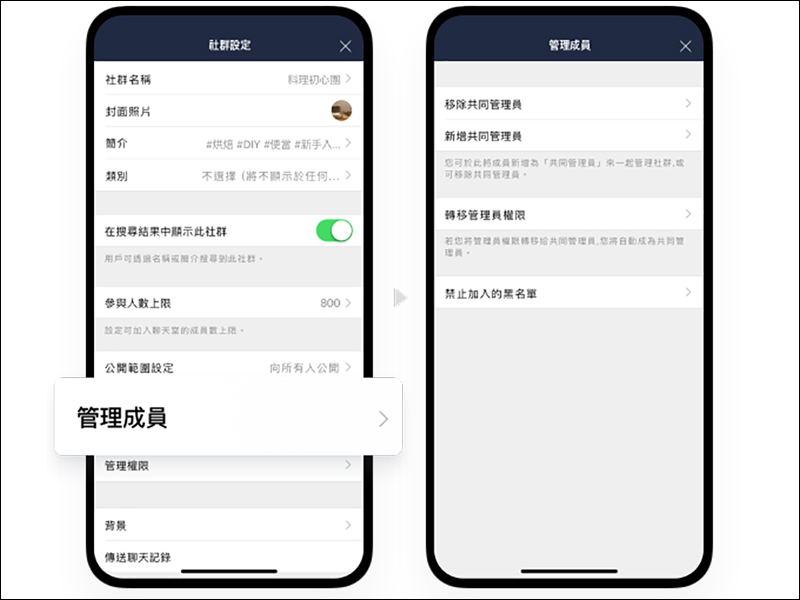
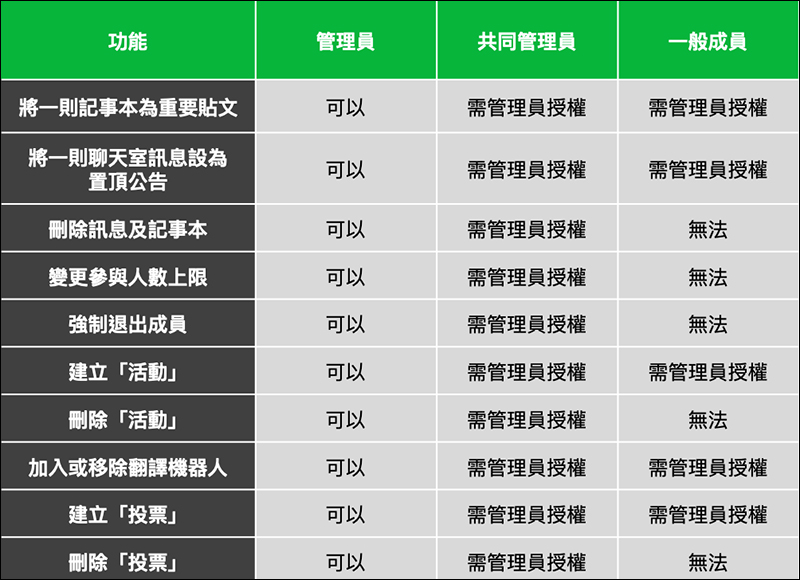
In LINE communities, the person who initially establishes the community is the administrator himself, and each community has only one administrator. Administrators can set up to 10 co-administrators. The following is a comparison of the functional permissions of LINE community administrators, co-administrators, and members.
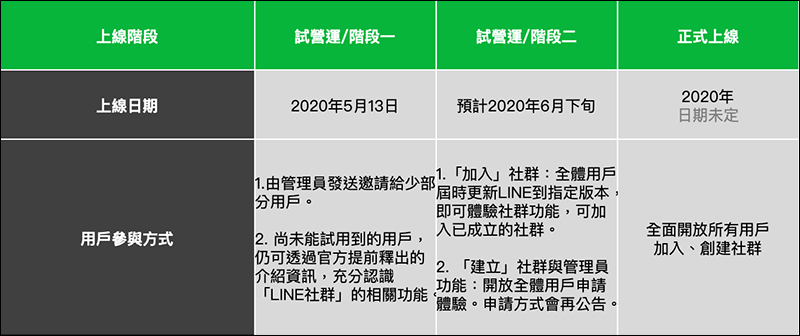
The first phase of trial operation of the “LINE Community” function has begun, but only a small number of users have participated in the test. The second trial operation phase is expected to be in late June this year. By then, all LINE users will be able to experience community functions as long as they update LINE to a designated version. They will be able to join various communities that have been established, and apply to experience community creation and administrator functions. The application method will be announced later.
Picture/Source:LINE
Further reading:
LINE Pay is officially launched in nearly 400 McDonald’s stores across Taiwan, and you can enjoy up to 25% rebate!

Source: KOCPC Chinese