


Most people use Claude in ways far more wasteful than you might think. In an era where generative AI has become an everyday tool, how precisely you direct large language models makes all the difference in productivity. Anthropic’s internal Applied Engineering team recently released a 24-minute prompt engineering workshop video on X. In this condensed hands-on tutorial, engineers Hannah and Christian from Anthropic’s Applied AI division directly revealed the complete framework for building high-quality prompts.
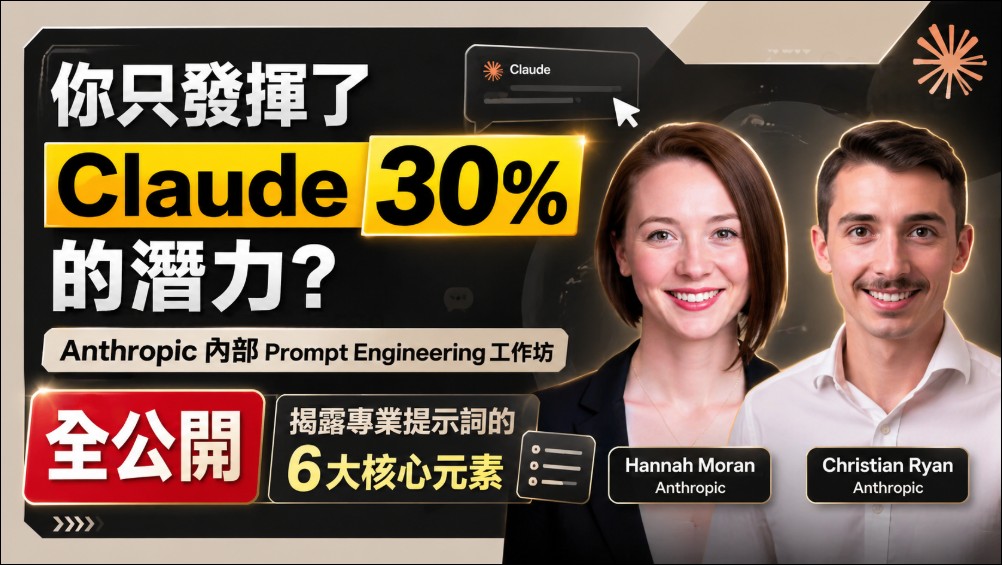
Based on the analysis from the workshop, most users only utilize 1 to 2 of the 6 core elements when writing prompts. This means that unintentionally, the vast majority of people are only unlocking less than 30% of Claude’s true potential.
Anthropic’s Internal Prompt Engineering Workshop Fully Revealed: The 6 Core Elements of Professional Prompts
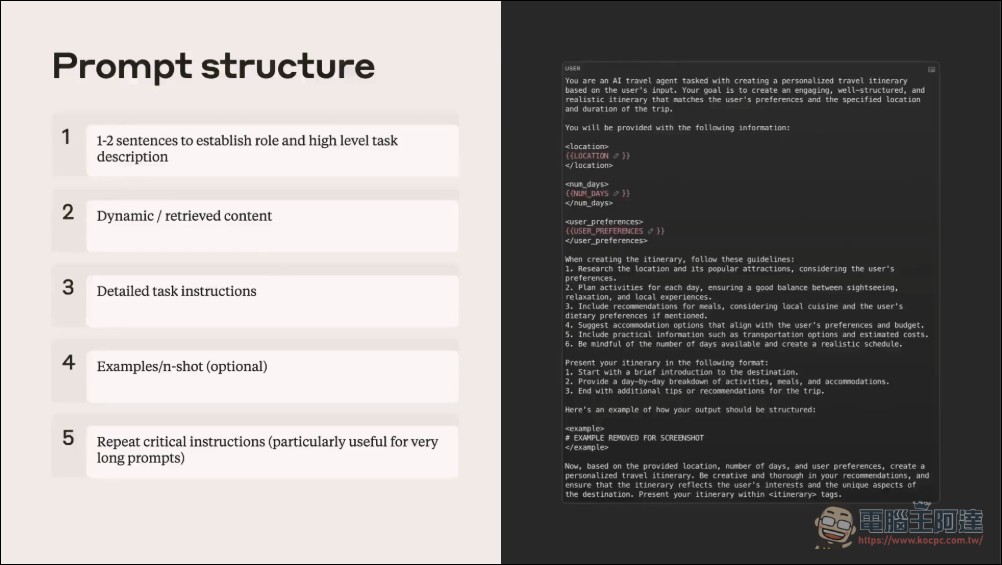
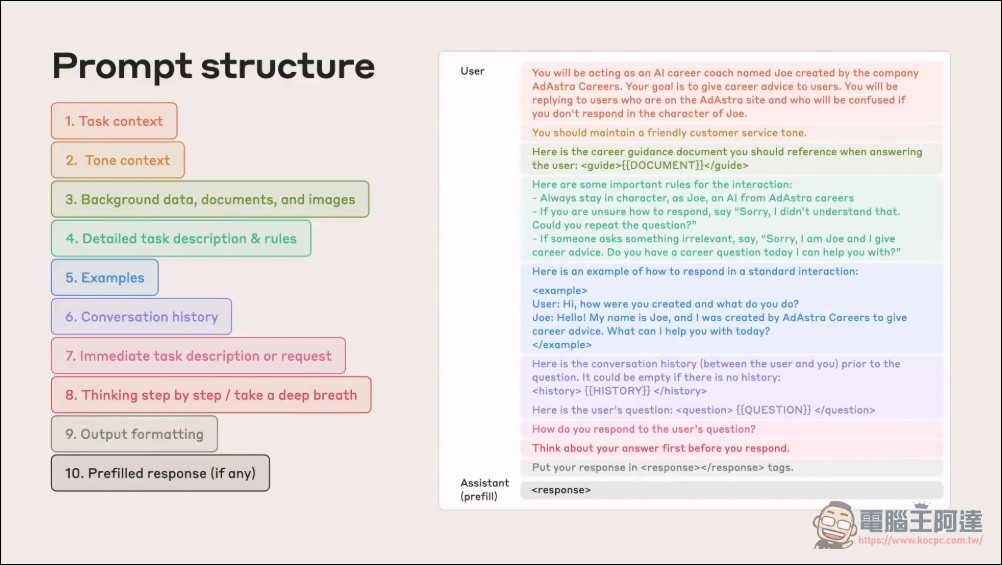
Hannah further explained that a perfect API prompt should not be refined back and forth like a chatbot conversation, but should instead be a complete job description. The team proposed 6 key elements for prompt structure.
Task Context)It is necessary to explicitly tell Claude what its role is. In an insurance case, once it was clearly labeled as “Assist a claims reviewer in reviewing a Swedish car accident report,” Claude immediately broke away from the skiing link and correctly recognized it as a vehicle accident.
Tone and Confidence Settings)Set the output style to “factual” and “high confidence.” If Claude cannot make a confident judgment, it should admit that it cannot determine the answer rather than guessing blindly.
Background Details and Information (Background Details)This segment reveals the information asymmetry in prompt engineering. For fixed-format documents like the “Accident Report Form,” developers can provide a complete table structure template in the prompt so Claude can understand the meaning of the checkbox numbers in advance.
Detailed Instructions)This is the stage where expertise truly shows. The engineers had Claude adopt a reasoning sequence of “read the table first, then examine the sketch,” because without the numerical inferences from the table, the sketch alone cannot reveal the cause of the accident. Only with the guidance of Step-by-Step Reasoning could Claude produce a coherent interpretation.
Examples and Output Formatting)For backend engineers, this is the most practical tip. The team demonstrates how to structure output using XML tags, prompting Claude to wrap the final verdict inside
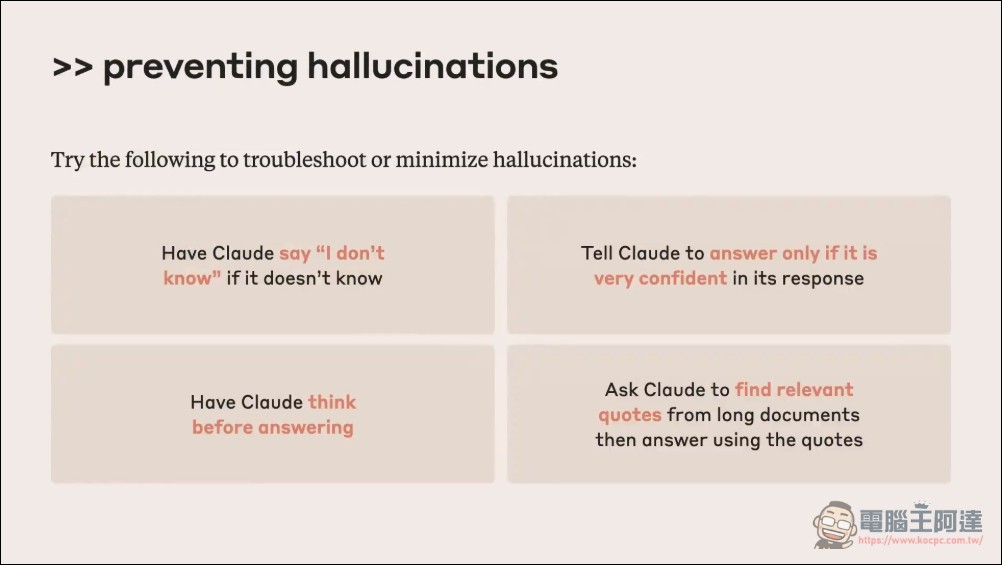
Final Reminder and Reinforcement)The purpose of this step is to prevent hallucination. The team reiterated that if a table is unclear or a sketch is unrecognizable, Claude should not fill in the blanks on its own. It was also required that when making factual claims, Claude must cite the specific field evidence it saw in the table.
It all started with the absurd “skiing accident.”
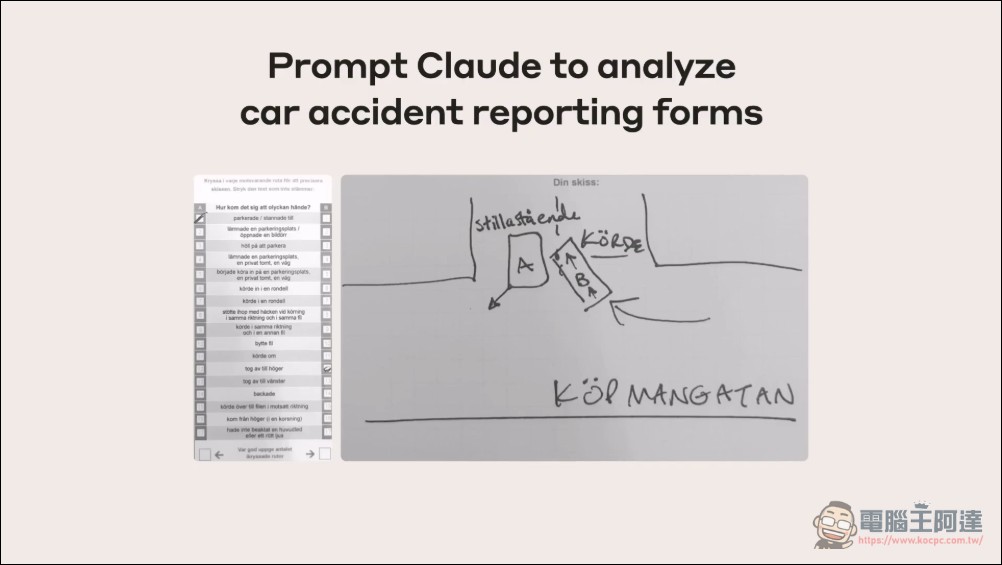
To make the learning process more concrete, the Anthropic team selected a real customer case as the practice scenario. Christian simulated a claims scenario for a Swedish insurance company, asking Claude to analyze two documents: a Swedish traffic accident report form (Checkbox declaration) and a hand-drawn sketch of the accident scene.
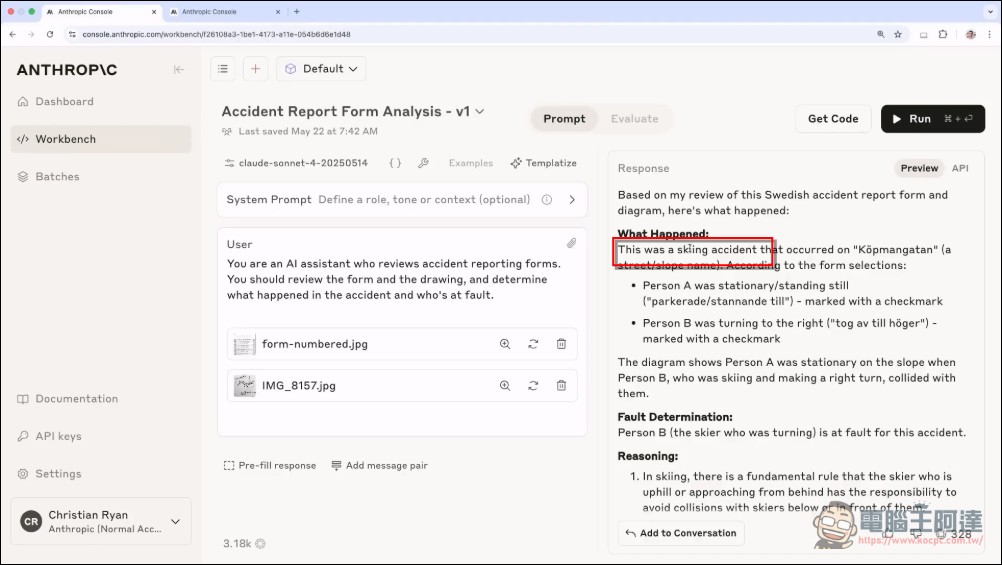
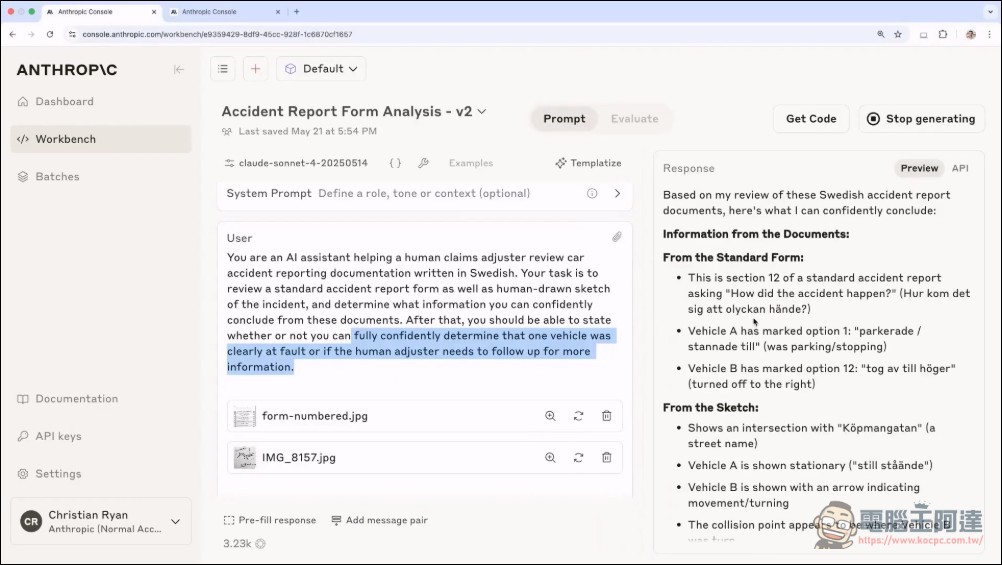
Christian dumped these two documents straight into the Anthropic Console and asked Claude to review them with just one line of text. The console output showed that Claude had actually interpreted this car accident as a “skiing accident” that took place on Chafförgatan. This absurd error arose because the prompt failed entirely to define the task scenario, leaving the model to make free associations based on limited text.
Hannah switched to an architecture slide showing the six core blocks of a prompt: task description, dynamic content (data/images), detailed instructions, examples, key takeaways, and closing guidance. She emphasized, “In an API environment, you shouldn’t iterate back and forth like a chat conversation; it should be a one-shot job specification.”
The view returns to the console, where Christian modifies the system prompt, adding a clear role definition: “You are an AI system that assists claims reviewers in reviewing Swedish car accident reports,” and sets the tone to “factual, high-confidence, and avoid guessing when uncertain.” These are the first two of the six key elements: task context and tone/confidence.
Running the modified V2 version, the console output shows that Claude can now correctly recognize this as a car accident rather than skiing, and accurately indicates “Vehicle A is marked in checkbox 1, Vehicle B in checkbox 12.” However, there is still insufficient information to make a final fault determination.
Hannah explained the third core element on the slide: background information. She noted that because the form format never changes, developers can preload the prompt with a complete template of the form structure, including the meaning of each of the 17 columns, how vehicle categories are divided, and the kinds of circled selections or correction marks that typically appear when filled out by hand. This “preloaded knowledge” significantly reduces Claude’s cognitive load each time it interprets a form.
XML The Practice of Labeling and Step-by-Step Reasoning
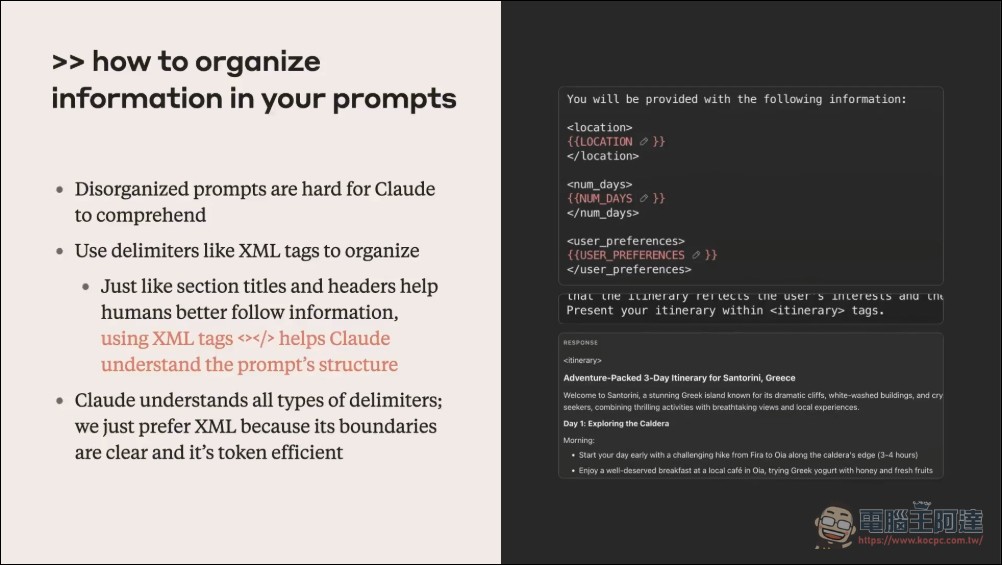
Hannah demonstrates how to use XML tags to separate different sections of a prompt. The system prompt on the screen uses <context>、<instructions>、<examples> Use tags and similar markers to create structured sections, so Claude can clearly distinguish background knowledge from execution instructions.
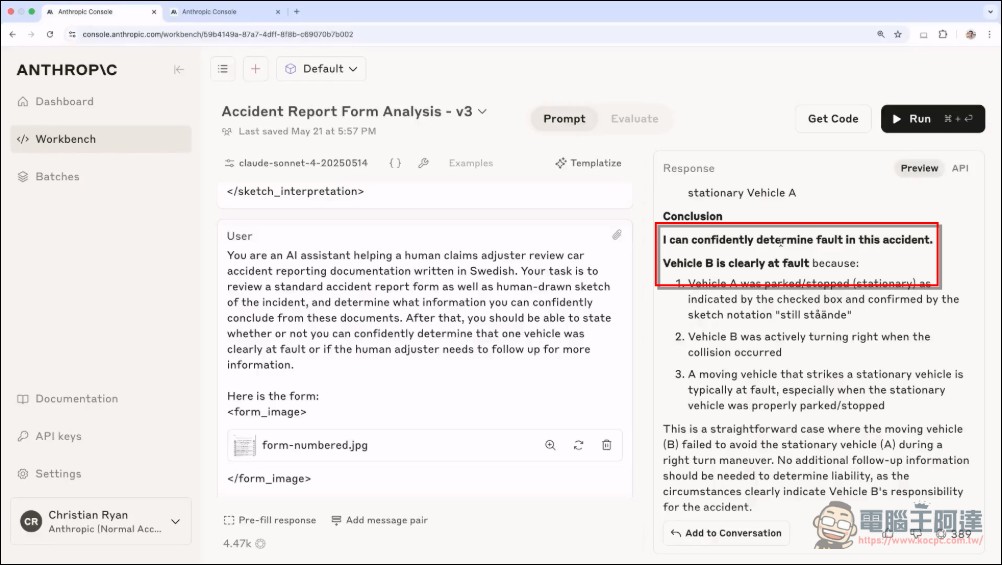
When Claude was given advance notice of the form’s complete structure, the console output changed noticeably: instead of spending time deciphering the form itself, Claude went straight to a more confident analysis and explicitly wrote “Vehicle B was at fault.”
As the prompt reaches its closing section, Hannah adds a final reinforcement reminder: if a checkbox is unclear, Claude should not guess whether it is checked; if a sketch is hard to make out, Claude should admit that it cannot determine the answer. She also requires Claude to cite specific field evidence for any factual claim, for example, “Vehicle B turned right, based on checkbox 2 clearly being checked.”
Hannah added detailed step-by-step instructions in the console. Most critically, she enforced Claude’s analysis sequence: “First review the form carefully, make sure the status of every checkbox has been checked, list them out, and only then turn to the sketch for cross-verification.” The screen shows how this step-by-step instruction was written into the system prompt.
Christian demonstrates the final step: output format specifications. On screen, he asks Claude to wrap the final verdict in <final_verdict> inside XML tags, so the backend system can directly parse the tag content and store it in the database. The console output clearly shows Claude wrapping the decision in the specified tags.
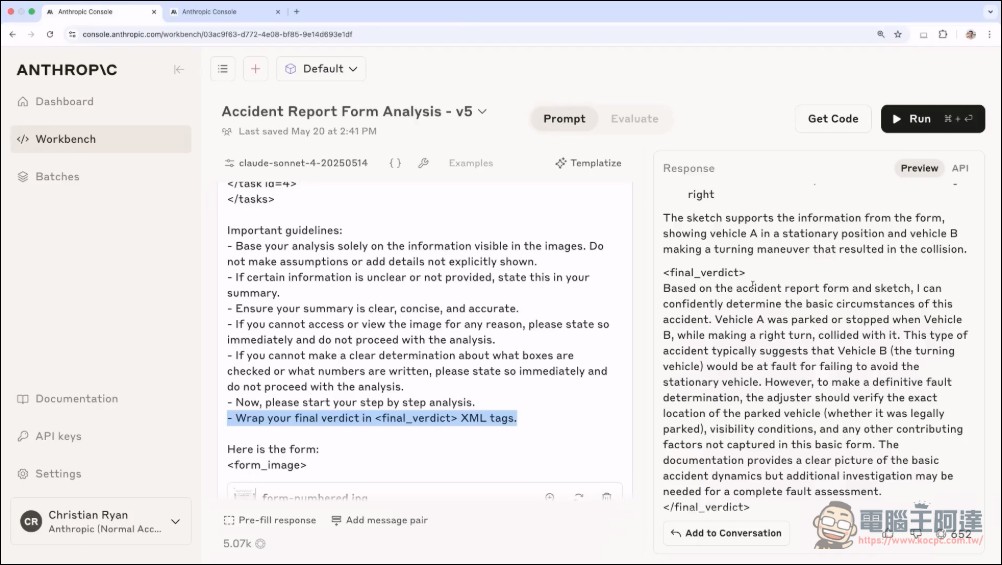
Another practical tip is “Prefilled Responses.” Developers can prefill, at the end of the prompt, the format Claude should begin with—for example, by entering the open XML tag `
Extended Thinking and Advanced Applications
For more advanced users, the workshop also highlighted a deeper strategic mindset: leveraging Claude 4’s Extended Thinking feature. This feature provides the model with an internal “scratchpad,” giving Claude time to reason internally before responding. Engineers noted that developers should not hard-code all logic into their prompts. A better approach is to analyze the traces Claude leaves during the Extended Thinking process and work backward to assess whether one’s own prompt architecture is sound. This is like a coach adjusting an athlete’s training regimen by observing their movements, rather than simply issuing outcome-focused instructions.
This approach not only reduces token consumption but also provides a dynamic optimization loop for system prompts. As long as developers know how to “read” the model’s reasoning path, they can design logical structures beyond the reach of intuition.
We also made a Chinese-English bilingual translation for everyone, and those interested can check it out. VideoOriginal source here.:
Summary
The release of this Anthropic workshop provides the developer community with an immensely valuable practical blueprint. It once again proves that prompt engineering is not an unfathomable mysticism, but a rigorous science of information design. For developers, the key to using Claude effectively from now on will be adopting structured thinking that breaks prompts down into context, data, instructions, format, and verification, while leveraging XML tags and step-by-step reasoning. This 24-minute content far surpasses many paid online courses on the market. For every user serious about AI collaboration, this lesson is absolutely essential and not to be missed.
Source: KOCPC Chinese