


For NVIDIA GPU users with high refresh rate monitors (especially OLED panels), the mysterious brightness flickering and slight stuttering that occur when a game is locked at 60FPS have long been a persistent headache. Now, Orbmu2k, the developer of the well-known tuning software NVIDIA Profile Inspector, has stepped in again, releasing a free open-source tool called “NVIDIA G-SYNC Tweaks” on GitHub, allowing users to directly unlock and fine-tune undocumented G-SYNC and variable refresh rate (VRR) low-level parameters in NVIDIA drivers.
A genius developer created the open-source “NVIDIA G-SYNC Tweaks” tool, completely solving 60FPS flickering and stuttering on high-refresh-rate OLED monitors.
Why does 60FPS actually cause flickering and stuttering? The culprit turns out to be the driver “intervening too early.”
The core value of variable refresh rate (VRR) lies in allowing the monitor’s refresh rate to dynamically follow the GPU’s actual output frame rate, thereby eliminating screen tearing. When the game frame rate drops below the monitor’s minimum supported VRR threshold, the system activates Low Framerate Compensation (LFC), maintaining a synchronized, smooth feel by doubling and repeating frames.
However, according to An in-depth study of Reddit user PykeFeedSome NVIDIA drivers have a hidden parameter called vrrFrameSplitBehavior, which causes the system to activate LFC prematurely—”over-eagerly”—before the monitor has even reached its true minimum VRR limit.
For example, even if a high-refresh-rate monitor’s actual VRR lower limit is 48Hz, the NVIDIA driver may by default trigger frame doubling early in the 58–65 FPS range. As a result, when a game runs steadily at 60FPS, the monitor’s refresh rate repeatedly jumps back and forth between 60Hz and 120Hz. On OLED panels, this directly causes visible gamma shifts and brightness flicker, while on typical LCD monitors it causes noticeable stuttering.
No need to manually edit the registry! Unlock hidden driver controls with one click.
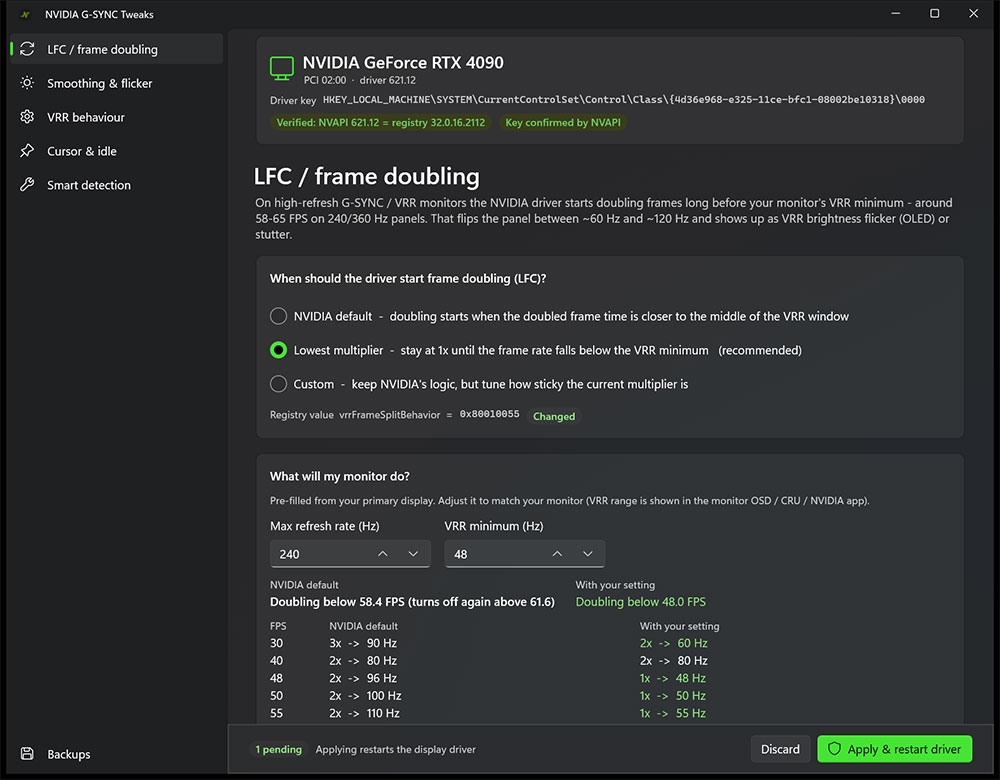
In the past, if players wanted to avoid this issue, they often had to resign themselves to manually lowering the monitor’s maximum refresh rate or risk modifying the Windows Registry. With NVIDIA G-SYNC Tweaks, players can now safely and intuitively make low-level adjustments:
- Delay the LFC trigger threshold: Freely adjust the frame multiplication conditions to precisely postpone when LFC kicks in until near the display’s true VRR lower limit, while fully preserving the display’s maximum refresh rate.
- Comprehensive VRR parameter fine-tuning: In addition to LFC threshold and hysteresis settings, the tool also exposes advanced options such as VRR frame smoothing, flicker suppression, frame pacing control, refresh rate cap, screen tearing strategy, and even cursor responsiveness and render idle behavior.
- Comes with complete reverse-engineering documentation: The developer thoughtfully included detailed technical analysis documents that break down the operating logic of the NVIDIA VRR driver, helping hardcore gamers find the optimal balance between “ultimate smoothness” and “lowest input latency.”
Downloads and System Requirements
NVIDIA G-SYNC Tweaks is now available in Released as free and open source on the GitHub platform.For safety during use, the tool automatically backs up the system registry before applying any settings and supports one-click restart of the graphics card driver, eliminating the cumbersome need to reboot every time an adjustment is made.
- System requirements: 64-bit Windows 10 or Windows 11
- Hardware and Environment: Equipped with an NVIDIA GPU, and Microsoft Windows App Runtime 2.x must be preinstalled.
Source: KOCPC Chinese