


Many people want to set up AI workflows locally, but ordinary Windows PCs simply can’t run large language models. If you want to run models of this caliber, you have to spend money on high-end workstations or professional servers. There may be a better solution in the future! Recently, Microsoft announced an RDMA over USB4 technology that allows multiple Windows PCs to be connected with USB4 cables to form a small AI computing cluster, without needing to buy dedicated RDMA network cards or switches. This means that in the future, it’s okay if one machine can’t run it—by linking together computers at home or in the office, you might be able to successfully run the large AI models you want to use.
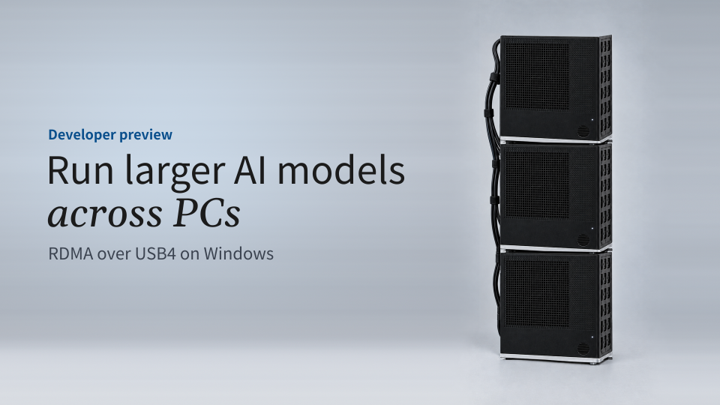
Image source: Microsoft
Microsoft lets multiple Windows PCs join forces to run AI! RDMA over USB4 debuts, and three mini PCs can run a 235-billion-parameter model.
Earlier, Microsoft announced via its official USB blog New RDMA over USB4 technologyand announced that a developer preview will be released soon. It can directly connect two or more Windows PCs with USB4 ports, allowing the same AI model to jointly use the memory and GPU compute resources of these PCs. The entire process requires no RDMA network cards, switches, or third-party drivers. It has also open-sourced the relevant driver components and provides a testing framework based on llama.cpp; AMD and Intel have also each published their benchmark results.
Microsoft’s approach this time is to implement RDMA functionality directly over USB4 in software. Windows’ USB4 connection manager establishes a point-to-point channel between each pair of computers, and then a new RDMA driver uses the DMA transfer channels built into the USB4 controller to move data. Each connection uses two sets of channels: one for data and one for control signals.
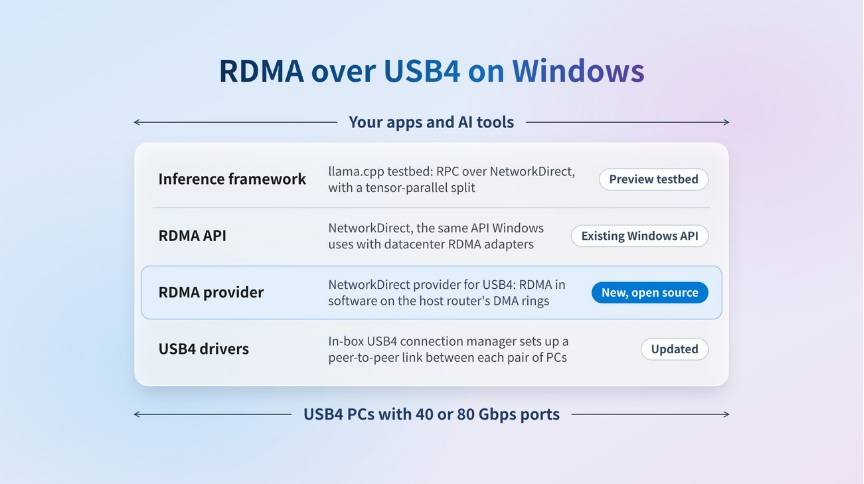
Image source: Microsoft
On the application side, this is done through Windows’ existing NetworkDirect API. NetworkDirect is an existing RDMA interface in Windows; previously, it was used only with Ethernet and InfiniBand RDMA network cards on servers. This time, Microsoft has added USB4 support to it.
The overall architecture announced by Microsoft is as follows:
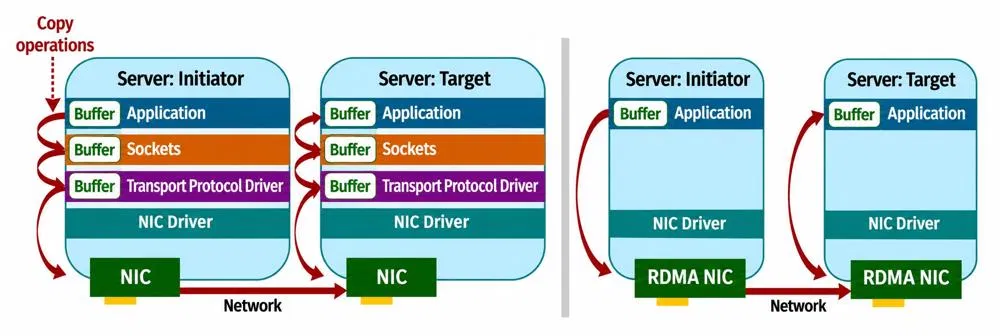
Image source: Microsoft
With this technology, a large AI model that originally couldn’t fit in a single computer’s memory can be split into several parts and distributed across multiple computers to run collaboratively.
The test framework provided by Microsoft is modified from the open-source llama.cpp. Originally, llama.cpp used TCP for transmission between multiple computers; Microsoft changed it to use NetworkDirect and added tensor parallelism modifications, allowing a model to be split across multiple computers for joint computation. Microsoft also mentioned that choosing llama.cpp was only for demonstration, and it expects other inference frameworks to adopt the same NetworkDirect API later.
Also, note that these connections can only be established on USB4 ports that are managed by Windows and have Kernel DMA Protection enabled—not just any USB-C port.
This time, Microsoft also announced the test results from two partner groups.
First is the AMD setup, using three mini PCs equipped with Ryzen AI Max+ 395, Radeon 8060S integrated graphics, and 128GB of unified memory each, interconnected pairwise via 40Gbps USB4. The model running is Alibaba’s Qwen3-235B-A22B, using 4-bit (Q4_K_M) quantization, and Microsoft measured a generation speed of about 18.5 tokens per second in its own lab.
AMD also published its own measured data. With a context length of 1,600 tokens and generating 2,048 tokens, the generation speed is 21.98 tokens per second, while the prompt processing speed is 117.98 tokens per second.
Next is Intel, using three- and four-machine setups equipped with Core Ultra Series 3 processors, each with 64GB of memory (9,600 MT/s), connected via Thunderbolt 4. The model being run is OpenAI’s open-source model GPT-OSS-120B, which cannot fit on a single 64GB machine alone.
The test conditions and results for the two groups of platforms are summarized as follows:
| Item | AMD Ryzen AI Max+ 395 | Intel Core Ultra Series 3 |
|---|---|---|
| Number of computers | 3 units | 3–4 units |
| Single-machine memory | 128GB unified memory | 64GB(9,600 MT/s) |
| Connection method | USB4 40Gbps | Thunderbolt 4 |
| AI model | Qwen3-235B-A22B(Q4_K_M) | GPT-OSS-120B |
| Model parameters | 235 billion | Approximately 120 billion |
| Generation speed | Approximately 18.5 tokens/s (measured by Microsoft) 21.98 tokens/s (measured on AMD) |
3 units at approximately 49.4 tokens/s 4 units at approximately 54.2 tokens/s |
Source: Microsoft Tech Community
AMD Senior Vice President and Chief Software Officer Andrej Zdravkovic also said in the announcement that cluster computing is a critical part of the developer experience, and AMD is working with Microsoft to develop an RDMA over USB4 driver.
For this Intel set, Microsoft also lists results at different context lengths:
| Number of computers | context length | Time to first token | Generation speed |
|---|---|---|---|
| 3 units | 1K | 1.1 seconds | 49.4 tokens/s |
| 4 units | 1K | 1.2 seconds | 54.2 tokens/s |
| 3 units | 2K | 2.9 seconds | 49.4 tokens/s |
| 4 units | 2K | 3.2 seconds | 51.7 tokens/s |
Intel’s data also shows that going from three machines to four, generation speed for a 1K context increased from 49.4 to 54.2 tokens per second—an increase of less than 10%—while the wait time for the first token actually became slightly longer. In other words, adding another computer mainly gives you more memory capacity and the ability to run larger models; speed does not scale proportionally.
RDMA over USB4 is currently in developer preview, and the usage requirements are as follows:
| Item | Conditions of Use |
|---|---|
| Number of computers | At least 2 Windows computers |
| Port | USB4 ports managed by Windows, 40Gbps or higher recommended; Thunderbolt 4 and Thunderbolt 5 also count. |
| Connection method | Connect every pair of computers directly with a single cable; daisy-chaining is not recommended. |
| System version | Every machine must have the same RDMA-capable Windows Insider beta/preview driver installed. |
| Security settings | You need to enable test signing mode and disable Secure Boot in the BIOS. |
| Software | An AI inference framework that supports NetworkDirect, currently a Microsoft-modified version of llama.cpp. |
| Launch time | Windows Insider Experimental Channel (Future Platforms) is coming soon; no date has been announced yet. |
Microsoft recommends a “full mesh” connection, in which every computer is directly connected to every other computer. If daisy-chaining is used, performance will noticeably degrade:
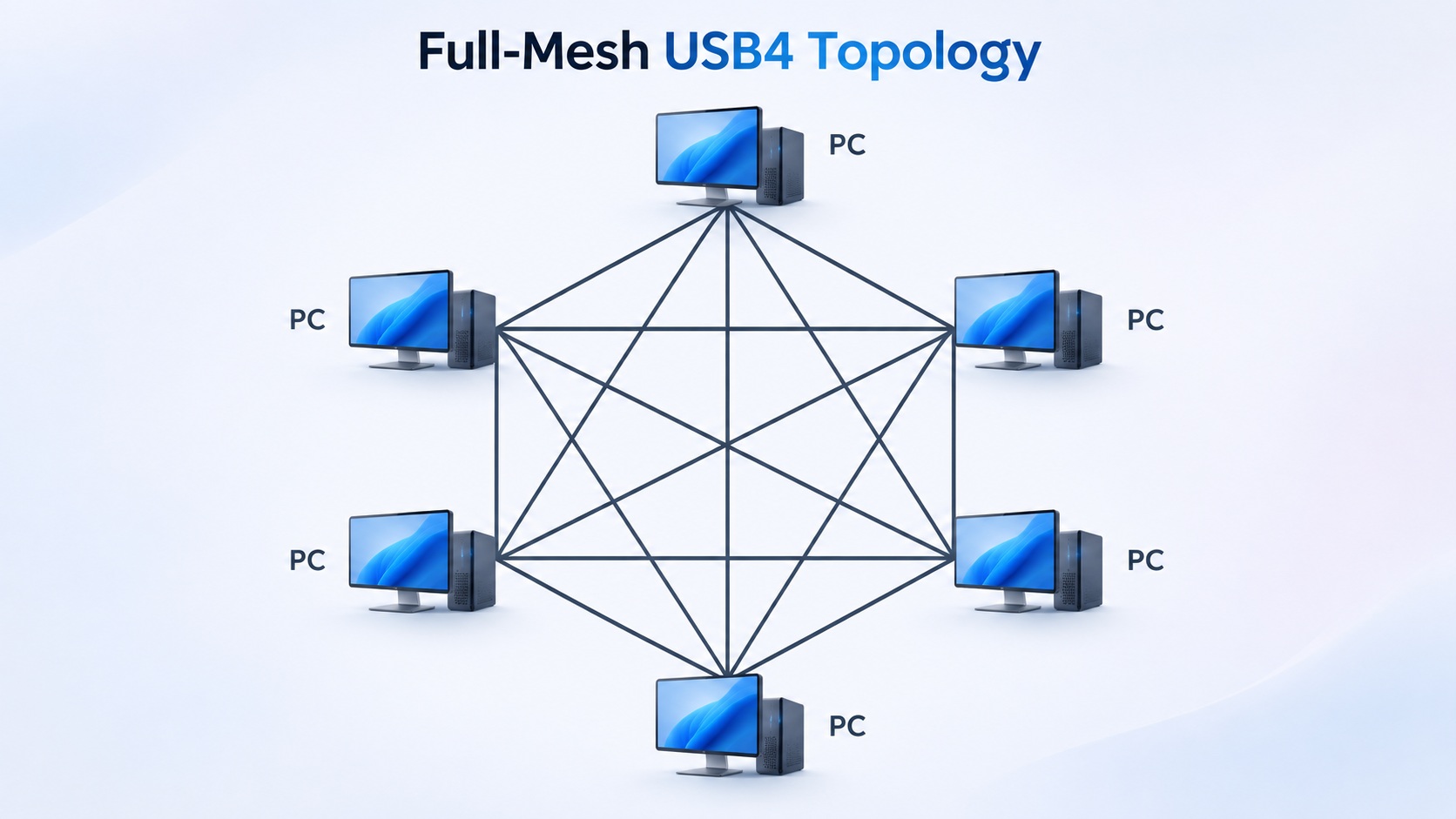
Image source: Microsoft
Microsoft says the relevant Windows Insider Experimental Channel test builds will be released soon, but it has not announced an official release date. The NetworkDirect USB4 driver, sample programs, and llama.cpp examples have already been posted on GitHub, so interested developers can study them first.
Source: KOCPC Chinese