


Scams are becoming more and more common these days, and I believe many people will remind their parents or family members, to some extent, not to trust calls from strangers, not to click suspicious links, and especially not to transfer money easily to people they don’t know. But the problem is that no matter how scam-aware you are, you can’t stay by your family’s side 24 hours a day, nor do you know what text messages they receive or what calls they get every day, or even whether they’ve been manipulated by scammers.
Especially nowadays, many scams unfold in several stages and gradually gain the victim’s trust. By the time family members are informed, losses may already have occurred.
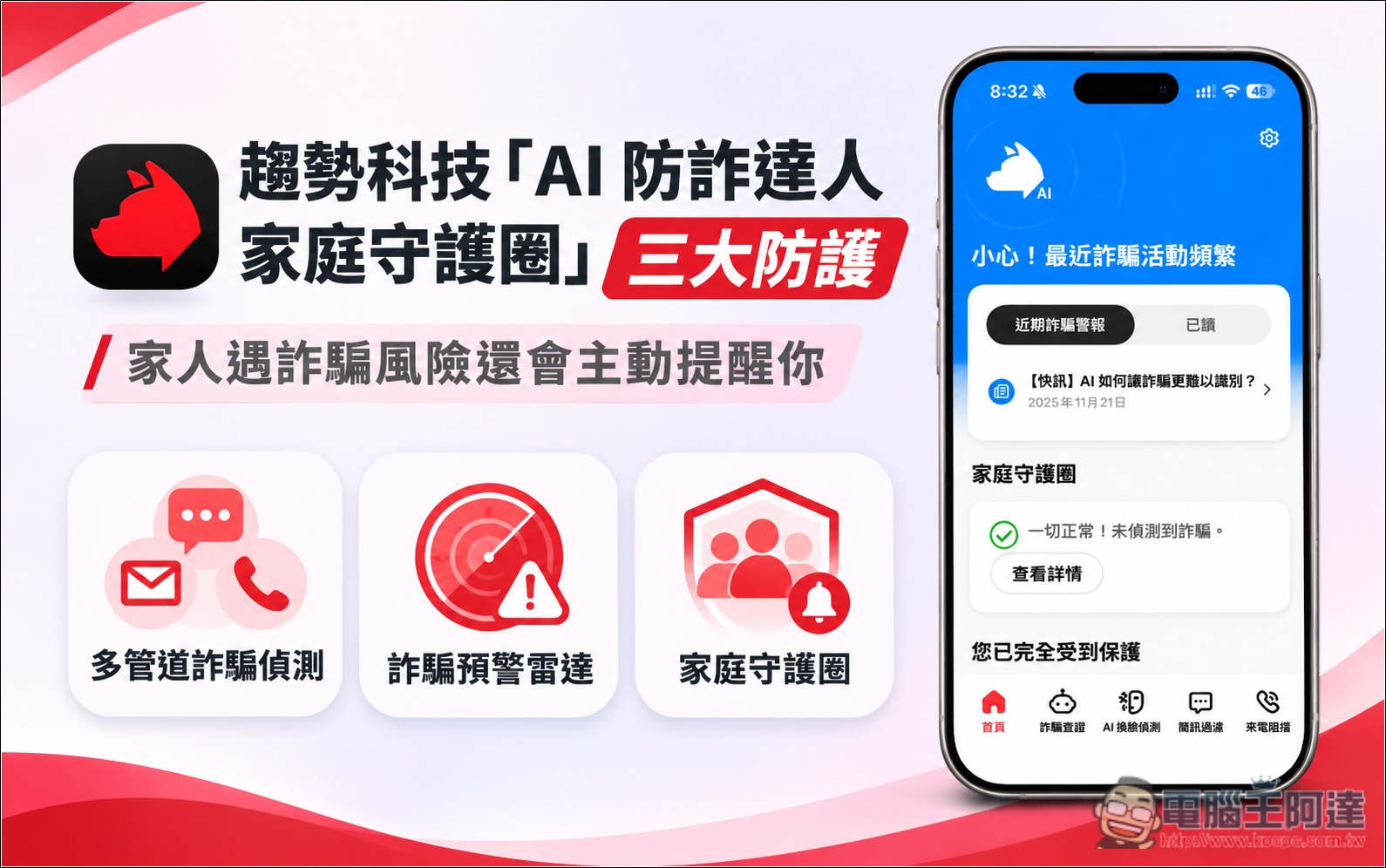
For this reason, Trend Micro’s “AI Anti-Fraud Expert Family Guardian Circle” is quite good. In addition to the multiple scam detection and scam warning radar features that AI Anti-Fraud Expert already offers, when a family member encounters a scam risk, it will also proactively notify the other members of the guardian circle—meaning that even if you are not by your family member’s side, you can still know whether they are being targeted by a scam.
If you’re also worried about your family members being scammed, it’s definitely worth looking into—below is a detailed introduction.
Visit the official website of the AI Anti-Fraud Expert Family Protection Circle.
1. Why is it no longer enough to protect only yourself from fraud?
How easily are older adults exposed to scams? The latest statistics released by the Criminal Investigation Bureau actually reveal some clear signs.
According to data released by the Criminal Investigation Bureau in October 2026, among fraud cases involving people aged 65 and over from January to September this year, “fake online shopping fraud” was the most common; however, when looking at actual financial losses, “fake investment fraud” was the most severe.
Recently, even 91APP, which provides enterprise solutions, experienced a personal data leak involving nearly 4.8 million consumers. If scam groups obtain this shopping data, they could impersonate brand customer service and send scam text messages citing reasons such as “abnormal order,” “duplicate charge,” or “refund processing.” If a family member happens to use a partner platform and does not know that their personal data has already been leaked, they could be induced to click malicious links, join LINE, or even make transfers.
In other words, from everyday online shopping and social media ads to LINE investment groups, older adults may encounter scam rings. It is no longer just fake police or prosecutor calls and phishing text messages.
And as children, we all assumed that when our parents came across something they didn’t understand, they would ask us first—but reality isn’t necessarily like that.
Some older adults are used to handling things themselves and don’t want to trouble their children with everything; others worry about being blamed and are afraid that as soon as they bring it up, they’ll be told, “This is obviously a scam—how could you still believe it?” More importantly, scammers know this too, so they deliberately ask victims to keep things confidential, or through showing concern and interacting with them over a long period, they make the person increasingly believe what the other party says.
It wasn’t until the matter actually came to light that I realized my family member had already been in contact with the scam syndicate for several weeks, or even several months.
So if there were a tool that could quietly keep watch anytime, anywhere, and immediately remind them as soon as something begins, “This could be a scam.” More importantly, even if your family members don’t say anything, you can know right away when a scam risk arises—which will definitely give you greater peace of mind.
II. What Is the AI Anti-Fraud Expert Family Protection Circle? Three Key Protection Focus Areas
AI Anti-Scam Expert is a mobile anti-scam tool launched by Trend Micro, while “Family Guardian Circle” is a feature focused on shared family protection. Simply put, it can also be seen as a family version that allows parents, a spouse or partner, or other relatives and friends to join.

First Line of Defense: Multi-Channel Fraud Detection
There are many scam tactics nowadays, such as common package delivery text messages, bank notifications, social media investment ads, and even video calls with strangers.
To address these different scenarios, AI Anti-Fraud Master integrates multiple protection features, including scam call identification and blocking, scam SMS filtering, dangerous website blocking, and AI face-swap video detection, helping users identify suspicious information when they encounter it.
In addition to protection features, AI Anti-Fraud Expert also offers AI scam verification. It works like chatting with ChatGPT or Gemini, but it is an AI built specifically to detect scams. So when users receive suspicious LINE messages, social media content, or other information, they can hand it to the AI for analysis.
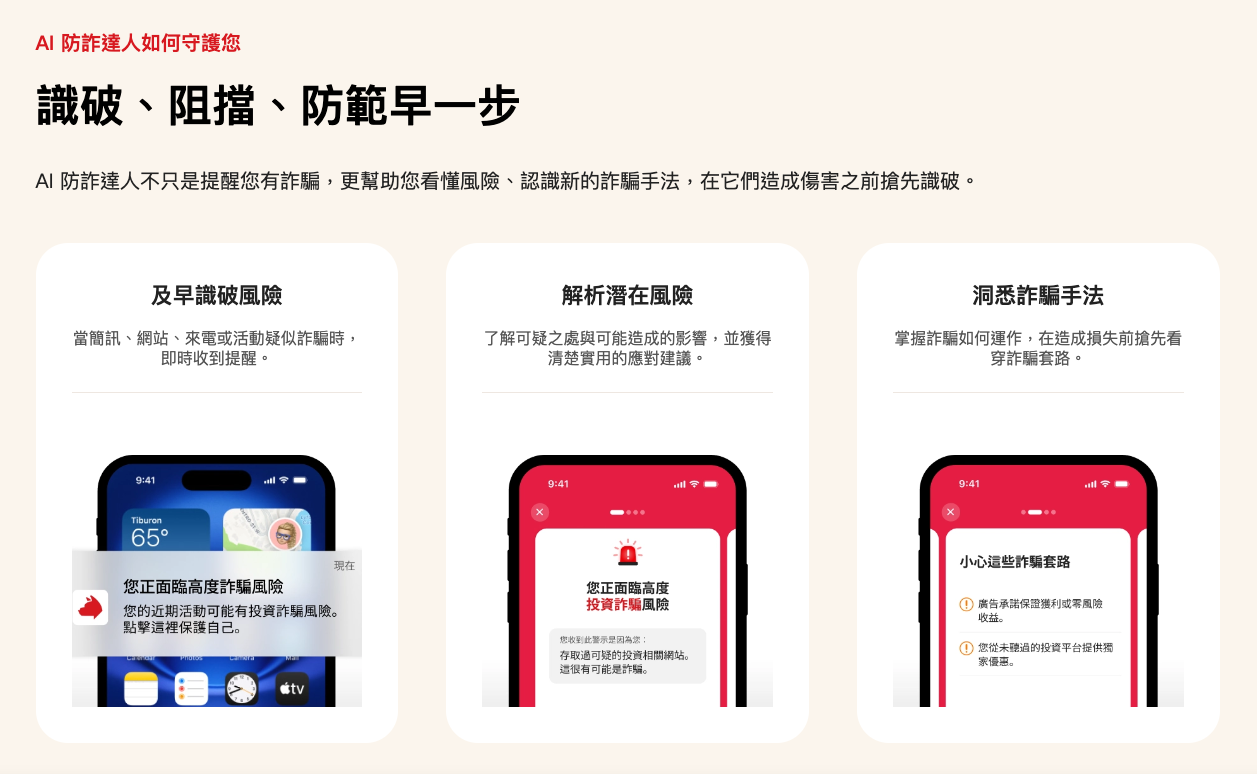
Second major protection: Scam Early Warning Radar—it doesn’t just tell you there’s a scam, it also alerts you to what may happen next.
“Scam Warning Radar” is a very important feature of the AI Anti-Scam Expert. This feature uses an AI scam prediction model to analyze suspicious information and related behavioral signals that users encounter, identify the types of scams that may be occurring, and further alert users to the tactics scammers may adopt next, giving users a chance to become more vigilant before losses occur.
Third major protection: the Family Protection Circle, which proactively notifies you when a family member faces a fraud risk.
As mentioned earlier, by inviting your parents, partner, or other relatives and friends to join your family, you can use the relevant anti-fraud features, and you can also check each member’s protection status through the Family Guardian Circle.
In addition, when a family member in your guardian circle is exposed to a scam risk identified by the system, the app may also proactively notify you.
Go to the AI Anti-Fraud Expert Family Protection Circle official website
3. Is setting up the Family Protection Circle a hassle?
Not at all—the setup process is very simple. Even if you’re not there, elders and family members can easily join the Family Guardian Circle themselves.
During initial setup, once your data has been created, a screen will pop up asking whether you want to invite members to your Family Guardian Circle. You can invite up to 2 people:
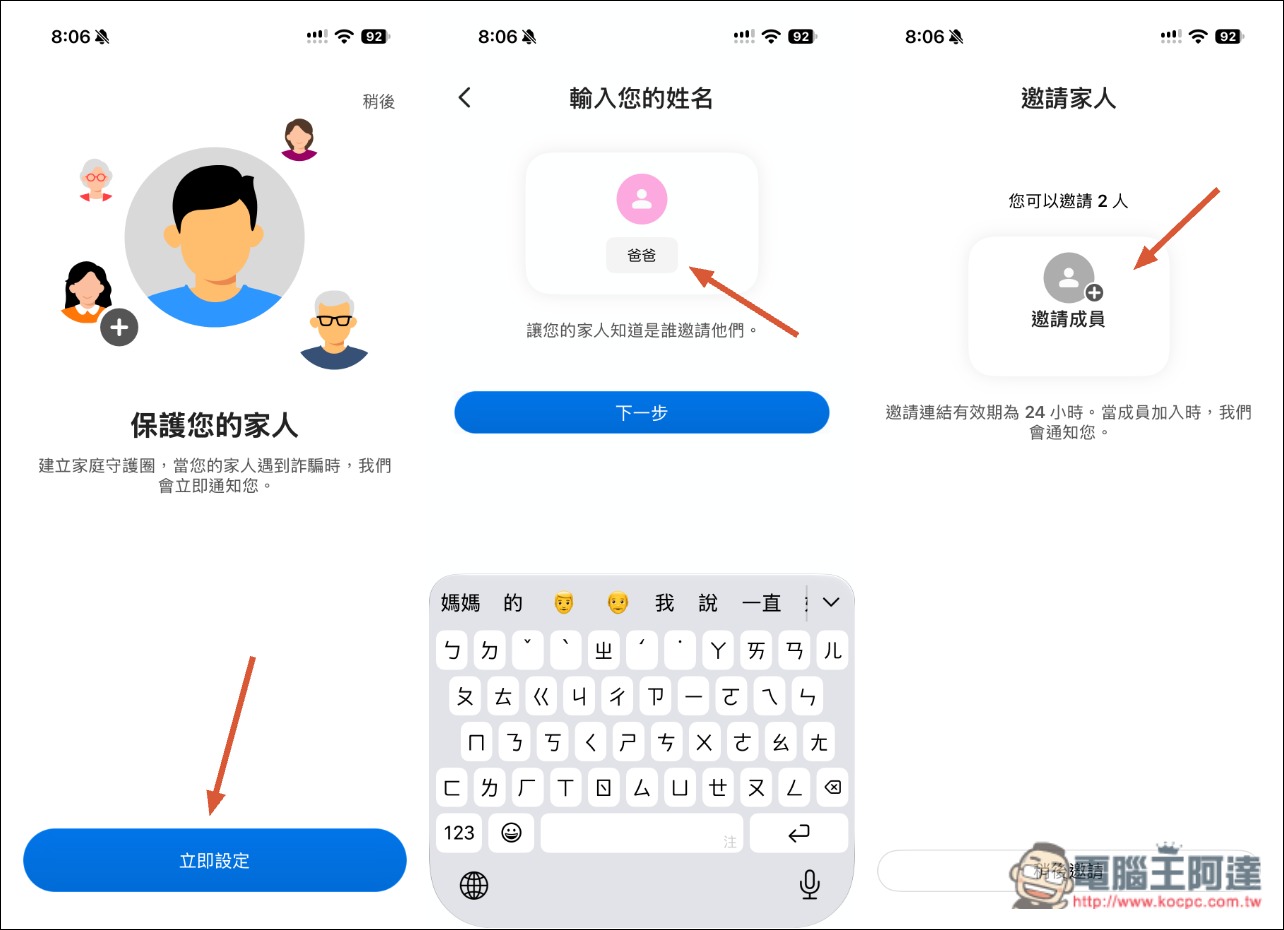
Enter the other person’s name and choose an invitation method: “Scan QR Code” or “Send Message.” If the family member is not nearby, you can use Send Message; the message will include the download link and invitation code for AI 防詐達人:
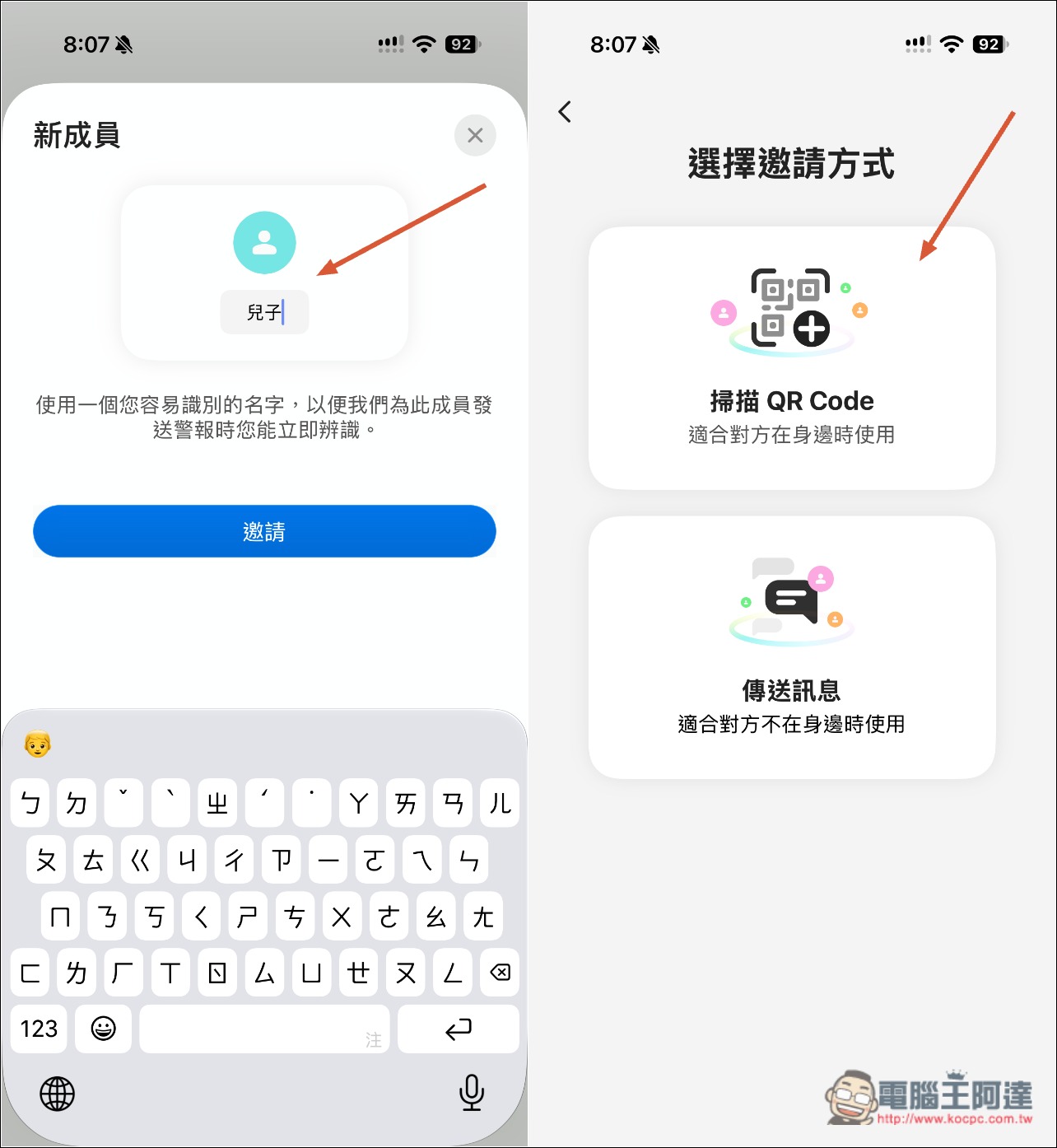
After the other person downloads AI 防詐達人, they enter the invitation code and tap “Join Family Protection Circle”—and that’s it:
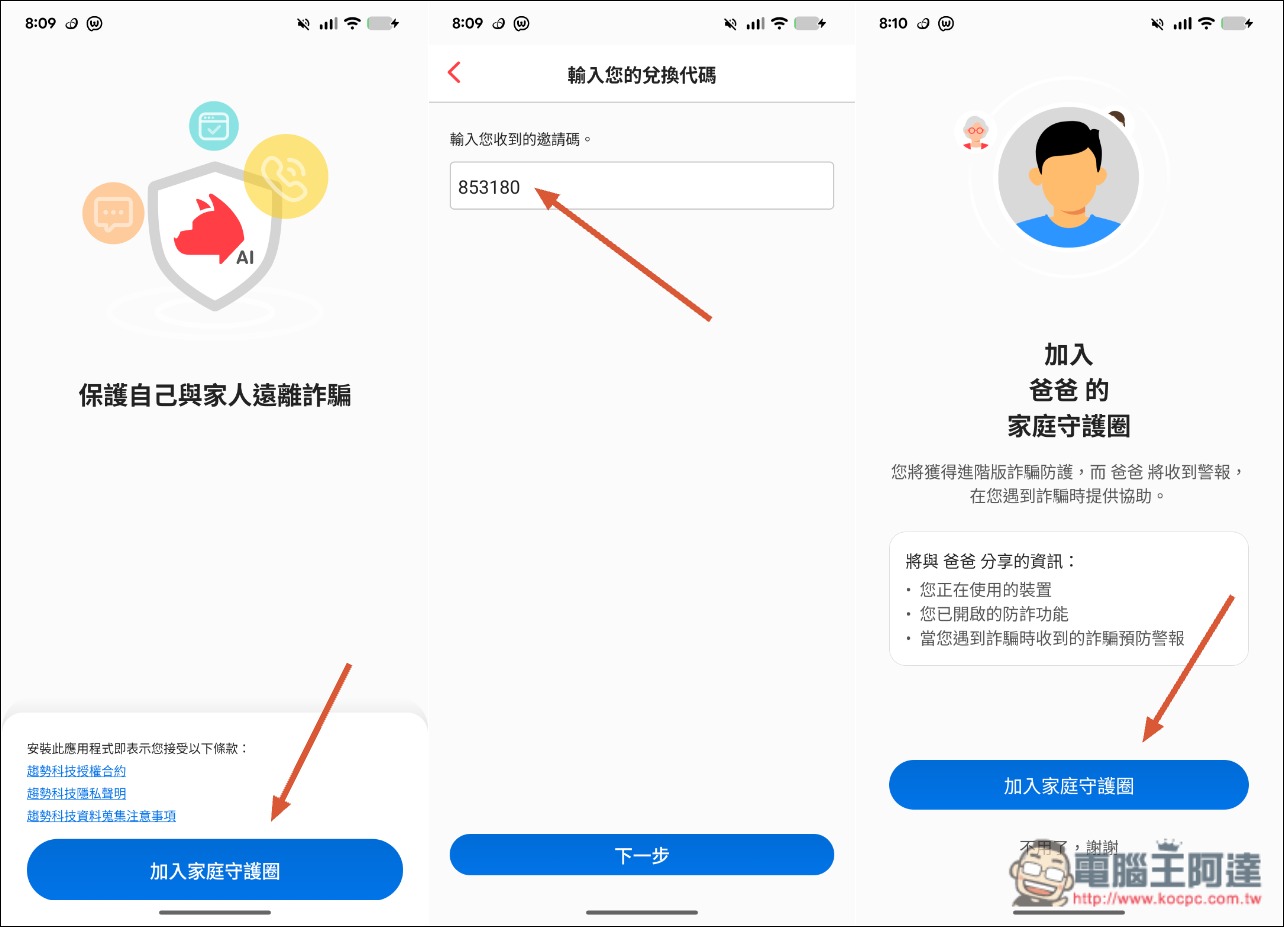
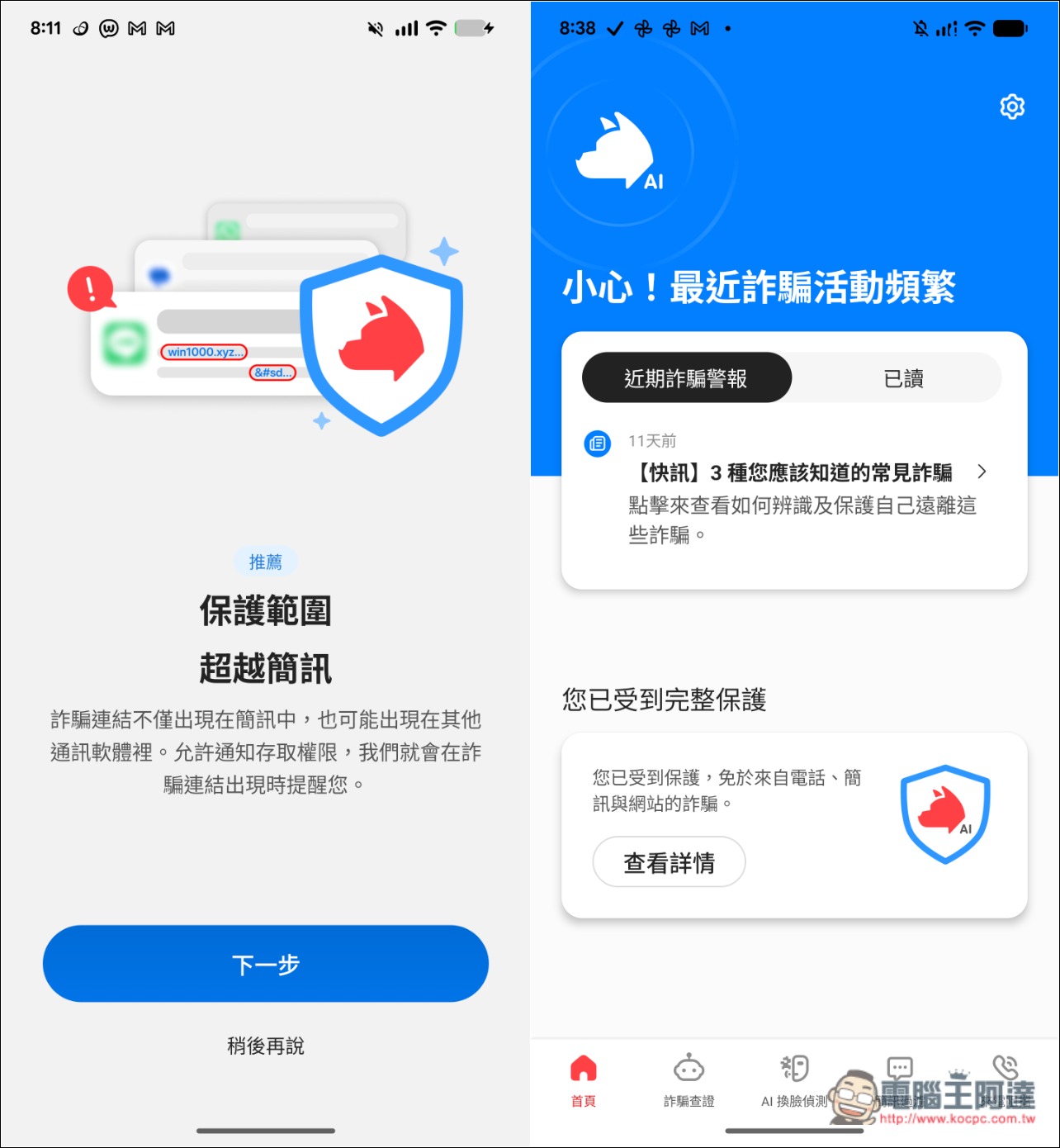
When using it for the first time, you’ll need to set some permissions. Generally, just follow the on-screen instructions and go through them one by one; it’s not difficult. Of course, it’s even better if someone can be there with the family member. After setup is complete, AI 防詐達人 will start protecting:
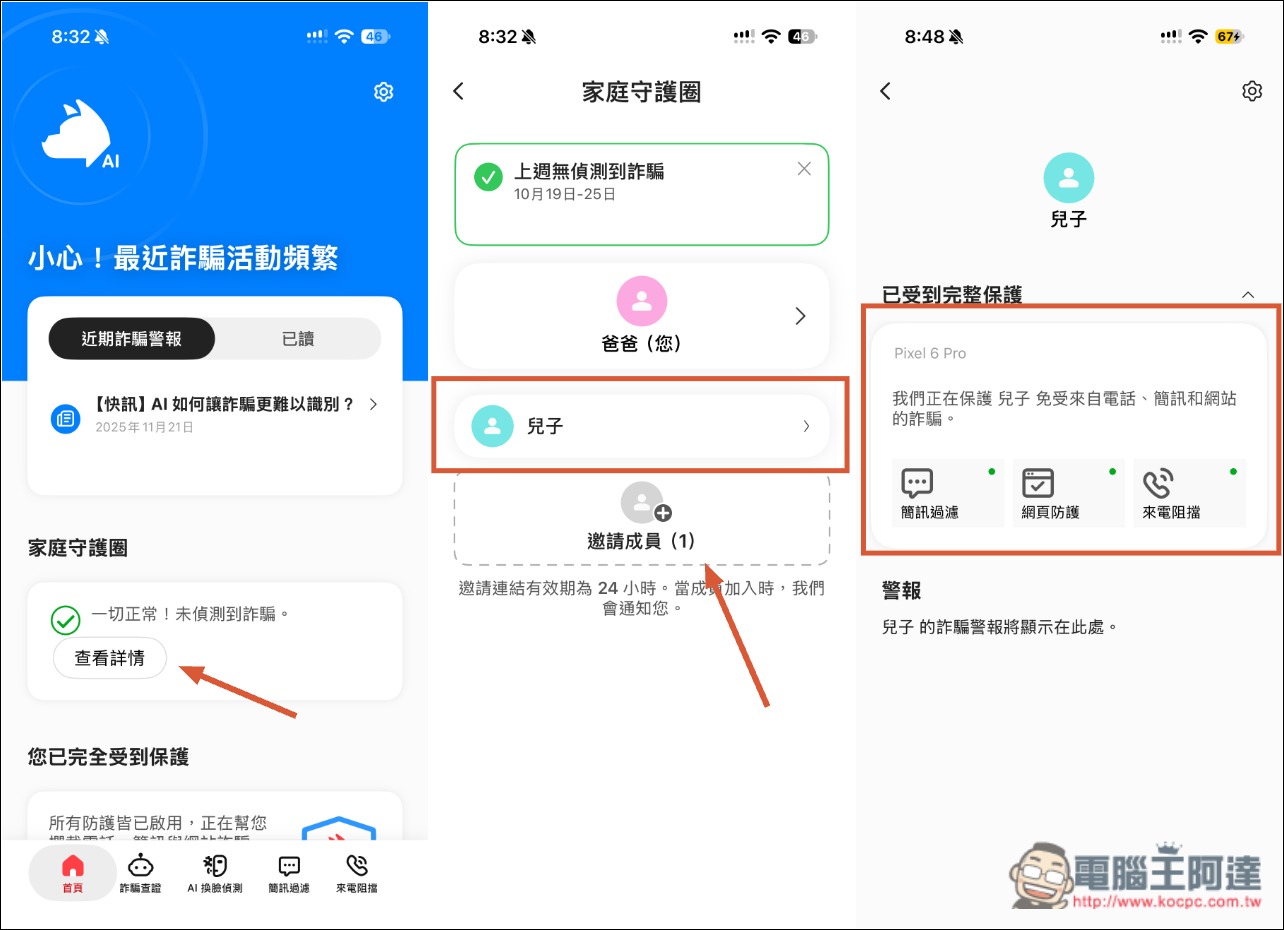
The Family Guardian Circle settings are in your AI 防詐達人 App. Here you can manage/invite members, and you can also go to a member’s page to check whether the protection features on their phone are fully enabled. If you see that something isn’t enabled, you can remind them right away. I think this design is quite good:
4. How does AI Anti-Fraud Expert handle it when family members receive suspicious messages or SMS, or visit suspicious websites?
Messages, text messages, and websites are arguably the channels through which family members are most likely to be scammed, so how effective the protections are in this area matters a great deal.
To this end, AI Anti-Fraud Expert offers two types of protection: “Messages and SMS are automatically filtered for suspicious content, and you can set your own blocking rules”; “When you visit a suspicious website, web browsing protection helps block dangerous links.”
In the AI era, these two safeguards are especially important. After all, even 91APP, which partners with many well-known retail brands, has suffered a personal data leak, not to mention smaller platforms and websites. The odds of anyone encountering a scam are bound to keep rising.
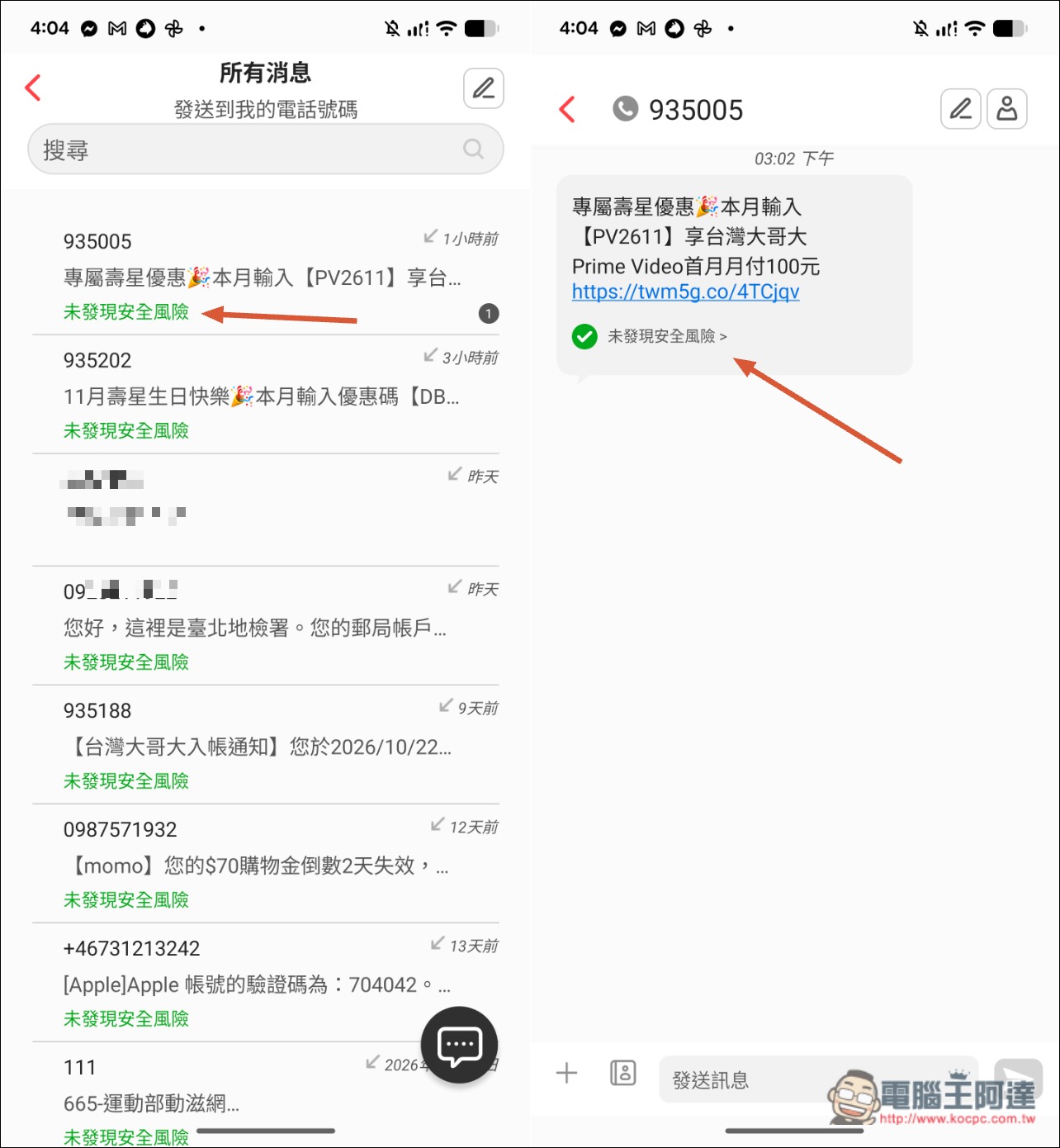
After enabling the protection feature, when the phone receives a message from an unknown sender, AI Anti-Fraud Expert will immediately assess the security risk and display it below the text message. This also means that before family members open the message, they can immediately know whether they need to be especially careful with it:
LINE—the messaging app most commonly used by people in Taiwan—is also supported. As soon as a risky message is received, a prompt immediately pops up in the LINE message notification, without waiting for it to be opened. And that’s not all: even opening the LINE message will trigger a warning: “We found a dangerous link”:
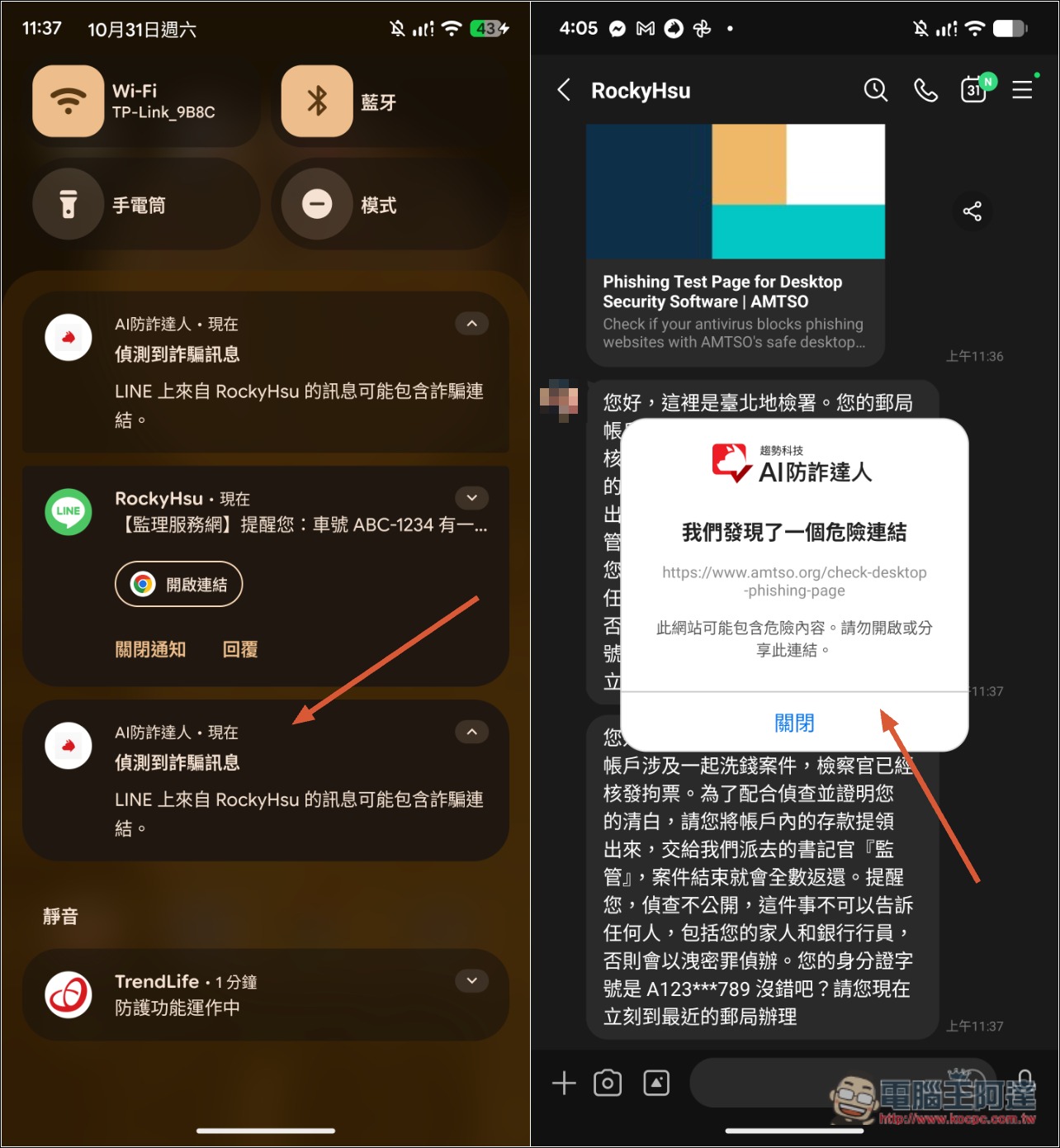
With this warning, I believe even careless elderly people and children would find it hard not to notice, greatly reducing the likelihood of being scammed.
Websites are the same: as soon as you visit a suspicious site, a full-screen block warning immediately appears, such as “This is a phishing webpage”:
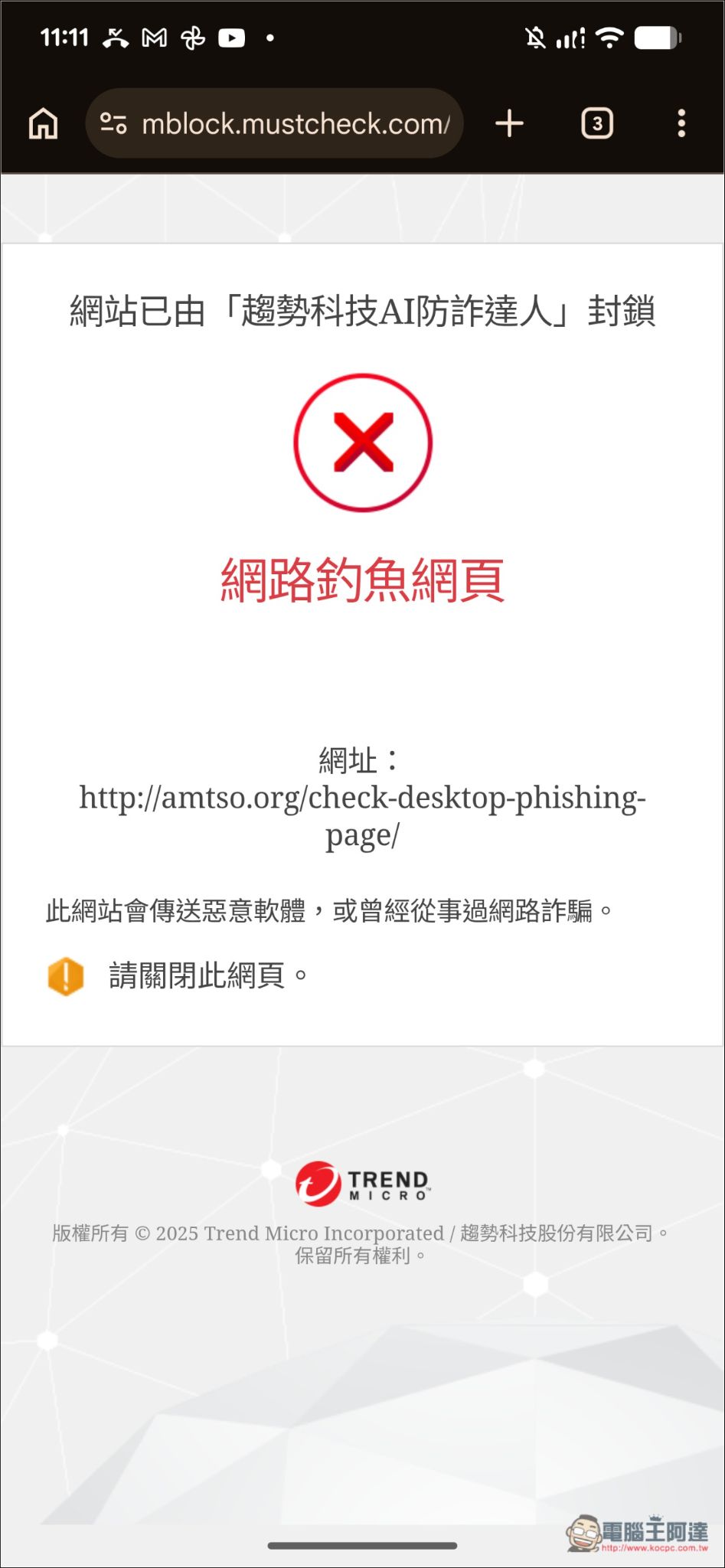
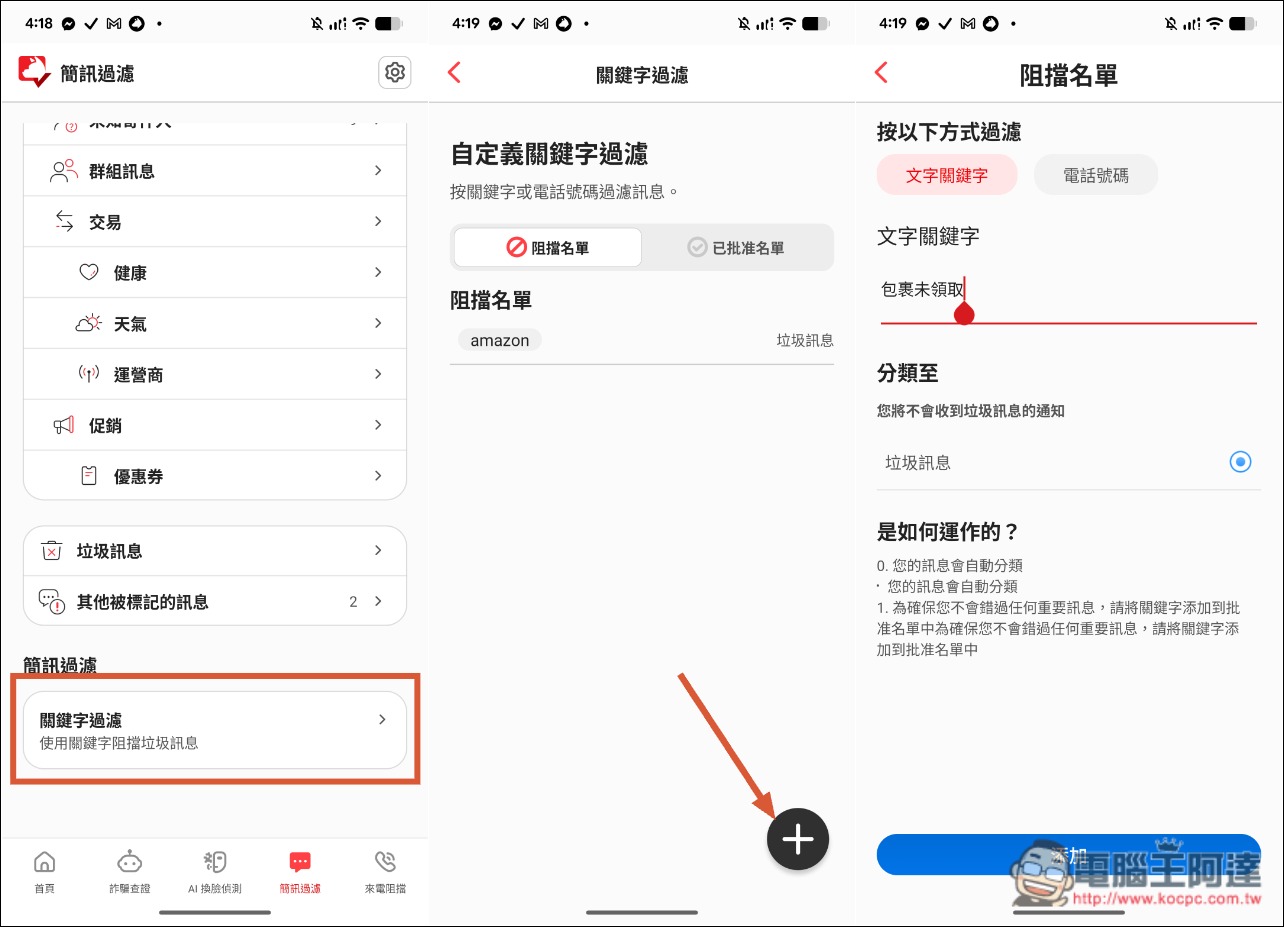
If you happen to be with a family member, I’d also recommend setting up keyword filtering. Enter common scam content and keywords for messages that would never be received in Taiwan. These messages will then be categorized as spam, and your family member won’t receive any notification, directly eliminating the possibility of being scammed:
5. Is the built-in AI scam verification feature easy to use? What can it check?
You definitely need to teach your family how to use the built-in AI scam verification feature—it’s super easy to use, even simpler than a regular AI chatbot!
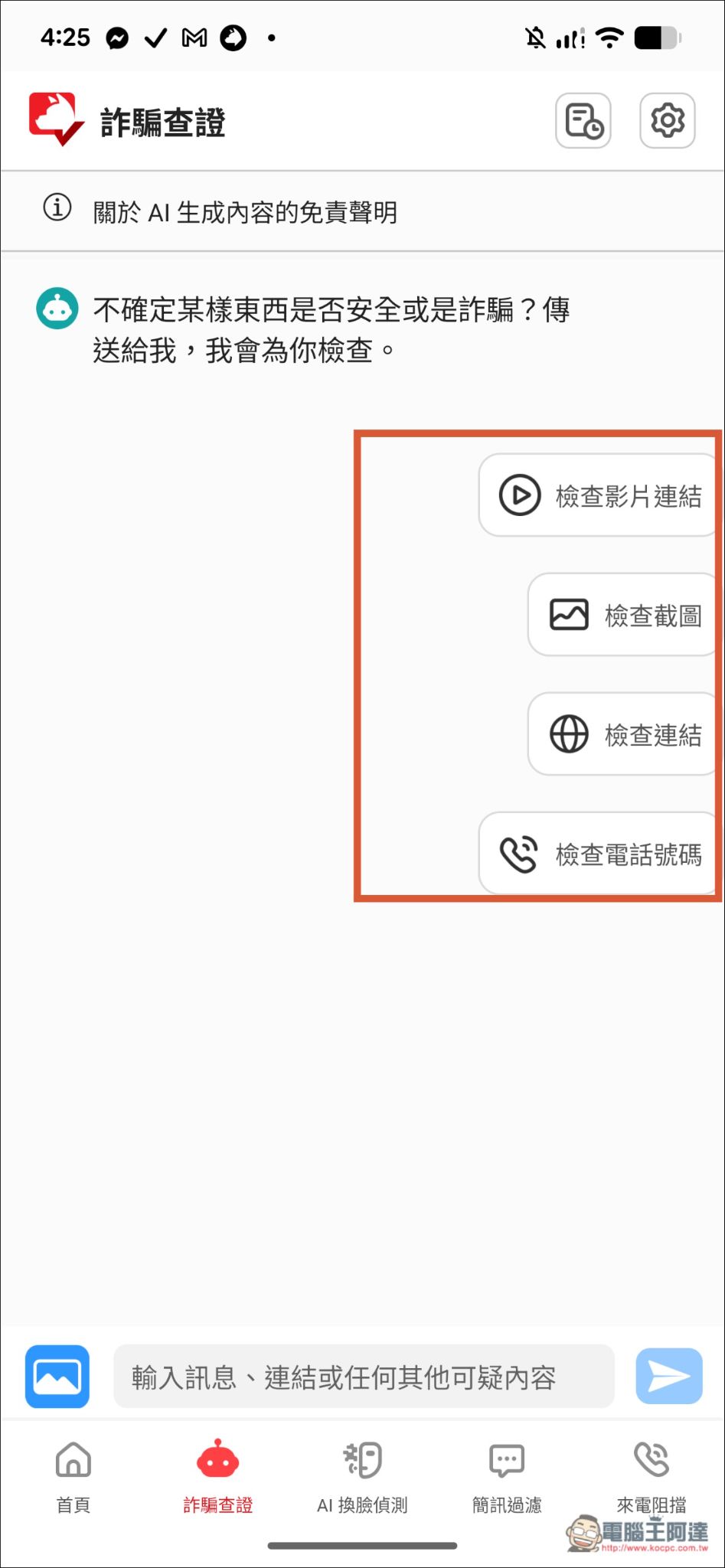
You don’t need to enter anything or provide a prompt. This AI has already been trained to identify scams, so you only need to upload a screenshot of what you find suspicious, or copy and paste the entire message, and the AI will directly make a judgment.
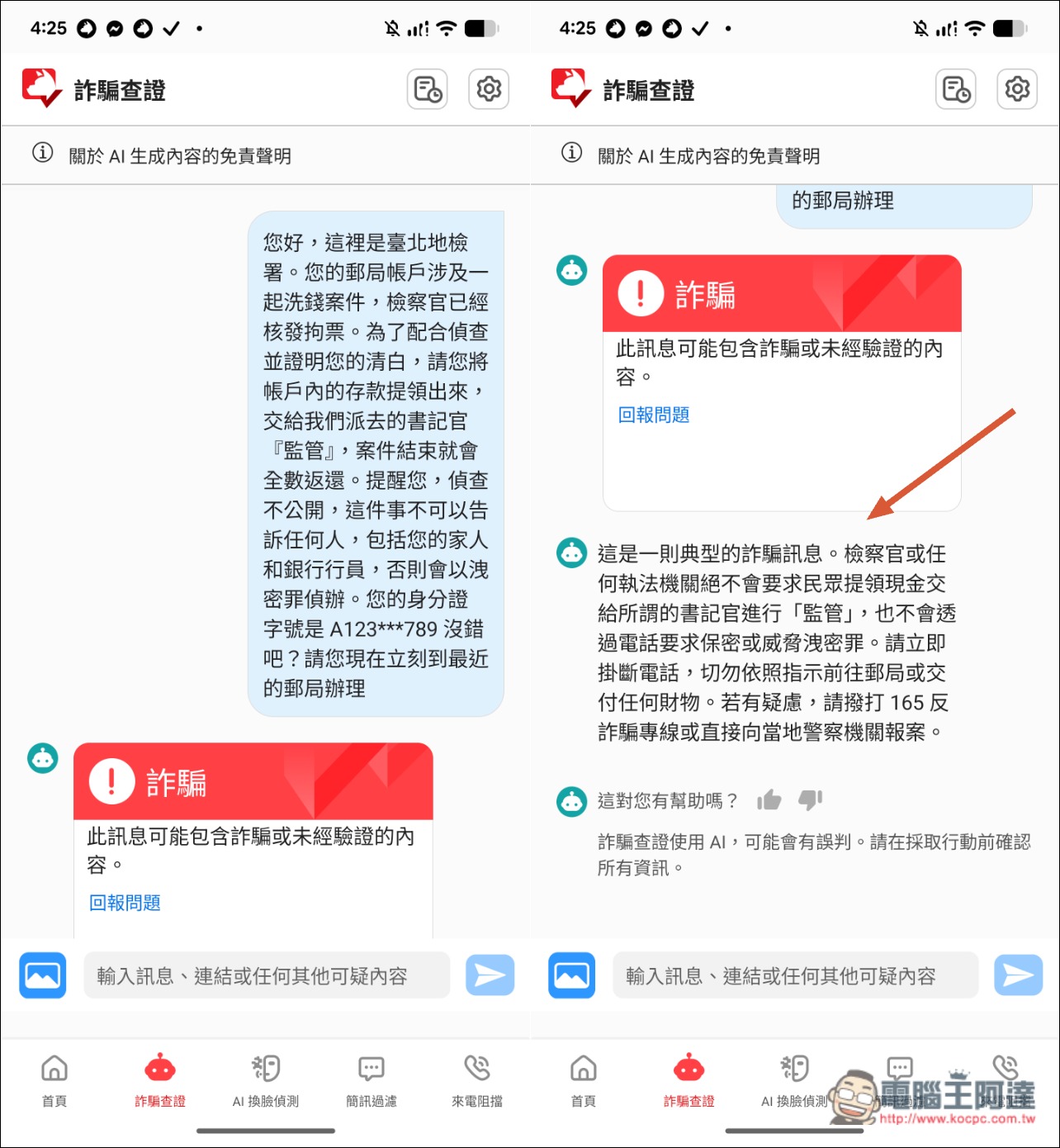
There are four commonly used options on the right that you can use directly—you can ask about videos, screenshots, links, and phone numbers. Of course, text messages are fine too:
After I pasted in this very common scam message, the AI immediately identified it as a scam and also provided an analysis of the scam’s intent to tell us what type of scam tactic it was. This is pretty good—it can indirectly help my family strengthen their scam awareness. The next time my family sees a similar scam message, they will become more alert on their own:
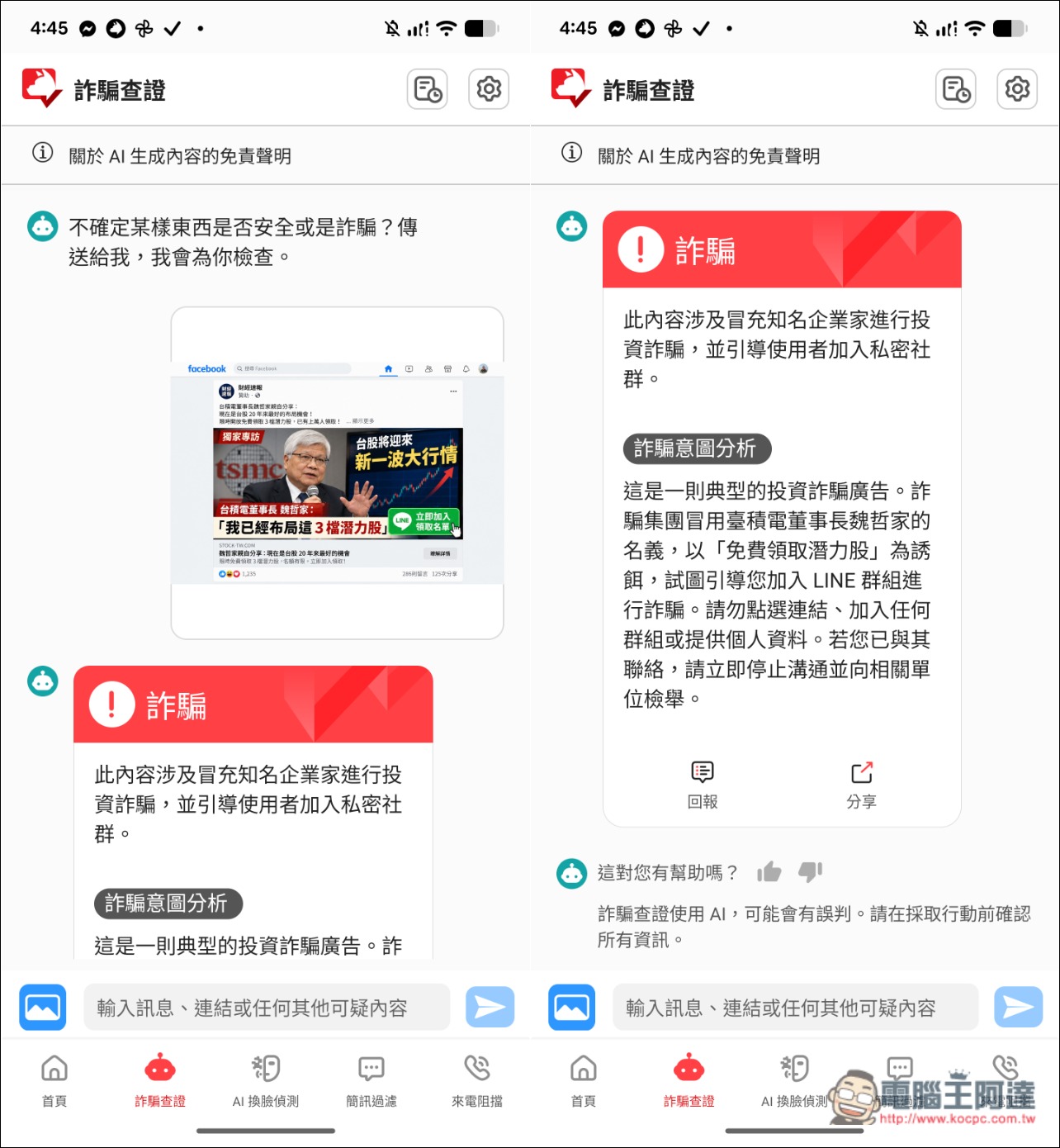
The same goes for images: after uploading one, the AI also identifies it as a scam. With the AI Anti-Fraud Expert, you can tell your family that from now on, whenever you see an enticing ad, take a screenshot and ask about it first—don’t click it directly:
6. How will family members be notified when they encounter a fraud risk?
This is probably what everyone cares about most: in what kinds of scam situations involving a family member would you be notified?
According to Trend Micro, not every questionable call from an unknown number received by family members, every suspicious text message, or visit to a phishing website will automatically trigger a family notification. The system assesses risk based on the information and behavior it detects.
This also means that when you receive a notification, that is the point where you really need to pay attention and take action. Ordinarily, for unimportant matters, or when family members have not engaged in any further high-risk behavior, you usually will not receive a notification.
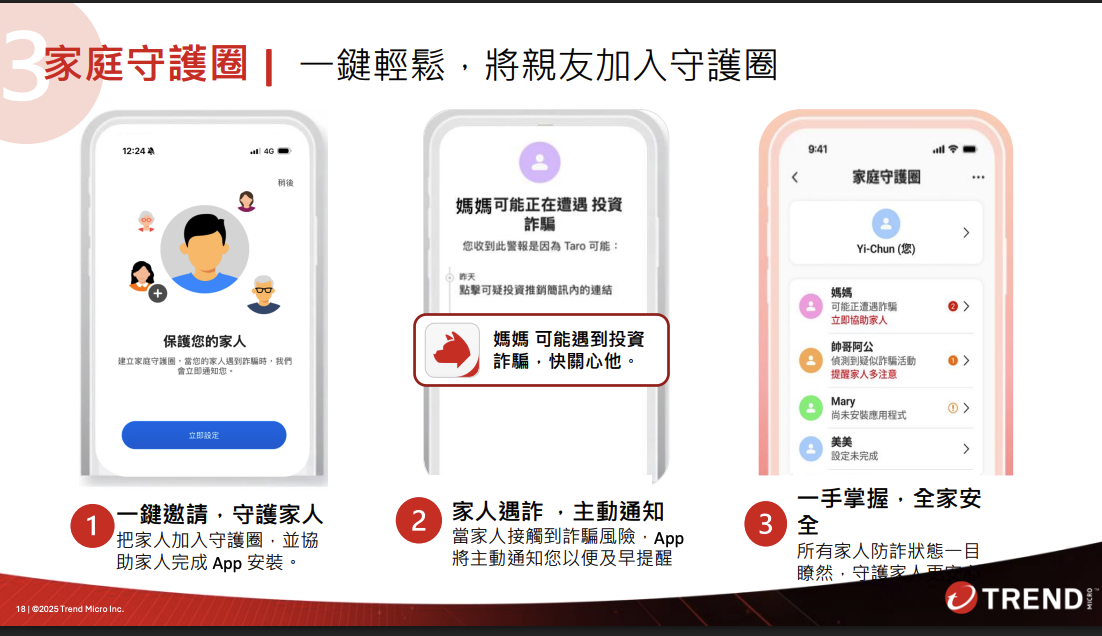
The notification you receive will look like the one in the middle of the image below, urging you to check in on the other person right away. At the same time, in the Family Guardian Circle management interface, you can track each family member’s current status at any time—such as whether they need attention, whether they have installed the app, and whether they have turned on all protections:
7. How does the fraud early warning radar work?
The scam warning radar feature is also a huge help for family members, because it proactively analyzes and notifies.
As introduced earlier, this feature combines an AI fraud prediction model with fraud behavior pattern analysis to proactively analyze the fraud risk users are currently facing and send a notification when early-warning conditions are met.
For example, suppose parents receive a text message suspected of being an investment scam; the system may issue an initial warning based on the detection results. If they later click the scam URL in the message, even if the website is successfully blocked, the system may still raise the warning to medium risk because of this click. If they subsequently go further, such as adding the LINE account and establishing contact with the scammer, it can be classified as high risk:
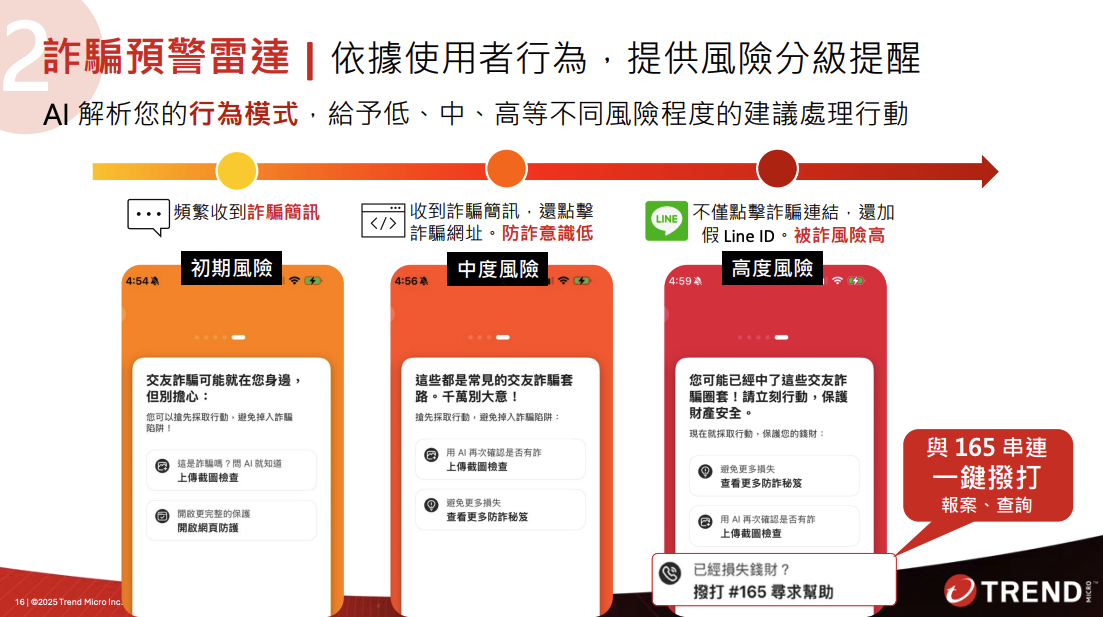
In short, the fraud warning radar not only looks at whether users have received suspicious information; it also assesses whether fraud risk is rising based on subsequent behavior the system can detect.
When it issues a warning, in addition to showing the risk level, it also analyzes the types of scams you may encounter, reminds you or your family of the tactics the scammers may use next, and suggests how to respond.
8. Other protections: caller ID and blocking, AI face-swap video detection
In addition to the SMS filtering, website protection, and scam warning radar introduced earlier, AI 防詐達人 also provides two protection features: “Caller ID and blocking” and “AI deepfake video detection”; the latter is very important in today’s AI era.
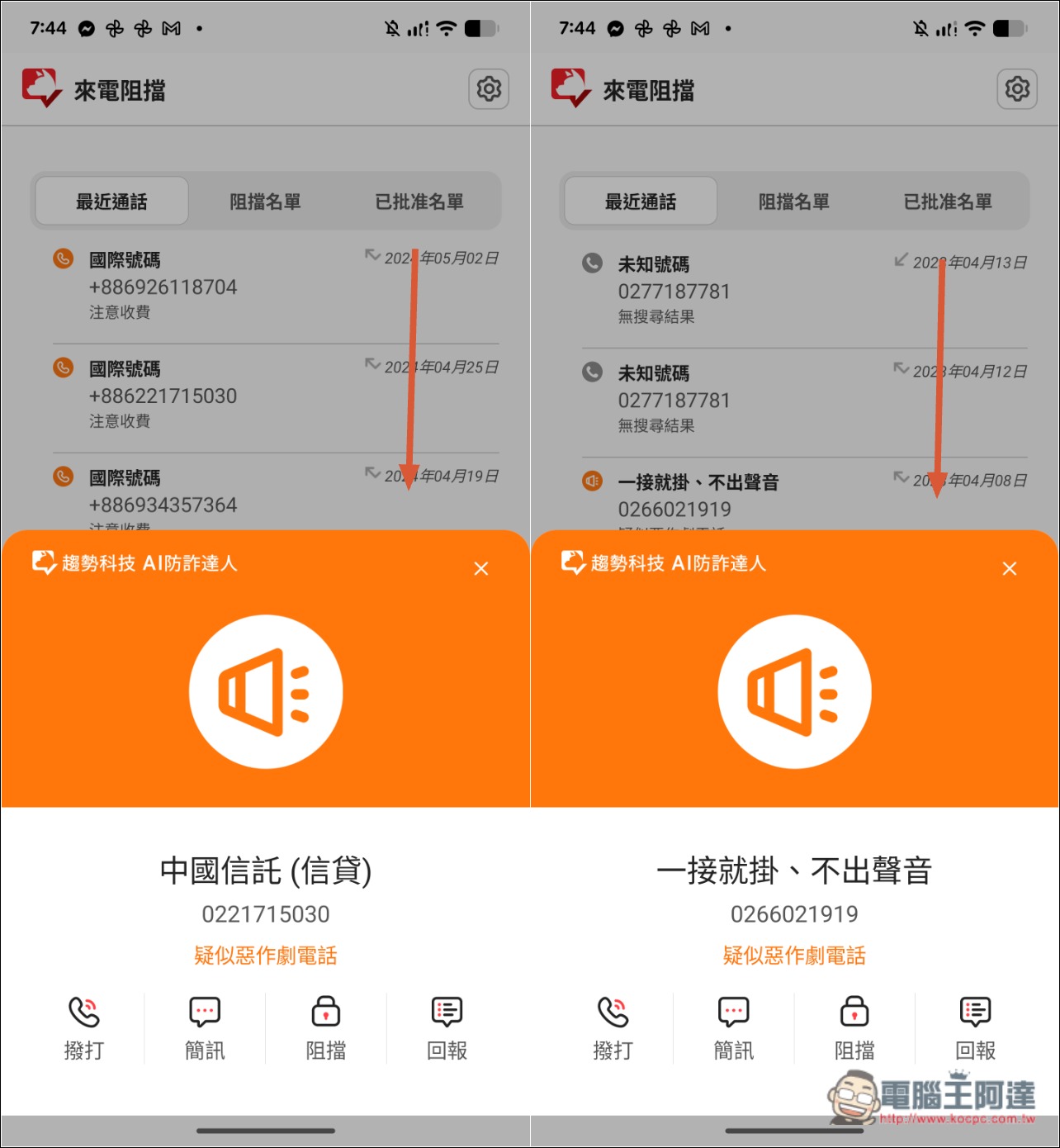
After the caller identification and blocking feature is turned on, when a call comes in from an unknown number, the system uses a scam call database and related identification information to help determine whether the incoming call may be a scam, telemarketing, international, or unknown number, and displays this on the phone’s incoming call screen. So before you answer, you can decide whether to take the call, similar to apps like Whoscall:
Nowadays, scammers also use AI to imitate the appearance of acquaintances and impersonate family members, friends, or even police officers during video calls to trick victims into transferring money or providing personal information. This kind of high-tech deception is very difficult for older adults to judge.
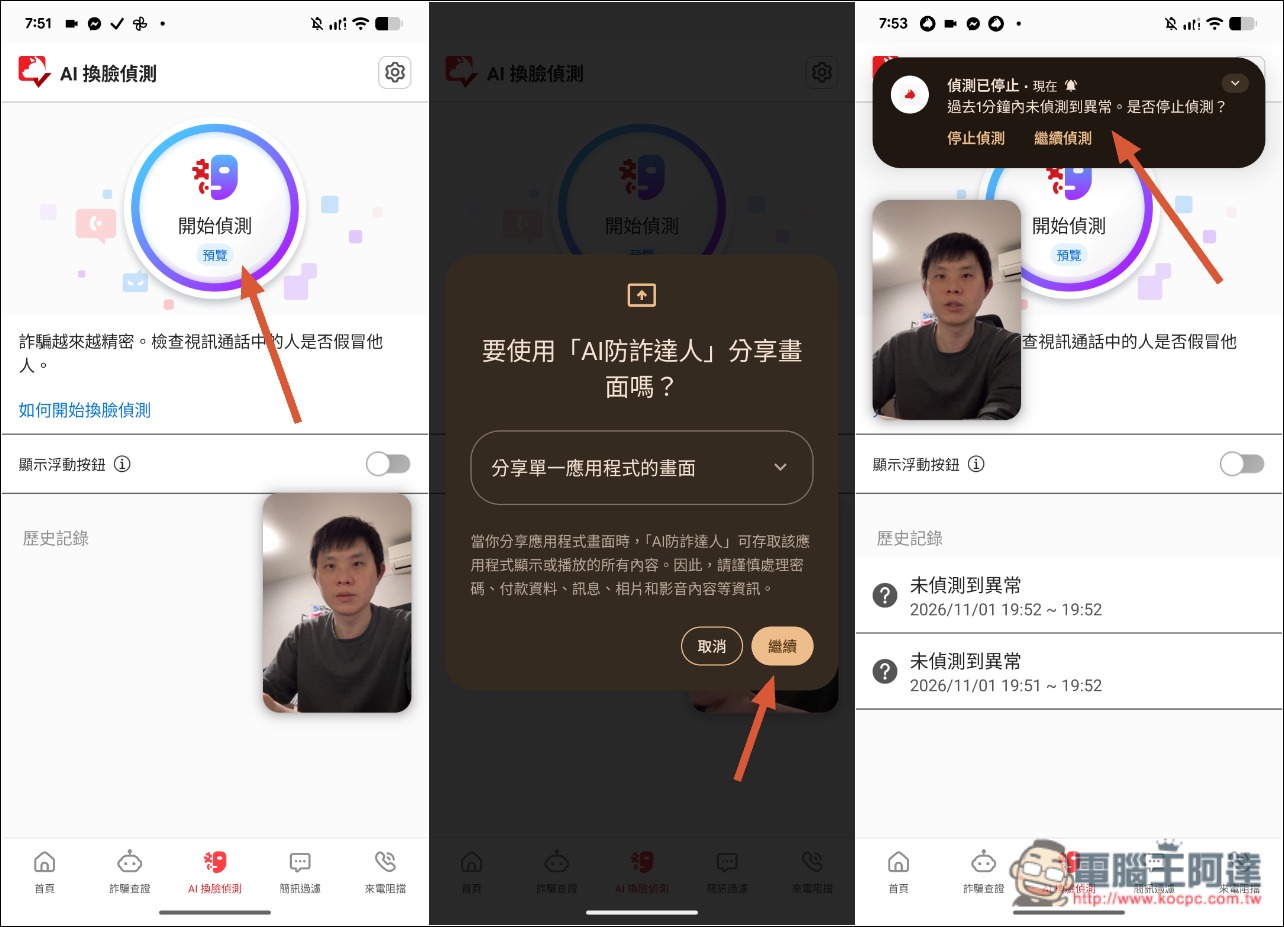
With the “AI Face Swap Video Detection” feature, once enabled during a video call, the AI will analyze the footage and identify whether there are any abnormal signs of face swapping or deepfakes. If suspicious activity is detected, it will display a warning notification.
However, I think the current way of operating it is a bit difficult for older adults.
During a video call, you need to open the app and enable the AI face-swap detection feature, then specify the app screen you want to share—the video call one—and only then will detection begin. It would be even better if this could be optimized to be simpler in the future:
9. Is the AI Anti-Fraud Expert Family Protection Circle worth subscribing to? Who is it suitable for?
Trend Micro AI Scam Defender offers a Personal edition and a Family edition. The Family edition includes the “Family Guardian Circle,” with an annual fee of NT$1,490—only NT$600 more than the Personal edition—but it can protect up to 3 devices, making it very cost-effective.
Visit the official website of AI Anti-Fraud Expert Family Protection Circle.
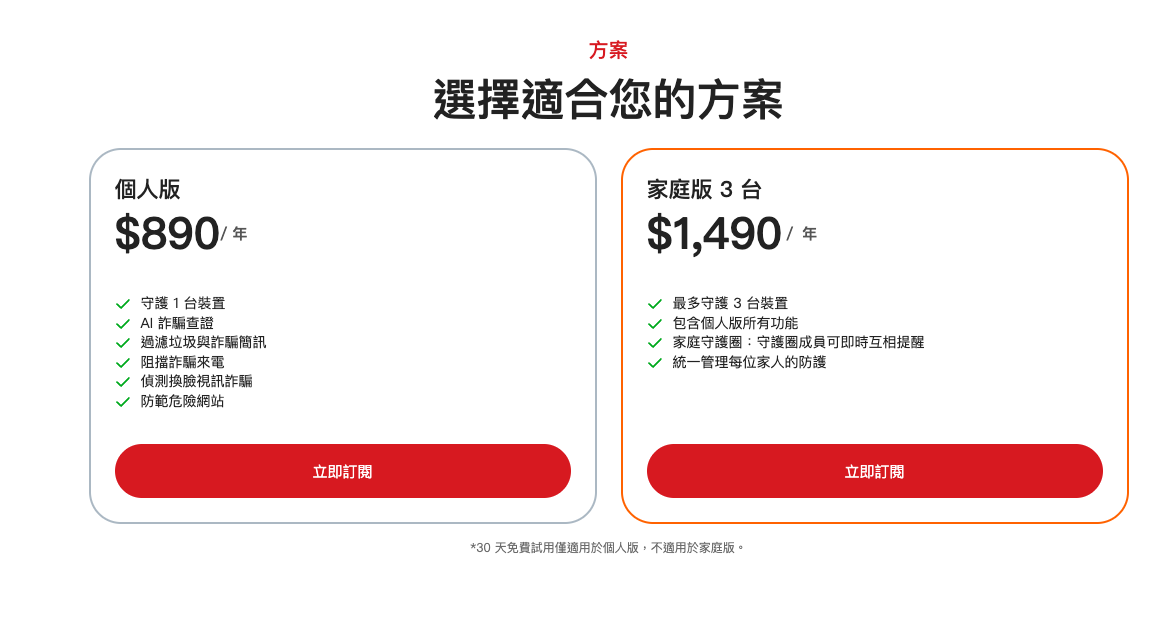
If you are one of the following types of users, then I think the Family Edition is well worth it:
The first type: people who do not live with their parents and usually cannot stay informed about their family’s situation in real time.
Families in which people work away from home, live separately after marriage, or whose parents have retired and live alone. Even if you regularly call to check in, you may not know whether your parents are encountering suspicious messages. If a family protection circle can notify other members when a risk arises, there is an opportunity to intervene earlier.
The second type: family members frequently encounter unfamiliar information but aren’t in the habit of actively verifying it.
Some older adults regularly use LINE, Facebook, and online shopping, and they also receive various package notifications or investment ads, but they may not know how to tell what is real from what is fake. With the AI Anti-Fraud Expert, they can develop the habit of using the AI scam verification feature to check first when something is uncertain, thereby reducing the risk of directly believing messages from strangers.
Third type: wanting to set up protection for multiple family members at once.
For those who want to set up anti-fraud protection for multiple family members such as parents, a spouse, and children, the Family Plan is not only cheaper, but the primary user can also view members’ protection statuses in one place, making management more convenient.
10. Conclusion
The family plan costs NT$1,490 per year and supports up to 3 devices. On average, that’s less than NT$500 per device per year (only about NT$1.3 per day). Compared with property losses of tens of thousands—or even hundreds of thousands—of NT dollars from fake investment or fake online shopping scams, this expense is entirely worth it and can actually be seen as digital anti-fraud insurance.
If you often can’t be with your parents or family members at all times and worry that they might accidentally fall for a scam, it’s highly recommended that you install “AI 防詐達人” on your and your family’s phones as early as possible and add them to the Family Guardian Circle, so AI technology can help keep watch at all times.
Visit the official website of AI Anti-Fraud Expert Family Protection Circle.
Source: KOCPC Chinese