


AMD Radeon The issue of drivers secretly writing to SSDs in the background was only just resolved recently, and it didn’t take long for it to become an NVIDIA graphics card problem. According to foreign media reports, many GeForce users have recently reported that the 621.14 and 621.24 drivers released in November also exhibit a similar situation: even with no game running and the computer sitting idle, a background service keeps writing to the SSD, with the most extreme case claiming writes of up to 30GB per hour. However, NVIDIA has not yet publicly confirmed that the problem actually exists, nor is it certain whether it occurs on every computer.
Image source: VideoCardz
There are reports that GeForce 621.14 and 621.24 drivers continuously write to the SSD when idle, with some cases reaching 30GB per hour.
VideoCardz The latest reports indicate that, according to TroubleGrid Compiled user reports and discussions on the NVIDIA official forum indicate that GeForce 621.14 and 621.24 drivers cause continuous writes to SSDs, with the issue seemingly originating from the NVDisplay.Container.exe process.
It seems Nvidia GPU drivers also constantly write to your SSD
byu/Remarkable_Fly_4276 inpcmasterrace
NVDisplay.Container.exe belongs to the “NVIDIA Display Container LS” service, which starts automatically when Windows boots. Both NVIDIA Control Panel and NVIDIA App require it to function. On affected computers, this process continuously writes to the following binary log file:
C:ProgramDataNVIDIA Corporationnvtoppsnctnvlog.nvlgstg
Normally, when a program writes a log file, it appends new content to the end of the file. However, the user observed that NVDisplay.Container.exe appears to clear the entire file and rewrite it, repeating this every few seconds. This also means that as the log grows, the amount rewritten each time increases, causing the write volume to keep climbing.
Foreign media Wccftech It was actually tested on a computer equipped with an RTX 4090 running Windows 11: after turning off NVIDIA’s Instant Replay capture feature and leaving the computer idle, Resource Monitor showed NVDisplay.Container.exe writing to the system drive at about 1.43 MB per second. If this rate were maintained, that works out to about 5.2 GB per hour. Note, however, that this is only a single snapshot and cannot represent long-term write speed:
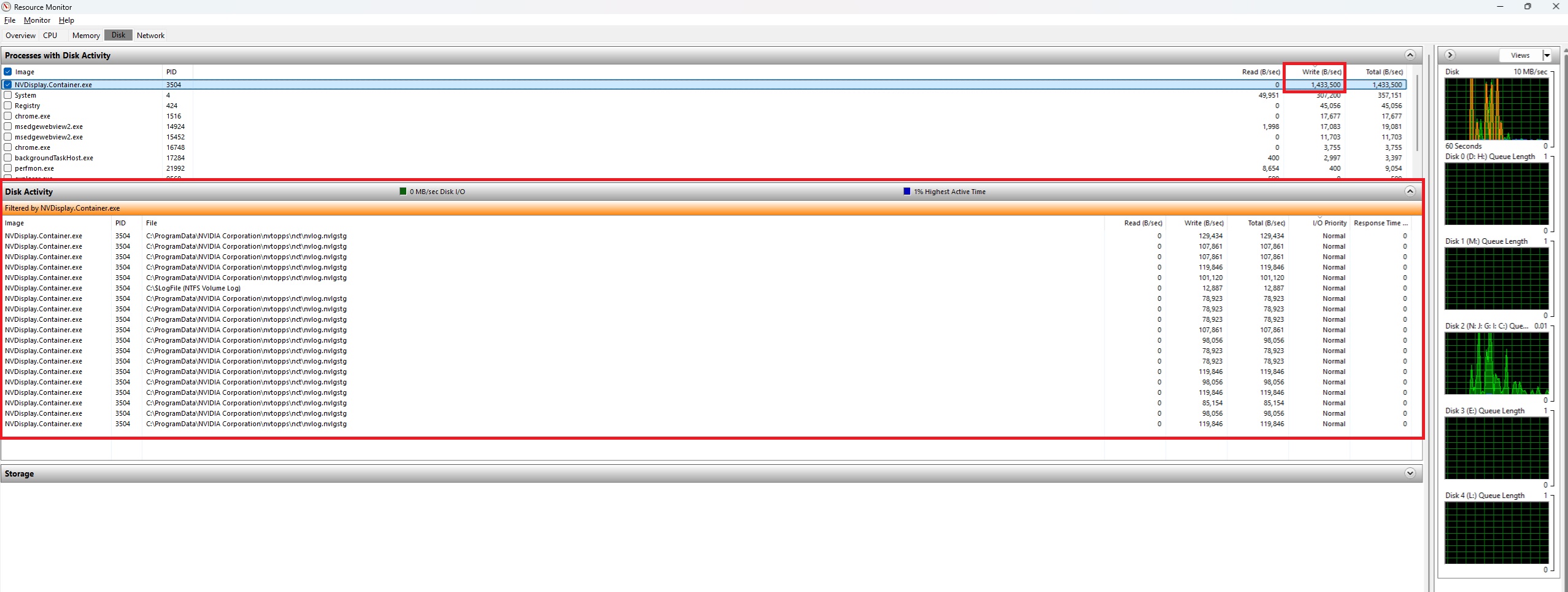
Image source: Wccftech
The following are user reports for the three most recent driver versions:
| Driver version | Release Date | User-reported situation |
|---|---|---|
| 621.01 | October 21 | In the control test, writes during a 5-minute idle period were under 2MB, and the log file increased by about 0.5KB per minute. |
| 621.14 | November 4 | Approximately 515MB after 5 minutes idle, with logs increasing by about 325KB per minute, it is considered the version where the problem first appeared. |
| 621.24 | November 12 | Users are still reporting that they are affected,In some cases, up to about 30GB per hour. |
From this, it can be seen that 621.01 is the least problematic version, with no obvious abnormalities seen in the comparison tests. The 30GB in 621.24 is a report from a single user, an isolated high value; not every NVIDIA computer writes 30GB per hour.
In addition, even for the same driver version, reports vary widely across different computers: some report 515MB in 5 minutes, while others report over 3GB in 10 minutes.
More serious cases aren’t just about write volume. Reports compiled by TroubleGrid mention that some users experienced stuttering in games and videos and brief mouse lag, and that each time they pressed Alt+Tab to switch windows, write volume increased by several hundred MB.
Seeing 30GB, many people might think, won’t this quickly shorten the SSD’s lifespan? The answer is not necessarily—it depends on your actual write volume.
SSDs have a limited amount of data that can be written to them. Manufacturers usually use TBW (total bytes written) to indicate endurance, and a typical 1TB consumer NVMe SSD is around several hundred TBW. TroubleGrid estimates that, based on the approximately 3GB per hour measured in 621.14, a computer left on 24 hours a day will write about an extra 26TB per year. Although this won’t cause it to fail immediately, it will still waste a chunk of its lifespan.
The “program write volume” displayed by Windows is not exactly equal to the amount actually written to the SSD flash memory, because this figure also includes data in the cache and may be higher than the actual amount.

If you want to find out whether you’ve been affected, you can check using Windows built-in Resource Monitor; it takes about a minute to confirm:
- Press Win + R, type resmon, and press Enter to open Resource Monitor.
- Switch to the “Disk” tab.
- In the “Processes with Disk Activity” section, click the “Write (B/sec)” column to sort, and check whether NVDisplay.Container.exe is there.
- Scroll down to the “File” column in the “Disk Activity” section. If nvlog.nvlgstg appears and the numbers keep changing, that means you’ve been infected.
- If you want to be more certain, you can open the C:ProgramDataNVIDIA Corporationnvtoppsnct folder and click Refresh several times; the “Date modified” of the affected files will change every few seconds.
Once it’s confirmed that you’ve caught it, there are currently three ways to handle it.
- Reset log files: Press Win + R and type services.msc, find “NVIDIA Display Container LS” and stop the service. Then go to the nvtoppsnct folder and delete nvlog.nvlgstg, then restart the service.
- Roll back to version 621.01: this is currently the only reported method that provides a long-term solution.
- Change the service to manual startup: In services.msc, set the startup type of “NVIDIA Display Container LS” to Manual and stop the service, then manually turn it back on when you need to use NVIDIA Control Panel or NVIDIA App. However, while the service is stopped, you can’t change G-SYNC, color, scaling, resolution, or per-game 3D settings (settings already applied will be retained), so it’s not recommended to change it directly to Disabled.
The earlier AMD case and this NVIDIA case, although both involve graphics card drivers writing to the SSD in the background, are not the same issue:
| Comparison item | AMD | NVIDIA |
|---|---|---|
| involves procedures | atieclxx.exe(AMD External Events Utility) | NVDisplay.Container.exe(NVIDIA Display Container LS) |
| Impact-driven | Adrenalin 26.10.1、26.10.2 | GeForce 621.14、621.24 |
| Abnormal behavior | It continuously writes to the system drive when idle, and also performs additional writes when moving or resizing windows. | Repeatedly clear and rewrite the entire log file. |
| Has it been officially confirmed? | Confirmed | Not yet publicly confirmed |
| Resolution status | 26.11.1 Optional Fixed (idle-write fix notes only list RX 7000, RX 9000) | a temporary workaround that users figured out on their own |
Source: KOCPC Chinese