


Cybersecurity research institution ReversingLabs recently exposed a malicious program loader called BubbleLoader.Its characteristic is that it does not directly disguise itself as standalone malware, but instead parasitizes legitimate Windows applications, turning originally trusted software into a propagation vehicle for malware and greatly increasing the difficulty of detection.

BubbleLoader disguises itself as legitimate software to infiltrate systems, using PNG files to hide malware and evade security detection.
According to researchers’ analysis, BubbleLoader has been found hiding in tampered versions of applications such as WinRAR, Windows Media Player, Firefox Launcher, x64dbg, and virtiofs. By modifying the program startup process, attackers implant specially crafted PNG image files in the software and hide malicious code within them. When users launch these applications, the modified launcher automatically loads and decrypts the malicious program, further executing subsequent attacks.
More notably, the research shows that only one of the related PNG files is a genuine image, while the other conceals encrypted malicious code. Because security tools often treat PNGs as harmless media files, this technique can effectively evade traditional scanning mechanisms and increase the attack success rate.
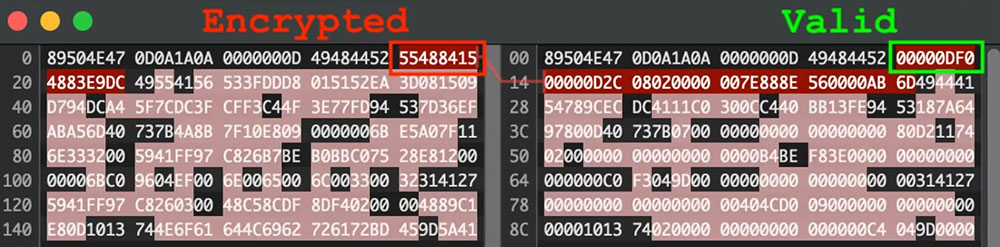
Another alarming capability of BubbleLoader is its highly mutable nature. Generally, security teams use file hashes as digital fingerprints to identify malware, but BubbleLoader generates a different hash each time it runs, making it harder for antivirus products that rely on signature matching to accurately detect and block it.

However, ReversingLabs also emphasized that the research found tampered software versions and did not find that the official versions of the above applications were infected. There is currently no evidence that installation files released by the relevant developers on official websites have been compromised, so ordinary users need not panic excessively. Regarding protection recommendations, the researchers remind individual users to prioritize downloading software from official websites or trusted sources, avoid using unknown third-party download platforms, and ensure that antivirus software remains enabled and up to date.

For enterprise environments, it is recommended to implement stricter application whitelisting mechanisms and code signing verification processes. The former can restrict the execution of unauthorized or modified software, while the latter can verify program integrity and source trustworthiness, further reducing the risk of malware infiltrating enterprise networks through legitimate applications.
Source: KOCPC Chinese