


Last week, Microsoft officially confirmed that it has begun rolling out the Windows 11 26H2 update to a broader range of users, including devices still running Windows 10 but with hardware that meets the upgrade requirements. In addition to adding a native internet speed test tool, backup and restore features have also been significantly enhanced, making data migration and system recovery more convenient. As the new version gradually becomes available, one of the main points of interest is Microsoft’s claimed significant improvements in memory management and system performance.
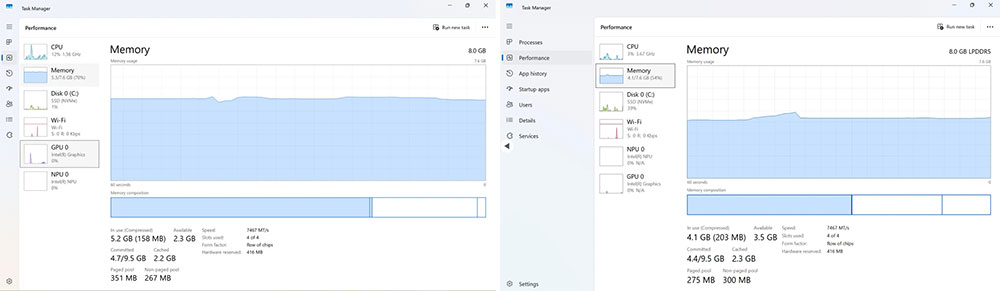
Direct comparison of Windows 11 26H2 and 25H2 stress tests shows a significant drop in memory usage.
One of the most important updates in Windows 11 26H2 is a significant reduction in the operating system’s memory footprint. According to Microsoft, after a series of optimizations to the underlying architecture and resource management, developers can even run Windows 11 in an environment with only 128MB of memory. Although this condition mainly targets specific development scenarios, it also reflects clear progress in the system’s resource efficiency. Microsoft further notes that these optimizations are specifically designed for devices equipped with 8GB of memory, so lower-spec computers will be the main beneficiaries.
To verify whether Microsoft’s claims match the actual situation, tech media Windows Central A series of hands-on comparisons were conducted between Windows 11 26H2 and earlier versions. The test device was an Acer Swift Air 14 laptop equipped with an Intel Core 5 320 processor, 8GB LPDDR5x memory, and a 512GB NVMe SSD. The testers first installed an earlier Windows 11 25H2 build (262000.7019), completed the tests, and then upgraded to Windows 11 26H2 (26300.9711), maintaining the same page file settings and driver environment to ensure comparable results.
The first test conducted was memory usage after system boot with no additional applications open. The results showed that Windows 11 25H2 used about 5.3GB of memory after startup, leaving only about 2.3GB available for use; by contrast, Windows 11 26H2’s usage dropped to about 4.1GB, retaining about 3.5GB of available space. In other words, the new version frees up an additional 1.2GB of memory under the same hardware environment, and for devices with only 8GB of RAM, this improvement is quite significant.
Next, the test team simulated a common multitasking scenario for typical users, including opening 10 Microsoft Edge tabs, a Word document, Slack, and Spotify at the same time. At this point, Windows 11 25H2’s memory usage was close to 7GB, leaving only about 563MB available; Windows 11 26H2, meanwhile, remained at about 6.6GB and still had close to 1GB of available memory. Although the difference between the two is not as large as in the boot test, for entry-level computers that frequently need to multitask, it can still provide a smoother operating experience.
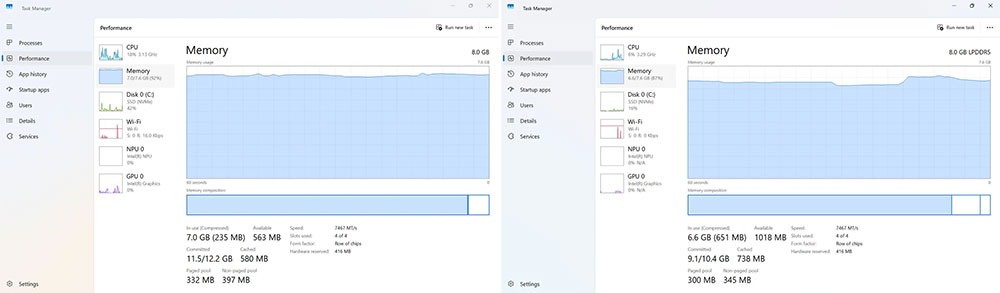
The real difference emerges in high-load stress testing. Testers opened 20 Edge tabs at the same time, along with multiple programs including Word, Excel, Spotify, Slack, Microsoft Store, the Photos app, File Explorer, and GIMP. In this extreme environment, Windows 11 25H2 used about 7.3GB of physical memory, leaving only about 352MB available; Windows 11 26H2 kept usage at about 6.8GB, still leaving about 764MB of available space.
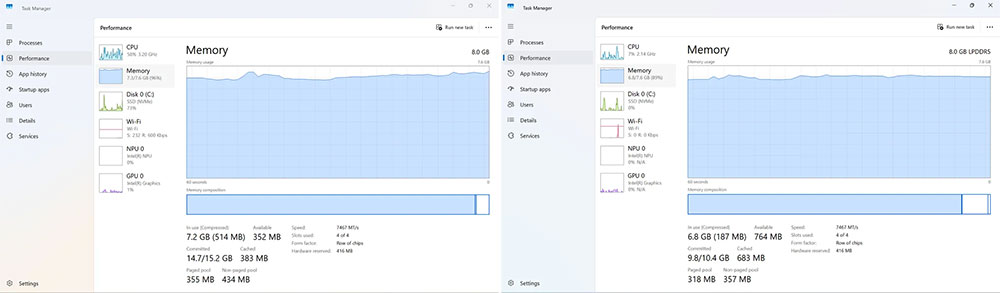
If we further observe the overall memory demand, the difference becomes even more pronounced. The total memory requirement of Windows 11 25H2 reaches about 15.2GB, far exceeding the system’s installed physical memory capacity, so virtual memory must be accessed frequently through the page file; in contrast, Windows 11 26H2 requires only about 10.4GB. Because virtual memory relies on the storage device for data exchange, its speed is far slower than physical RAM, so when the system relies excessively on the page file, it is prone to latency and performance degradation. If it is paired with a traditional mechanical hard drive rather than an SSD, this stuttering will be even more obvious.
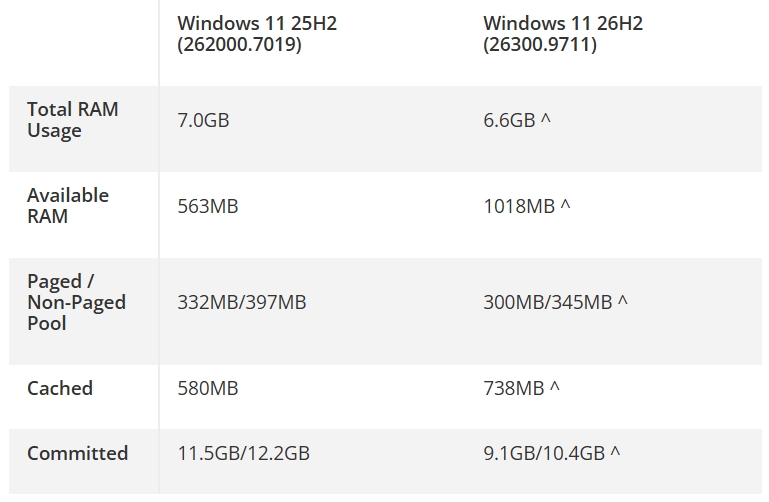
Overall, Windows 11 26H2 shows quite significant progress in memory management. Whether in standby, everyday multitasking, or high-intensity workloads, the new version can keep running with lower memory consumption and reduced reliance on virtual memory. This not only helps improve overall smoothness but also benefits computers with 8GB of memory or even lower specifications, further extending the useful life of older devices. For users considering upgrading to Windows 11, the performance improvements brought by 26H2 are undoubtedly one of the highlights most worth paying attention to.
Source:Windows Central
Source: KOCPC Chinese