


Many people probably wish an AI agent could operate their phone for them—for example, comparing prices, doing daily task check-ins, looking up information, sending messages…—but this has never been achievable. In the past, doing this required getting through three hurdles first: installing command-line tools, pairing the device, and handling system permissions. However, the open-source project phone-harness recently launched an official MCP server that condenses the entire process into a single URL. Any MCP-compatible agent, including Claude, ChatGPT, Cursor, Codex, and Hermes, only needs to paste https://mcp.phone-harness.com/mcp and complete the login, then the AI can see the screen of a real cloud device and then click, type, and swipe, operating just like the user themselves.
Introducing: Phone Harness MCP 🔌
Any agent that supports MCP can now control a real iPhone or Android in the cloud:
> works in Claude, ChatGPT, Cursor, Codex, and more as a custom connector
> nothing to install, just paste a URL and sign in
> sees the screen, taps, types, and swipes like you doAvailable in phone-harness 0.3.3.
https://t.co/88u1gSgvtS
— shawn (@shawn_pana) November 2, 2026
What tools has it registered?
The hosted server registers a total of 14 tools, with naming following the conventions of the mobile-mcp mobile automation project so that agents that have used similar tools do not need to relearn them. Except for the first two, every tool must carry a device identifier, which is phone_list_available_devices Obtain.
- Device lifecycle:
phone_start_deviceTurn on the phone and wait until it is ready,phone_stop_deviceEnd the session. Unsaved content will be lost, and Cloud Android billing will also end after stopping. - Loading screen:
phone_take_screenshotReturn a JPEG and include a line of conversion information that converts image coordinates to screen coordinates;phone_list_elements_on_screenList the text visible on the screen and the clickable center points. - Operation input: Tap, long-press, swipe, enter text, and system keys such as HOME, BACK, and APP_SWITCHER.
- App ManagementList installed apps, open them by icon name or package ID, and check which app is currently in the foreground.
The documentation notes one thing: this set of tools does not have the ability to open URLs. The local stdio version provides it separately. phone_save_screenshotcan save the screen as a file.
Configuration methods and client limitations
Transport is via Streamable HTTP, login uses OAuth, and the requested permission scope is phone:driveAlternatively, you can send an API key as a bearer token instead. The README lists the setup steps for Claude, Cursor, ChatGPT, Codex, Claude Code, VS Code, Windsurf, Grok, Devin, Gemini CLI, GitHub Copilot, Perplexity, Warp, Raycast, Manus, Zed, and OpenClaw one by one; most require only a single command or a JSON snippet. ChatGPT has additional restrictions: custom MCP servers in the web version are only available to Business, Enterprise, and Edu workspaces, and Pro accounts can only connect to read and fetch tools; to actually control a phone, you need to use the former.
Division of labor between the command-line version and the MCP version
The two versions are separate packages on PyPI. The command-line version, phone-harness, is currently at 0.3.3 and covers three routes: local iPhone mirroring, local Android, and cloud devices. Local iPhone requires macOS 15 or later and a paired iPhone mirror, and requires enabling Accessibility and Screen Recording permissions for the program running the agent; local Android can connect via adb over USB or wireless debugging on Windows, macOS, or Linux. The MCP version, phone-harness-mcp, is 0.1.0 and connects only to the cloud; according to the official description, it “requires no pairing, no adb, and no Mac—it works on any operating system.” Both share the same underlying capabilities; the difference is who invokes them: the command-line version lets the agent write its own scripts, while the MCP version breaks actions into individual tool calls. In addition to MCP, the main project also provides agent plugins, with official integration packages for both Hermes Agent and OpenClaw.
Windows + Android local hands-on test: directly control your own phone
“Cloud-only” refers to the one introduced in this article. phone-harness-mcp, not the entire Phone Harness project. Another command-line package phone-harness Supports direct control of the user’s own phone: Android can connect via ADB over USB or wireless debugging on Windows, macOS, or Linux; a local iPhone requires a Mac and iPhone Mirroring. For detailed requirements, refer toOfficial Installation Instructions。
We tested this using a Windows computer: after preparing uv, ADB, and Phone Harness, connecting an Android phone via USB, and authorizing debugging, we were able to have the AI Agent open X and browse public posts from a specified account. The actual control path is “AI Agent → Phone Harness on Windows → ADB/USB → our own Android phone.” It uses the existing app and login state on the phone, does not require logging in to Phone Harness Cloud, and does not incur that service’s cloud phone rental fees.
Compared with cloud MCP, which can be connected simply by pasting a URL, local mode requires you to prepare the tools yourself, complete phone authorization, and keep the connection active; if the phone locks, the user must also unlock it personally to continue. Android users can refer toOfficial USB and Wireless Debugging Setup Instructions。
“Local mode” here means the phone control app runs on your own computer; whether the AI model runs locally depends on the agent and model used, and does not mean the entire workflow is fully offline. AI services you use yourself may also incur separate subscription or API fees.
Pricing and Types of Cloud Phones
The MCP version currently supports cloud devices only; local iPhone mirroring and adb are not included. Cloud Android emulators can be started for free, after which$0.05 per minute(about NT$1.63), and a new account includes US$5 in credit (about NT$163). Cloud iPhone is offered on a monthly subscription: the regular price is US$80 per month (about NT$2,607), or US$64 per month with a 20% discount for annual payment (about NT$2,086); adding eSIM makes these US$100 and US$80, respectively (about NT$3,259 and NT$2,607). The official website emphasizes that physical devices are not billed by the minute—only emulators are billed that way. The physical-device plan highlights that apps will treat actions as coming from a real person, can receive SMS and 2FA verification codes, and retain login status across sessions.
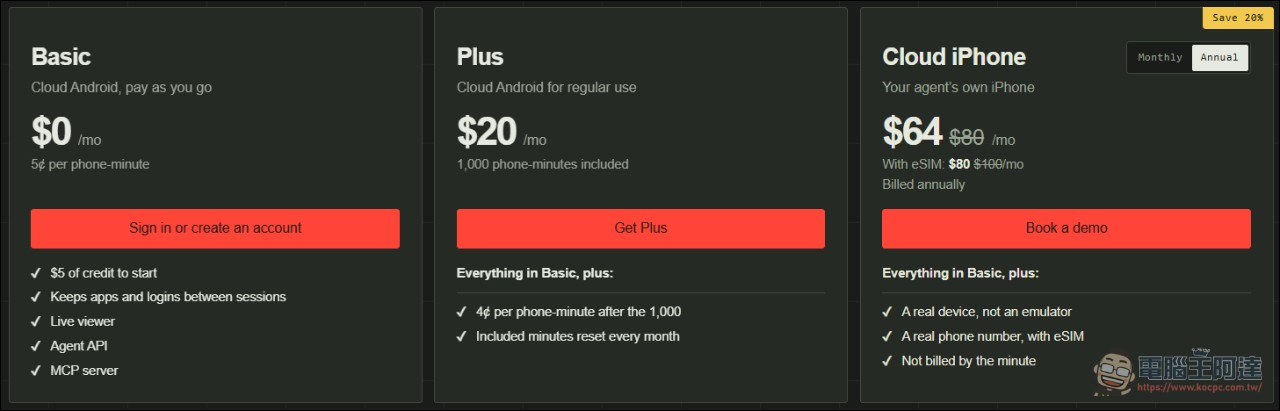
The emulator gives each session a brand-new Android, or you can specify a saved phone so apps and login state persist. The cloud iPhone is a real device allocated to an account, driven over HTTPS from any operating system. Both can open a live view window in the browser, letting you watch the agent operate and intervene. The homepage uses a set of scenarios to illustrate this capability: the agent messages family on the user’s behalf, hails a Waymo, adds shampoo to an Amazon cart, and approves a GitHub login.
How does the underlying layer work?
The main project’s technical approach is divided into four paths: iPhone uses the macOS mirroring window, captures screenshots and passes them to the Apple Vision framework for text recognition, then sends touch events via HID-level CGEvent; Android uses adb as the transport, uses screencap for screenshots, takes text from the phone’s own accessibility tree, and sends input via the input command, and can run over USB or Wi-Fi; cloud Android is the same path moved to a hosted phone; cloud iPhone switches to HTTPS. All four device types share the same set of helper functions, and scripts written for iPhone can run directly on Android.
Phone Harness MCP
Limitations and Security Considerations
The project states its limits bluntly in the README:
- Unlocking the physical phone pauses mirroring; Android devices with a PIN set require the user to unlock them personally.
- OCR only recognizes text, not icons; buttons without labels require screenshots plus a model that can see images.
- Multi-touch, camera, and Face ID flows are not supported; DRM videos will appear completely black.
- Connecting a phone is always the user’s own job.
Summary
Phone Harness MCP reduces the barrier to letting agents operate phones to just a URL and a single login. The trade-off is per-minute billed emulators, monthly-rental real devices, and approval settings you must oversee yourself. For teams that want to test mobile automation workflows, a $5 credit is enough to run through one round of validation; to go live officially, you must first think clearly about who has the authority to press that “Allow.”
Source: KOCPC Chinese