


For gamers still using older NVIDIA RTX 30 Series graphics cards, if you’re thinking that AI compute isn’t enough, you may not need to rush to upgrade to a new GPU now. A free open-source tool called “GPU Unlock” recently appeared on GitHub; it can remove rate limits on some matrix operations in the RTX 30 Series, and according to developer and community testing, performance for certain workloads can improve by up to nearly 80%. Users on Reddit have also shared actual test results, with AI image and video generation throughput increasing by nearly 60%.
However, note that the original GPU Unlock currently only supports Linux and cannot be installed and used directly on Windows 10 or Windows 11. Although third-party experimental Windows ports exist, they are not suitable for general users to try directly. In addition, the unlocking process carries certain risks, so you should think this through first.
RTX 30 series graphics cards’ AI performance is unlocked for free! GPU Unlock boosts BF16 compute by up to about 80%, and measured AI image generation throughput increases by nearly 60%.
GPU Unlock It is a free open-source project released by GitHub developer Zagitta under the GPL-2.0 license, designed for NVIDIA Ampere GA102, GA103, GA104, and GA106 chips—that is, RTX 30 series graphics cards. Its approach is to raise the issue rate of FP16/BF16 instructions on RTX 30 series cards to the same level as professional cards based on the same chips:
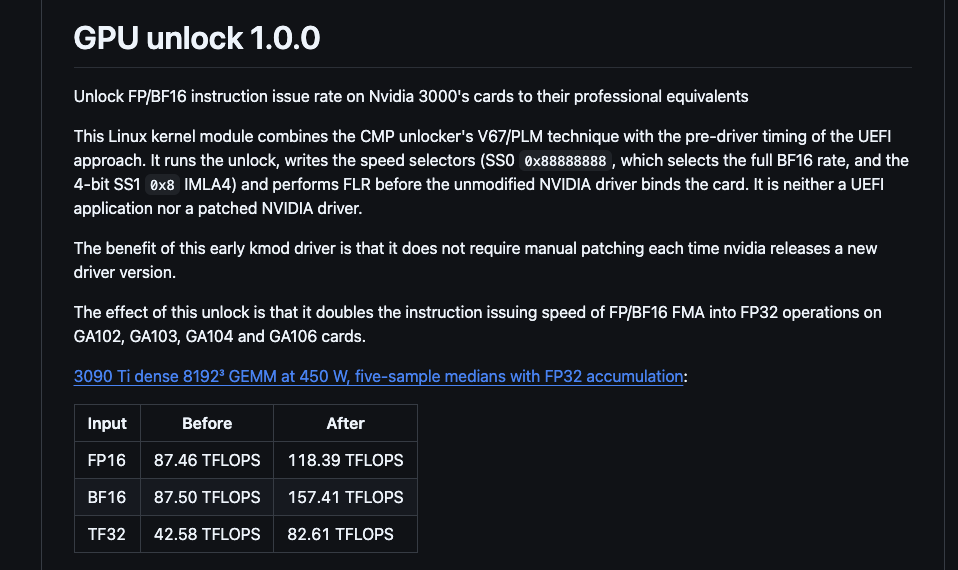
You might ask why RTX 30 series graphics cards have this limitation. When AI models perform matrix operations on GPUs, a common approach is to use FP16 or BF16 format inputs and then accumulate the results in higher-precision FP32. In this mode, GeForce cards run at only half the rate of professional cards.
Take the professional card A40, which also uses the GA102 chip: its TF32 Tensor performance is rated at 74.8 TFLOPS, while the GeForce RTX 3090 has only 35.6 TFLOPS—roughly a twofold difference. This is widely seen as NVIDIA’s market strategy for segmenting gaming cards from professional cards.
The GPU Unlock approach is to first use a Linux kernel module to rewrite the GPU’s internal speed selection settings before the NVIDIA driver takes over the graphics card, then reset the graphics card once, and then hand it over to the original NVIDIA driver for normal initialization. This process has several characteristics:
- You don’t need to overclock, and you don’t need to flash the graphics card BIOS.
- Without modifying NVIDIA’s original drivers, and no need to reapply patches after driver updates.
- It primarily improves the performance of matrix operations such as FP16 and BF16, and can also benefit some TF32 workloads.
- The direct speedup from general FP32 and pure INT8 matrix operations is not significant.
The developer also shared tests of the RTX 3090 Ti under a 450W power limit, where BF16 matrix operations increased from 87.50 TFLOPS to 157.41 TFLOPS, FP16 from 87.46 to 118.39 TFLOPS, and TF32 from 42.58 to 82.61 TFLOPS:
| Graphics card | chip | BF16 matrix operation improvement |
|---|---|---|
| RTX 3090 Ti | GA102 | 68~80% |
| RTX 3090 | GA102 | 25~67% |
| RTX 3080 10GB | GA102 | 70~73% |
| RTX 3080 20GB (modified memory version) | GA102 | 56~59% |
| RTX 3070 | GA104 | 73~81% |
| RTX 3060 12GB | GA106 | Approximately 80% |
Reddit user u/under-_-null recently also shared on the r/StableDiffusion subreddit that they used their own EVGA FTW3 RTX 3090 Ti to run a round of before-and-after unlock comparison tests on ComfyUI.
I tested the RTX 30-series GPU Unlock: up to 59% higher throughput in ComfyUI (3090 Ti)
byu/under-_-null inStableDiffusion
The test environment is a Dell Precision 5820 workstation. The graphics card is kept at stock clocks and a 450W power limit. The system runs Ubuntu, NVIDIA driver 615.71.09, and ComfyUI 0.42.1. For each configuration, 3 warm-up runs are excluded, then 15 images are measured and the median is taken.
For the video model, we warmed up once and then measured 3 video segments. Before and after unlocking, we used the same prompt, Seed, model file, and workflow; the timing covered text encoding, sampling, decoding, and saving, but excluded the time to load the model for the first time.
Below are the results:
| AI model/settings | Before unlocking | After unlocking | Throughput improvement |
|---|---|---|---|
| MiniMax H3 BF16 (Video + Audio) | 253.27 seconds | 158.05 seconds | +60.2% |
| MOSS-Image SFT BF16 | 71.98 seconds | 45.40 seconds | +58.6% |
| Qwen-Image 2.1 Turbo BF16 | 8.51 seconds | 5.41 seconds | +57.2% |
| Z-Image Turbo BF16 | 6.79 seconds | 4.35 seconds | +56.1% |
| FLUX.1 dev FP8 checkpoint* | 31.96 seconds | 20.66 seconds | +54.6% |
| Z-Image Turbo BF16+SageAttention | 6.47 seconds | 4.38 seconds | +47.7% |
| Krea 2 Turbo BF16 | 15.65 seconds | 10.70 seconds | +46.3% |
| MiniMax H3 INT8 ConvRot (Video + Audio) | 155.07 seconds | 118.21 seconds | +31.2% |
| LTX-2.5 distilled BF16 (video + audio) | 70.81 seconds | 60.63 seconds | +16.8% |
| LTX-2.5 distilled INT8 ConvRot (video + audio) | 48.02 seconds | 43.02 seconds | +11.6% |
| Krea 2 Turbo INT8 | 6.50 seconds | 5.98 seconds | +8.7% |
| Qwen-Image 2.1 Turbo INT8 | 3.92 seconds | 3.75 seconds | +4.6% |
| Qwen-Image 2.1 Turbo INT8+SageAttention | 3.92 seconds | 3.76 seconds | +4.3% |
| MOSS-Image SFT INT8 | 27.31 seconds | 27.23 seconds | +0.3% |
After reviewing this grade table, we can summarize three key points:
- BF16 shows the most pronounced gains in image generation: MOSS-Image, Qwen-Image, Z-Image, and FLUX.1 dev all fall between +54% and +59%, while Krea 2 Turbo also reaches +46.3%.
- Video generation benefits as well, but the differences are large: MiniMax H3 BF16 generating a roughly 5-second video with audio went from 253 seconds down to 158 seconds, the biggest gain of all. But LTX-2.5, also a video model, was only 16.8% faster with BF16.
- The improvement margins for INT8 models vary considerably: the INT8 versions of MOSS-Image and Qwen-Image are only 0.3–4.6% faster, while MiniMax H3 INT8 ConvRot improves by 31.2%.
In other words, how much performance you can gain depends on which compute format your model uses.
For those who want to use it to run local LLMs, it may disappoint you. According to reports from GitHub users, the Prefill phase for processing long prompts can be 14–36% faster, but in the Decode phase, where text is output token by token during normal chat, speed is mainly limited by VRAM bandwidth, so there is almost no change.
In terms of gaming performance, although DLSS also uses Tensor Cores, no tests currently show an improvement in gaming benchmark scores.
Compute power suddenly jumped by 60%–80%, and many people may worry whether the graphics card’s temperature and power consumption have risen along with it. The Reddit user mentioned earlier also provided the average GPU core temperature before and after unlocking:
| AI model | Pre-unlock average | Post-unlock average |
|---|---|---|
| MOSS-Image SFT BF16 | 77.9°C | 78.7°C |
| Qwen-Image 2.1 Turbo BF16 | 74.2°C | 72.7°C |
| Z-Image Turbo BF16 | 73.7°C | 66.6°C |
| FLUX.1 dev | 75.9°C | 77.6°C |
| Krea 2 Turbo BF16 | 74.6°C | 73.3°C |
| MiniMax H3 BF16 | 79.2°C | 78.5°C |
| MiniMax H3 INT8 ConvRot | 77.4°C | 78.4°C |
| LTX-2.5 BF16 | 70.9°C | 69.5°C |
| LTX-2.5 INT8 ConvRot | 70.6°C | 71.5°C |
The highest core temperature recorded throughout the entire test was 81°C before unlocking and 80°C after unlocking, with maximum fan speeds of 80% and 79%, respectively. The numbers appear to go up and down, but the difference is not significant.
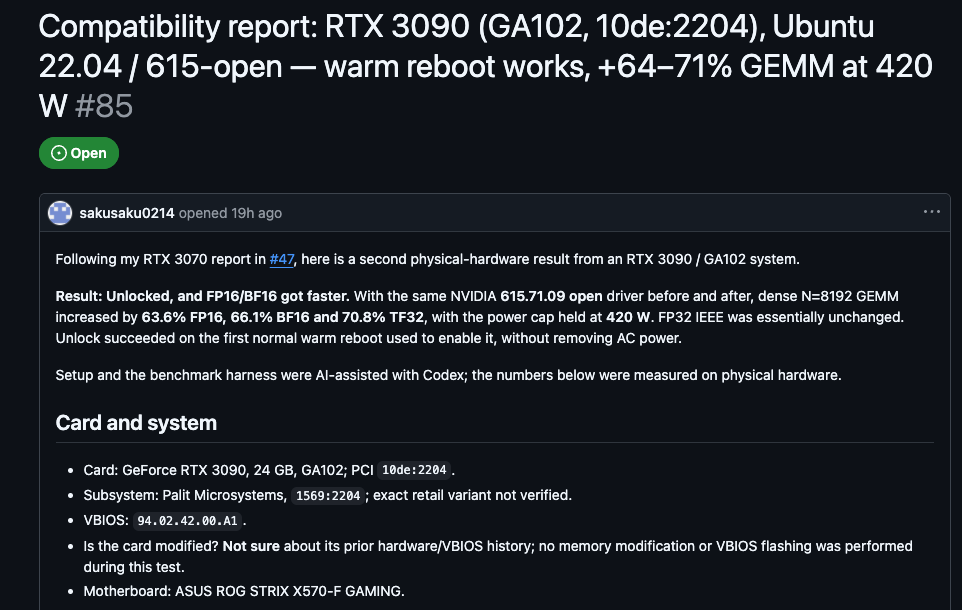
As for the power consumption part,GitHub Another RTX 3090 user above has provided relevant records.
Under the same 420W limit, peak power consumption was 420.33W before unlocking and 419.92W after unlocking; the maximum core temperature changed from 65°C to 63°C, meaning unlocking did not allow the graphics card to exceed its original power limit, and the additional performance gained was achieved under the same power consumption:
In addition to temperature and power consumption, there are a few risks to be aware of before use:
- Boot and driver compatibilityThe module must be loaded before the NVIDIA driver. If the order is wrong, unlocking will fail, and on some systems you may need to manually adjust the boot image settings.
- System stability: A user encountered the Xid 79 “GPU has fallen off the bus” error after enabling unlock on a computer with dual RTX 3090s, and the entire computer even rebooted outright; after turning off unlock, everything was normal. However, this user is using an 850W power supply, and he himself also thinks it may not be enough to power two 3090s. He does not consider it a problem with the tool itself and plans to switch to a larger power supply and test again (source:GitHub Issue #114)。
- Secure Boot and module signatureThe core module for GPU Unlock is unsigned. Some users who reported it were using it with Secure Boot disabled, and system logs also show warnings that the module is unsigned. Those with Secure Boot enabled may need to handle signing settings separately before it can be loaded.
- Long-term effects unknownAt present, almost all publicly available tests are short-duration benchmarks; there is still not enough data on stability during long-term use or whether they affect hardware lifespan.
Source: KOCPC Chinese