


When Microsoft first launched Recall, although the feature seemed convenient, allowing users to quickly find content they had viewed before, it soon sparked considerable privacy controversy because it periodically captures screenshots, which led Microsoft to adjust the design. However, it seems Microsoft has not given up on the idea of giving Windows 11 an AI memory feature. Foreign media outlet Windows Latest found that Microsoft is quietly testing another Recall-like Windows 11 AI memory tool, internally codenamed Project Pantheon.
However, this time the approach is different: it does not automatically record the screen in the background; instead, it lets users decide what content to save. After saving, the content can be searched and organized through AI, and can even be integrated via MCP with third-party AI tools such as Claude and Cursor, allowing these AIs to use the saved data as well.
 Image source: Windows Latest
Microsoft is secretly testing another Windows 11 AI memory tool, Project Pantheon: it doesn’t take screenshots automatically, you decide what to save, and it can also integrate with Claude and Cursor.
According to Windows Latest According to the report, several months ago they discovered an undisclosed app listing in the Microsoft Store for a Windows 11 AI tool internally codenamed “Project Pantheon.”
Microsoft has not officially announced Project Pantheon, so it cannot be found through ordinary search in the Microsoft Store either. They were not invited by Microsoft to obtain testing access; instead, they downloaded and installed it directly from this undisclosed store page. Since this summer, they have been actively using this tool.
It is worth mentioning that Project Pantheon had several different names during development, currently known to include:
- Context Vault: the name of the app actually tested by Windows Latest.
- Context IO: the name of the entire platform.
- Projects: the name used in earlier versions; traces of it can still be found in the Settings app in Windows 11.
Although the name keeps changing, the main function has stayed the same: it lets you save and organize useful content, then quickly find it again later with AI.
After opening Context Vault, the home page is the Collections page. The left sidebar includes features such as Library, Chat, Token usage, Timeline, and Connections. If you don’t specify which collection to save something to, it will first go into “Uncategorized memories”:
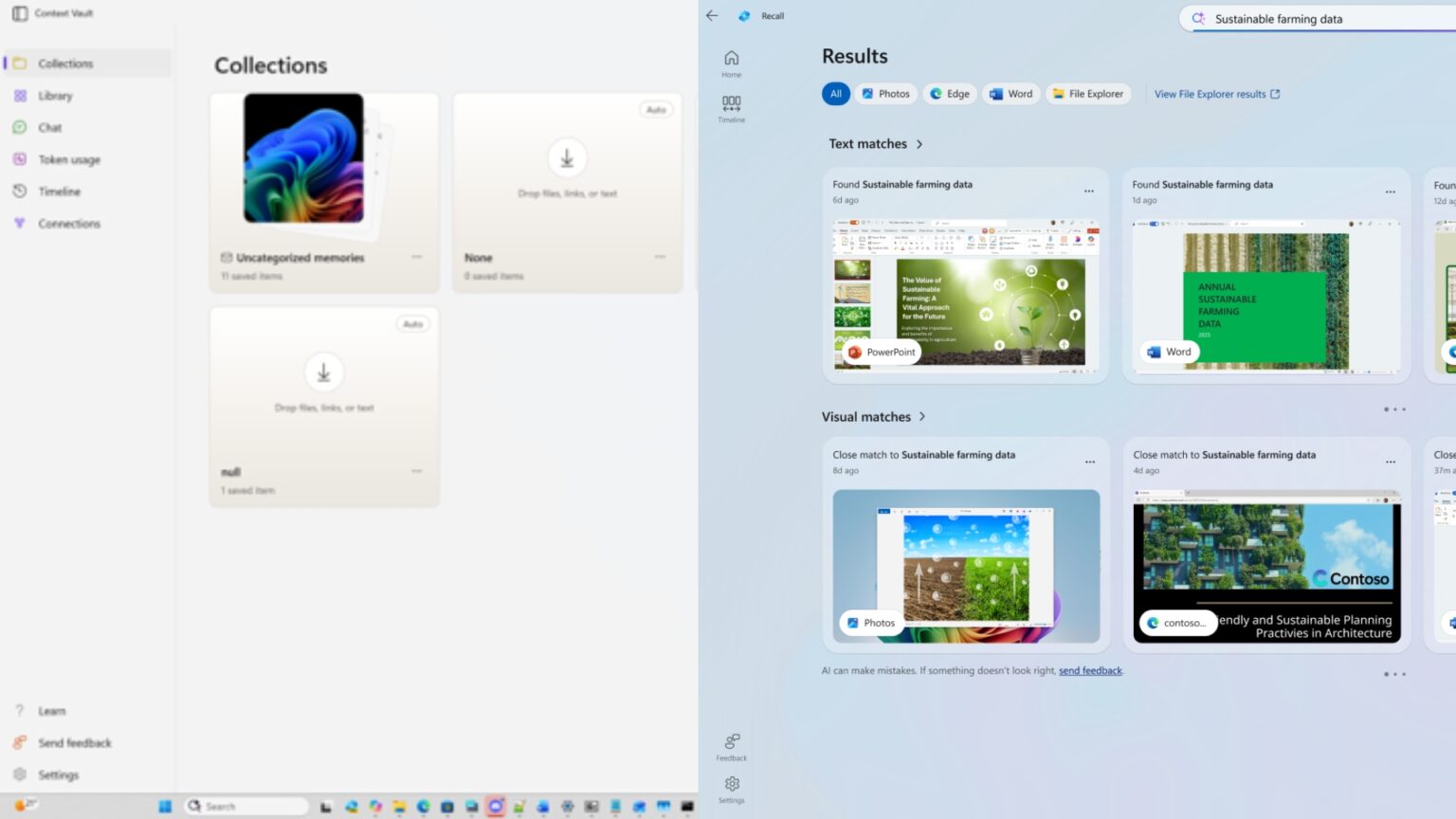
Image source: Windows Latest
Based on the version tested by Windows Latest, the currently supported saving methods include:
- Webpage: Save via browser extension
- Files and images: Add from the “Share” menu in File Explorer.
- Screenshot: Use Windows’ screen capture feature to proactively capture the screens you need to save.
- Text and images: select via Click to Do, then save
- Clipboard: Add copied content directly
- Audio and video: can also be saved as memories.
- Supported apps: Some apps can also send content directly into them.
For example, in File Explorer, after opening the right-click menu and clicking Share, Context Vault will also appear among the options, alongside WhatsApp, Outlook, and TikTok:
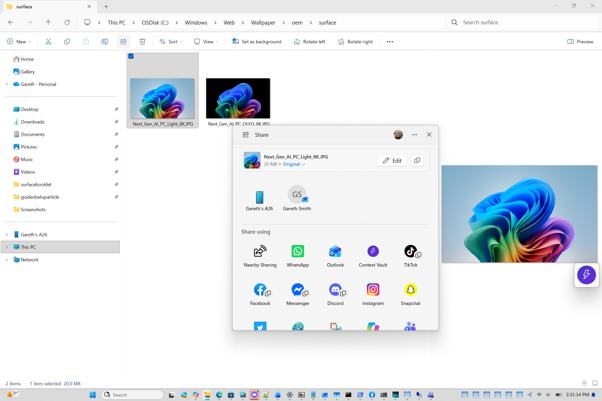
Image source: Windows Latest
In the Click to Do settings menu, there are also two actions at the bottom: “Save image to Projects” (saves the image to Projects) and “Save selected text to Projects” (saves the selected text to Projects):
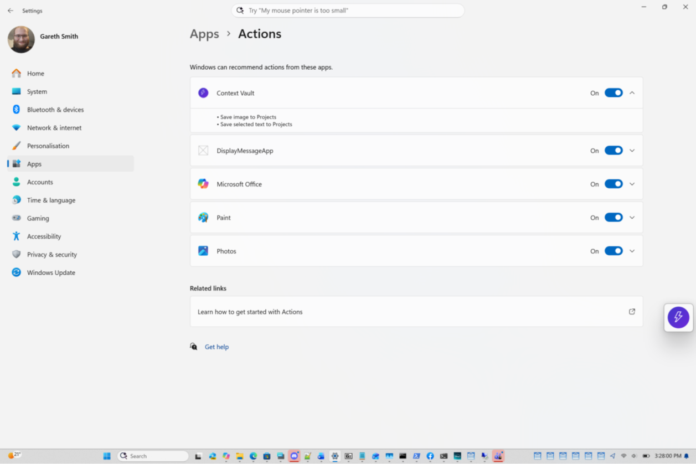
Image source: Windows Latest
Since you have to manually save the content you want anyway, some people might think Pantheon is just a more convenient collection tool and doesn’t seem much different from ordinary note-taking apps or screenshot tools.
Its real distinguishing feature is that the data stored in it can be handed directly to AI for processing.
All memories are organized into different Collections. In addition to creating collections manually, the app can also automatically create collections and label them with an “Auto” tag. On Windows Latest’s computer, there is a “Weekend Plan” collection automatically generated from a single note.
Once you have these memories, you can go to the Chat page and ask the AI questions. The interface will also offer several common command suggestions, such as “List my collections,” “Summarize a collection,” “What have I been working on recently?” and “Write a draft using a collection.” Next to the chat box, there is also a “Remember this” button that lets you save content from the conversation directly as a memory:
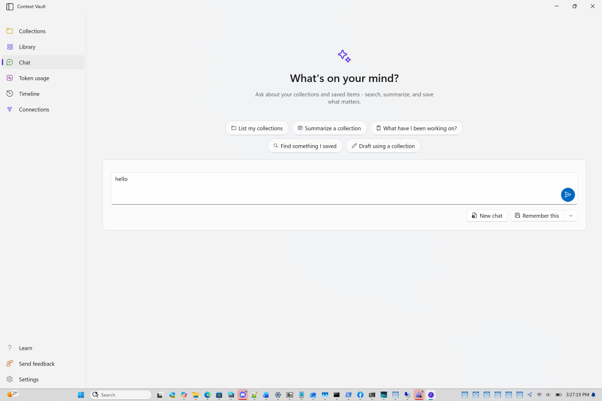
Image source: Windows Latest
According to Windows Latest’s hands-on testing, Pantheon can indeed bring relevant data together, so he doesn’t have to remember where each piece of data originally came from or search through multiple apps and folders; he can simply ask questions about the entire collection, and the results are even better than he expected.
When querying, you can choose which cloud AI model to use, so it works even without an NPU. The app also has a Token usage page where you can see how much of your AI quota you’ve used—a design that Recall doesn’t have either.
Pantheon also has a built-in MCP server, so AI tools like Claude and Cursor can directly read the memories you’ve saved, which is quite a nice touch.
In his final hands-on verdict, Windows Latest said that although manual saving gave him more control over his data, it also added to his workload. When he used Pantheon to plan a seaside trip this summer, his biggest frustration was having to remember to manually save everything. Recall’s strongest feature—automatic background capture—was actually what he missed most while using Pantheon.
In addition, as the data in a collection grows, the app lacks comprehensive filtering features, making it more difficult to manage; however, from what he understands, Microsoft is already considering adding them.
As for when Project Pantheon will be released, that is currently unknown.
Below is a table of the differences between Pantheon and Recall:
| Comparison Item | Project Pantheon(Context Vault) | Windows Recall |
|---|---|---|
| Storage method | The user actively saves each item. | Once enabled with consent, screen snapshots will be captured automatically at regular intervals. |
| Save content | Webpages, files, images, screenshots, text, clipboard, audio, video | Screenshot |
| AI search | Supports natural-language questions, summaries, and drafting. | Supports natural language search of past footage. |
| Organization method | Collection categorization; the beta version supports AI automatic collection creation. | Mainly organized along a timeline. |
| Third-party AI integration | Built-in MCP server, available for use with Claude and Cursor. | Non-identical integration methods |
| AI processing | The beta version supports cloud AI models and includes a Token usage page. | Processed locally on the device. |
| Hardware Requirements | The beta version does not require an NPU; the requirements for the official version have not been announced. | Copilot+ PC only |
| How to obtain | Independently downloaded App | Built into Windows |
| Launch status | Undisclosed testing; Microsoft has not yet announced it. | Now available and can be enabled on Copilot+ PC. |
Source: KOCPC Chinese