


Nvidia’s RTX Spark laptops have just launched, and various related hands-on tests are being released one after another. The well-known YouTube channel Hardware Canucks put the Microsoft Surface Laptop Ultra equipped with RTX Spark (N1X chip) into the ring, assembling Apple’s current fastest MacBook Pro M5 Max, M5 Pro, and base M5, plus AMD Strix Halo’s HP ZBook Ultra and Intel gaming laptop Legion Pro 5i—a five-way showdown lasting 27 minutes. This 128GB version of the Surface Laptop Ultra costs close to $6,000 (about NT$195,000), a bit cheaper than the MacBook Pro M5 Max with the same memory, but can it actually win?
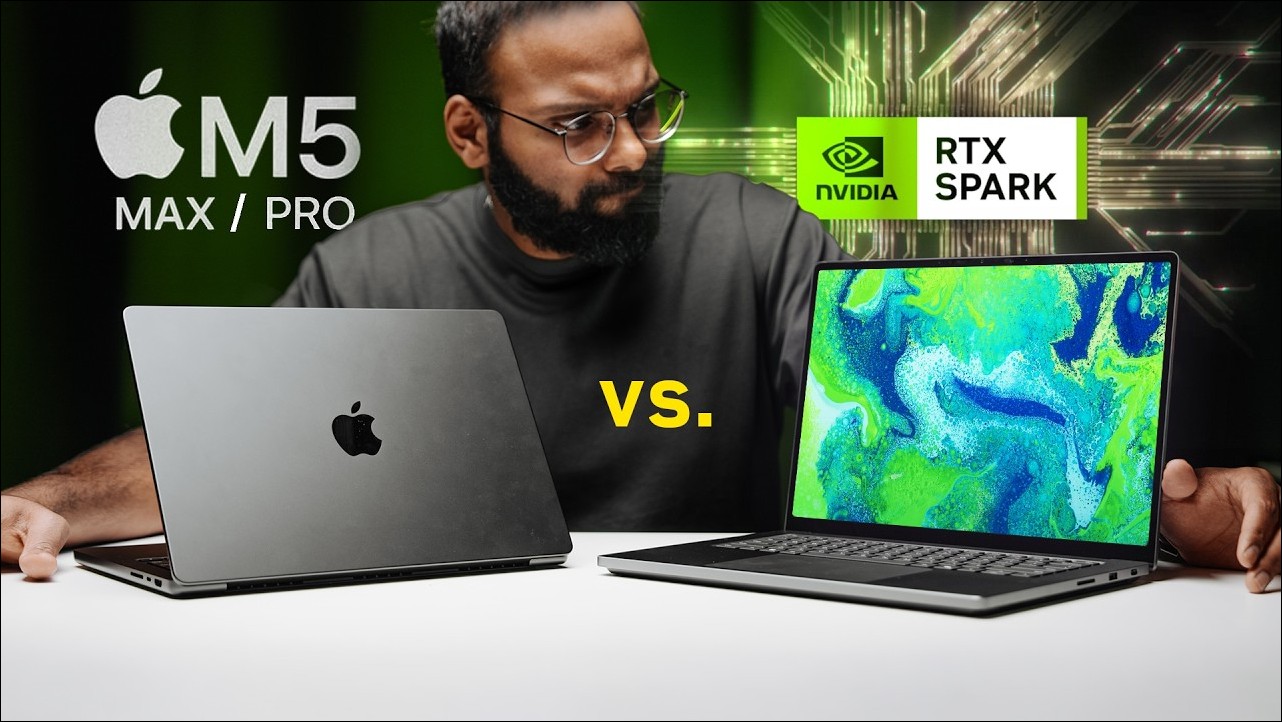
RTX Spark vs. the MacBook Pro M5 family and AMD Strix Halo laptops
Test lineup and pricing
RTX Spark is Nvidia’s all-new SoC: an Arm-based Grace CPU (performance cores Cortex-X925 plus efficiency cores A725, co-designed with MediaTek) paired with a Blackwell GPU, with the CPU and GPU sharing the same unified memory pool. The laptop version N1X comes in two tiers: the entry-level 18-core CPU with 5,120 CUDA cores and 24 to 64GB of memory; the high-end 20-core with 6,144 CUDA cores and up to 128GB, with the entire SoC consuming 45 to 80 watts.
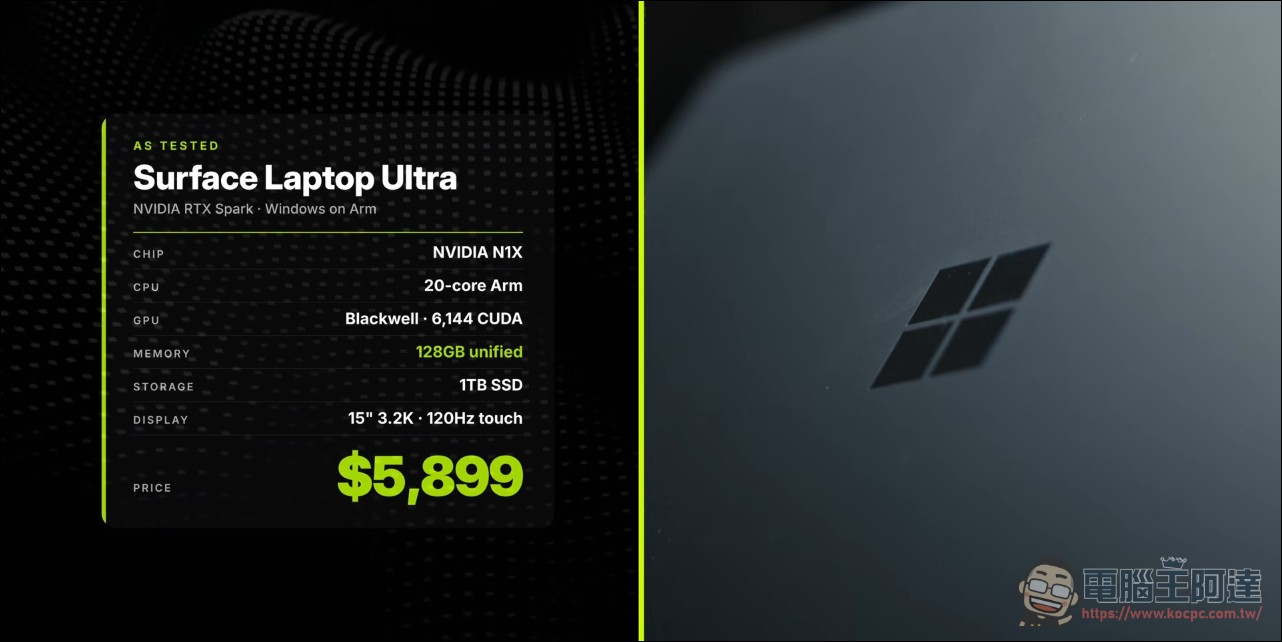
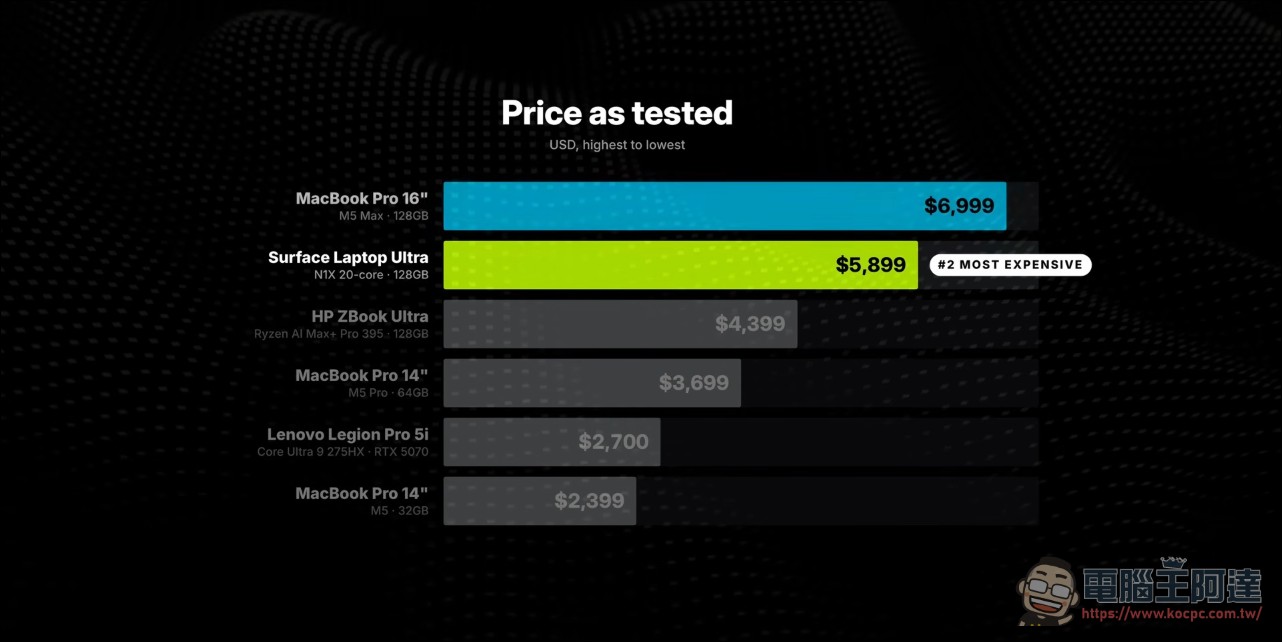
Pricing: The entry-level Surface Laptop Ultra with 24GB starts at $2,599 (Taiwan pricing starts at NT$119,000,This site has previously reported), the 32GB high-end chip version is about $3,700, and the 128GB model is $5,899. For comparison, the base M5 MacBook Pro with 32GB is about $2,400; for the same $3,700, on the Mac side you can get a 64GB M5 Pro, directly doubling the memory; the M5 Max with 128GB costs nearly $7,000. The HP ZBook Ultra, also a 128GB model, is on sale for under $4,500, $1,500 cheaper than the Surface.
CPU: The Cost of Old Arm Cores
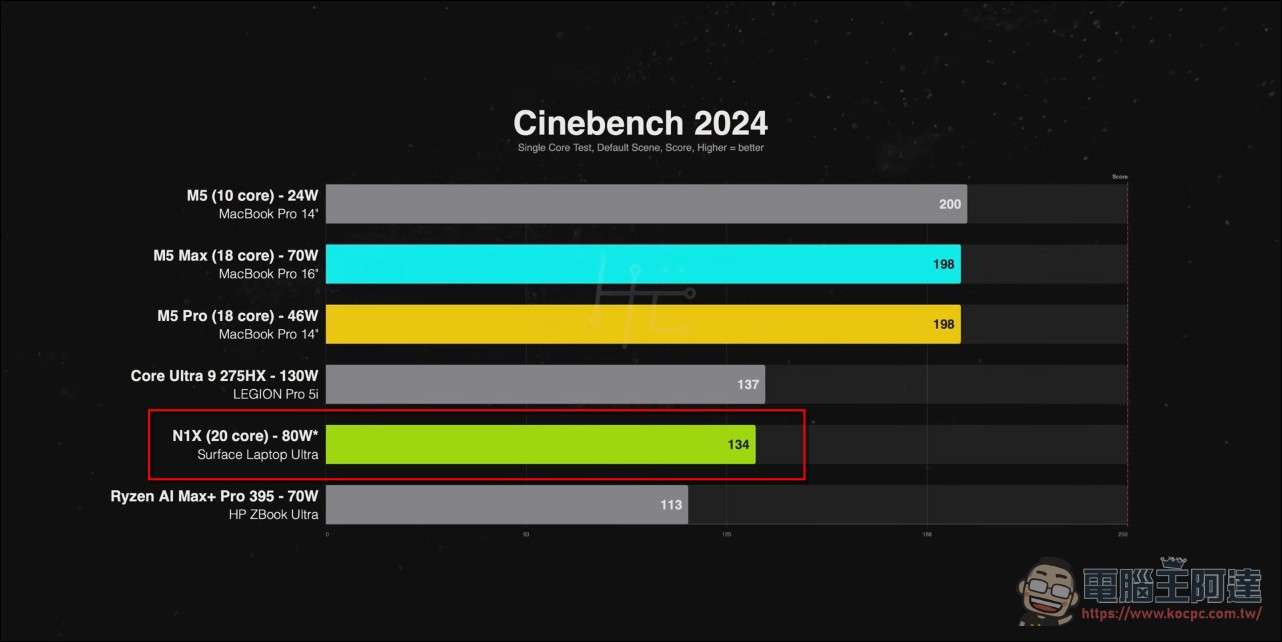
In the Cinebench 2026 single-core test, the N1X trails the entire M5 family; in the sustained 10-minute multi-core test, it is about 17% slower than the M5 Pro and also loses to the much higher-power Intel Arrow Lake, beating only the AMD Ryzen AI Max+ Pro 395 by about 14%. The host bluntly said that these Arm core architectures are already more than two years old and that “Apple’s architecture is far ahead.”
Cooling and noise are an unexpected bonus: even at full speed the fan is very quiet, comparable to a MacBook Pro, but under heavy load there is noticeable coil whine. In real-world applications, Blender CPU rendering is about one-third slower than the M5 Pro, and HandBrake encoding is about 15% slower; “in terms of CPU performance per dollar, it doesn’t look pretty.”
GPU: Nvidia’s home turf
Switching to GPU acceleration is a different story. With Blender running the OptiX ray-tracing engine, the N1X is about 18% faster than the M5 Pro and only about 8% behind the 112-watt RTX 5070 laptop GPU in the Legion Pro 5i, breaking into that range with a much smaller power budget. Unfortunately, HandBrake on Windows on ARM still doesn’t support NVENC hardware encoding, so the test failed outright, and even the alternative presets for other Arm platforms didn’t help.
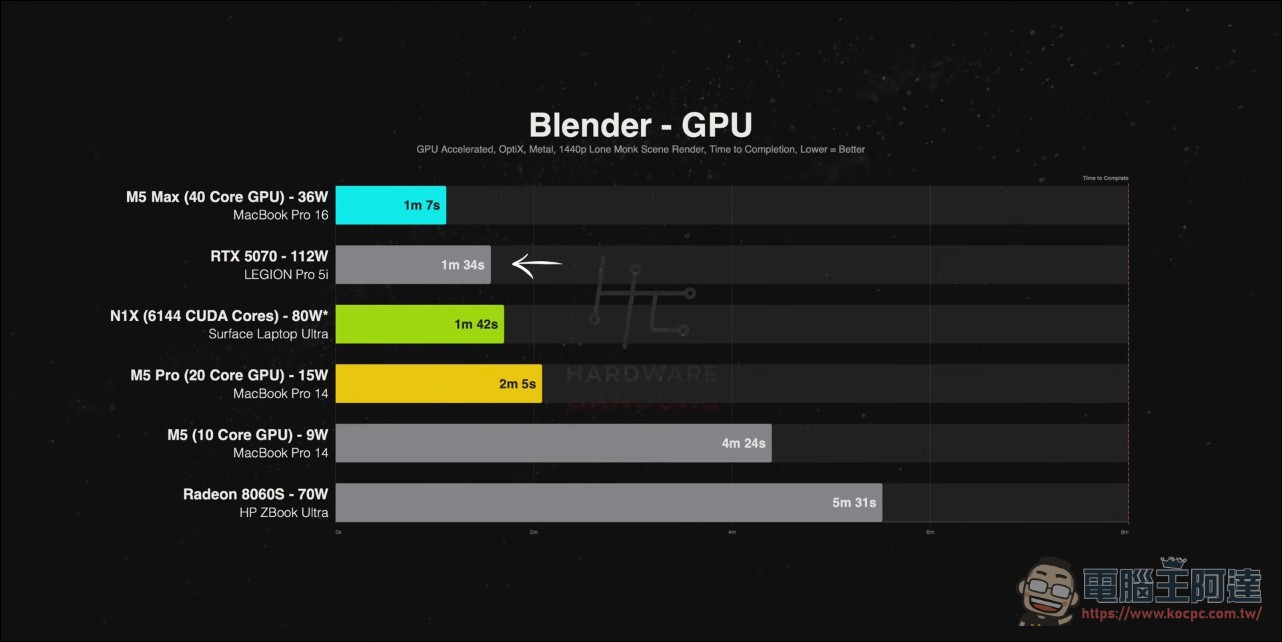
The GPU architecture advantage is real, but when the toolchain doesn’t keep up, paper specs can’t turn into actual output. Problems like NVENC’s lack of support—the kind of “ecosystem not properly connected” issue—ran through the entire review.
Creative software: the old Windows on ARM problem
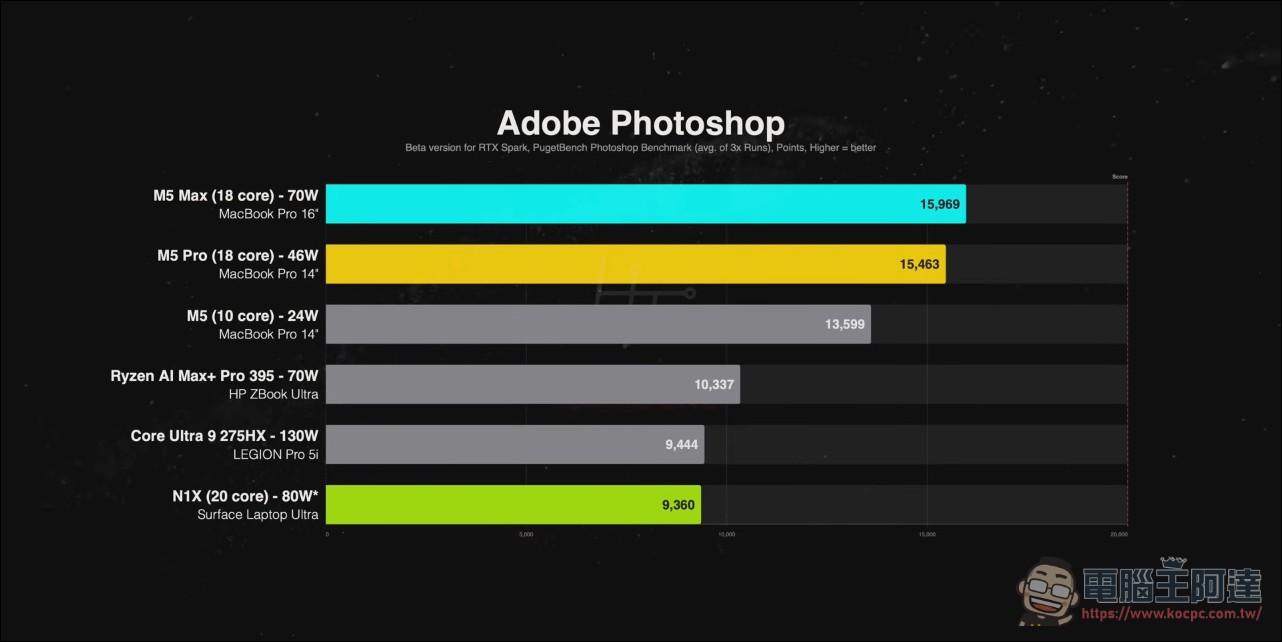
Adobe ecosystem performance is the worst part of the entire piece. Although Photoshop has a dedicated beta version, the N1X still comes in last, about 40% slower than the M5 Pro; even the cheaper $3,500 base M5 MacBook Pro is 45% faster. When exporting 12.4-megapixel RAW photos in Lightroom, the N1X takes more than three times as long as the M5 Pro and nearly twice as long as the base M5 (Lightroom Classic still runs on the Prism emulation layer).
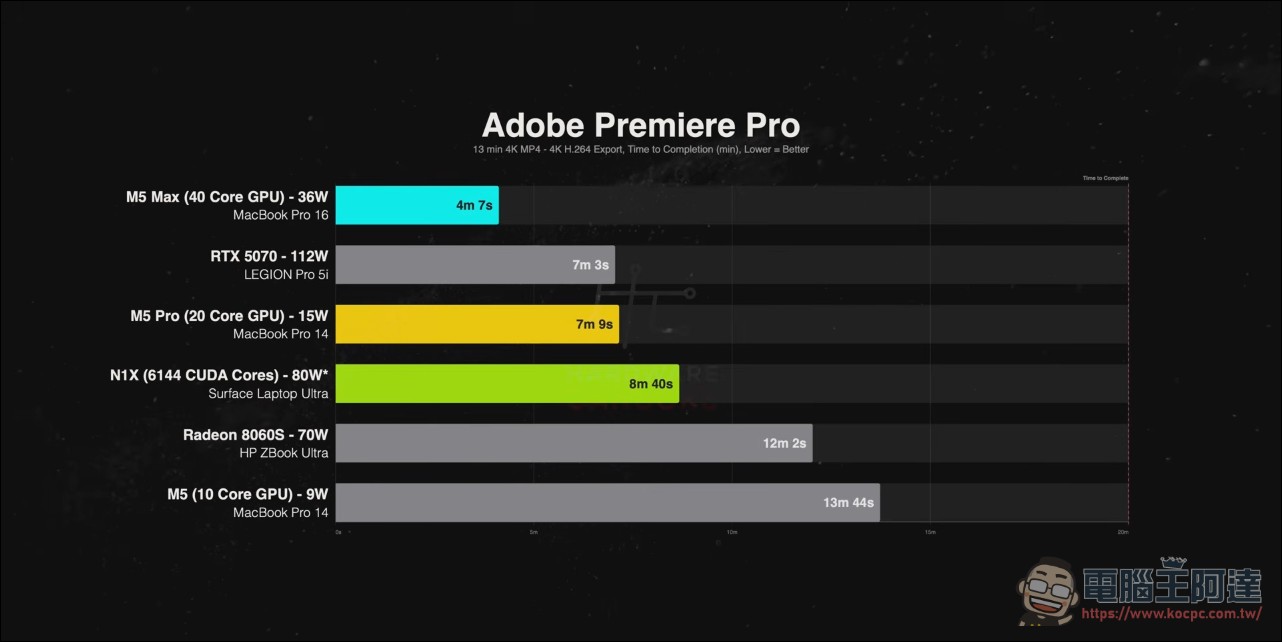
Premiere Pro exports are about 20% slower than on the M5 Pro, while the M5 Max takes only half the time; the Windows on ARM version of Premiere still lacks hardware-accelerated export, MKV input, plug-ins, and RAW format support such as ProRes RAW. Adobe says it is “coming soon,” but the host believes that “nearly a year after the native version launched, this is still unforgivable” and that people should not “pay for a promise.”
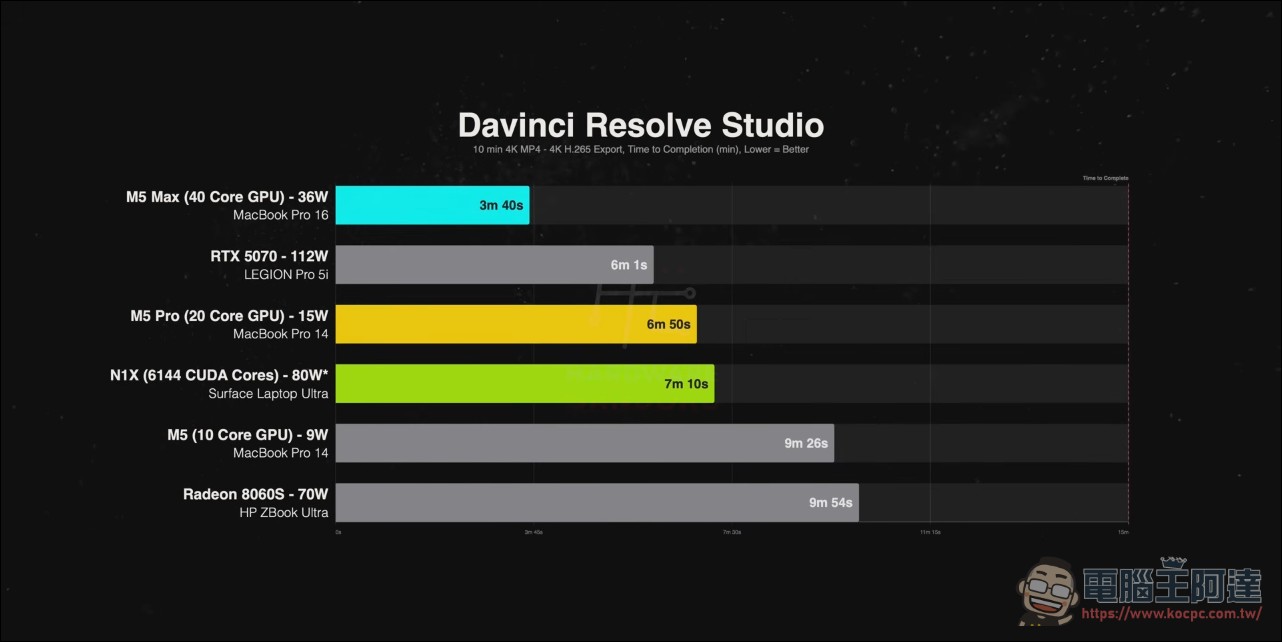
DaVinci Resolve saves some face: 4K project export is only 5% slower than the M5 Pro, but the M5 Max still takes just half the time.
Local AI: The home turf of large memory + CUDA
This is Nvidia’s main battleground. The host tested six models with LM Studio, ranging from 12 billion to 70 billion parameters. On the small model (Gemma 4 12B), N1X trails M5 Pro by about 16%, and the gap narrows to 9% with GPT-OSS 20B; when it comes to Qwen 3.8 27B at Q4 quantization, the tables turn: N1X surpasses M5 Pro by about 10%, comes within 12% of M5 Max, and leaves the RTX 5070 five times behind in speed. That card’s 8GB VRAM can’t fit the model; once data spills into system memory, it crashes.
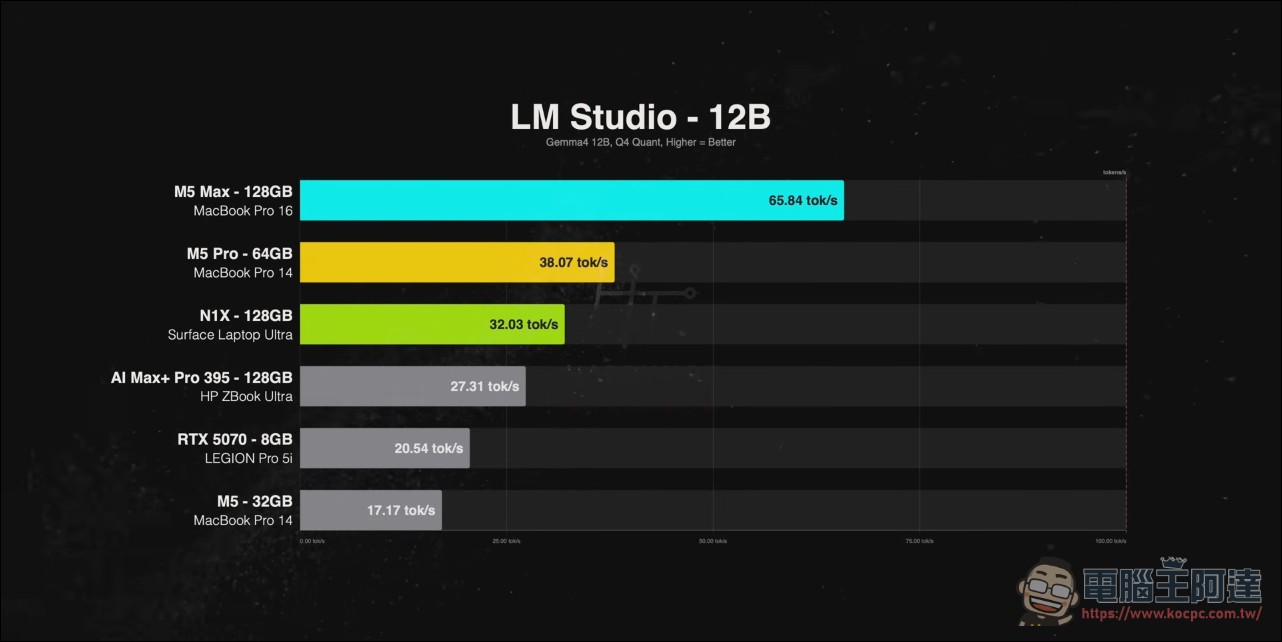
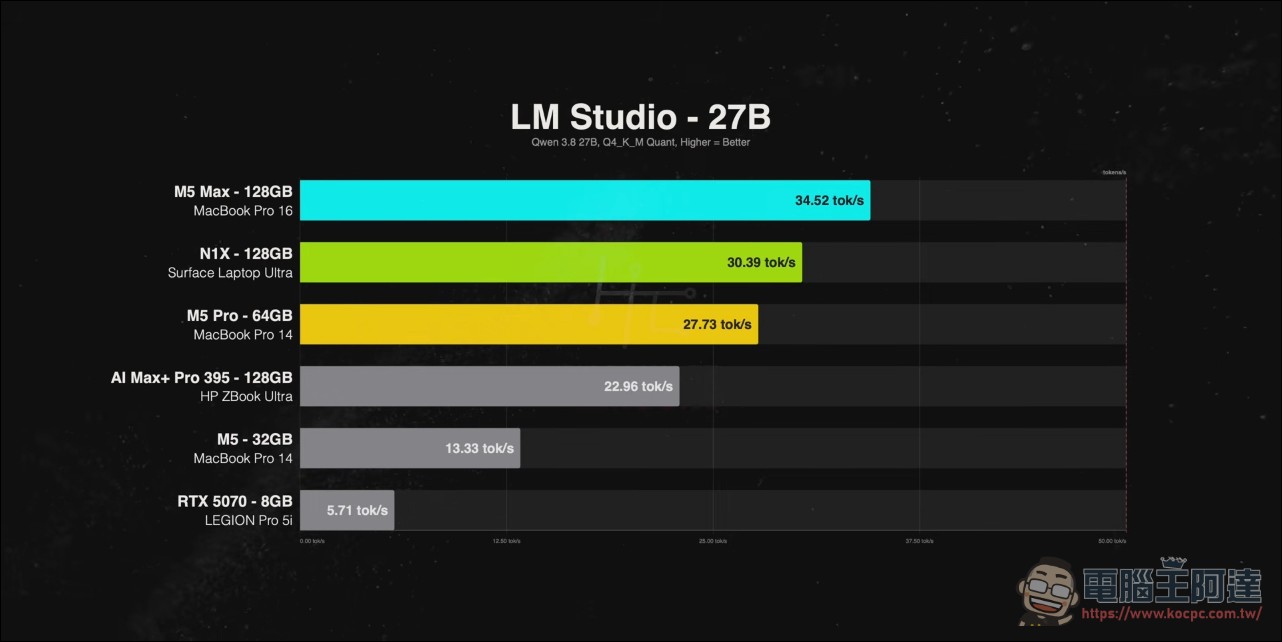
Q8 quantization is memory-bandwidth-bound, and M5 Max wins back 30% (its bandwidth is twice N1X’s); Gemma 4 31B trails M5 Pro by about 12%; finally, running the 70-billion-parameter DeepSeek R1 distilled model at Q4, N1X is 8% slower than M5 Pro but 60% faster than the ZBook Ultra, which also has 128GB. The key is the unified memory architecture: 20, 30, and 50GB models can fully use the memory pool without slowing down, something no laptop with a discrete GPU can do right now; combined with the CUDA toolchain, “no other thin Windows laptop has this combination.” Our site has tested an MSI RTX Spark laptop running a 125B model, and the principle is the same.
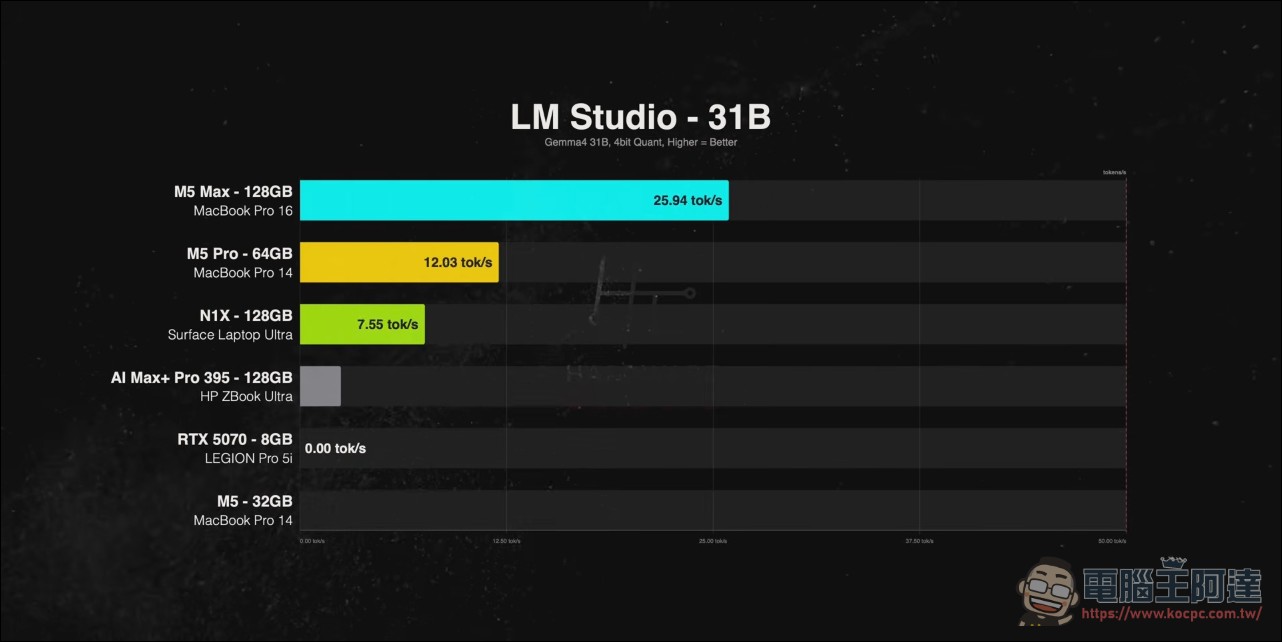
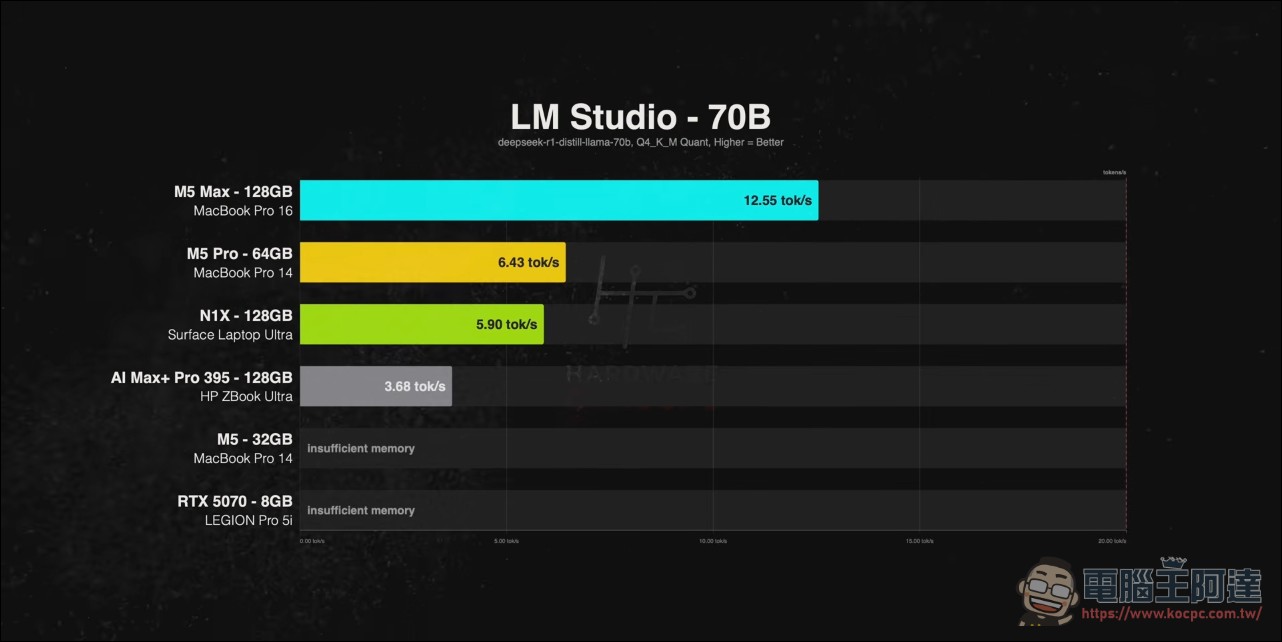
The key dividing line in AI testing is whether the model fits into memory. If it fits, the comparison is about memory bandwidth and software optimization; if it doesn’t, it’s an immediate elimination. The predicament of running local large models on an 8GB graphics card in 2026 is laid bare.
Game: The Limits of the Simulator
Windows on ARM games rely on Prism emulation (CPU-side emulation only, with native GPU), and performance is more interesting than expected.
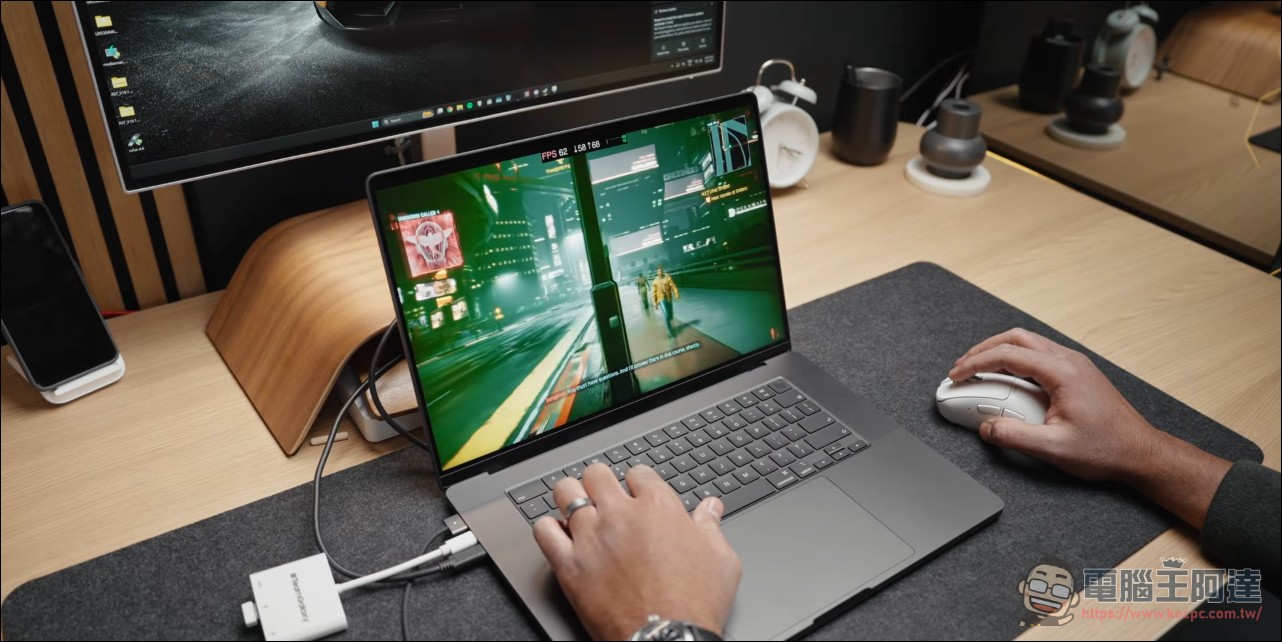
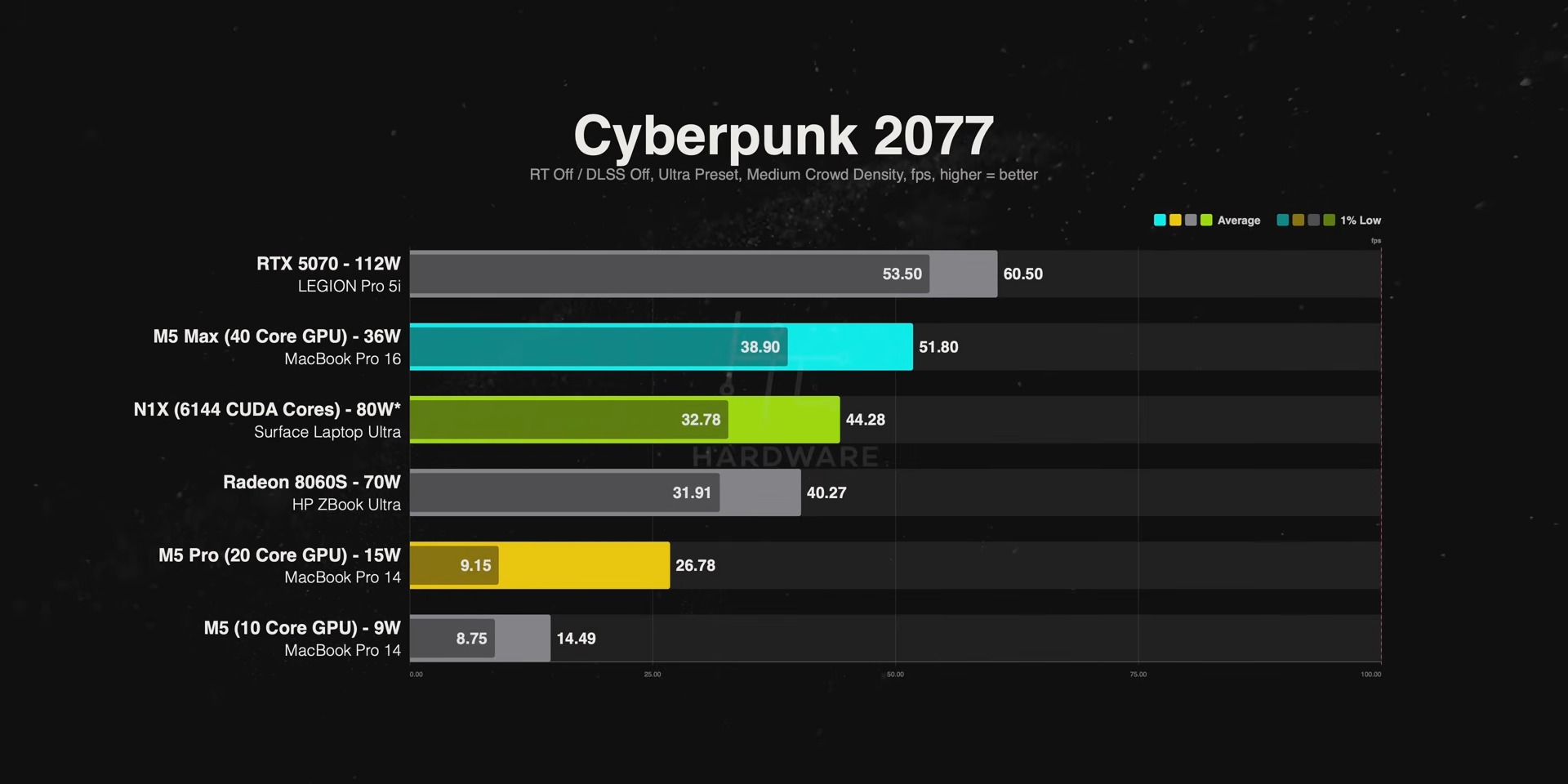
At 1600p resolution, in Cyberpunk 2077, N1X is 65% faster than M5 Pro and has 3.5x higher 1% lows; in Baldur’s Gate 3 it is 14% faster; in Total War: Warhammer III it is 44% faster. M5 Max has higher average frame rates, but its 1% lows are disastrous, so the overall gameplay experience is actually smoother on N1X.
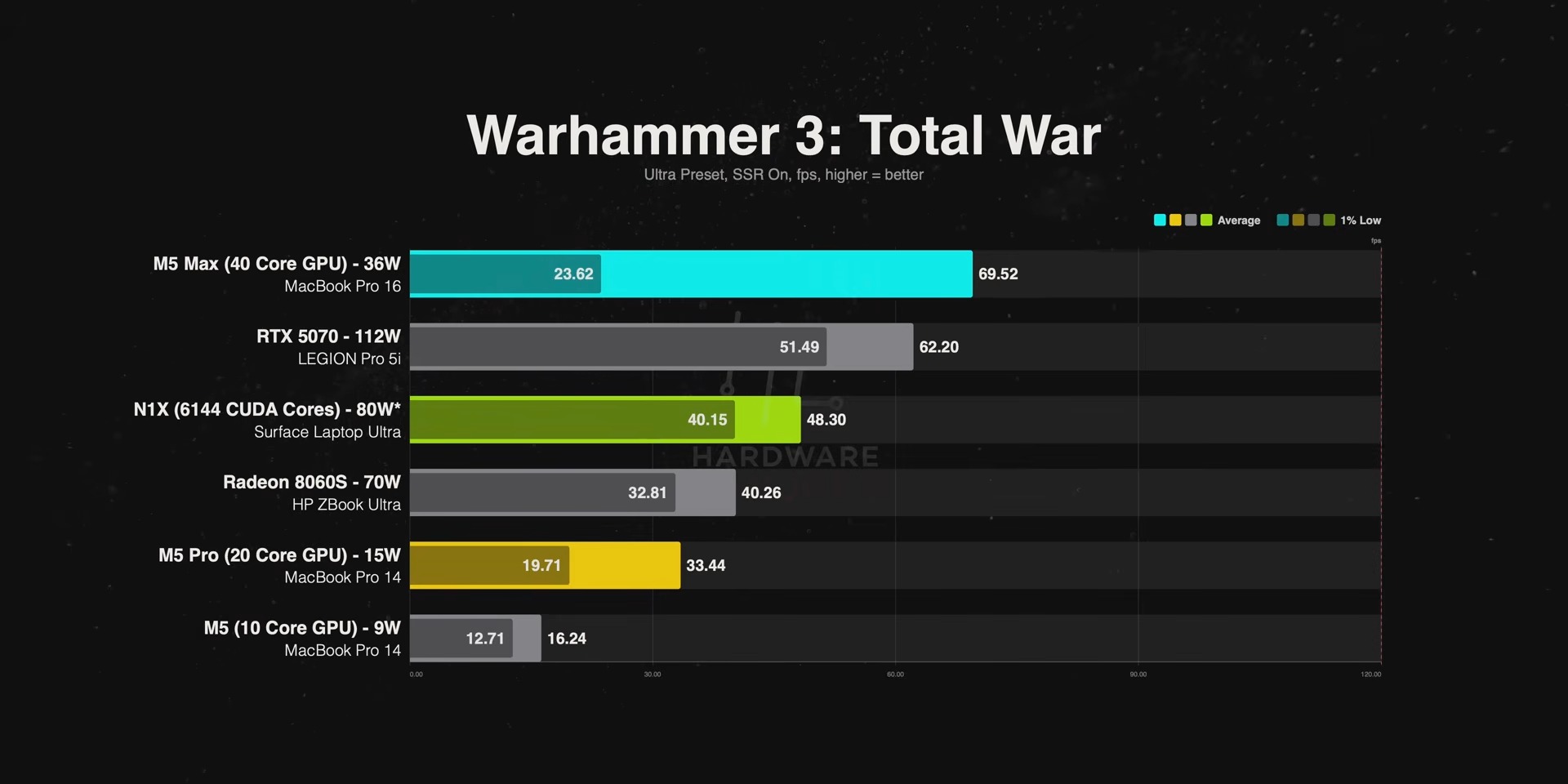
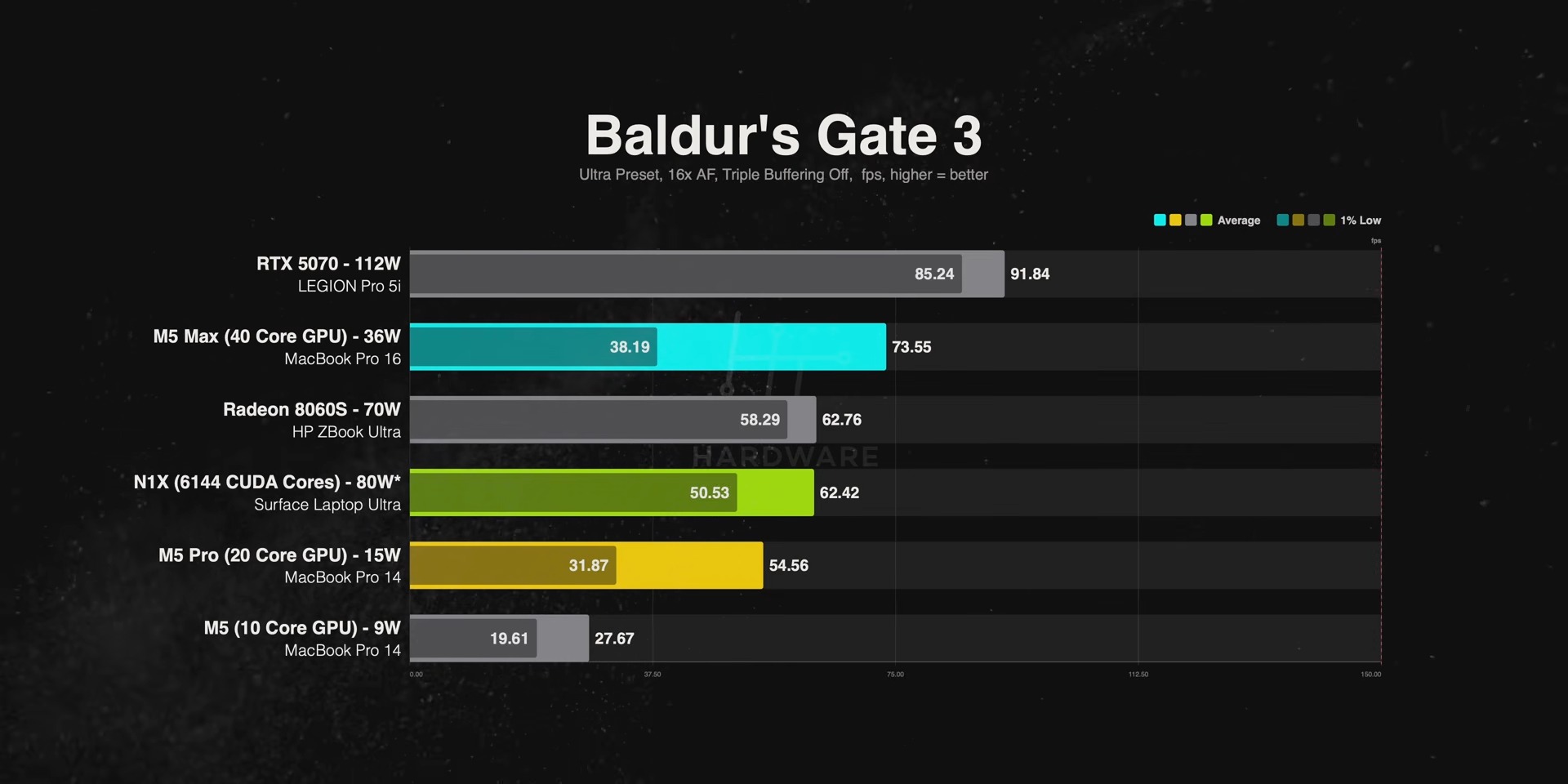
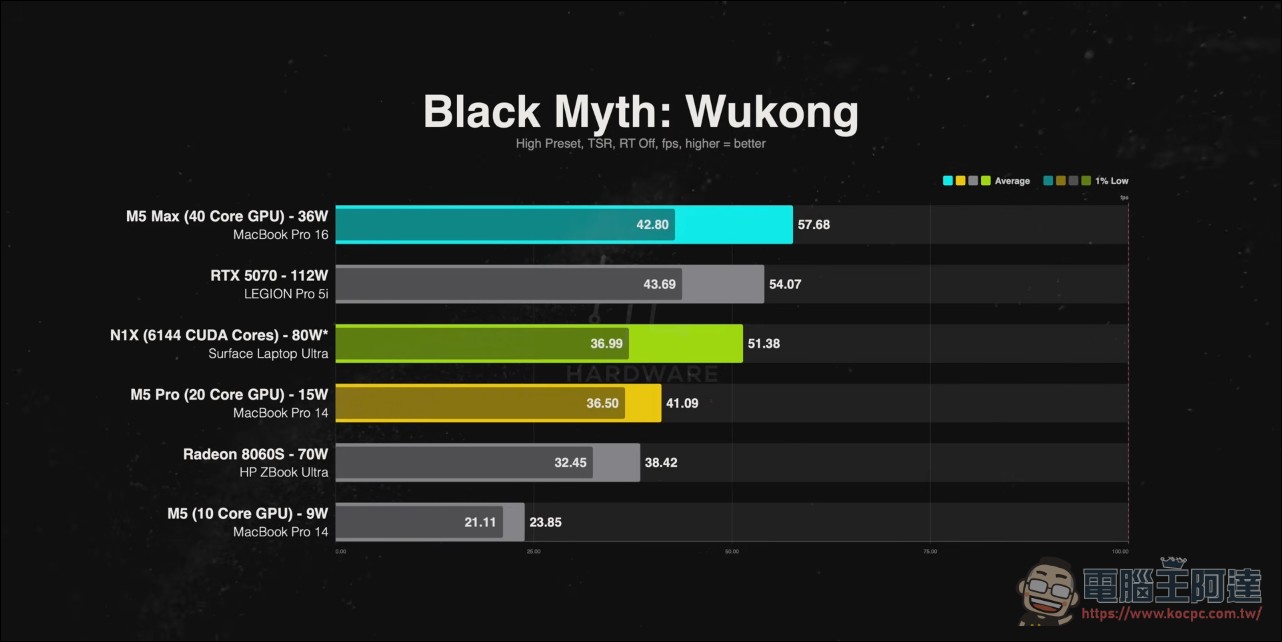
Black Myth: Wukong is 25% faster and closing in on the RTX 5070; Indiana Jones simply won’t run on the M5 Max; in CPU-heavy CS2, the N1X loses to the 5070 by a 3x frame-rate margin. Of the 10 games, 3—Battlefield 6, Rainbow Six Siege, and Doom Eternal—are outright dead (anti-cheat or unsupported).

Battery: claimed 95%, actual test under 80%
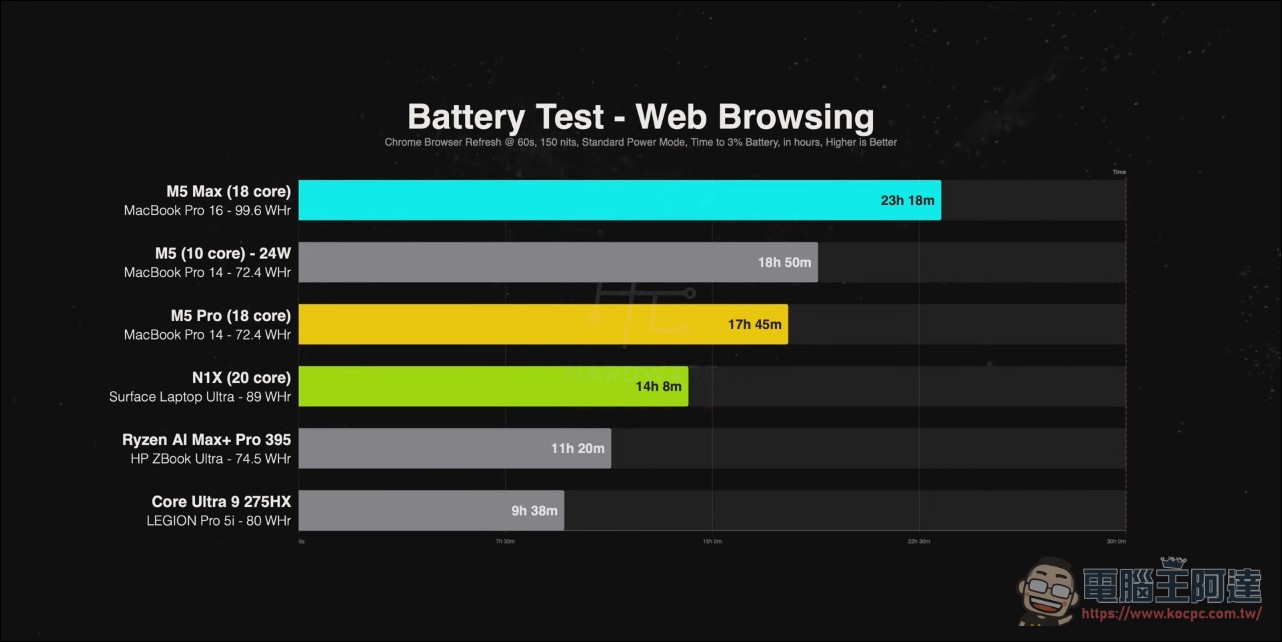
Battery life is the most disappointing part. Web browsing is 20% less than the M5 Pro and 40% less than the 16-inch M5 Max; 4K YouTube playback collapses outright, at 60% less than the M5 Pro and less than one-third of the base M5 (Apple’s media engine wins big here). The host’s comment on this was merciless: with the same battery capacity, it is only slightly more efficient than Strix Halo, “which is a bit ugly for an Arm chip.”
Nvidia claims it still maintains about 95% performance after being unplugged, but in actual testing it dropped about 26% (HandBrake was 27% slower, Photoshop dropped 40%), maintaining less than 80%. The trio of MacBooks showed almost no degradation.
The device itself: this Surface is really great.
Setting the chip aside, the Surface Laptop Ultra has received high praise: a 15-inch 3.2K touchscreen with a 120Hz variable refresh rate, SDR brightness exceeding 1,000 nits and 55% brighter than the MacBook Pro—the brightest display the channel has tested; color accuracy is on par with Mac. The trackpad supports haptic feedback, with feedback when dragging timelines in Premiere, Resolve, and even Office. The speakers are loud, but vocals sound somewhat muffled. It features the world’s first built-in magnetic USB-C charging (limited to a single port); the 140W charger is compact, but the cable is “ridiculously short.” Ports are generous: three USB4 Type-C, HDMI 2.1, a 10Gbps USB-A, a UHS-II card reader, and a headphone jack. Four screws open the bottom cover, the SSD is user-replaceable, and Gen5 SSD read/write speeds are even faster than the M5 Max.
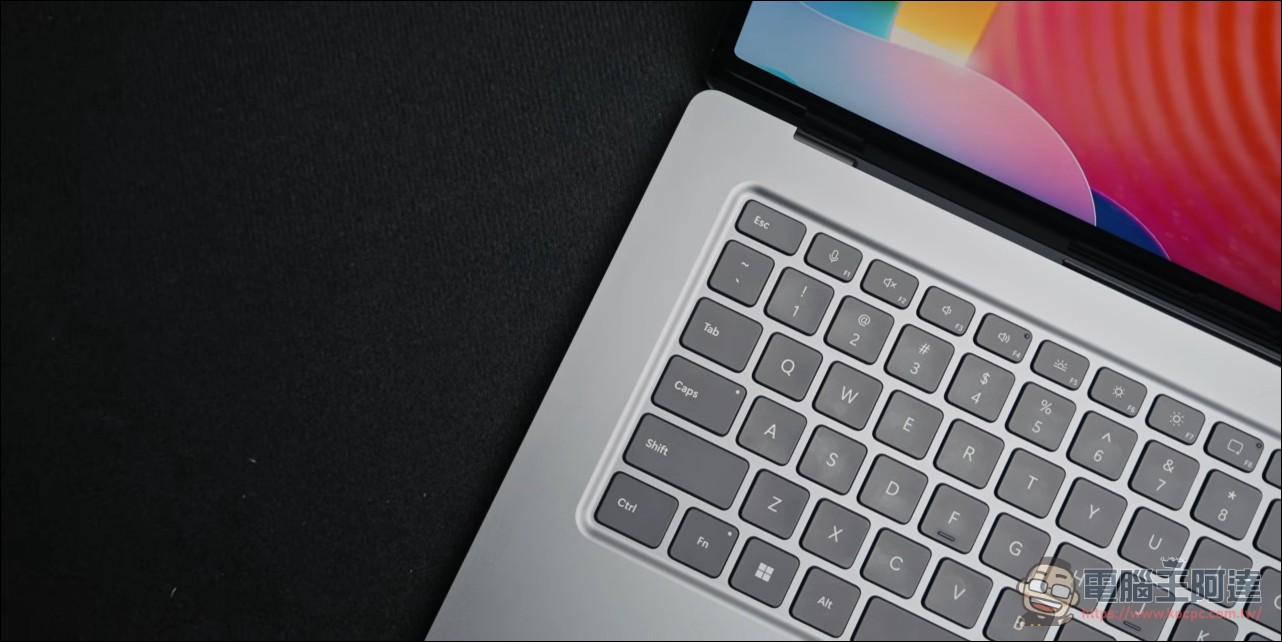
This review is quite extensive. Those interested can check out his detailed review video. Overall, the conclusion is: the host’s answer is quite polarized. The hardware itself is “possibly one of the most premium Windows laptops he has ever handled,” but the overall verdict is “only recommended for AI developers who need to run CUDA and a large memory pool on Windows,” while everyone else “should not choose it.” Its price-performance and AI performance are not as good as the M5 Max’s:
Conclusion: a machine with only one or two tricks.
The host’s final assessment was unambiguous: “If it hadn’t launched during the AI boom, it would have died on arrival,” and “It’s a one-trick, half-measure architecture.” On buying advice: “If you want efficiency and battery life, this is out; if you want the ultimate creative workstation, absolutely not; if you want to guarantee every game runs, it’s not it either.” The 128GB version is worth considering for AI developers; for the 32GB version, “an AI laptop with less than 40GB of memory isn’t worth buying.” In closing, he said he looked forward to revisiting this platform in two or three years: “If any company can influence Microsoft, it’s Nvidia.”
Source: KOCPC Chinese