


At its latest event, Microsoft delivered a packed lineup, including the newly unveiled Surface Laptop Ultra, a major Windows upgrade built around the concept of “Hybrid Intelligence,” expanded Copilot controls, and a redesigned search experience. Amid these major announcements, however, there was a relatively low-key update whose practical convenience for users who often use a laptop and multiple wireless accessories at the same time should not be underestimated.

Microsoft is finally bringing a battery widget to Windows 11, letting you see the power status of your peripherals at a glance.
Windows 11 is about to get a brand-new “Battery Status widget,” a feature that perfectly consolidates the battery information of a laptop and all connected peripherals into a single screen. In the past, if users wanted to keep track of each device’s battery level, they often had to run around: first check the taskbar to confirm the laptop’s own battery level, then go to system “Settings” or each separate dedicated app to check one by one how much battery was left in a mouse, keyboard, or wireless headphones. Now, just open the widgets panel, and the battery status of all devices is visible at a glance.

According to information released by Microsoft, this battery status widget can display the status of the PC and multiple connected devices at the same time, such as Surface Headphones, Surface Keyboard, and Precision Mouse. Each device clearly shows its own battery percentage and current connection status. This feature is currently being gradually rolled out for testing to Windows Insiders; users can simply go to the Widgets panel, click “Add widgets,” and select “Battery status” to easily add it to their desktop.
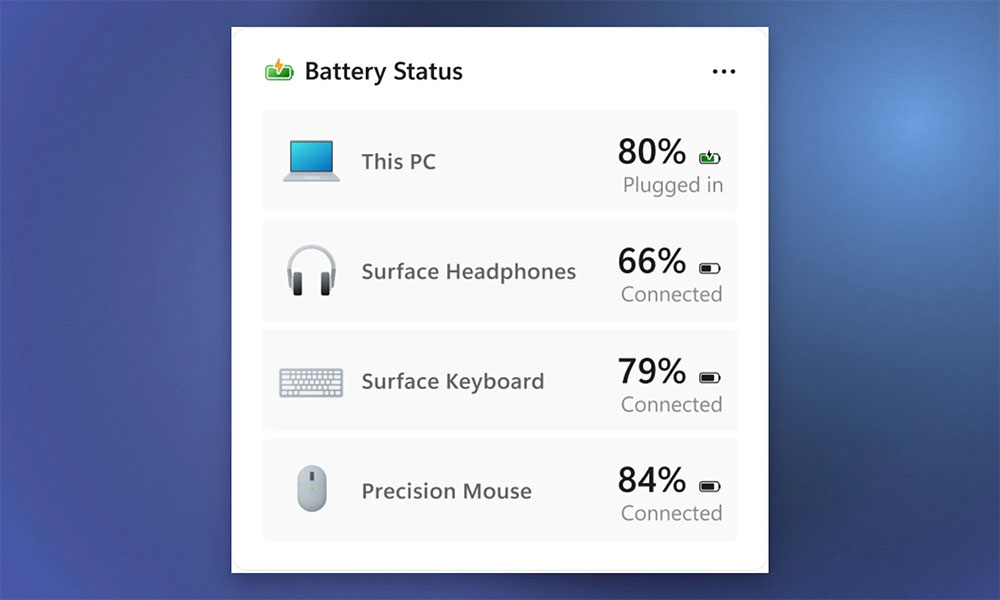
In fact, clues about this feature had already appeared in Windows 11 preview code as early as last month. At the time, there were even rumors that it might also support lock-screen display in the future, but Microsoft has so far only announced how it will be implemented in the widgets panel. The feature’s biggest appeal is its ultimate convenience: before heading out, a single glance at the panel immediately tells you whether your laptop has enough battery, or which mouse or headphones need to be charged in advance, completely eliminating the awkward situation of suddenly running out of power at a critical moment.

However, how far this practical feature can go in the future depends on the breadth of its support. In its current demonstrations, Microsoft is mainly focusing on its own hardware ecosystem and has not yet clearly indicated whether it will fully support wireless accessories from Logitech, Sony, Razer, or other third-party brands. If Windows can one day pull battery information from various Bluetooth accessories across brands, this widget will surely become an indispensable must-have tool on the desktop for many laptop users.
Source: KOCPC Chinese