


2022 has arrived at the end of April before we know it. As we welcome May, of course we can’t forget the annual Mother’s Day! In addition to dining with your mother and giving gifts, don’t forget to wish her a happy Mother’s Day. Starting today (28th), LINE will start this year’s LINE Mother’s Day chat room limited special effects in advance, so that you can prepare in advance to send blessings to your mother!

LINE’s Mother’s Day chat room limited special effects are here. Enter the specified “keyword” to wake it up!
Mother’s Day is celebrated every year on the second Sunday in May. This year, May 1 falls on the first Sunday, which means Mother’s Day will be celebrated on May 8. Whenever there are special holidays, LINE will launch limited-time chat room effects so that users can celebrate the festival online on LINE.
In response to Mother’s Day, which comes relatively early this year, LINE will also start Mother’s Day chat room limited special effects in advance today (28th). This chat room special effect will start at 10:00 on April 28, 2022 (Thursday) and will last until 10:00 on May 9, 2022 (Monday) , as long as you enter the three sets of mysterious keywords for this event, you can call Xiong Da to come out with a big carnation to offer Mother’s Day blessings to your mothers. No matter how busy you are at work, don’t forget to thank your mothers for their hard work over the years!

▲Picture source:LINE Taiwan official BLOG
The keywords for the limited special effects of LINE Mother’s Day chat room this time are “Mother’s Day”, “Thank you Mom” and “Mommy”. Just enter any of these three sets of keywords during the event to wake up the background special effects of the chat room! After the special effect is played for the first time, the user can also click on the keyword link to play it again. The chat room background effects this time are suitable for most devices, whether it is an iPhone (iOS), an Adroid smartphone, or a computer using Mac or Windows. If you update the LINE application to the latest version, you can see the super cute bear on all platforms!
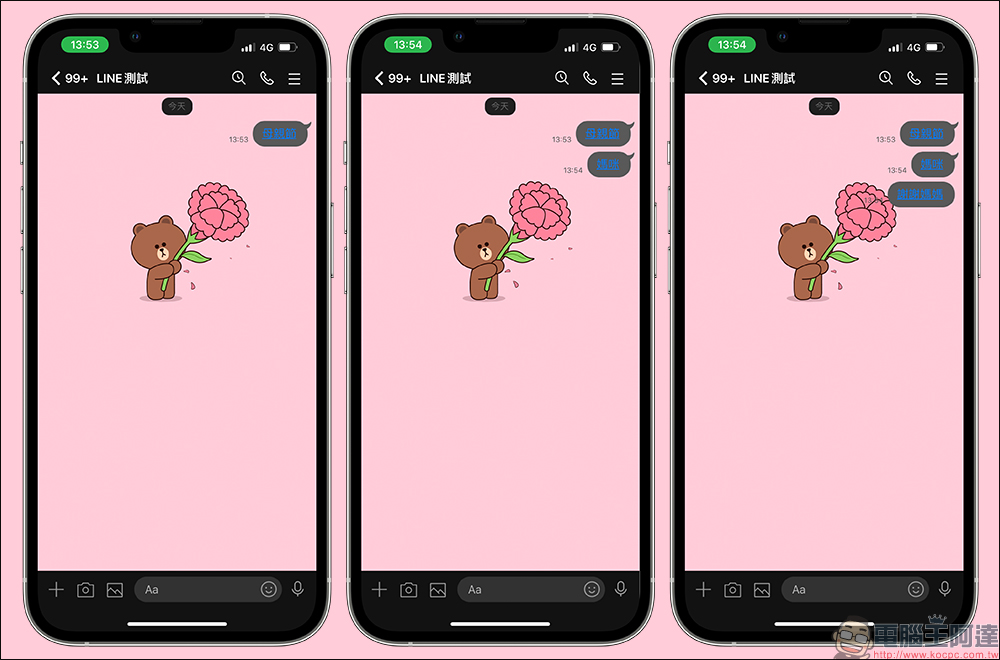
Mother’s Day special effects version
- iOS: LINE App 9.15.0 (inclusive) or above
- Android: Android 7.1 (inclusive) or above, and LINE App 10.2.0 (inclusive) or above
- Computer version (Mac / Windows): LINE application 5.16.0 (inclusive) or above
How to turn on/off chat room background effects?
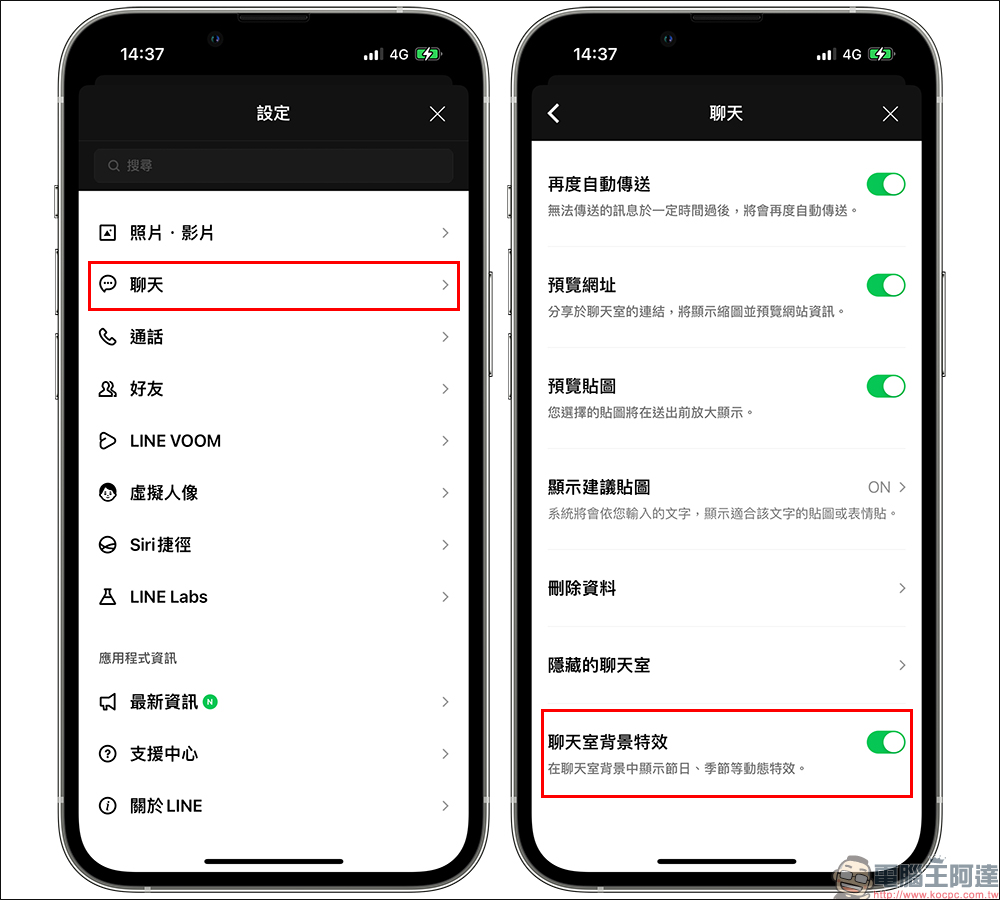
If you find that your device complies with the above version but the Mother’s Day special effect does not appear, you can try to turn LINE back on. If you find that after re-opening, you enter the correct keyword but the chat room effects do not appear, you may wish to check the settings in the LINE App! Go to “Settings” > “Chat” > turn on the “Chat Room Background Effects” function! Usually this feature is turned on by default, but if you don’t want these special effects to appear, you can turn it off here.
In addition to chat room special effects, many of the free LINE stickers we have compiled for you are quite suitable for use in Mother’s Day wishes. If the chat room’s special effects are not enough, you can also use LINE stickers to make your mother happy! More LINE free sticker information,You can click here to refer to the previous LINE free sticker arrangement link.。
Source: KOCPC Chinese