

• About Us
King of Computer Media
  • Home
  • Tech News
  • AI News
  • Apps & Tutorials
  • Mobile & Telecom
  • Lifestyle
  • About Us
No Result
View All Result
  • Home
  • Tech News
  • AI News
  • Apps & Tutorials
  • Mobile & Telecom
  • Lifestyle
  • About Us
No Result
View All Result
King of Computer Media
No Result
View All Result

Home - Internet and software applications - How to watch YouTube with “picture-in-picture” in Chrome, Microsoft Edge and FireFox?

How to watch YouTube with “picture-in-picture” in Chrome, Microsoft Edge and FireFox?

Claire by Claire
July 23, 2021 - Updated on August 4, 2026
in Internet and software applications

Many people regularly watch the live broadcasts of epidemic news from government units. Now that the Olympic Games are about to start, exciting programs are even more difficult to miss. Although YouTube itself has a mini player function, as long as you jump to the tab, you will not be able to see the screen, which greatly limits your computer use. This time I will tell you how to use the super practical “Picture-in-Picture” (PiP) mode to watch YouTube videos in the three major browsers of Chrome, Microsoft Edge and FireFox!

How to watch YouTube with “picture-in-picture” in Chrome, Microsoft Edge and FireFox?

The convenience of the “Picture-in-Picture” mode is that it is not restricted by paging. You can switch to other pages to browse the website and continue watching videos. Chrome, Microsoft Edge and FireFox are currently the most popular browsers, and they all support picture-in-picture. How do you use them?

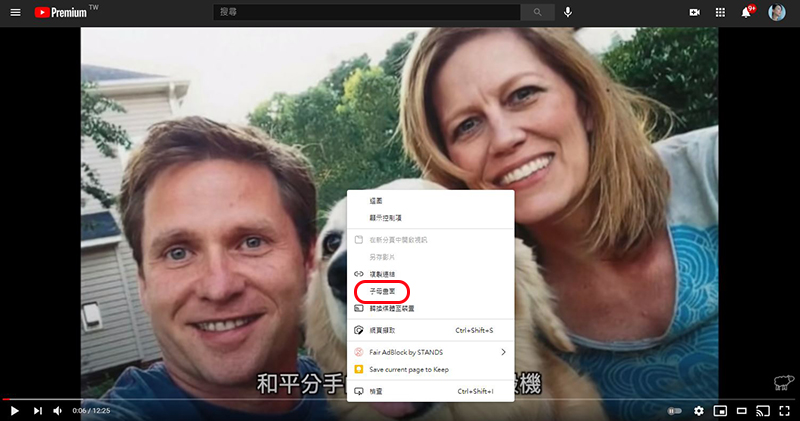
Microsoft Edge

  • Open any YouTube video in Microsoft Edge
  • Double right-click on the player and select “Picture in Picture”
Chrome

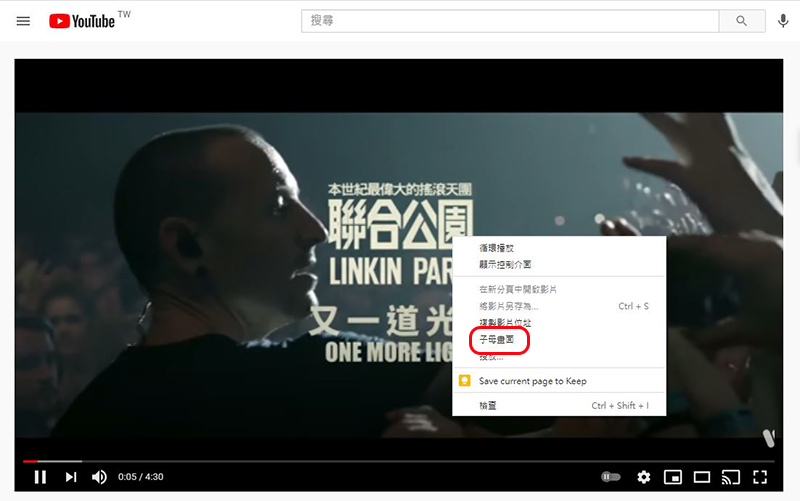
  • Open any YouTube video in Chrome
  • Double right-click on the player and select “Picture in Picture”
FireFox

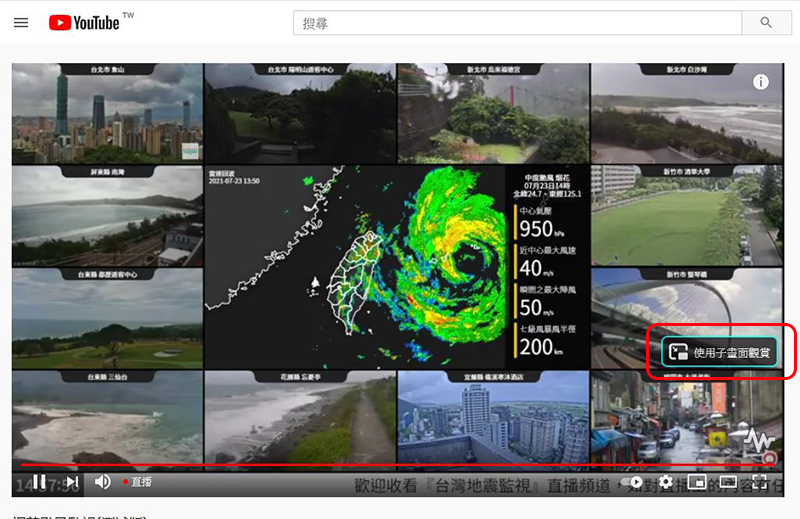
  • Open any YouTube video in FireFox
  • Hover your mouse cursor over the video player and click the “View in picture picture” icon that appears on the right
This feature is free, and there is no need to pay to subscribe to YouTube Premium. It is a function built into the browser. You can also drag it to change its placement or customize its size. It is super easy to keep up with the latest typhoon dynamics or epidemic news at any time!


Source: KOCPC Chinese

Tags: BrowserChromeFirefoxMicrosoft Edgepicture within picturepicture-in-picturePiP

Recent Posts

  • The Xiaomi Pad 8S Pro has passed network access certification and will debut with the self-developed XRING O3 chip.
  • The entire Google Pixel 11 lineup has been leaked! Official promotional renders of the Pixel 11 Pro XL have also surfaced
  • Are Chinese phone battery capacities falsely labeled? A brief look at the “capacity locking” phenomenon in Chinese silicon-carbon batteries.
  • NCC is leaderless, recklessly sending out national-level alert messages!?
  • What does “QR” in QR Code mean?

Recent Comments

No comments to show.
  • About Us

We welcome partnership inquiries and product review opportunities from smartphone manufacturers, iPhone accessory brands, and app developers.koc kocpc.com.tw|Privacy Policy |Hosting & Maintenance: Fast Line Taiwan, A-Chang Digital Technology

No Result
View All Result
  • Home
  • Tech News
  • AI News
  • Apps & Tutorials
  • Mobile & Telecom
  • Lifestyle
  • About Us

We welcome partnership inquiries and product review opportunities from smartphone manufacturers, iPhone accessory brands, and app developers.koc kocpc.com.tw|Privacy Policy |Hosting & Maintenance: Fast Line Taiwan, A-Chang Digital Technology