


Do you believe you can now fit a Steam Deck into an iPhone—no streaming, no gaming PC, just running games directly on your phone? It was just open-sourced. iDeck This is what it does: it brings Valve’s official Steam client (Big Picture interface) to iOS, using compatibility layers and instruction translation to run Windows PC games.Run locally on the device。
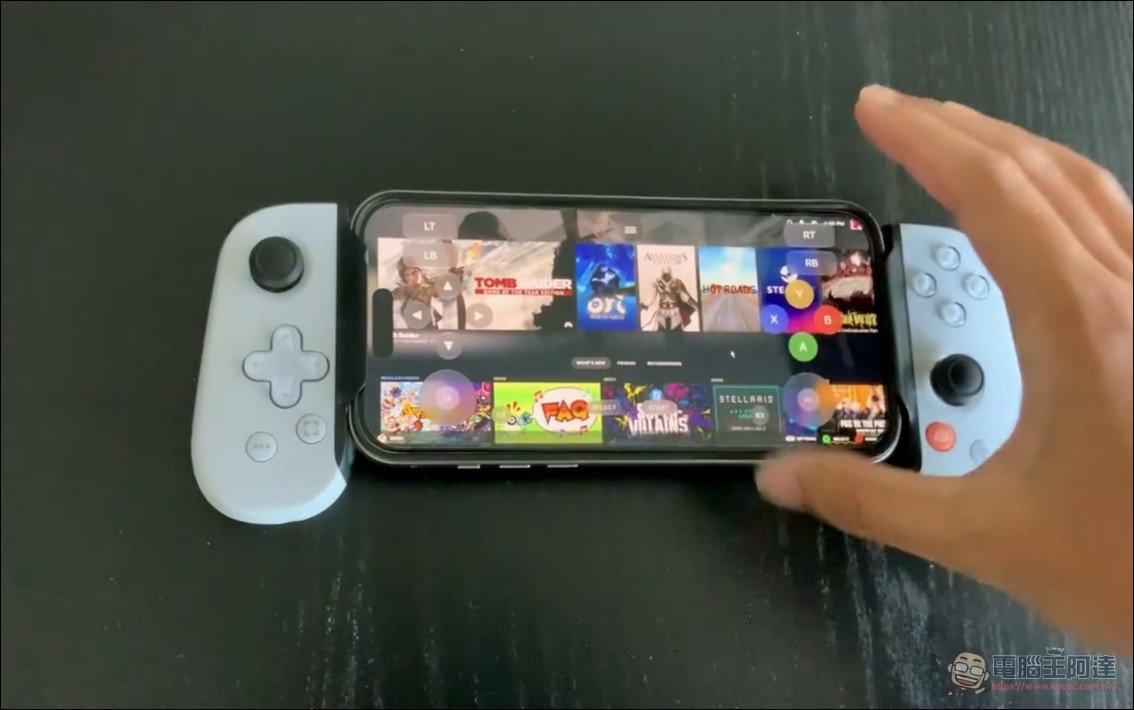
The official demo is very convincing: from the iPhone home screen, tap the iDeck icon, log in to Steam, browse the game library, rotate the phone to landscape, and the screen shows the loading screen for the 2013 Tomb Raider reboot, with a full set of Xbox-style virtual controls floating on both sides (LT/LB/RT/RB, D-pad, dual analog sticks, ABXY, SELECT/START).
The engine underneath: Madeira’s four-layer stack
iDeck itself isn’t responsible for running games; under the hood is an open-source project we introduced earlier. Madeira, capable of running unmodified Windows games on a non-jailbroken iPhone, all contained in a single iOS app.
Its architecture is divided into four layers:
- FEX-Emu: At runtime, the game’s x86/x86-64 code is translated into ARM64 in real time
- Wine 11.4 (ARM64EC version): Provides a Windows environment; Wine itself runs natively, and only the game’s own code needs translation; 32-bit games go through WoW64
- DXMT: Rendering Direct3D 9/10/11 onto Metal
- madeira-d3d12Madeira’s in-house Direct3D 12 implementation, which uses Apple’s Metal Shader Converter at runtime to convert DXIL shaders
There’s also a clever workaround forced by an iOS limitation: iOS apps cannot launch other processes, so Wine’s server can only become a thread, and the entire system runs in a single process. Madeira’s feature list is also complete: game library, Steam login and downloads (Madeira Dock), Steam Cloud save sync (if saves were modified on both sides, ask first; replaced saves are automatically backed up), Bluetooth controller XInput, touch virtual controller, and keyboard/mouse and trackpad passthrough.
What iDeck added: Steam Big Picture interface
Madeira has its own game library interface; iDeck’s differentiation is toBig Picture on Valve’s official Steam clientTreat it as the main interface: use Steam’s own account system, game library, and installation process; even Steam Guard and remembered logins go through the official mechanisms. iDeck does not touch user passwords and does not replace Steam’s verification. Game license checks remain with Valve.
Madeira also includes a built-in Windows desktop session, so Windows apps outside of games may also be launched. For controls, it supports physical controllers, direct touch, and an on-screen virtual controller (validation is still in progress). There is also a floating iDeck button that can be dragged anywhere: bring up the keyboard, show the control layout, adjust the layout, open the Steam menu, or request a graceful game exit.

Currently, compatibility is decided on a game-by-game basis. Older indie games usually succeed more easily than performance-intensive new releases. The official iDeck demo choosing the 2013 Tomb Raider reboot as a showcase probably also took this into consideration—this 2013 AAA title is much friendlier to the A17 Pro.
Want to play? Get past three levels first.
Level 1: This isn’t something you can just download and play. The public version isSource code snapshotIt does not include a precompiled runtime, there is no ready-made IPA, and even the Steam CEF client has to be obtained yourself through legitimate channels; the official guidance also specifically warns against copying other people’s authentication cache. Nor is it a one-click clean build.
Level Two:JITiOS only allows JIT to be enabled when a debugger is connected. Madeira uses StikDebug or the built-in StikJIT assistant to complete the authorization pairing, and on iOS 27 it can even pair by itself without a computer. Also, because JIT is required, these kinds of apps cannot be distributed on the App Store.
Third hurdle: signing. Sideloading requires an Apple ID, and free accounts work too, but signatures expire after seven days, so you have to refresh once a week; games and saves persist between reinstalls. Madeira itself requires iOS 26 or later, and development is done on the latest Pro models.
iDeck – GitHub
The predecessor DroidDeck and this wave of “pocket PC gaming” hype.
The inspiration behind iDeck DroidDeck It’s the same thing for Android: bringing the SteamOS experience to Android. Since it was open-sourced at the end of September, it has accumulated 14,000 stars.[5]Overseas media assessments of Madeira echo this direction as well; generationamiga described it as “turning your iPhone into a Windows PC gaming handheld”: no remote gaming PC, not a mobile port—just installing Windows games on a phone and seeing whether they run.
iDeck draws a clear distinction between two things: it runs the Windows version of Steam plus compatibility-layer translation,Linux SteamOS was not installed, nor were the games turned into native ARM iOS apps.Those who are able can try testing it themselves (though even if it runs, it won’t be able to install many games anyway).
Source: KOCPC Chinese