


A few days ago, LINE officially announced that it will usher in a newly designed user interface in the LINE 10.21.0 version update., the first comprehensive update to the user interface since its launch in 2011. Recently, LINE has also quietly released 10.21.0 updates for the LINE Android version starting on the 7th, and it is expected to be launched on the LINE iOS version soon. Users will automatically apply this new interface as long as they update to LINE 10.21.0 (or later versions).

▲Picture source:LINE Taiwan official BLOG
LINE 10.21.0 version update released: new user interface, simpler, broader and brighter
After countless internal tests, positive and negative reviews, and review of past user feedback, the LINE team has established an optimization direction of “simple, broad, and bright” with a new design for this LINE 10.21.0 version update, including optimizing the color, layout, icons, fonts and other aspects of the overall interface, while retaining the relative position of the main functions.
Adjustments such as reducing the grid lines in the interface and optimizing the configuration of the information bar make user operations more intuitive. In addition, adjusting both text and text also increases overall reading concentration. In addition to the surface interface design visible to users, this update is also linked to the internal development architecture, which can greatly improve efficiency and quality in future functional updates or related optimizations.
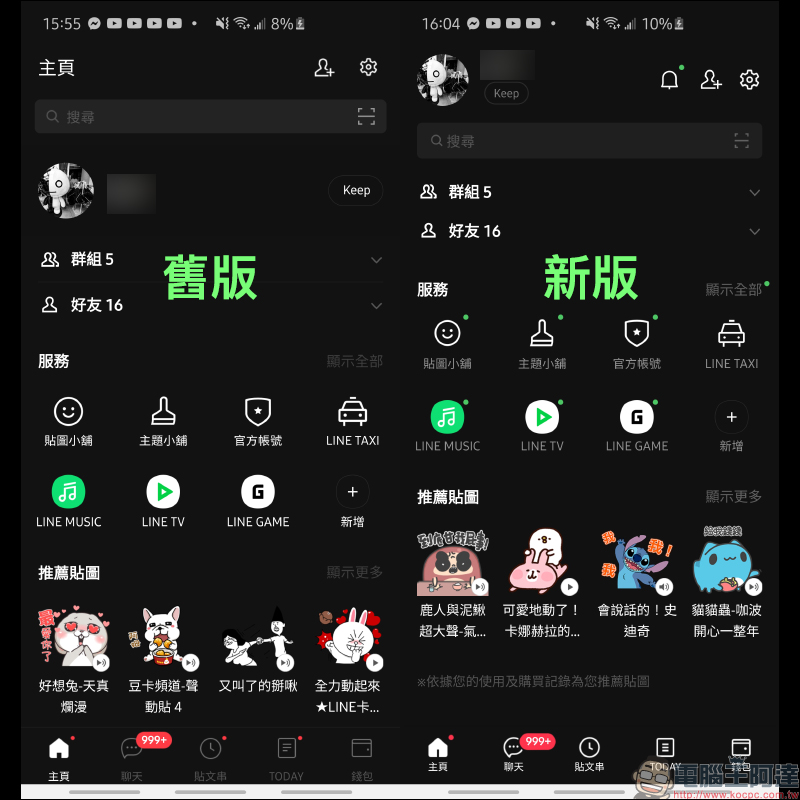
Home page
Then let’s compare the differences between the old version and this new user interface screen! Since the Android version of LINE is currently the first to release the update, the LINE iOS version is not expected to be released until recently. Therefore, ordinary users are not yet able to actually experience the new interface of LINE iOS 10.21.0. Here we also use the screen released by LINE’s official blog to supplement the differences in the user interface of LINE Android 10.21.0 before and after the update.
Differences in the interface between the old and new versions of LINE iOS:
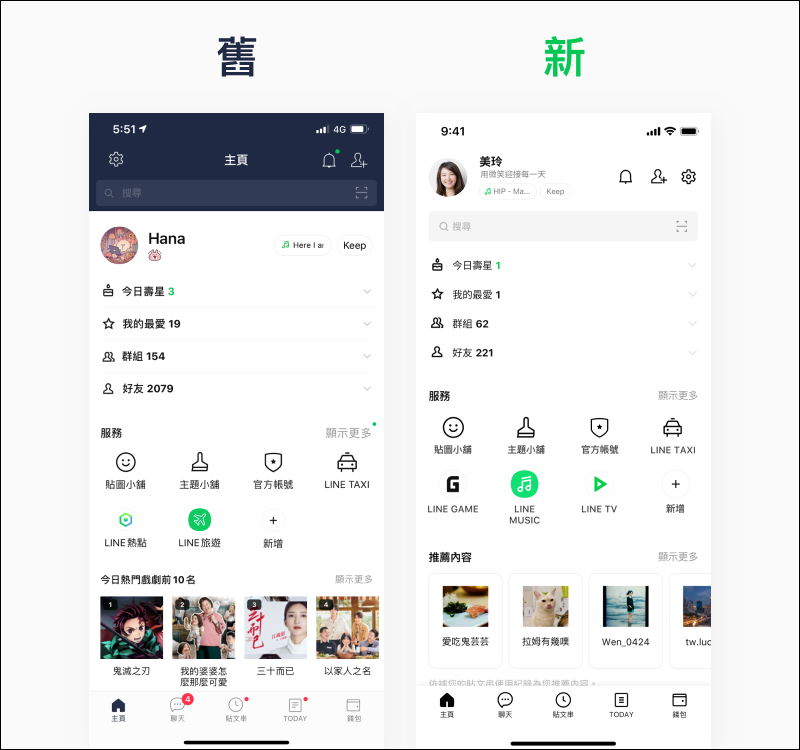
▲Picture source:LINE Taiwan official BLOG
Differences in the interface between the old and new versions of LINE Android version:
chat
Differences in the interface between the old and new versions of LINE iOS:

▲Picture source:LINE Taiwan official BLOG
Differences in the interface between the old and new versions of LINE Android version:
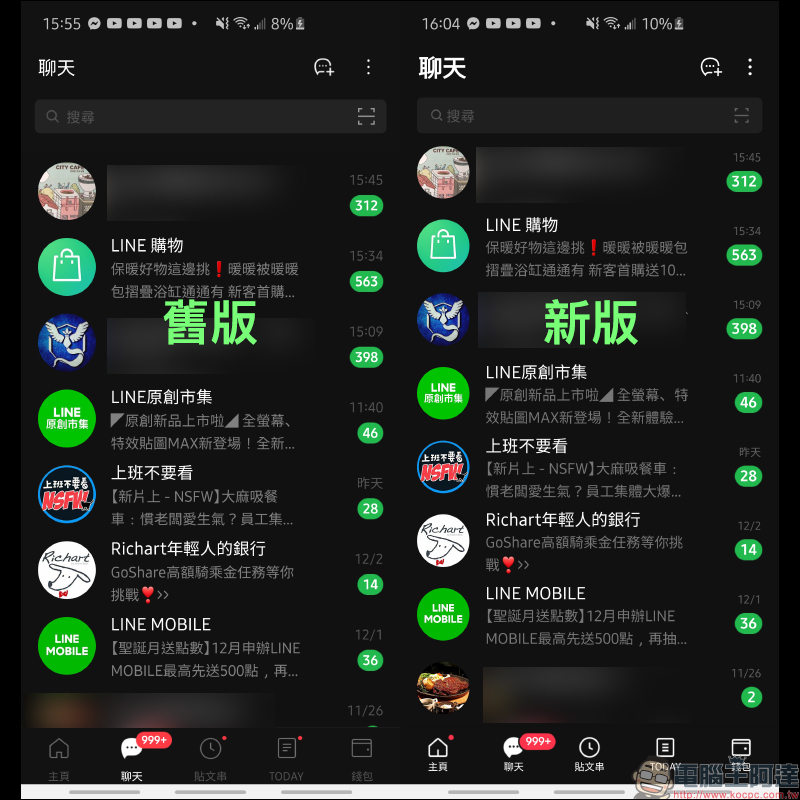
chat room
Differences in the interface between the old and new versions of LINE iOS:

▲Picture source:LINE Taiwan official BLOG
Differences in the interface between the old and new versions of LINE Android version:

Post string
Differences in the interface between the old and new versions of LINE iOS:

▲Picture source:LINE Taiwan official BLOG
Differences in the interface between the old and new versions of LINE Android version:

TODAY
Differences in the interface between the old and new versions of LINE iOS:

▲Picture source:LINE Taiwan official BLOG
Differences in the interface between the old and new versions of LINE Android version:

wallet
Differences in the interface between the old and new versions of LINE iOS:

▲Picture source:LINE Taiwan official BLOG
Differences in the interface between the old and new versions of LINE Android version:
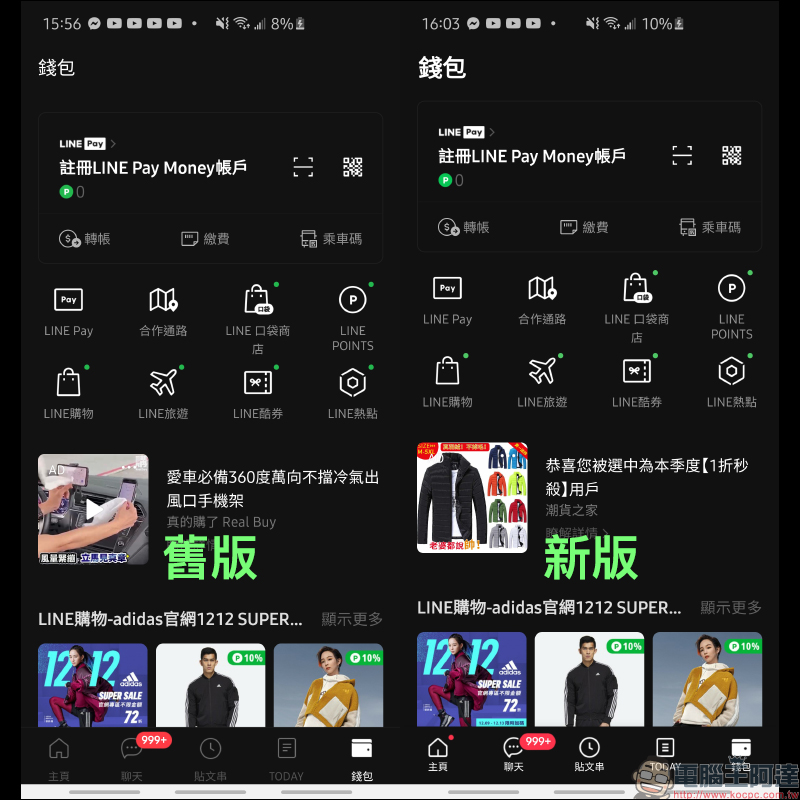
Source:LINE Taiwan official BLOG
Further reading:
LINE application tips: How to set up “Text-only photo stickers”, another option besides photos and avatars
Memoji Christmas dress-up instruction, how to play with Santa hats and red masks!

Source: KOCPC Chinese