


People who often install systems know the importance of product keys. Maybe ordinary users don’t care. The previous free upgrade of Widnows 10 made me eager to find a cold string of text, and then started to manage the software serial number. In fact, every time they refill their computer system, most people have forgotten the serial number they used, or even cannot find the purchase information. What should they do? A passer-by told you to use the LicenseCrawler tool to easily find out the serial numbers of various software on the system. In addition to being free, you don’t need to enter any commands. Just one click and wait for the scan to reveal the serial numbers of all installed software.

用 Telegram 訂閱【挨踢路人甲】最新文章:https://t.me/itwshare
After installing the system or software (such as Windows 10 serial number, Office 2019 serial number, etc.), ordinary users often neglect to record the software activation serial number (registration code), because they do not expect to reinstall the system. When they want to reinstall the system, it is like rummaging through the boxes and boxes. In fact, the product serial number is usually stored in the login file of the computer system and is not easy to obtain from the interface. LicenseCrawler It is a small but beautiful set of free software that can scan the Windows login file for product keys and other software authorization codes or serial numbers related to the Windows operating system. Give it a try!
[Software name]: LicenseCrawler
[Software version]: 2.3
[Software language]: Multiple languages, supports Traditional Chinese
[Software nature]: Free software (registration required for commercial environment)
[System support]: Windows XP/Vista/7/8/10
【Official website】:https://bit.ly/376orGd
[Download URL]: Please selecthere
Go directly to the official website to see the [Download] page. Click to see the instructions and download link.

Scroll down to see the different download platforms, select one of the links to download.

After downloading and decompressing, LicenseCrawler.exe is an installation-free execution file. I am accustomed to right-clicking the mouse and “execute as system administrator”.
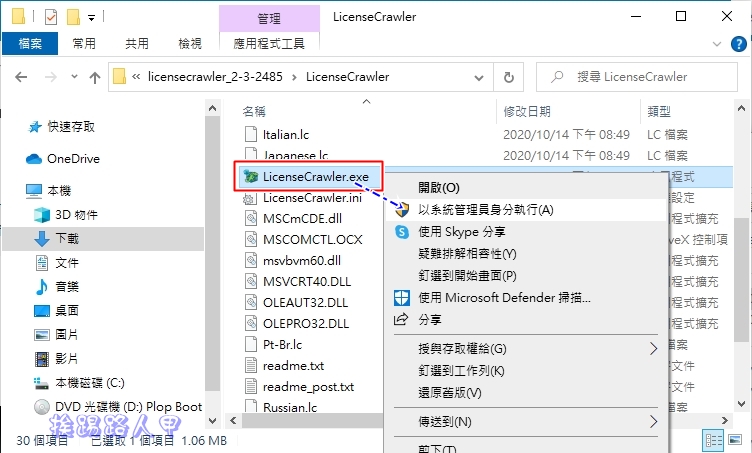
Windows 8/10 has a SmartScreen filtering function, which mainly helps detect phishing websites and ensures that you will not install malware or malicious code, which is a program filtering function that performs illegal, virus, fraudulent or malicious activities. If you are worried, you can select [Do Not Run] to leave. If you want to continue, please click [Other Information].

After Windows 8/10, the work of protecting the system becomes more and more rigorous. At this time, the system will display the following message window, which mainly tells you who the publisher of this LicenseCrawler.exe application is. Of course, the decision is still up to you. I chose [Execute Still] to continue.

In the Windows 8/10 environment, a window for using this account will appear during execution. This is because a security warning window of “User Account Control” will appear due to security issues. Mainly when the user performs some actions that will affect the system, a confirmation screen will often appear, so it is better to press [Yes] to continue (if you want to remove this warning, please refer to “Talking about User Account Control (UAC) in Windows 8/10″article).

When executing, the language selection first appears. Chinese is supported, but Taiwan is not expected.

You will then be asked a question. Only if you answer it correctly can you enter the program and press the number of buttons according to the number.

If there are additional pop-ups, ignore them and press [Accept] to continue.

If you don’t understand it, don’t worry about it. Just click the “Search” button to start looking for the software serial number stored in your computer.
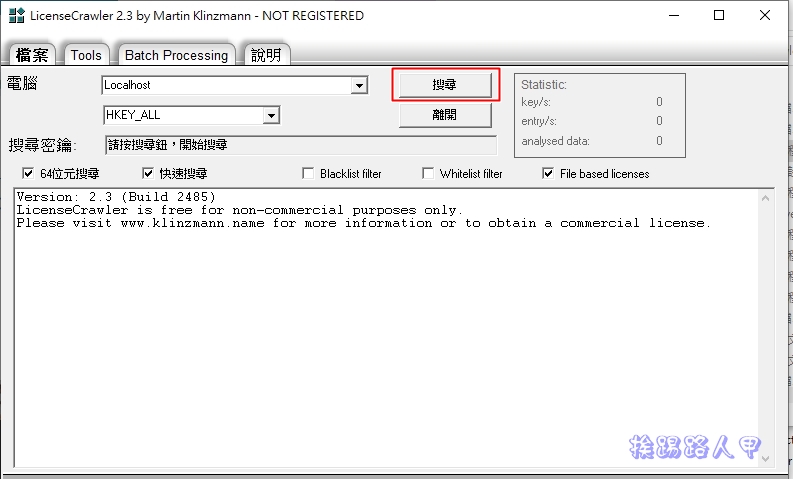
Don’t worry about him when he pops out of the countdown window, just wait for the countdown in the lower right corner to finish.

After the search is completed, you can see the software name, registration code or other related information found so far in the window below.

Reference article
- Youtube Premium cross-region registration in India, the home version only costs NT$12 per month
- Rufus is a small yet comprehensive USB boot tool that supports direct downloading of Windows 10
- Command-based network speed test tool iPerf3 reveals the true side of network bandwidth
- The lightweight and easy-to-use AJA System Test disk speed test tool (Mac / Windows)
Source: KOCPC Chinese