


Many people use it every day iPhone , but often ignore the true strength of built-in apps. Among them, the seemingly simple “memorandum” In fact, it is no longer just used to record to-do items or casual notes. It combines functions such as privacy protection, document digitization, and voice-to-text, and can be used in work and daily life.
Whether it is storing important information, quickly organizing paper materials, or taking complete notes during meetings, as long as you master a few key skills, you can greatly improve your efficiency. This article helps you sort out 3 useful iPhone memo functions that many people don’t know about, but will be inseparable from once you start using them.
Don’t just use it to take notes anymore! Learn 3 hidden functions of iPhone Notes to double your efficiency
The functions of smartphones have evolved every year, but most people only use them for the most superficial operations, such as taking pictures, sending messages, or scrolling through social groups. In fact, many apps built into the iPhone already have high integration capabilities. As long as you are familiar with the functions, they can replace many third-party tools.
Memos are a classic example. It looks like a simple notepad, but in fact it has been upgraded to a multi-functional information center. From protecting confidential content, to converting paper materials into electronic files, to automatically generating verbatim manuscripts, they all demonstrate strong productivity potential. Especially for those who need to organize information, record inspiration, or hold frequent meetings, it is an underestimated efficiency tool. The following 3 tips are worth learning for every iPhone user.
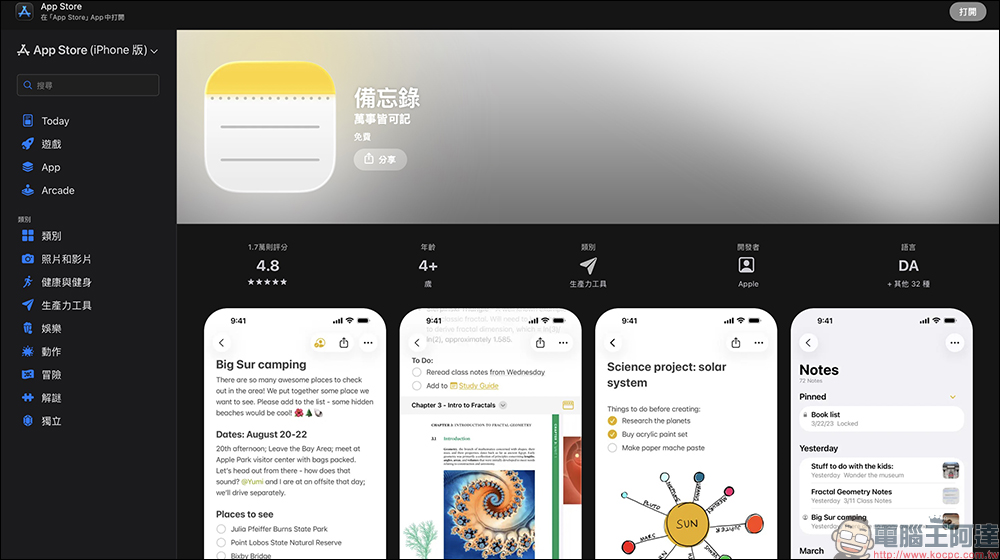
1. Lock the memo and add a line of defense for important information
Many people are accustomed to recording account passwords, important document information, and even financial-related information on their mobile phones for easy reference at any time. But if the phone is accidentally lent to someone or the screen is seen in public, privacy may be exposed. Memo provides a “lock” function to provide an additional layer of protection for sensitive content.
The operation method is quite intuitive. After opening the memo you want to protect, just press and hold a certain memo. The unlocking method can directly use the iPhone password, or you can set a unique password. It also supports Face ID verification, taking into account security and convenience.
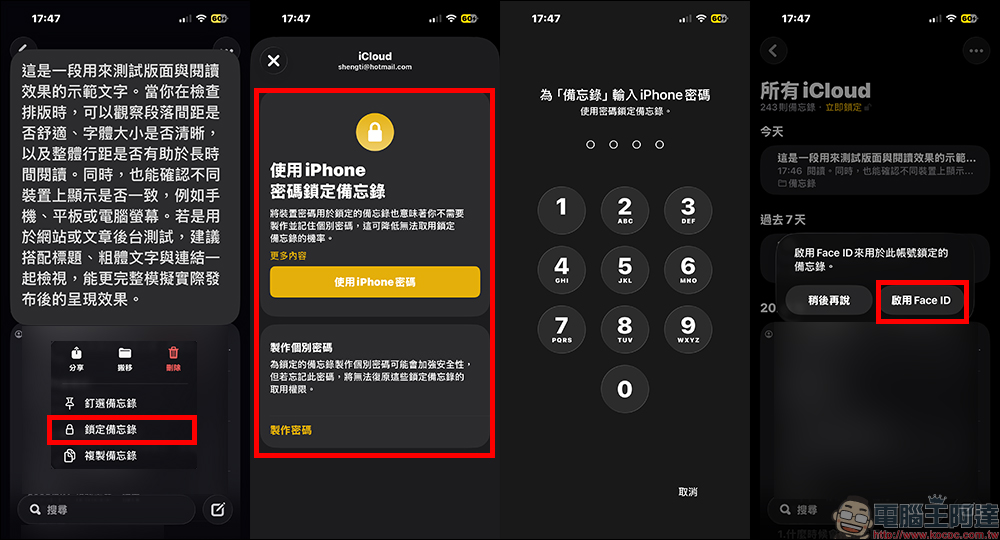
This function is especially suitable for saving ID information, insurance information, Wi-Fi passwords or important contract content. Rather than scattering information across different apps, it is better to centrally manage and encrypt it, making it safe and easy to find. Of course, it is still recommended to avoid completely recording overly sensitive information, such as complete credit card numbers and security codes. Good digital habits are always the first step in information security.
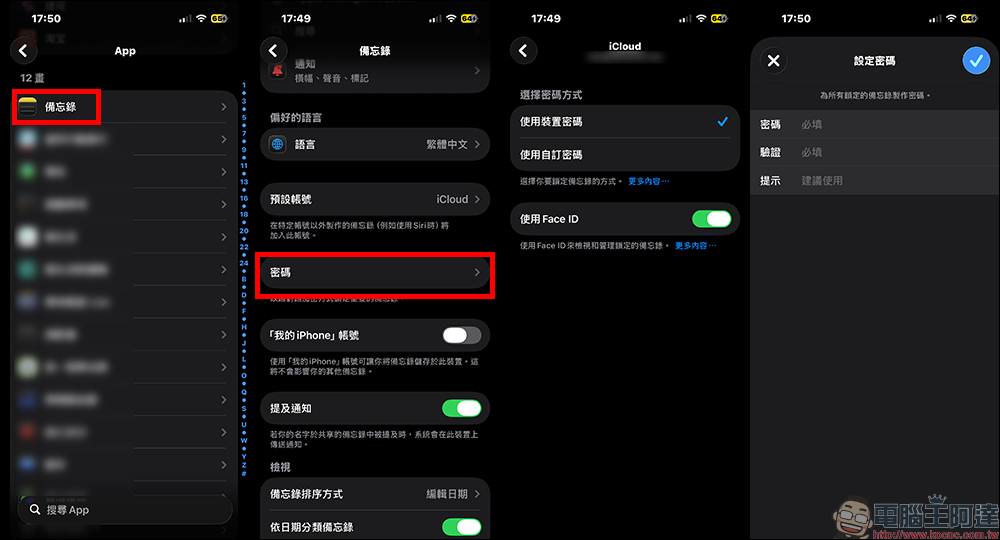
If you want to change the lock password, you can select App in “Settings”, then find the “Notes” app. After entering, select “Password” to see the password method set, and you can also change the password here.
2. Scan documents and turn paper into electronic files in one second
In the past, if they wanted to digitize a document, most people would download a scanning app. But in fact, iPhone Notes has already built-in a complete scanning function, and the recognition and cropping performance are quite mature. There are two ways to activate it. You can click the attachment button in a memo and select “Scan Document” to open it. Or just press and hold the Memo App icon to quickly enter scanning mode.
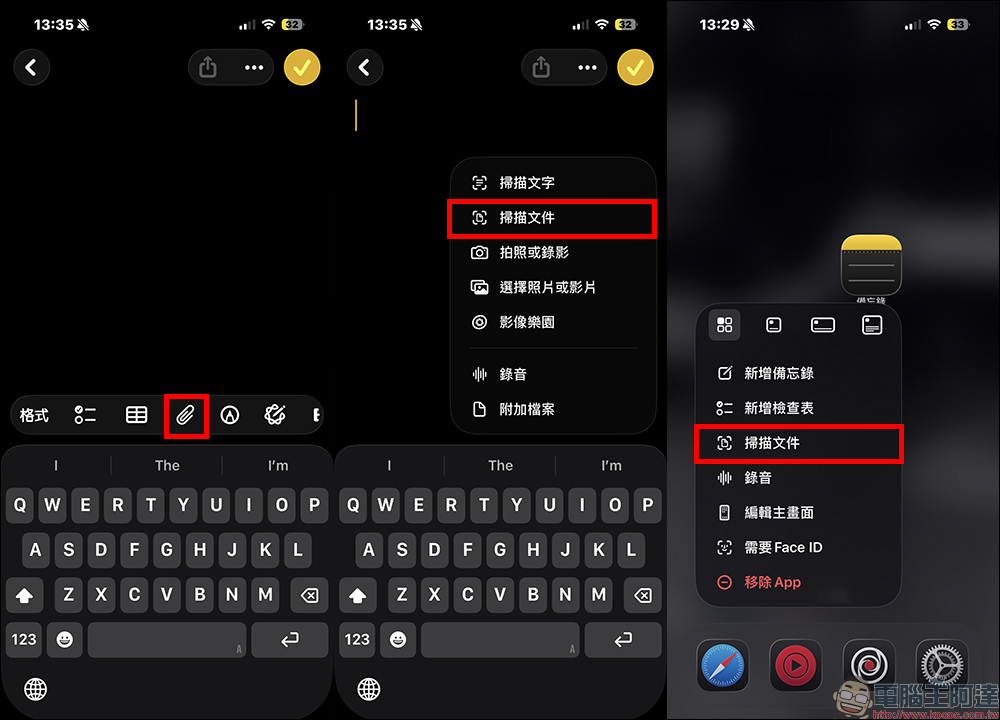
Just point the lens at the document when scanning, and the system will usually automatically detect the frame and complete the shooting. If the light is uneven or the angle is skewed, it can be adjusted manually to ensure a clear picture. When finished, you can add text, mark key points, or even sign directly. This is very convenient for people who need to send signed documents back.

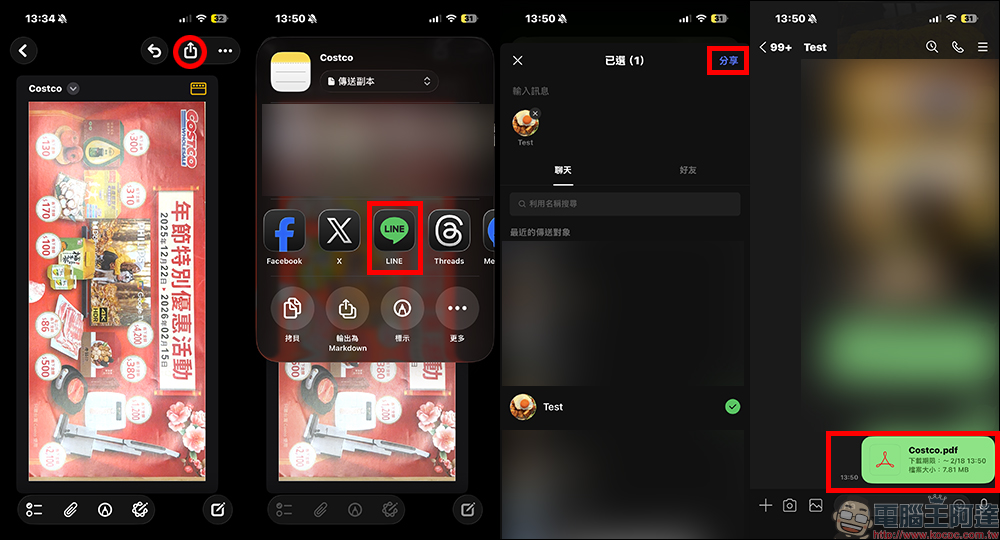
More practical is the sharing mechanism. When sharing through communication software such as LINE, the sent file will automatically be converted to PDF format, no additional conversion is required. Whether it’s contracts, quotes, course notes or receipts, they can be quickly organized and saved.
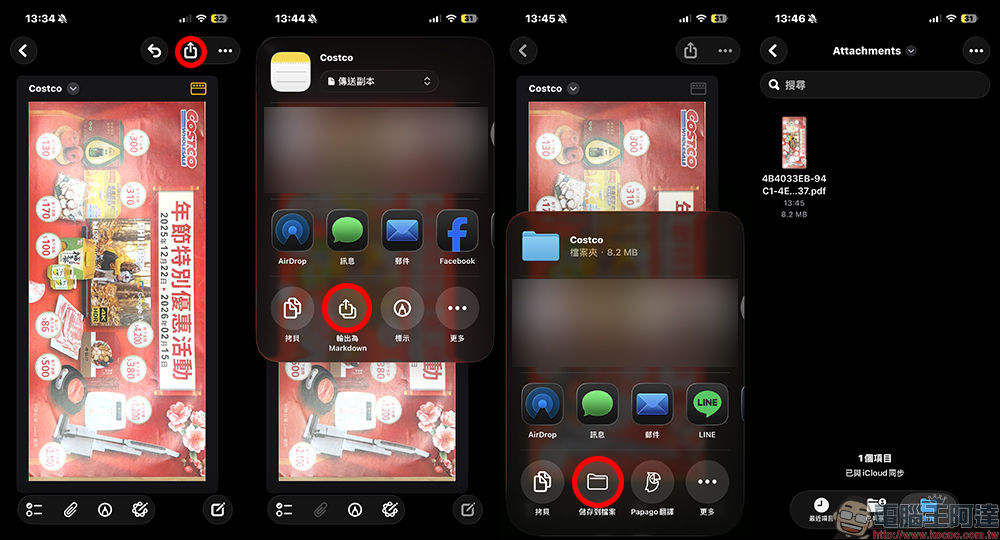
If you want to save PDF files to iPhone, select “Export as Markdown” on the share page and then save to the desired location.
For people who frequently travel or work remotely, mobile phones are almost a mobile office. Installing one less app not only saves storage space, but also makes the operation process simpler.
3. Recordings are synchronized to generate verbatim transcripts, so meeting minutes are no longer messy.
During meetings or interviews, it is often difficult to keep up with the rhythm of typing while listening, and simply recording requires time to be played back and organized. Recording of memoverbatimFunction, just solve this pain point. The opening method is similar to scanning, just start recording in the memo. After the recording is completed, the system will automatically generate verbatim content, which users can directly copy, edit, or organize into formal notes.
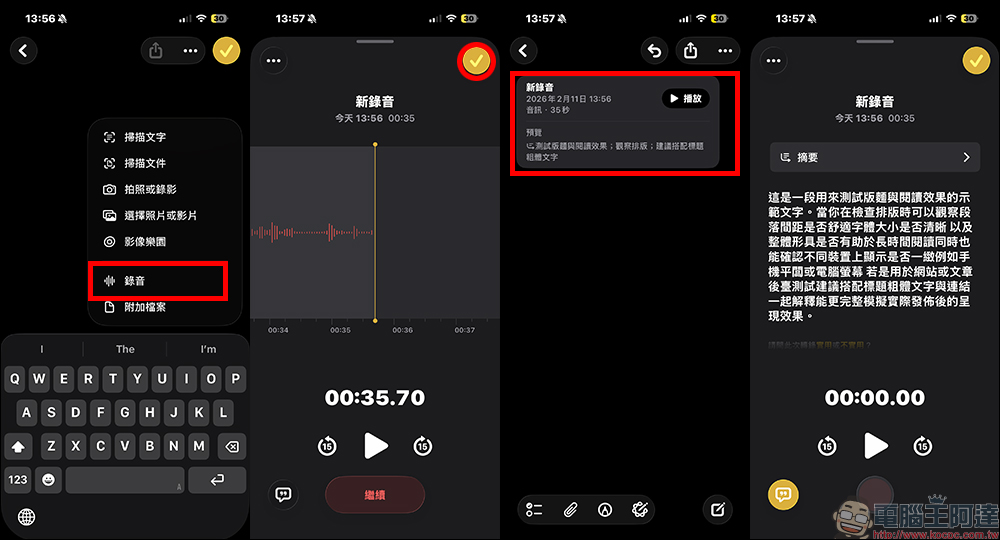
This feature is especially helpful for journalists, students, researchers, or people who need frequent meetings. It not only saves organizing time, but also reduces the risk of missing important points. Another hidden advantage is search. Once the verbatim manuscript is created, you can quickly find relevant paragraphs by entering keywords in the future, greatly improving the efficiency of data search. However, it is still recommended to prepare a backup recording device for important occasions to avoid environmental noise or excessive distance from affecting the recognition quality. Only by treating technology as an assistant, rather than as your sole reliance, can you ensure nothing goes wrong.
Conclusion
Many people think that to improve efficiency, they must download a large number of tools, but in fact, as long as they have a deep understanding of the built-in functions of the mobile phone, daily operations can become smoother. Memo is a typical example. It integrates security, organization and records into the same platform, which not only reduces learning costs, but also reduces the confusion caused by app switching.
From locking private content, to quickly scanning files, to automatically generating verbatim transcripts, these functions may seem low-key, but they can come in handy at critical moments. When you start to treat Notes as a personal database and mobile assistant instead of just a notepad, you will find that your work process becomes smoother and your life becomes more organized.
Instead of chasing new tools, start by getting the most out of your iPhone. Maybe the next feature that will greatly improve your efficiency has already been lying quietly in your phone, just waiting for you to open it and use it.
Further reading:
Source: KOCPC Chinese