


At the I/O developer conference on 2026/5/19, Google announced it will adjust the usage caps for the Gemini model, no longer calculating based on the number of commands issued but instead determining them based on Token computation volume. As a result, Taiwanese Google AI paying customers not only received a pleasant surprise without prior noticeYouTube Premium Lite or a free YouTube Premium subscriptionApart from the perks, I also received a notice that Gemini usage limits will be adjusted and the basic plan will no longer provide 1000 AI points per month.
What are the details of Google’s tightened Google AI usage limits starting May 20? How much quota do Gemini core services consume? How can you avoid exceeding your usage quota? Here is an explanation and analysis:

Starting May 20, Google will tighten Google AI usage limits. A summary video and detailed explanation of the new usage calculation mechanism, limits, and how to conserve usage are below:
1. Gemini AI Usage Cap Adjustment Details:
Google announced at the 2026 I/O developer conference that it will adjust the Gemini model usage cap. Paid Google AI users in Taiwan have been receiving notifications that starting May 20, the changes will target…Usage limits and AI points for the Gemini app have been adjusted. Model access permissions.Original features and storage space will remain unchanged.
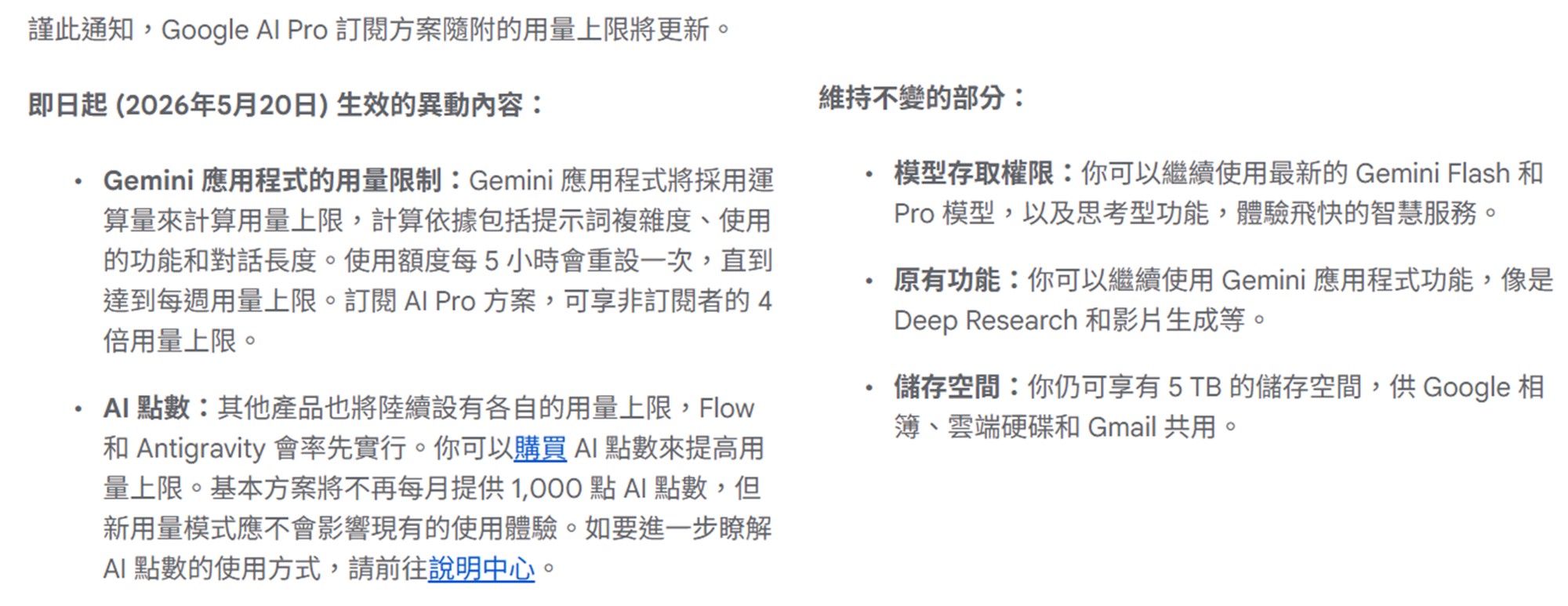
The following is an explanation of the changes effective May 20:
A.Gemini App Usage Limits:
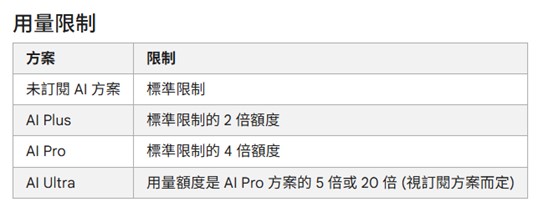
Beginning May 20, the Gemini app will use compute to calculate usage limits, based on prompt complexity, features used, and conversation length. Usage quotas reset every 5 hours until the weekly usage limit is reached. The limit for regular free members is the “Standard limit.”AI Plus subscribers get twice the usage; AI Pro offers four times the usage; and AI Ultra provides up to 20 times the standard usage. If your subscribed Google AI plan has reached its usage limit, in addition to upgrading to a higher-tier plan, you can also switch to Flash-Lite to continue the conversation.
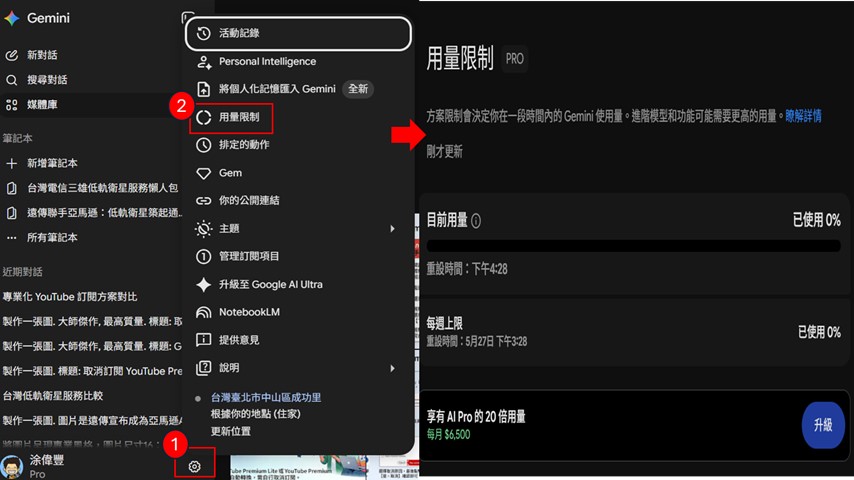
How to check current usage?
In the Gemini app or on the web, open Settings in the bottom-left corner and select Usage Limits to check your remaining quota. Your current usage will be shown as a percentage, along with the reset countdown.
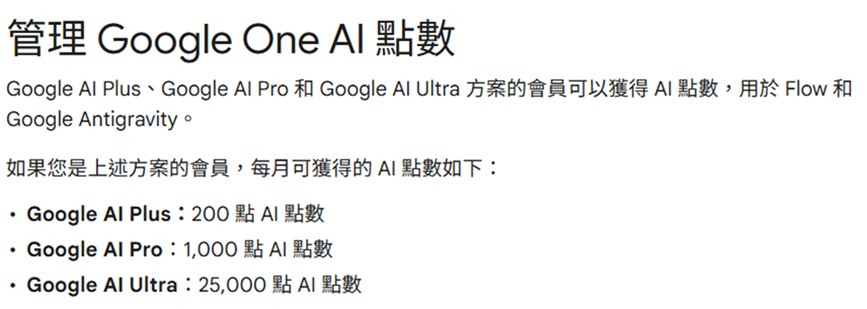
B. Basic plan no longer includes free AI Credits:
Starting May 20, the Basic plan will no longer provide 1,000 AI credits per month. Other paid plans will continue to receive their existing monthly AI credits at no extra charge. In other words, AI Credits (AI Credits) officially become the core token for paid Google AI service subscribers to purchase extra compute. The new system operates mainly through a dual-track mechanism of “base quota” and “AI Credits (top-ups).” When the basic compute quota (compute volume) of the original AI paid plan, which resets every 5 hours, is exhausted, AI credits will be used to add capacity without interrupting service.
2. What usage do Gemini core services consume?
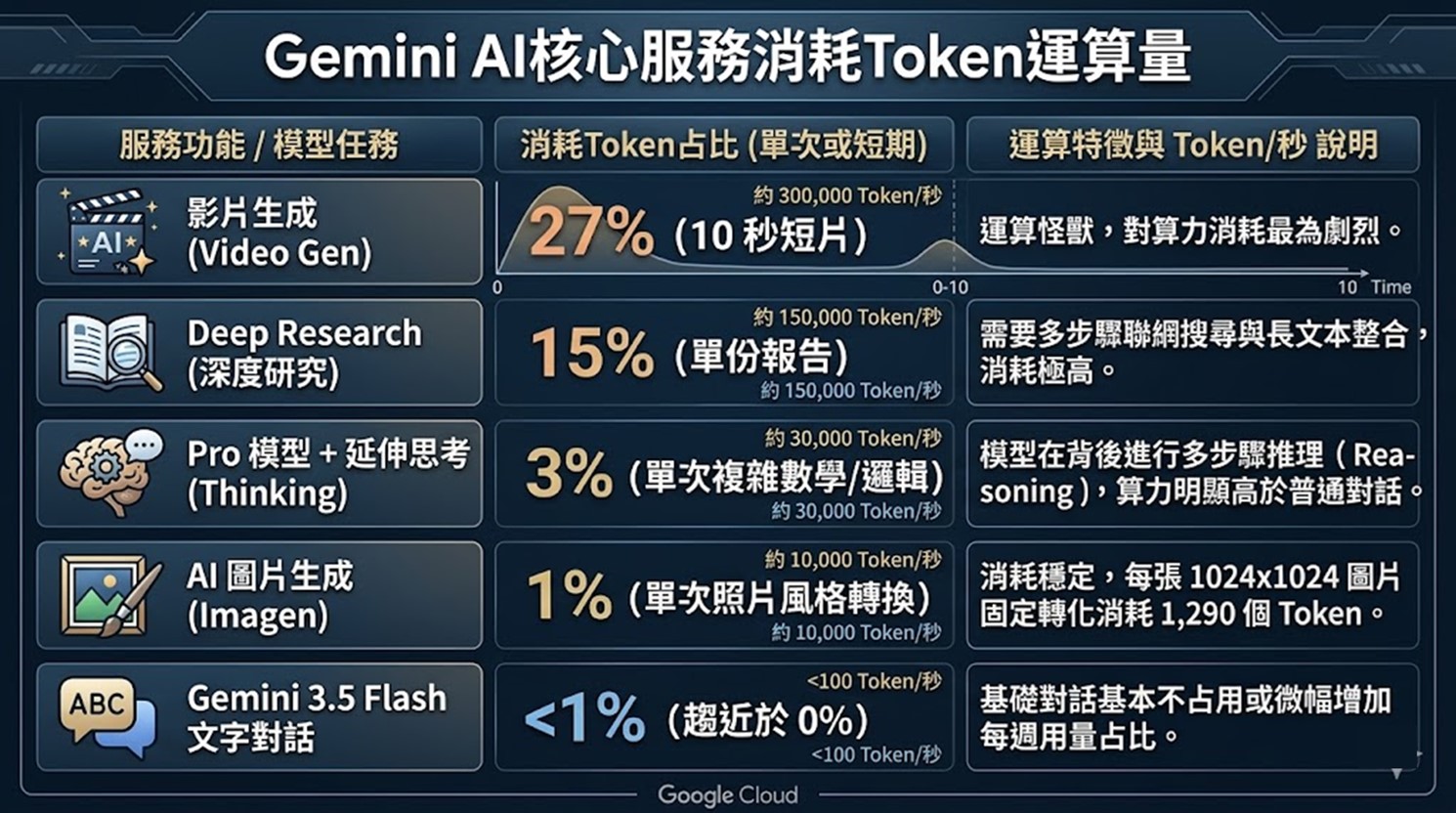
According to Liberty Times editor testing, the AI image generation feature—asking Gemini to convert a designated photo into anime style—accounts for only 1% of the current quota; answering a math problem with the Pro model plus extended thinking adds another 3%. Using Deep Research to produce a survey report on the memory industry consumes 15% of the quota; using video generation, a 10-second clip uses up 27% of the quota.
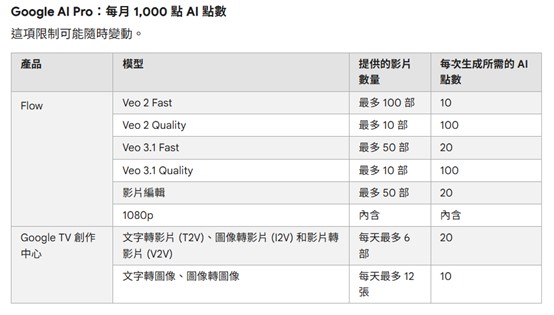
For the AI credit consumption portion, based on…Google’s official websiteData: AI point consumption for Google AI Pro users is as follows:
3,How to avoid exceeding the recommended dosage?
To avoid frequently reaching the daily usage limit, you can take the following steps to reduce usage:
A. Adjust conversation and usage habits:
a. Start new chats regularly,Avoid accumulating an overly long history in the same conversation thread.
b. Summarize first, then ask questions,When asking about a long document, extract the key sections first or have the AI summarize it before continuing the discussion, to reduce unnecessary token usage.
c. Streamline the prompts,Use specific, concise prompts and limit the length of Gemini’s responses.
d. Compress input data,Avoid pasting the entire lengthy PDF or code directly; instead, convert it to Markdown format or submit only the most critical sections.
e. Limit the AI’s output length,In the prompt, explicitly ask the AI to “explain briefly,” “summarize in under 50 words,” or “list the key points.”
B. Manage or upgrade subscription plan:
a. View usage limits,Click “Usage Limits” to view your remaining daily and weekly quota.。
b. Upgrade to the right Google AI plan,For heavy usage, consider upgrading to the Google AI Pro plan to unlock higher limits.

Source: KOCPC Chinese