


With AI enhancements in Windows 11 24H2, Paint and Notepad have become significantly more powerful compared to previous versions. However, Microsoft hasn’t stopped there. The company recently announced on its official website that three new major features are coming, among which “Generative fill” looks quite promising. Here’s a summary for you below.
Also, to add on, the features announced this time are currently only available in the Windows 11 Canary and Dev channels, meaning it may still be a while before they are released.

Windows 11’s Paint will introduce “Generative fill” and “Generative erase” features
In the latest Windows 11 Canary and Dev builds, Paint has added a powerful “Generative fill” feature that lets you generate desired content in any area of an image using text, and AI will calculate and generate content that matches the specified area.
As shown below, first select a region in the image, then a small menu will pop up. Enter the description of the content you want to generate in the input box, then click Create, and the AI will begin computing and generating.
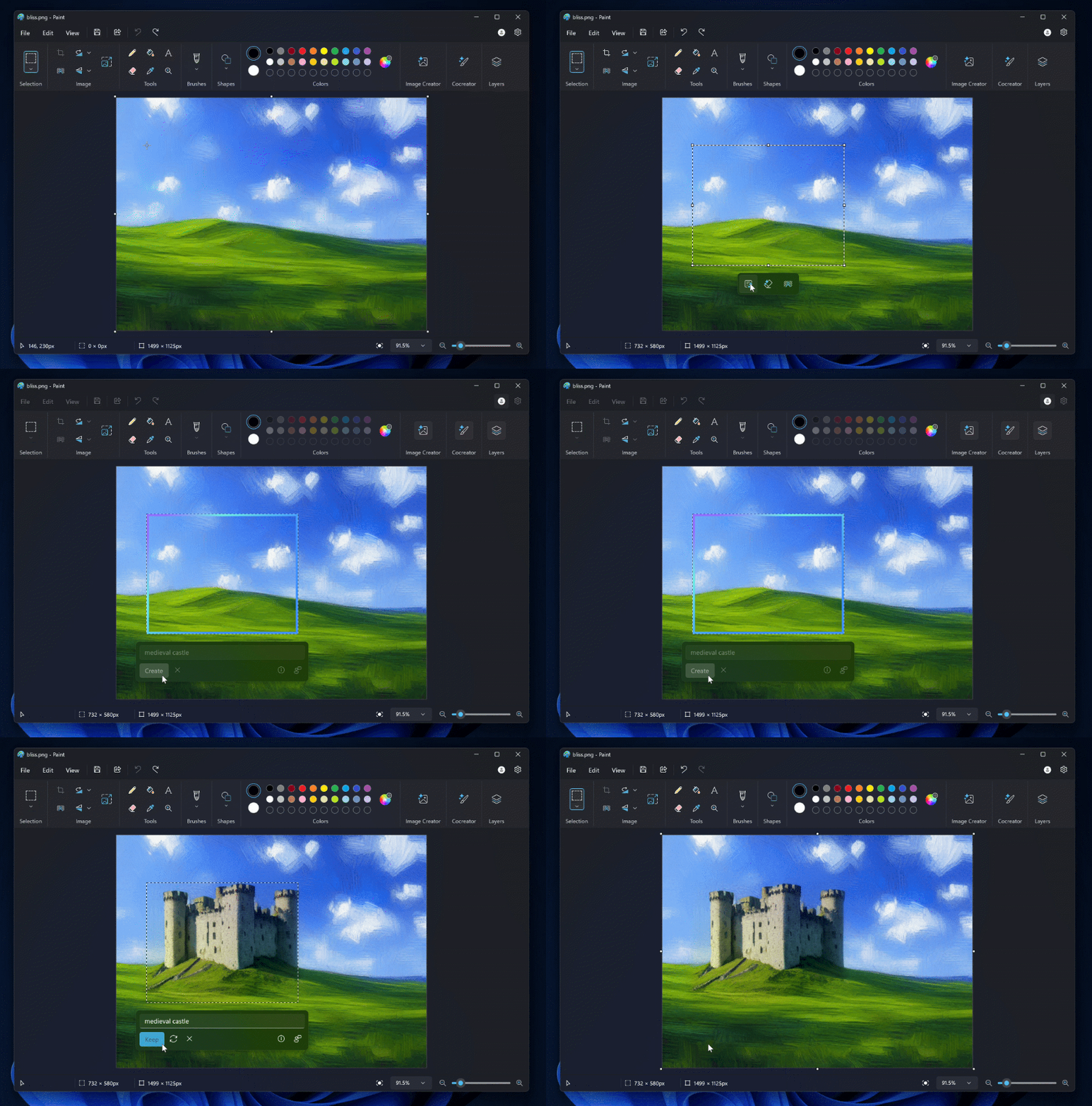
What’s even better is that if you don’t like the current generated content, you just need to click the Try again button and the AI will generate it once more.
You can also get better results by optimizing the text description. If you’re satisfied with the generated content, press Keep to apply it to the image.
Microsoft also noted that this “Generative fill” will initially only be available on Copilot+ PCs powered by Snapdragon chips, meaning that even if you’re using Intel or AMD and have installed the Canary or Dev version, you won’t be able to experience this feature.
Generative erase removes unwanted objects from an image. Like most tools, you use an eraser to paint over the object’s area, then press Apply. The AI will remove the object and fill in suitable content.
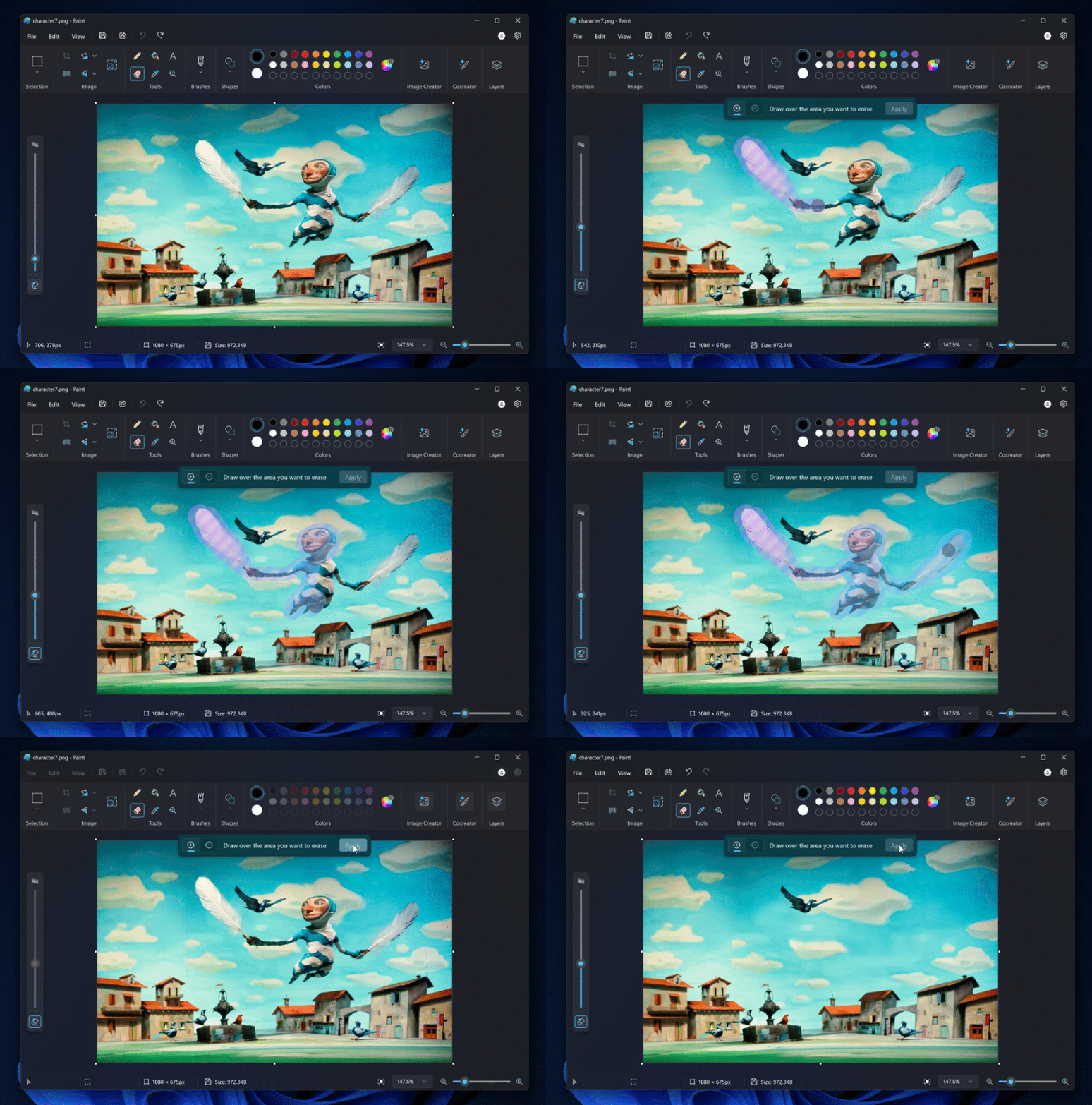
However, the background in Microsoft’s demo video is quite simple, and the AI fill worked perfectly. It’s uncertain whether it can deliver the same results with complex backgrounds.
“Generative erase” will be available to all Windows 11 PC users, not limited to Qualcomm Snapdragon.
Windows 11’s Notepad will add a “Rewrite” feature.
As for the notebook section, it adds a “Rewrite” feature that uses AI to help you rewrite sentences you’re not satisfied with, and can also adjust the tone and modify the length of the text.
After highlighting the text you want to rewrite, select ‘Rewrite’ from the menu, or press the shortcut Ctrl + I. Notepad will then generate three different versions (which is pretty good). Choose the version you like. If you’re not satisfied, you can adjust the settings and then press Retry:

The “Rewrite” feature is currently only available in select countries, including the United States, France, the United Kingdom, Canada, Italy, and Germany.
Microsoft also added that they will continue to improve Notepad’s startup speed. After the update, most users will see startup time reduced by 35%, and some could even see reductions of over 55%.
Data source:Microsoft
Source: KOCPC Chinese