


Affected by the epidemic, the prices of daily necessities and food have increased, but only salaries have not. Therefore, investment has become more and more important. ETFs and funds can be said to be the most suitable way for most people. They do not need to choose stocks by themselves. However, there are too many types and complicated information on the market. How to choose? Yuanta Investment Trust’s newly launched “Mr. Yuanta Funds” app is a very good choice. The interface design is simple and easy to use. It not only allows you to query various Yuanta ETF and fund information, such as annual dividends, shareholding status, etc., but also provides regular fund quota services. It is very good for lazy people, making investing simpler. It can be used whether you have opened an account with Yuanta or not.
Replenish:The ETFs and funds demonstrated in this article do not provide any investment advice and are only used to introduce the App.
Click me to download now Mr. Yuanta Fund
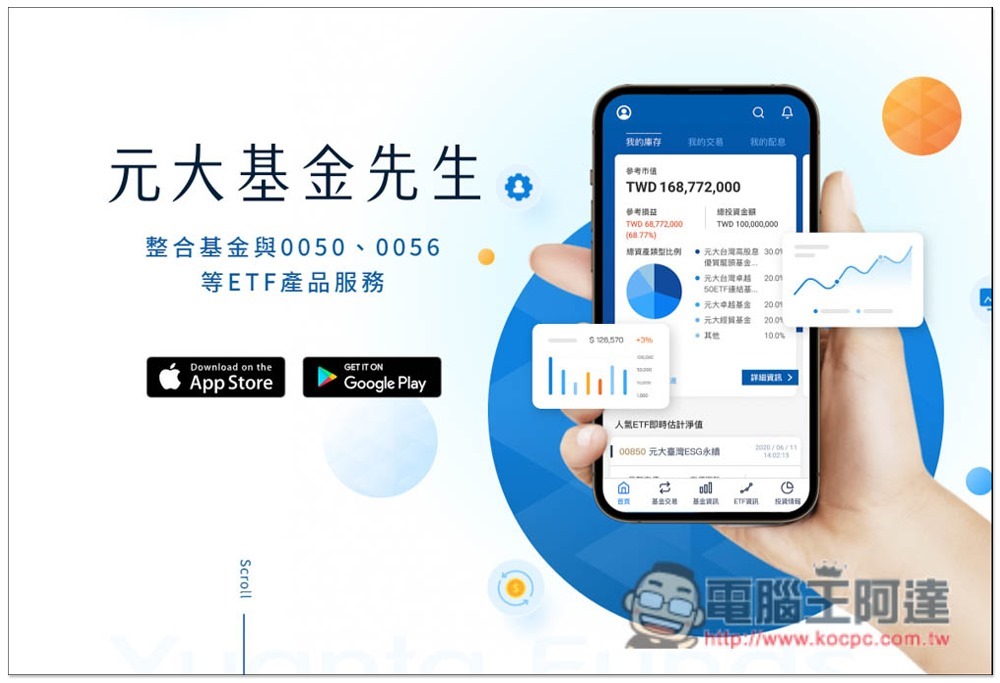
Easy-to-use interface, even for novices
The interface design of Mr. Yuanta Funds is very simple. The menu is located at the bottom. There are 5 menus: “Home”, “Fund Transactions”, “Fund Information”, “ETF Information” and “Investment Information”. Only fund transactions can be used if you open an account in Yuanta, and the other four are not used:
The home page allows you to check the historical interest distribution records, such as: Yuanta ETF, Yuanta Fund, which allows you to quickly browse the interest distribution of all stocks, and keep track of the progress of the interest payment at any time. You don’t have to check the bank books one by one. I think this is quite good, especially when you buy a lot of stocks and a lot of stocks for a long time, it saves a lot of time:
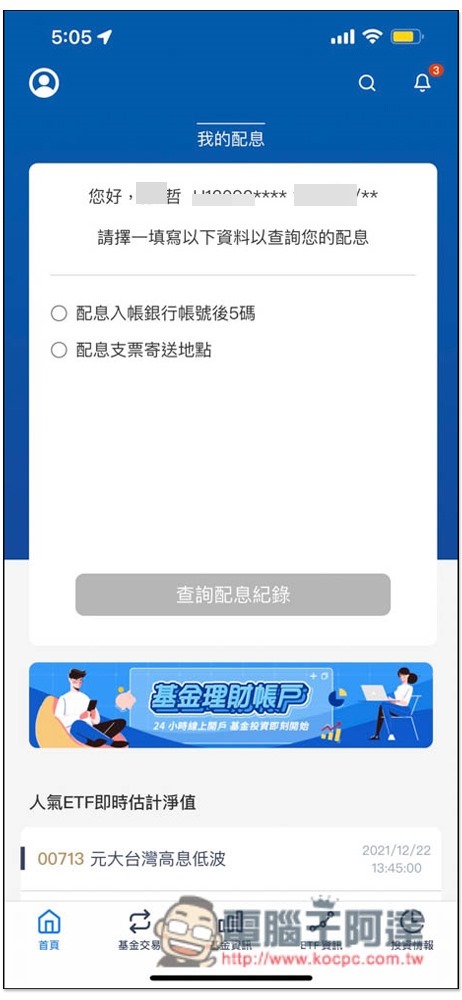
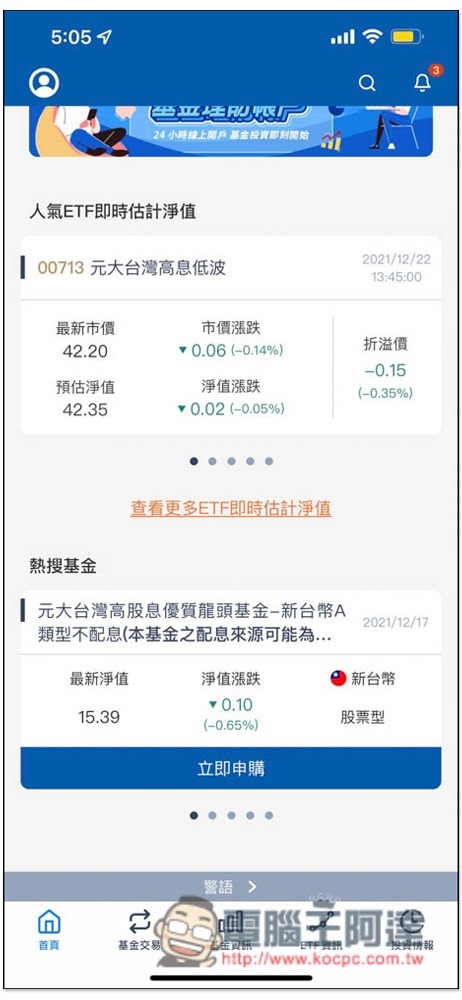
The most popular ETFs and funds are also displayed below for your reference:
Fund information will list the various fund introductions provided by Yuanta. There is also a search function. You can quickly find the target you want to search by entering keywords:
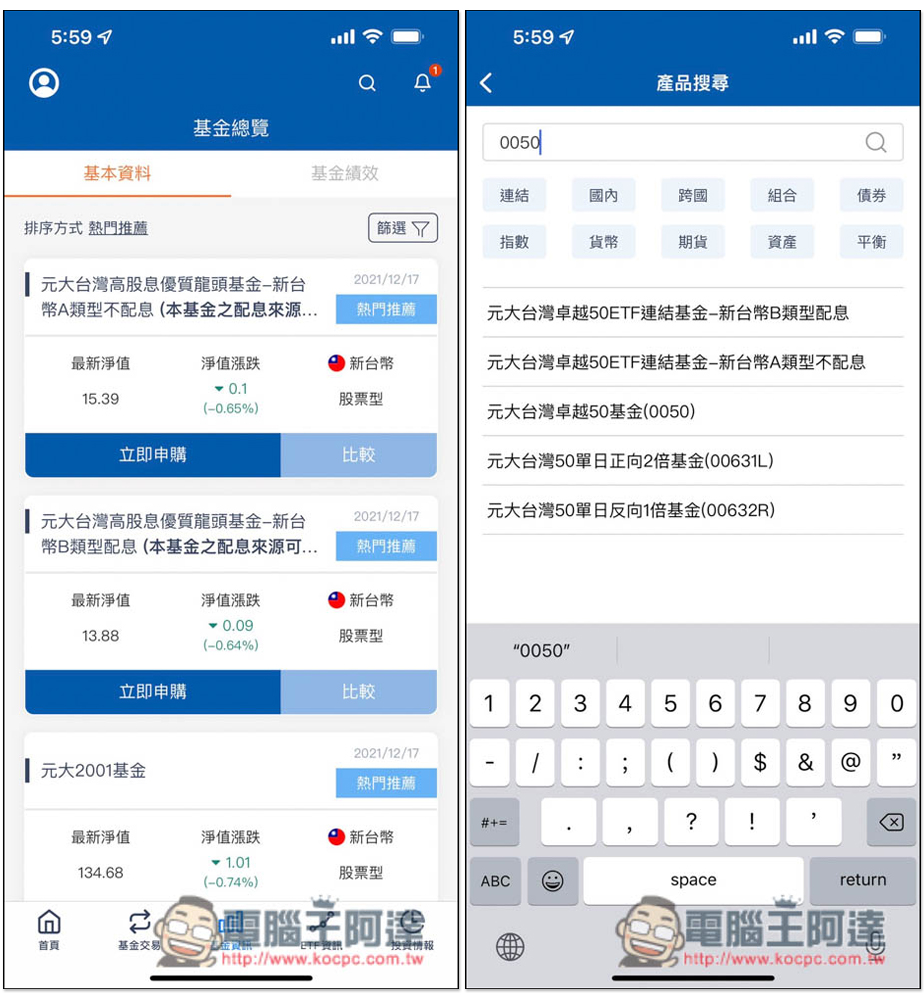
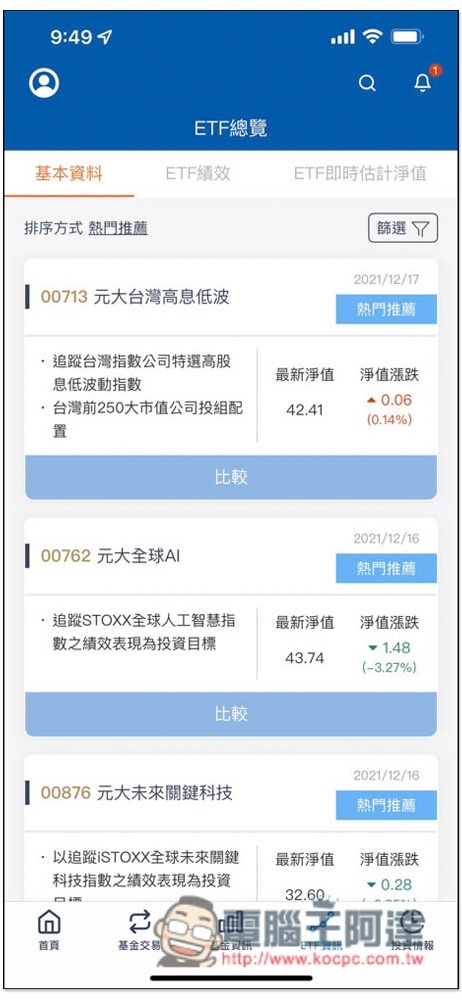
ETF information is an introduction to various ETFs in Yuanta, and also has a search function:
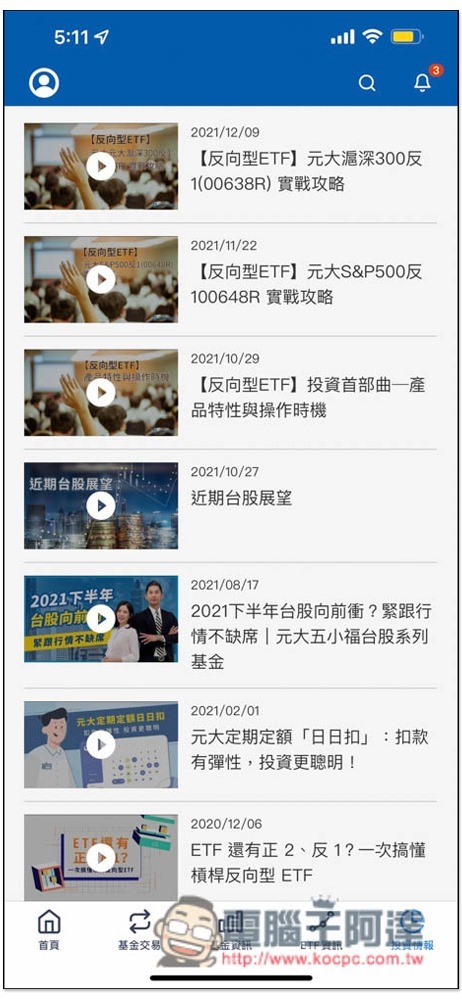
Investment Information will send some strategies and investment reports from time to time. For those who want to absorb more financial knowledge and improve their investment capabilities, you can occasionally come here to dig for treasures:
It’s more convenient to check ETF information, everything you want to know is available
You can find a lot of important information for each Yuanta ETF, such as the “dividend distribution method”, “historical dividend distribution”, “dividend distribution ratio”, “shareholding status”, etc. that everyone is most concerned about. Even the performance is directly calculated. This is very useful for finding new ETF investment targets, and you can quickly find the option that best meets your needs.
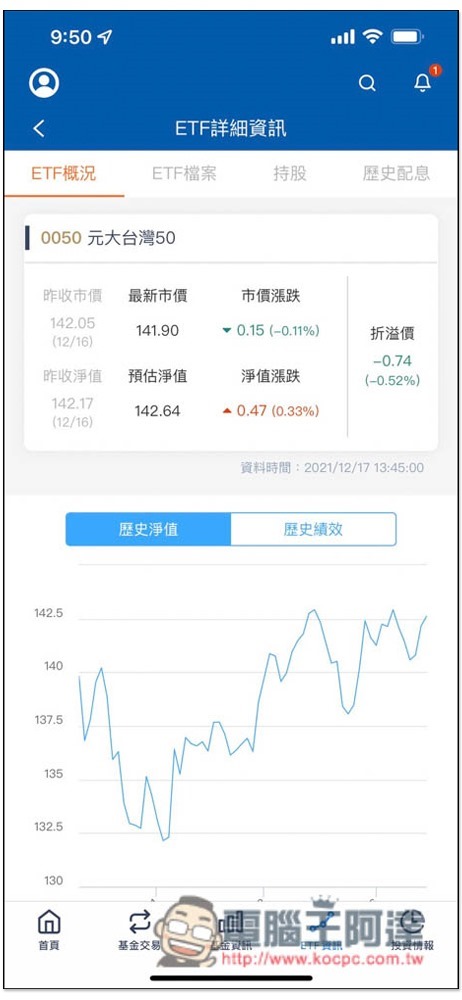
Taking Yuanta Taiwan (0050), which everyone knows and will definitely want to invest in, as soon as you open it, you can see the historical net value and historical performance trend charts of this ETF, and the longest time can be set to “since its establishment”. This way you can clearly understand why many people recommend this ETF, and it will indeed continue to rise as time goes by. In addition, when the market opens, the market price and net value above will be updated in real time, which means that you can use the real-time net value in the market to judge whether it is the best time to buy. This function is not bad, and you can check it at any time.ETFIntraday
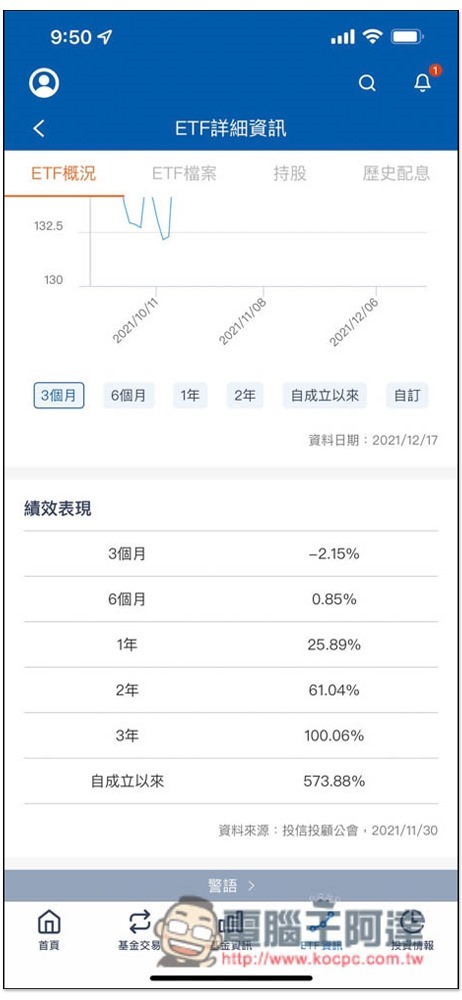
The following will also count the performance of 3 months, 6 months, 1 year, 2 years, 3 years, and since its establishment. The trend chart is difficult to understand. It is best to look at the numbers directly:
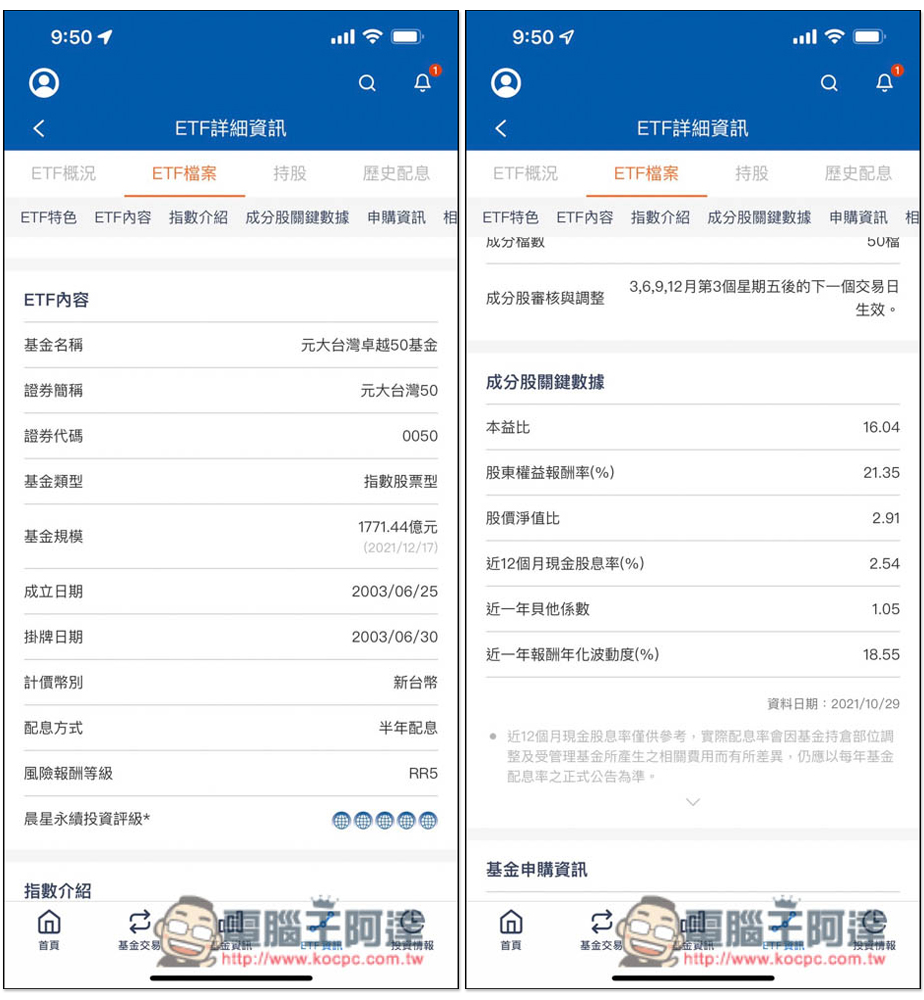
In the ETF files, there is a lot of rich information, such as the “dividend distribution method” that many people want to know most. 0050 is the distribution of dividends every six months. Scroll down and there are the current price-to-earnings ratio, stock price-to-book value ratio, return on shareholders’ equity, etc. These are important numbers that are compared when evaluating investment targets:
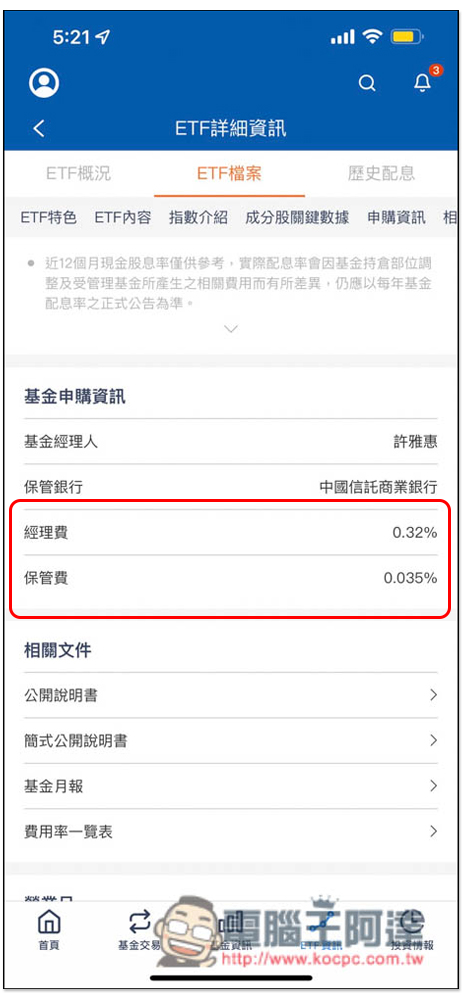
There are also manager fees and storage fees:
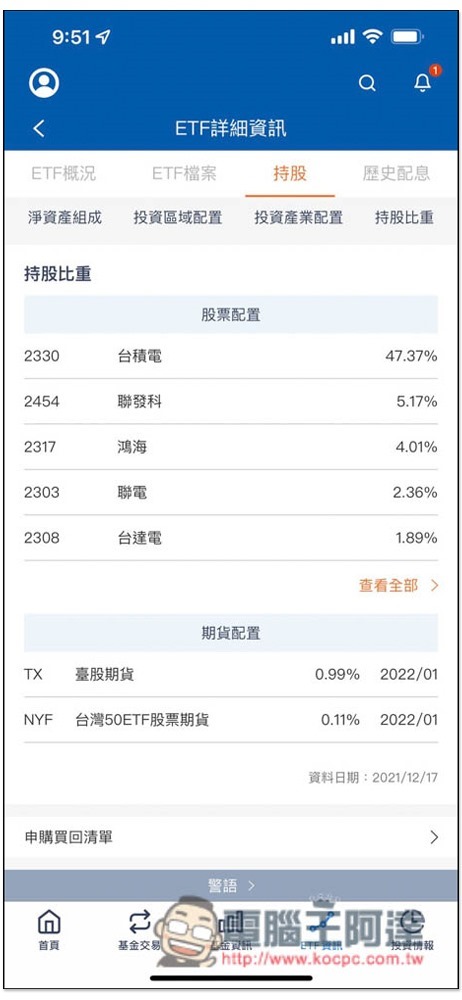
Before buying an ETF, the holding status is definitely a must. You must first know “which stocks are invested in” and “what proportion of each fund” is very important. For example, if you plan to buy a 5G ETF, but the holdings are only some marginal or second-tier manufacturers, then it is not worth investing at all.
Although the holding status of ETFs can also be found online, anyone who has checked it should know that it is very difficult to find. Many websites do not list it, or they only list the top few, making it impossible to fully understand all investment targets.
Mr. Yuanta Fund’s stock holdings list is very clear. What stocks this ETF invests in and their proportions are clearly written. 0050 is of course the top 50 companies in Taiwan, such as: currently TSMC (47.37%), MediaTek (5.17%), and Hon Hai (4.01%):
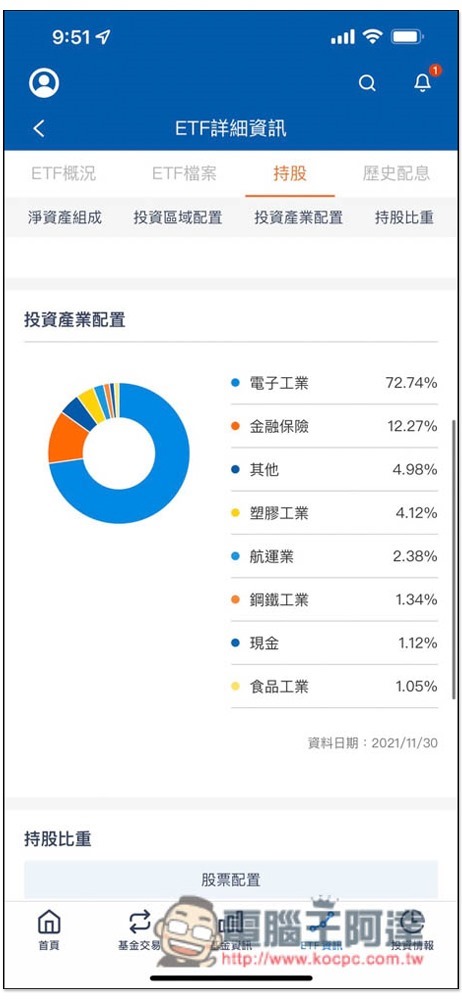
There is also an investment industry allocation chart, which I like very much. You can know the investment distribution ratio of this ETF at a glance:
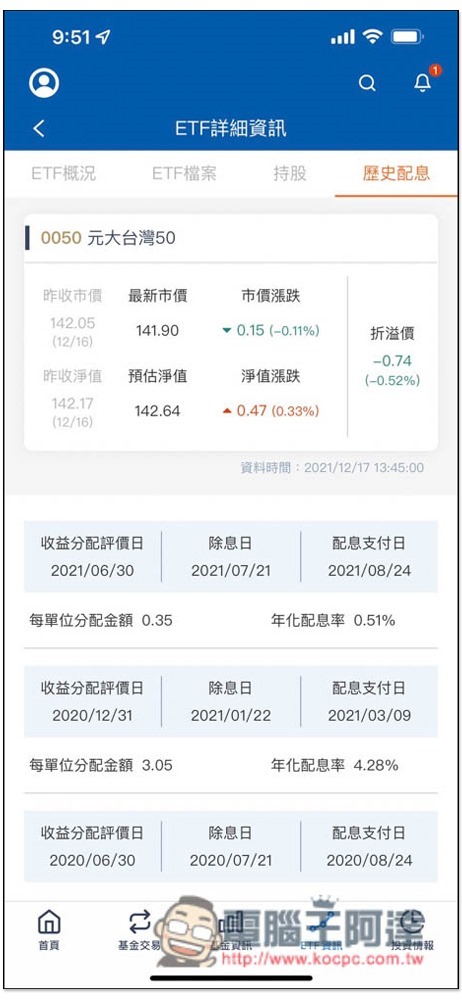
The dividend information is also very complete, including the historical annualized dividend rate, how much the dividend is, and the dividend date. For friends who want to find ETFs with high dividends, it can save a lot of query time:
Click me to download now Mr. Yuanta Fund
The most complete Yuanta Fund information, including performance rankings
Compared with ETFs, fund information can be said to be more difficult to find. Most of the information on the Internet is very scattered, which means that not only does it take a lot of time, but also you may not be sure in the end. Mr. Yuanta Funds can be said to be the most detailed and clear fund app I have ever used. It has information on performance, shareholdings, fees, and dividends. It even provides fund performance rankings, so you can know at a glance which funds have performed better recently.
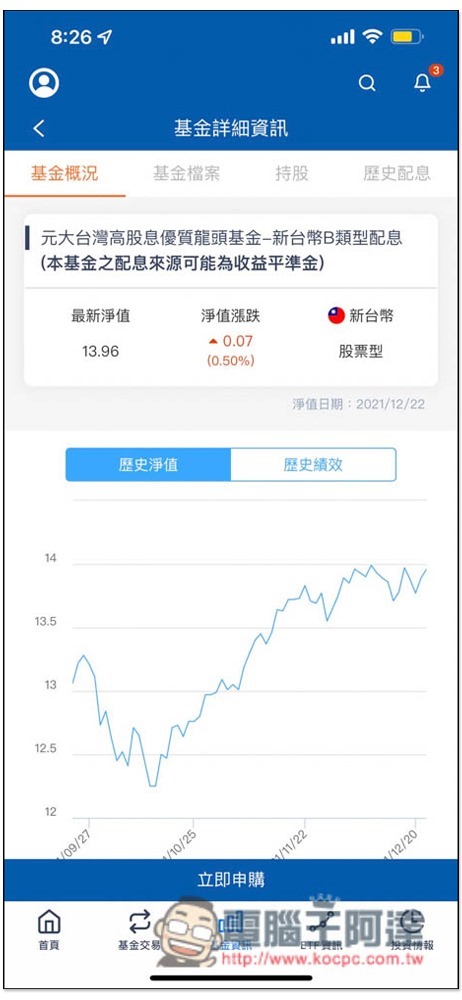
The fund interface is similar to that of ETF, with trend charts of historical net value and historical performance:
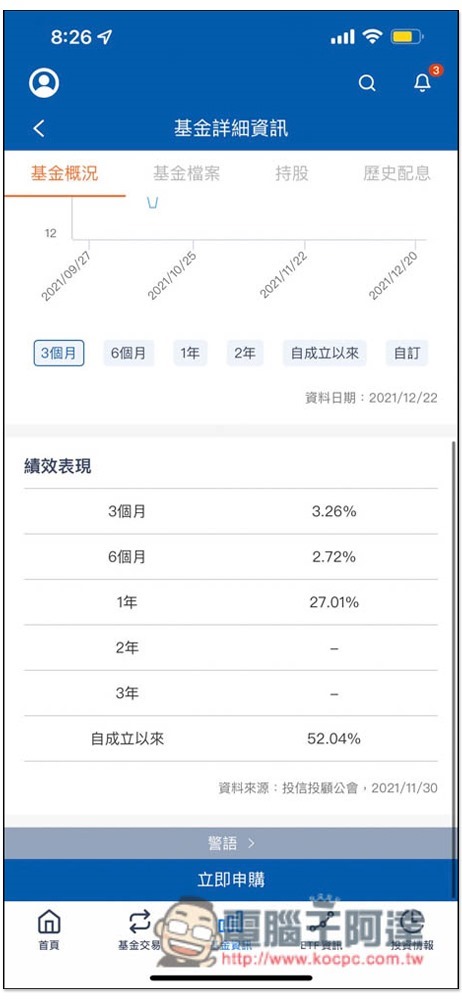
You can also find the performance of the last 3 months, 6 months, 1 year, etc. The screenshot I took was only launched in the last year, so there are no values from 2 years ago:
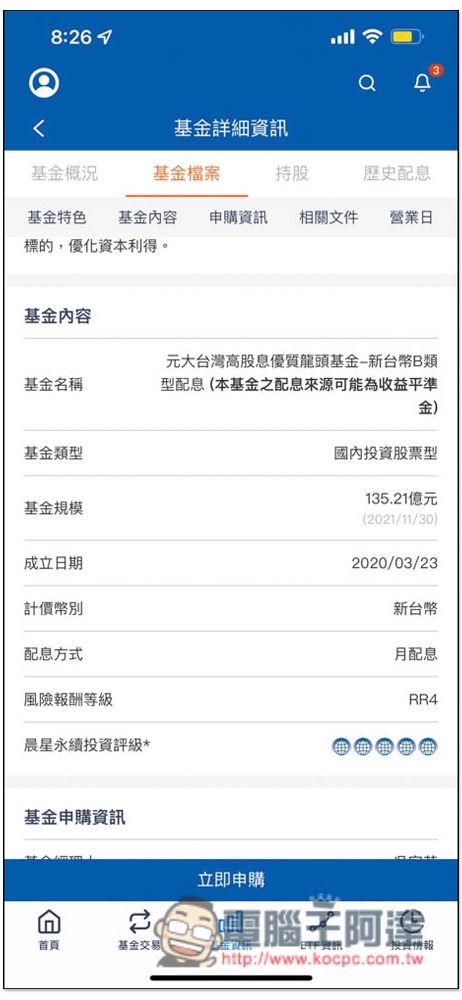
You can find the dividend distribution method in the fund file. There is a dividend distribution for this fund, and it is a monthly distribution. The risk-reward ratio is RR4:
Scroll down to find the handling fees, manager fees and management fees:
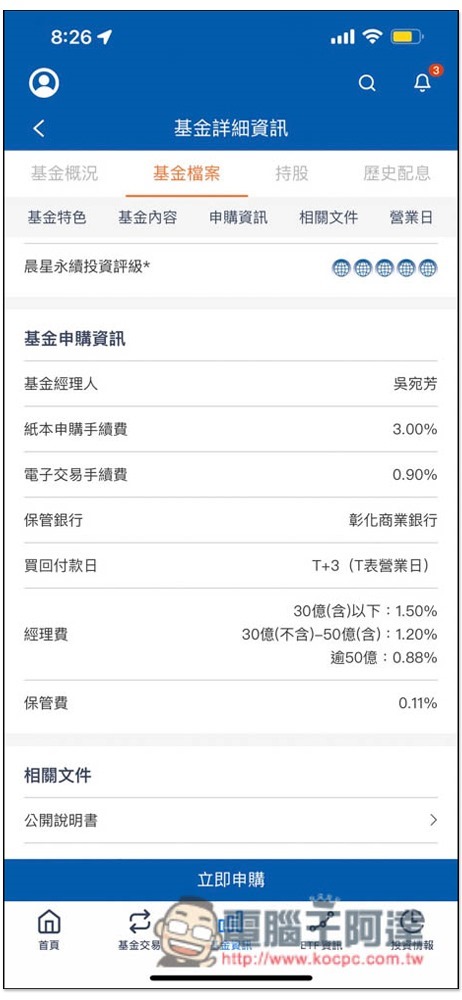
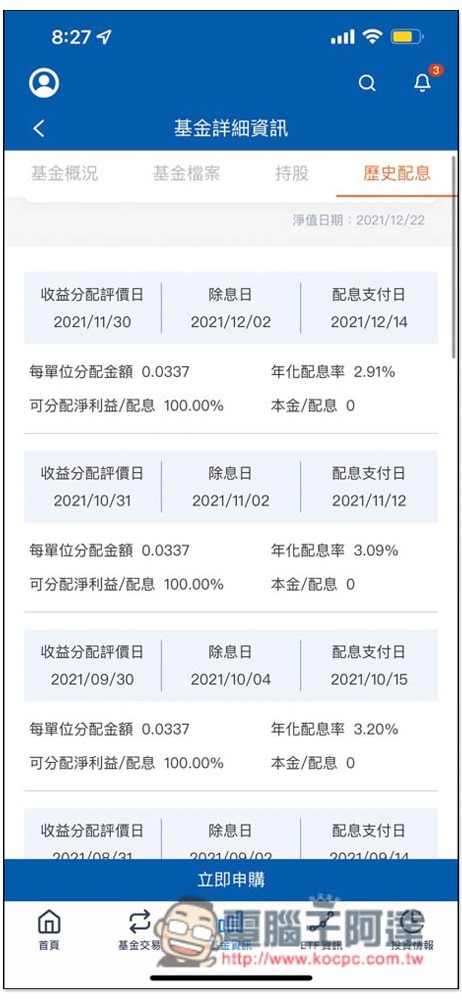
Funds with dividend distributions will have an additional “Historical Dividend Distribution” menu, and you can check past dividend distribution status by clicking on it, such as: distribution amount per unit, dividend rate, and ex-dividend date:
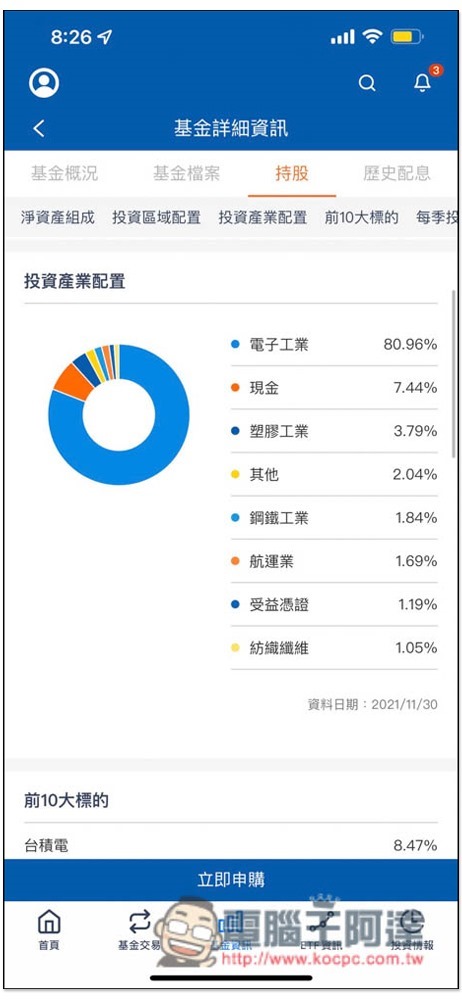
If you want to check the holding status of a fund on the Internet, it is more difficult than an ETF, and there is very little information. But just like an ETF, you must first understand what industries and targets it invests in before buying, so that you can judge whether it is worth investing in. With this app, you can easily check the industry allocation of each Yuanta fund. The proportion of each industry is clearly written:
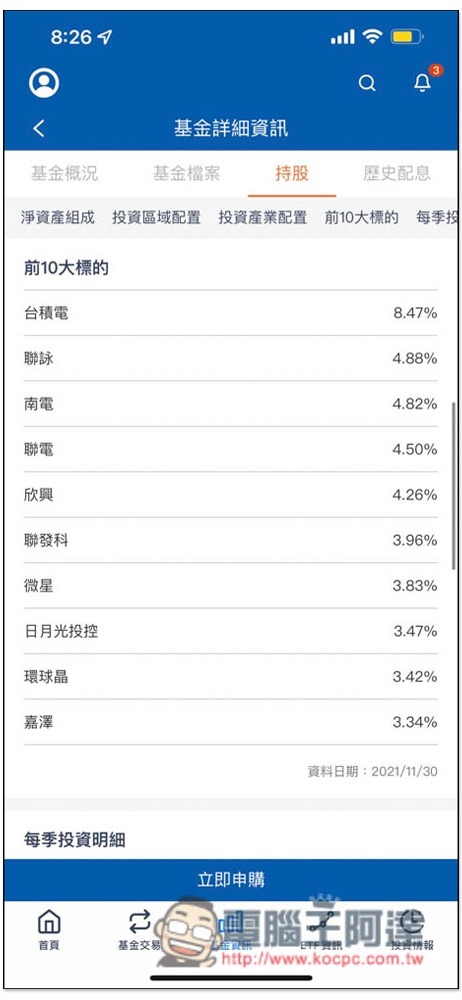
There is also a list of the top 10 bids:
Super practical comparison function allows you to quickly find the best investment options
Mr. Yuanta Fund has a very good built-in “Compare” function. After you find two targets that you are interested in, press Compare and you can compare each difference side by side, such as performance, investment industry allocation, and top 10 targets. This is very useful.
I take the two ETFs “Yanta Global AI” and “Yanta Future Key Technologies” as examples. After clicking on the comparison below, click “Start Comparison” in the lower right corner:
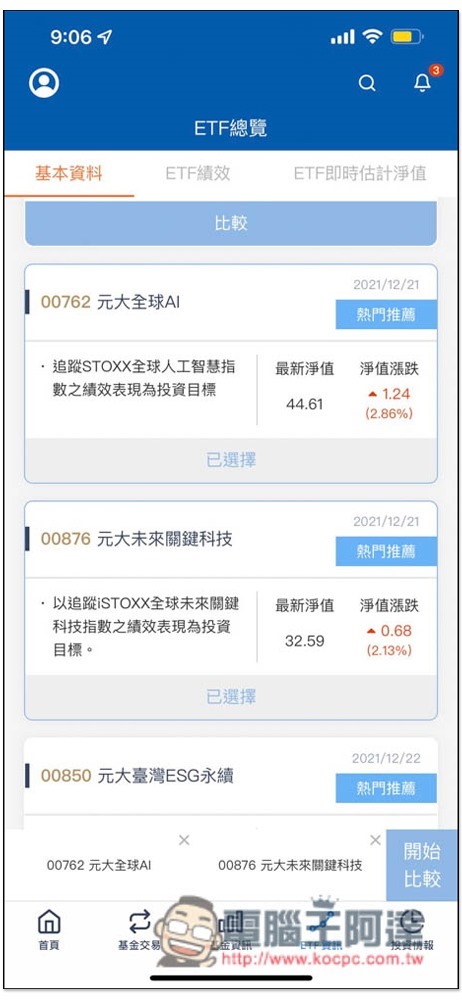
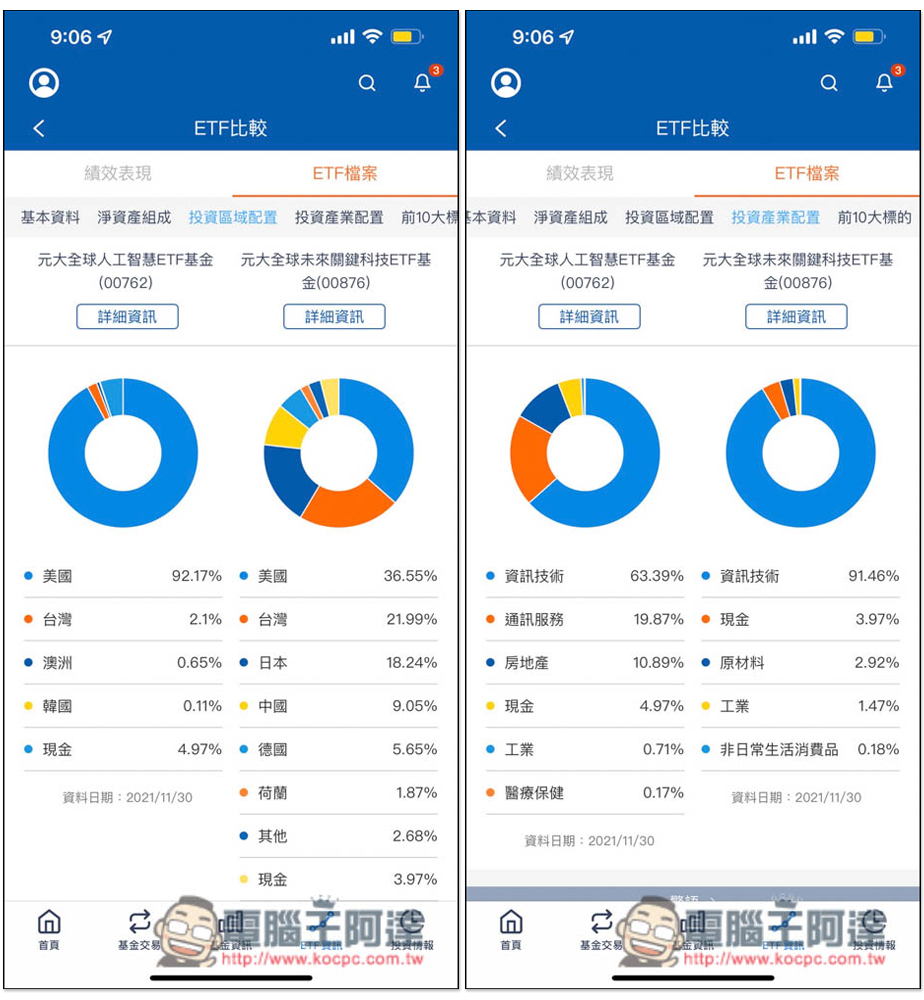
The two ETFs will be displayed side by side, and then you can start to compare each piece of information, such as the investment area and industry configuration in the picture below. From this comparison, you will know that “Yanta Global AI” is mainly concentrated in the United States, while “Yanta Future Key Technologies” is in the United States, Taiwan, and Japan, and they all invest in information technology. Unexpectedly, Yuanta Global AI has real estate-related targets:
Among the top 10 bids, most of the two grades are different:
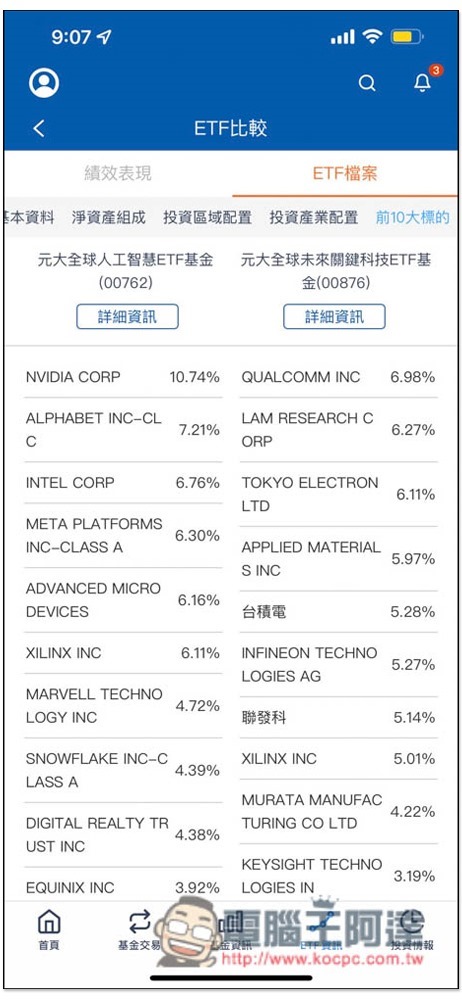
Using this comparison function, you can quickly know the difference between the two levels. Strictly speaking, they are completely different in nature. But if you want to compare, of course, if you want to invest in American companies, choose AI. If you want it in both Taiwan and the United States, choose future key technologies.
Built-in regular fixed amount function, let the “Yanta Fund Mr.” APP help you invest in funds
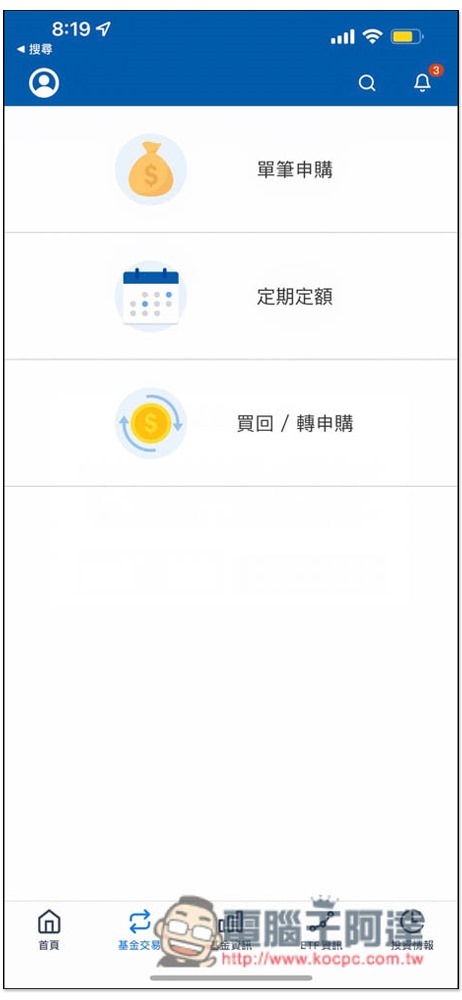
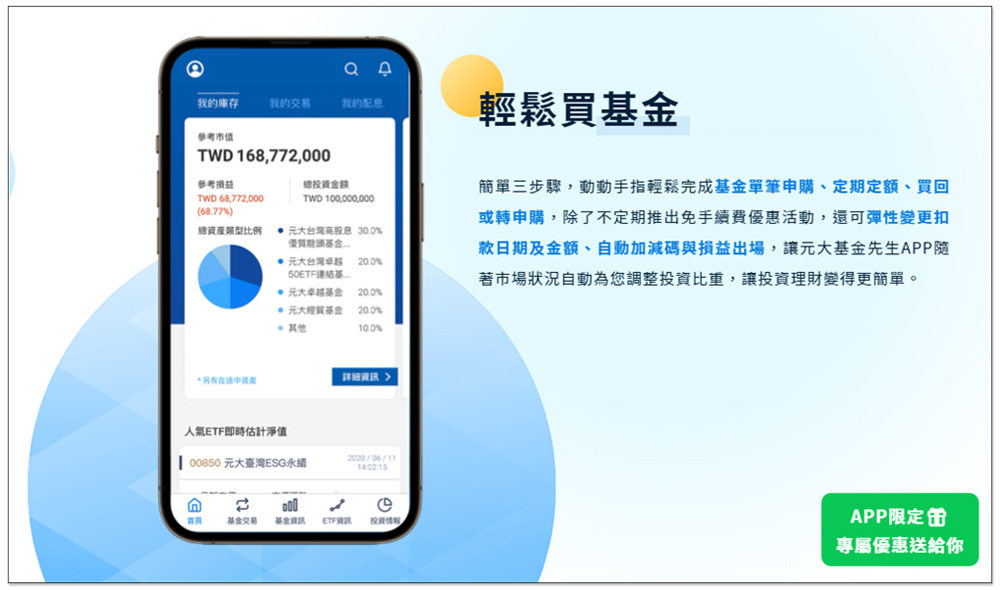
For those who don’t want to spend too much time researching, Mr. Yuanta Fund also has a built-in “regular quota” function. After setting the amount and the target to invest, the money will be automatically deducted when the time is up. It is very lazy, and the deduction date and amount can be flexibly changed. It is not tied to a fixed amount, and can be adjusted at any time according to your financial situation.
In addition, this product also provides two very practical functions: automatic addition and subtraction, and profit and loss exit. For those who are usually very busy and cannot track frequently, they can set it in advance, so they don’t have to worry about not buying at a low price or losing too much money to exit in time.
In my inventory interface, information such as profit and loss, total investment amount, and the proportion of each category are available:
Summarize
Mr. Yuanta Fund is a really good investment app. It has rich and complete information on ETFs and funds. It also has a built-in easy-to-use comparison function. You don’t need to spend too much time to choose the most suitable target for you. It also integrates functions such as buying and selling, regular quotas, and interest distribution inquiries. In other words, this app can satisfy everything from looking for investment targets, buying and selling, and all the way to inventory related functions.
To celebrate the launch, Mr. Yuanta Fund also launched an early bird discount for a whole year:
- From now until the end of December, as long as you download + register as a member and log in to the App before 12/31, you can enjoy the lifetime fee-free discount for regular fixed-amount fund purchases through the “Yanta Fund Mr.” App throughout 2022!
Click me to download now Mr. Yuanta Fund
“Mr. Yuanta Fund” APP helps you invest in funds and check ETF information more conveniently. You can check historical dividend distribution records, grasp the progress of dividend payment, and check the real-time intraday net value of ETFs at any time. Download now:https://yuantafunds.page.link/kocpc
Source: KOCPC Chinese