


It can be said that replacing old computers with new ones is commonplace, just like replacing mobile phones. It is not really used to break down, but mostly to upgrade to make the computer run faster. Although reinstalling the system is a common occurrence for the author, it is very troublesome to reinstall many applications after reinstalling, and transferring data after backup. Although there are many tools for cross-machine transfer, there are more or less flaws. If you are changing computers, you can use the EaseUS Todo PCTrans PRO tool to transfer data between the old and new computers. It is simple and convenient. It is currently free for a limited time. You can download it first for backup.

用 Telegram 訂閱【挨踢路人甲】最新文章:https://t.me/itwshare
It is normal for the author to DIY computers, and he often replaces connecting parts to upgrade, such as SSD replacement. If you don’t want to reinstall, you can refer to the author’s other article “Replace the SSD without refilling and transfer the current system to another M.2 PCIe SSD“article. If you are replacing an old computer with a new one, using EaseUS Todo PCTrans PRO can save you time in transferring user data and settings between old and new computers.
EaseUS Todo PCTrans PRO download and installation
Go to the event webpage to see that EaseUS Todo PCTrans PRO, which costs US$49.9 a year, is free for a limited time and is free for one year (there is an event webpage URL at the end of the article).

Scroll down to Step 1. Expand “License code” to see the one-year authorization code. Please note it down.

Scroll down to Step 2. to download the EaseUS Todo PCTrans software.

In the Windows 10/11 environment, a window for using this account will appear during execution. This is because a security warning window of “User Account Control” will appear due to security issues. Mainly when the user performs some actions that will affect the system, a confirmation screen will often appear, so it is better to press [Yes] to continue (if you want to remove this warning, please refer to “How to turn off User Account Control (UAC) in Windows 11″article).

Execute the downloaded installation file. It is always more friendly to see that Traditional Chinese is supported.

All actions can be completed with just one click of the mouse.

Enter the main screen, go to the upper left heading and there is a trial version, so you need to register to get the official version.

Enter the startup serial number you wrote down previously (I4YJY-F3G5Q-1ZZQ3-Q3TM4-LIPNK), follow the following process to start, and press [Register Now] to upgrade to Pro.

After registering, you will see that there is no word Trial trial version in the upper left title, and you will get a one-year free license number.
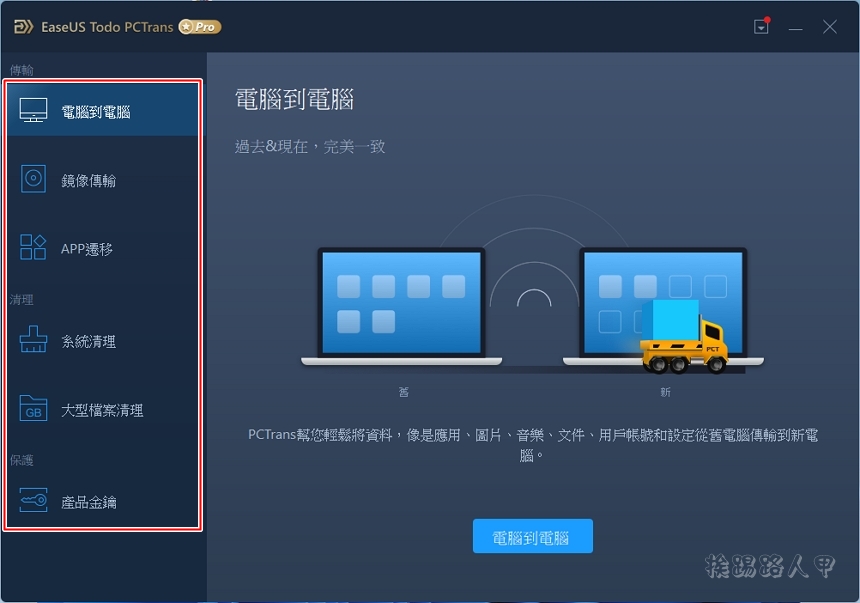
Basic operation introduction
EaseUS Todo PCtrans helps you transfer applications, files, settings or user profiles from your old computer to your new computer. It supports transfer applications including MS Office (Word, Excel, Outlook, etc.), Photoshop, Adobe software, AutoCAD, Dropbox, etc.
The left menu has functions such as computer-to-computer, image transfer, App transfer, system cleanup, large file cleanup, and product key. Computer-to-computer is the transfer of account files and applications between two computers on the same network segment. Since there is currently no such environment, readers can try and test it by themselves.
The picture below shows the image transfer method to create a mirror file, allowing you to transfer data to different machines.

Since image files can be generated, of course you can also restore from image files, so choose the right one!

When generating an image file, you can specify the file name and path.

The created data mainly includes applications, files and accounts. The space to be backed up can be displayed under each type.

You can click the edit icon to see the content you want to back up, and you can check or exclude the applications you want to back up.

Next, you will see the selected data being backed up to the image file.

After completion, you can see the size of the data backup after mirroring.

With the backup image file, you only need to put the file into another computer and then use EaseUS Todo PCTrans PRO to restore it, and you can transfer data to another computer.

App migration is to move applications to different directories or other disks to reduce system disk space.

EaseUS Todo PCTrans PRO also has a built-in system cleaning function to remove junk data before backup to ensure cleanliness during backup.

You can also pull out a list of large files to help you decide whether to clear them, which can save time when transferring.

Personally, I think it is a very good tool to find product keys. Although not all application serial numbers can be found, at least for the more well-known Windows, Adobe and Office, it can be found.

[Software name]: EaseUS Todo PCTrans PRO
[Software version]: v 11.8
[Software language]: English / Chinese
[Operating system]: Windows XP/Vista/7/8/10/11
[Activity webpage]: Please clickhere
Further reading:
Source: KOCPC Chinese