


Although innovative user experience should be the efforts of developers. However, for users who are accustomed to being able to quickly access certain pages, I believe that before everything is truly “transferred”, they should also hope that they can continue to use their comfortable old interface (Facebook traditional page expression: Miss me?). Recently, the mobile version of Google Chrome, a browser that many people love to use, has suddenly adjusted the new tab experience, which makes people feel a little confused – I wonder if you have received it? If you feel uncomfortable using it, this article can give you a reference on how to retrieve it. Continue reading Is the new tab page of the new mobile version of Chrome difficult to use? In fact, you can retrieve the default page to report the content.
▲Image source: 9to5Google
Is the new tab page of the new mobile version of Chrome difficult to use? In fact, you can retrieve the default page
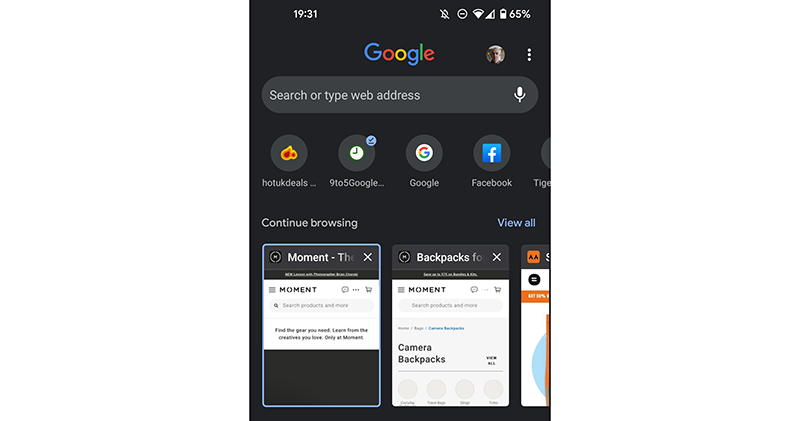
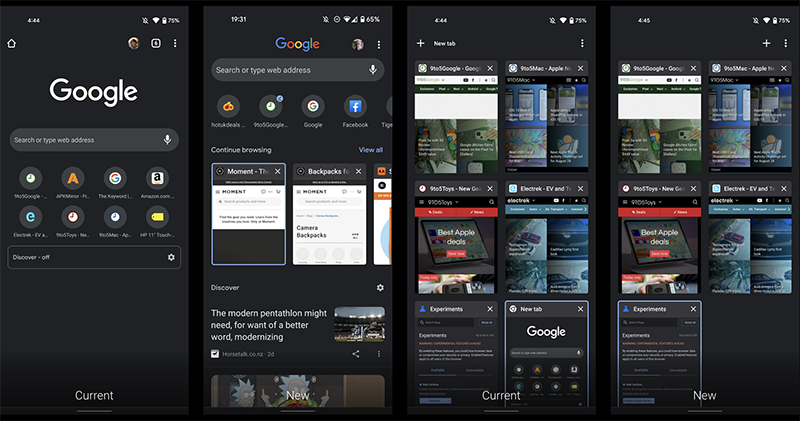
In fact, the editor has not received this new page yet. However, according to the user experience of foreign media 9to5Google, it feels a bit confusing. And judging from the picture, it does feel that way (eh). Although the “Google” logo itself is shrunk and squeezed together with the account icon in the new tab page. However, the original homepage symbols and page number buttons also disappeared out of thin air.
You may be thinking, how do you switch the currently opened tab?
▲Image source: 9to5Google
In fact, the vertical page vacated by the Google Logo is the space left for the new “Continue browsing” block. Here, you can browse the recently opened tabs by sliding horizontally, or select “View all” to return to the previous tab preview page.
Seeing this, you already think it’s complicated, right? In fact, the experience aspect is really a bit complicated. Fortunately, for now, if you have updated to this experience, you can still return to the previous state through Flags.
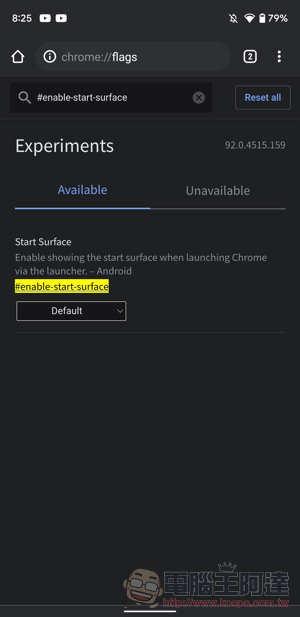
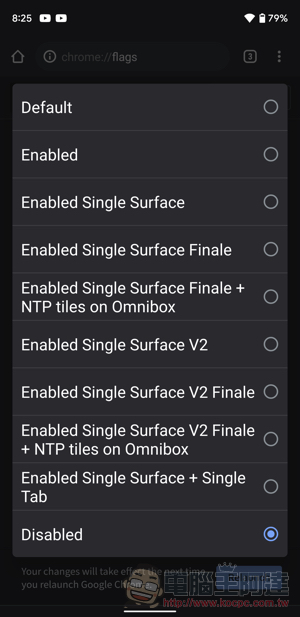
Through “chrome://flags/#enable-start-surface” page, you can return to the previous experience by changing “Default” to “Disabled” in the options.
That is to say, the new page is not as difficult to use as expected, but it does take a little getting used to where a few commonly used buttons go. If you really don’t adapt to it, you should still be able to support it by changing the Flags before Google insists on changing it to a new page.
Pictures/sources cited in this article
Further reading:
Gogoro VIVA MIX SUPERFAST trial riding experience: a ticket that is “fast enough and happy enough”

Source: KOCPC Chinese