


Hedra has launched Character-1, a model that can generate lifelike dialogue and singing characters. With Character-1, you can use a single photo to make someone sing, rap, or say whatever you want. It works on both computers and mobile phones. If you’re interested, let’s take a look at how to use Hedra to generate videos!
Free voice and video synthesis tool Hedra, making the people in your photos speak.
Hedra can combine photos of any person with voice synthesis to generate dynamic videos of them speaking or singing, while also maintaining lip sync and facial expressions, with gestures matching the vocal content. The generated videos have no length limit.
Introducing the research preview of our foundation model, Character-1. Available today at https://t.co/G45zFlUfcN (on desktop and mobile).
* Infinite duration (30s for open preview)
* 90s generated per 60s (if our H100 supply holds)
* Expressive talking, singing, rapping… pic.twitter.com/cYuHpSnqMu— Hedra (@hedra_labs) June 18, 2024
Go to the Hedra official website to generate videos.
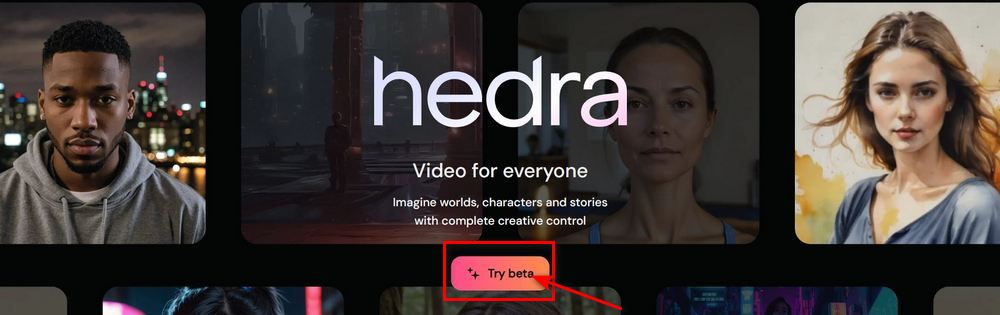
Go to the Hedra official website and click “Try beta” to start using Hedra. If you’re new to Hedra, you’ll need to register before using it—you can simply sign up with your Google account.

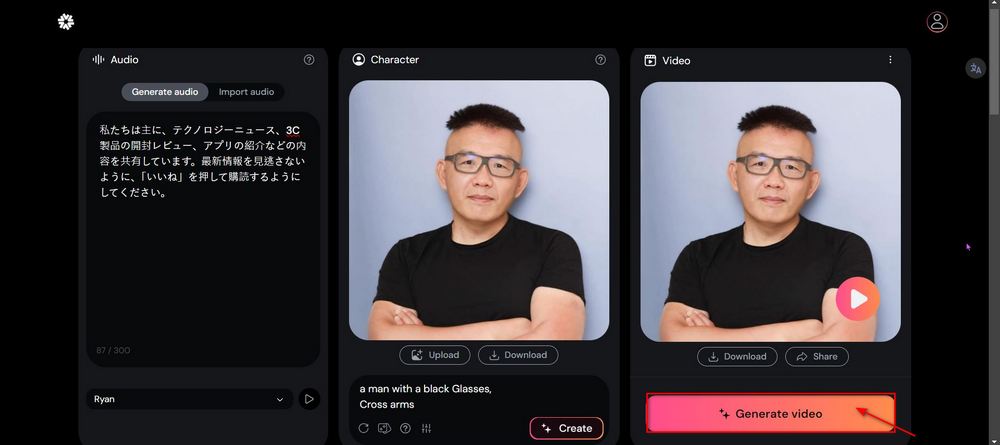
After registering, you can use Hedra to generate images. Enter the text you want the character to say in the box on the left, and options will appear below to let you choose a voice. Currently, 6 voices are available in total—3 male and 3 female. If you’d prefer to use your own voice, you can also click “Import audio” to upload your own audio. Based on testing, Hedra can recognize Chinese, English, and Japanese.

After finishing the audio processing, upload the photo of the person you want to generate, then enter a prompt describing the photo in the field below. A simple description is enough—the barrier to entry isn’t high. Once both the audio and photo have been uploaded, click “Generate video” in the box on the right to create the video.
Here are a few videos we’ve made:
Go to the Hedra official website to generate videos.
Although the quality of the generated videos doesn’t seem very good, since it’s free, everyone can just make do and have some fun with it! Also, here’s a bonus video generated by a netizen using Hedra. Friends who want to try it can click the link provided above to visit the Hedra official website:
Wow. @hedra_labs is fast and the quality is great!
AI talking avatar generated in less than 30 sec from text. 🤩 pic.twitter.com/xwdRk9PSNh— 𝐙𝐞𝐧𝐠 💜 (@zeng_wt) June 20, 2024
Hedra just dropped Character-1.
And people can’t stop making any person in image sing and talk from audio with this AI.
10 wild examples:
1. Fake female Elon rapping Paparazzi pic.twitter.com/ycI1PIMCNi
— Min Choi (@minchoi) June 19, 2024
Source: KOCPC Chinese