

• About Us
King of Computer Media
  • Home
  • Tech News
  • AI News
  • Apps & Tutorials
  • Mobile & Telecom
  • Lifestyle
  • About Us
No Result
View All Result
  • Home
  • Tech News
  • AI News
  • Apps & Tutorials
  • Mobile & Telecom
  • Lifestyle
  • About Us
No Result
View All Result
King of Computer Media
No Result
View All Result

Home - Computer Applications and Other Tutorials - If the website is not working properly, don’t rush to clear the browser cache. This trick teaches you how to clear the temporary files of “single website”.

If the website is not working properly, don’t rush to clear the browser cache. This trick teaches you how to clear the temporary files of “single website”.

KOCPC Editor by KOCPC Editor
February 21, 2021 - Updated on August 4, 2026
in Computer Applications and Other Tutorials, Internet and software applications, Latest Technology News and Reviews

I believe that readers who often use computers will occasionally encounter a situation where you are browsing certain websites, which were fine, but suddenly there is a problem with the website, but you can use it normally again when using an incognito browser. This is usually a problem with the temporary data of the Chrome browser. Originally, the problem should be solved by clearing the browser’s cache, but now there is actually a more convenient way.

code-1076536_1920

Generally speaking, if there is a problem with the cache of a browser website, you should either use the website in incognito mode first, or clear the browser cache. However, if you use the normal method to clear the cache, it will cause all the websites you usually log in to be logged out. It becomes “you have to log in to the accounts of many websites in order to restore a certain website to normal operation.” In fact, it is relatively troublesome in disguise, but now there are actually other ways to clear the cache of the target website faster.


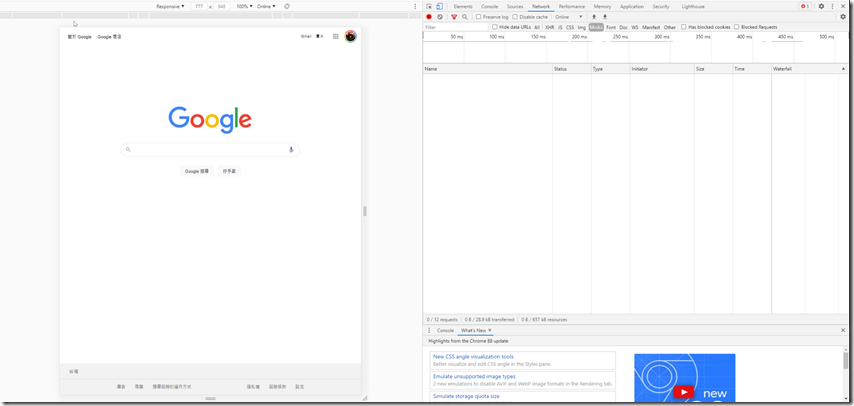
This method is based on the fact that you are a Chrome user. First, you enter the target website you want to clear the cache, then press F12 on the keyboard (press Command+Shift+I on macOS), and the browser interface will pop up the developer tools.
2021-02-21 19_43_39-開始
↑First press F12 on the keyboard to open the developer tools.


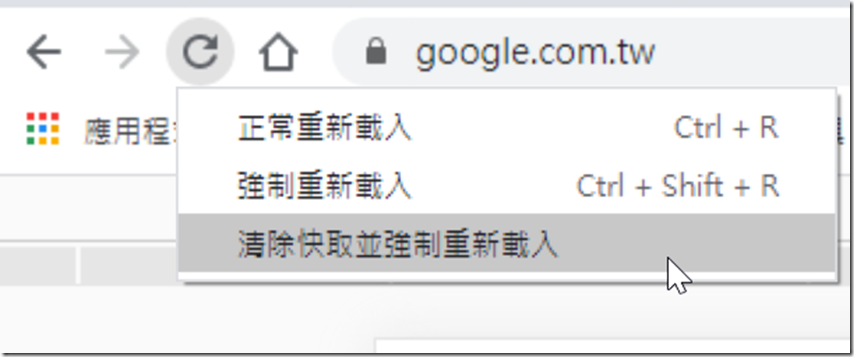
Then, with the developer tools open, press and hold the “Refresh” button on the Chrome browser with the left mouse button. You will see a menu pop up with three options. Select the third option “Clear cache and force reload”. At this time, the cache of the target website left in the browser will be cleared. If there are no accidents, you can use the website normally. There is no need to clear the browser cache like in the past and have to log in to the account and password for a bunch of websites again. This can be said to be very convenient.
2021-02-21 19_43_56-開始
↑With the developer tools open, press and hold the refresh button, and three options will pop up. Select the third one to clear the cache of the target website.

Source: KOCPC Chinese

Tags: cacheClearFaultwebsite

Recent Posts

  • The Xiaomi Pad 8S Pro has passed network access certification and will debut with the self-developed XRING O3 chip.
  • The entire Google Pixel 11 lineup has been leaked! Official promotional renders of the Pixel 11 Pro XL have also surfaced
  • Are Chinese phone battery capacities falsely labeled? A brief look at the “capacity locking” phenomenon in Chinese silicon-carbon batteries.
  • NCC is leaderless, recklessly sending out national-level alert messages!?
  • What does “QR” in QR Code mean?

Recent Comments

No comments to show.
  • About Us

We welcome partnership inquiries and product review opportunities from smartphone manufacturers, iPhone accessory brands, and app developers.koc kocpc.com.tw|Privacy Policy |Hosting & Maintenance: Fast Line Taiwan, A-Chang Digital Technology

No Result
View All Result
  • Home
  • Tech News
  • AI News
  • Apps & Tutorials
  • Mobile & Telecom
  • Lifestyle
  • About Us

We welcome partnership inquiries and product review opportunities from smartphone manufacturers, iPhone accessory brands, and app developers.koc kocpc.com.tw|Privacy Policy |Hosting & Maintenance: Fast Line Taiwan, A-Chang Digital Technology