


Recently, LINE is the first to release the LINE Android 10.21.0 version update for Android users, allowing many Android users to be the first to use LINE’s new user interface. Earlier today, the iOS version of LINE 10.21.0 update was finally released! In addition to ushering in a new more concise and easy-to-read interface design, and simultaneously improving the user experience, it also finally supports the iOS 14 desktop gadget function, allowing users to open pinned chat rooms faster!

LINE 10.21.0 iOS version update officially released: supports iOS 14 desktop gadgets, and also welcomes new user interface and other new features
In the earlier LINE 10.21.0 iOS version update, in addition to updating the overall design of the LINE application, it also updated the voice/video call function, such as improving the call menu screen to make it easier to browse, adding the ability to use self-made avatars as special effects in video calls, and improving the operational convenience of the virtual background function. In addition, for the “desktop gadgets” supported from iOS 14, LINE is now also included in this update.

API updates
Although the new user interface launched in LINE 10.21.0 has been officially announced before, there are still many little surprises when you actually get your hands on it! The readability part of the screen is indeed more convenient to read than the old version.
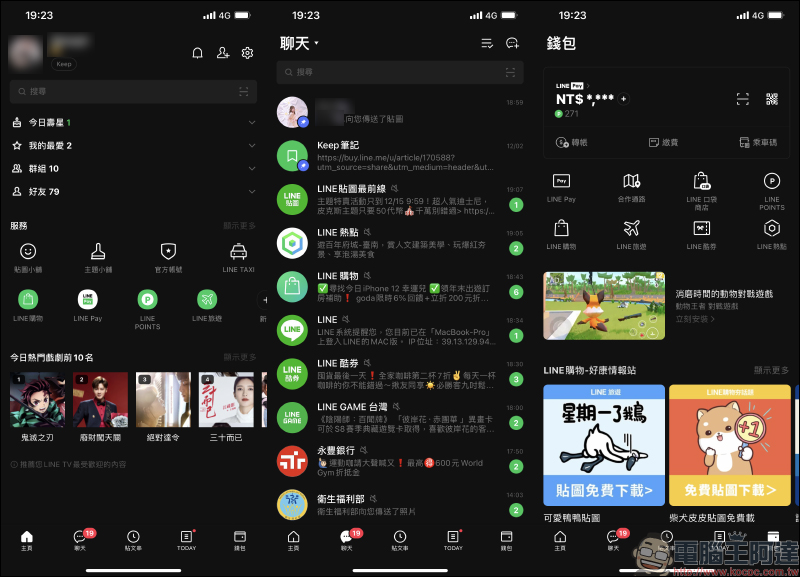
The LINE iOS 10.21.0 version update also brings small changes to the function buttons. Here I would like to highlight an update that many people may not notice immediately, which is that there is an “Edit Chat List” button in the upper right corner of the chat room tab. Users can directly select “All Read” by clicking on it:
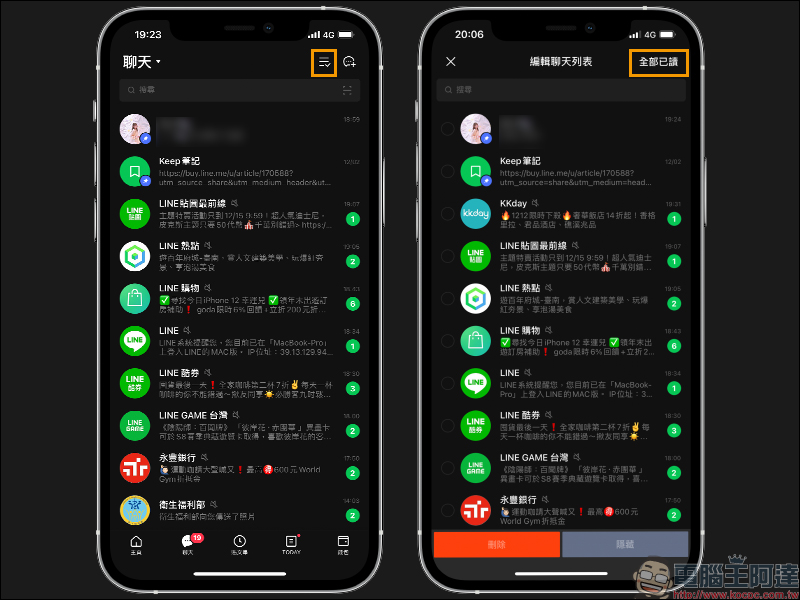
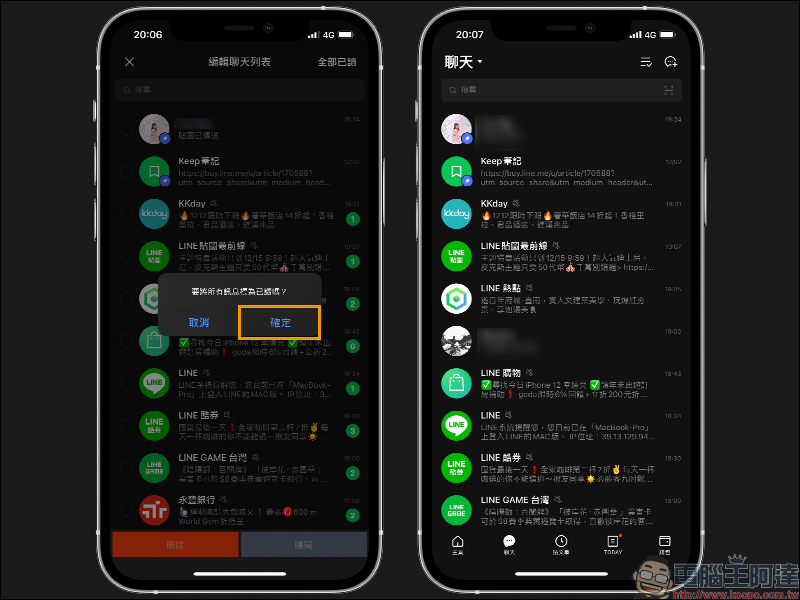
After pressing OK, you can directly read all unread messages in the chat room at once!
Use “virtual avatars” for video calls
After the LINE 10.21.0 update, iOS users can use their own avatars as special effects in video calls when using LINE’s free video calling function:

▲Screenshot source:LINE(Japan)
#LINEビデオ通話 がアップデート‼️
LINEバージョン10.21.0より…1⃣あなたの表情にあわせて動く、アバターが使えるようになりました✨
アバターの作り方⇒ https://t.co/HTqYrRHw4F2⃣「みんなで見る」機能を1:1の通話に追加!2人でYouTubeを見ながら話せます✨
使い方⇒ https://t.co/F6gqBpWiR0 pic.twitter.com/UuO1R40NsL— LINE (@LINEjp_official) December 14, 2020
LINE iOS 14 Desktop Gadgets
Previously, after LINE Pay supported iOS desktop gadgets, it became much more convenient to use LINE Pay for payment. Now, finally LINE can also use desktop gadgets! Currently, the LINE desktop widget provides two layout sizes. The application part is mainly used as a shortcut function for “pinned chat rooms”, allowing users to quickly go to chat rooms, voice calls or Keep functions on the iOS home screen:
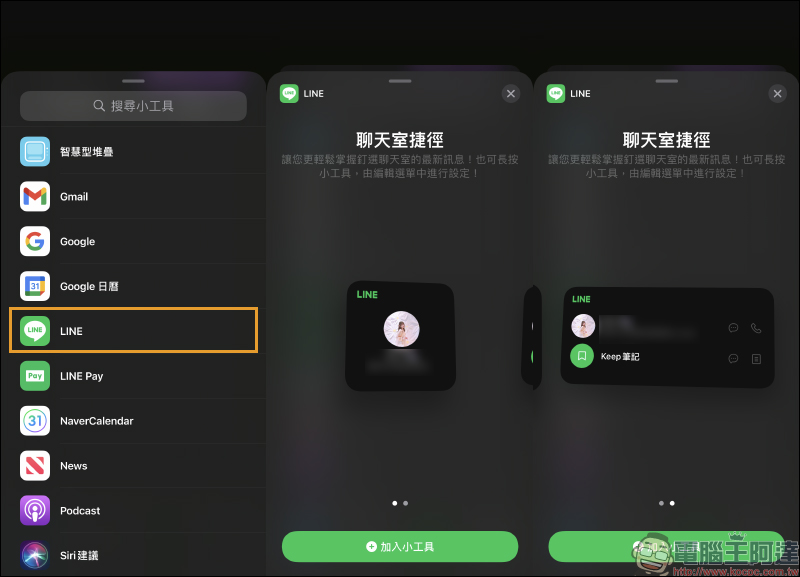
In order to be displayed in the LINE desktop gadget, the chat room must first be added to “Pin” in LINE. Users only need to swipe right on the chat room they want to pin in the chat tab, and then press the pin button to pin the chat room to the top:
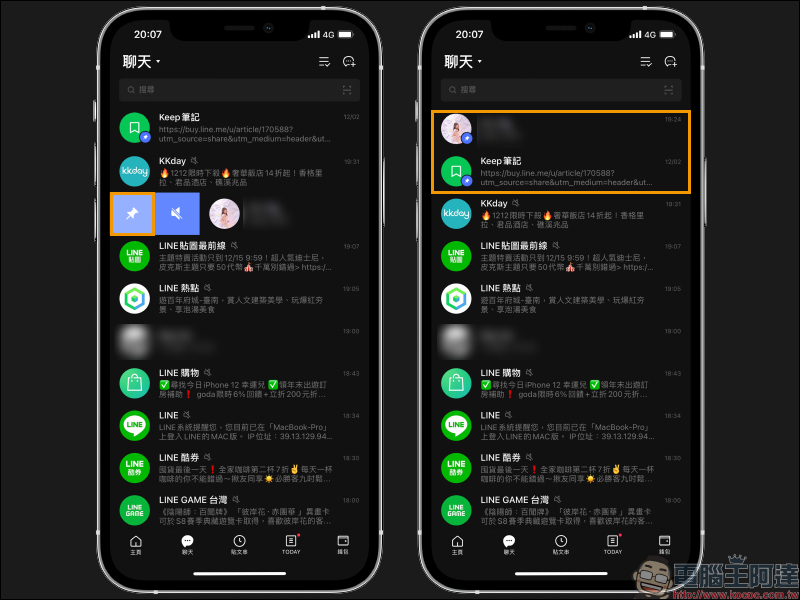
Next, let’s take a look at the functions of general chat rooms and Keep notes in the LINE shortcut function! Generally, chat rooms support two functions: “Chat” and “Voice Call” in the desktop gadget. Users only need to click the corresponding button on the gadget to quickly go there. For voice calls, there is no need to worry about accidentally touching the phone and making a call directly, because when opening the LINE application, a query window will pop up asking the user whether he wants to have a voice call with “someone”. At this time, the user must press Confirm before the voice call can be started.
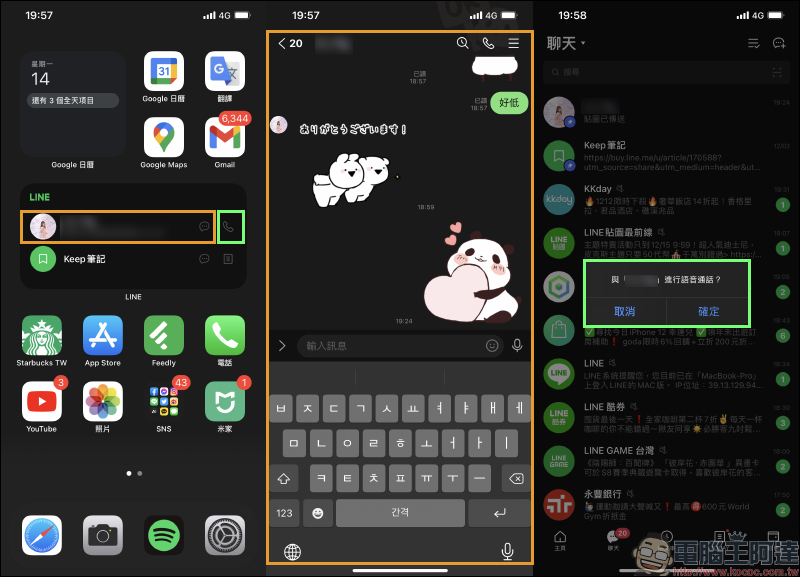
Keep notes, which are very popular among many LINE users, are divided into “Keep Notes (Chat Room)” and “Keep” pages. Users can go to Keep quickly through desktop gadgets directly on the home screen to write down important things:

LINE App download:iOS version (App Store)
Further reading:
LINE application tips: How to set up “Text-only photo stickers”, another option besides photos and avatars

Source: KOCPC Chinese