


In addition to chatting with friends, LINE also has chat rooms such as groups, official accounts, and even LINE community chat rooms. Friends’ chat rooms are often flooded with messages due to the large number of messages.In early May this year, LINE took the lead in opening the experimental function of “Chat Room Classification” in LINE Labs for Android users to experience early., which is really enviable for the majority of iOS users! (laugh)
Finally, the LINE iOS version 10.19.0 was recently updated, and LINE Labs added this long-awaited feature to the iOS version.

LINE iOS version also launches the “Chat Room Classification” experimental function: friends, groups, official accounts and social chats are automatically classified!
Before some new features of LINE are officially launched, most of them will be first opened to users to try out the upcoming features in LINE Labs, and the LINE team will also collect user feedback as a reference for corrections before the features are launched. These LINE Labs features may be silently tested after the experimental phase ends or the feature is officially launched. For users whose lives rely heavily on LINE, there are too many kinds of messages!
Whether it is a friend chat, group, community or official account, and in the chat room list, important information from friends is often overlooked. Therefore, this year LINE is also experimenting with the “chat room classification” function. In addition to being the first to be experienced by Android users half a year ago, it is now also available to iOS users!
As long as you update LINE to the latest version, then click “LINE Labs” on the settings page to enter, you will then see the newly added “Chat Room Classification” function. Users can also turn on or off various experimental functions at any time according to their usage habits.
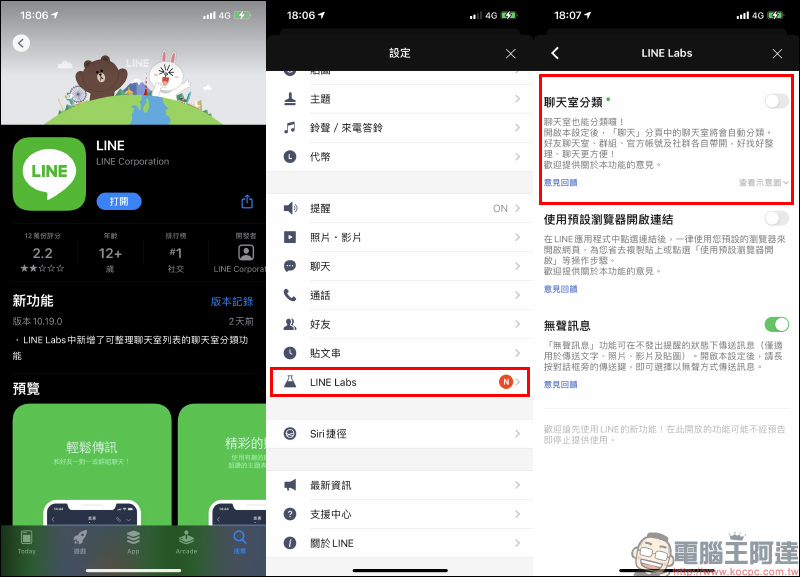
Compare the difference between the “Chat Room Classification” function when it is not turned on and when it is turned on. After it is turned on, various chat rooms will be automatically classified on the chat room page. For example, friend chat rooms, groups, official accounts and community chat rooms will all have exclusive categories:

For users who want to quickly switch between various chat rooms, they no longer have to worry about not being able to find their friends’ messages! For example, if you switch to the “Friends” category, only chat rooms with one-on-one conversations will be displayed:
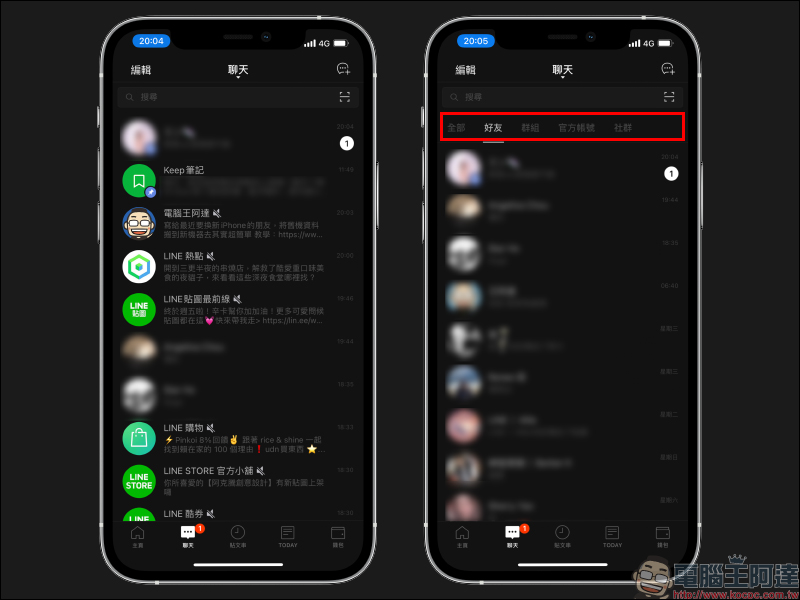
Other categories, such as “Group”, “Official Account” or “Community”, also make various types of chat room messages more organized and reduce the tragedy of swiping back to the wrong chat room!

Further reading:
LINE updates to open the “Biometric Login” function, iPad users can experience it first (Usage Tutorial & iPad version privacy improvement settings)


Source: KOCPC Chinese