


After the recent iOS 14 upgrade, in addition to many features of iOS 14, YouTube 4K video playback has also been quietly supported for some iPhone models. Even if not all models and videos are currently supported, how can you use your iPhone to watch YouTube 4K videos? In fact, as long as you use several iPhones mentioned in this article and use YouTube 4K video search techniques, you can find 4K high-definition videos that can play 2160p60 HDR!
Searching tips for watching YouTube 4K videos on iPhone (tutorial)
Even though the iPhone currently does not support 4K resolution screens, it can still play YouTube’s 4K high-definition videos normally. In addition to having a clearer picture than 1080p, with HDR high dynamic range support, iPhone models with OLED can get brighter highlights, darker shadows, and better color vividness on the screen.
Currently, the iPhones that support the YouTube 4K video playback introduced in this article are: iPhone 11 Pro, iPhone 11 Pro Max, iPhone XS, iPhone XS Max , the above-mentioned limited models can play 4K YouTube videos as long as they are upgraded to iOS 14. As for the iPad, according to actual tests, even if the iPad Pro (2020) is upgraded to iPadOS 14, the same video source is still not supported.

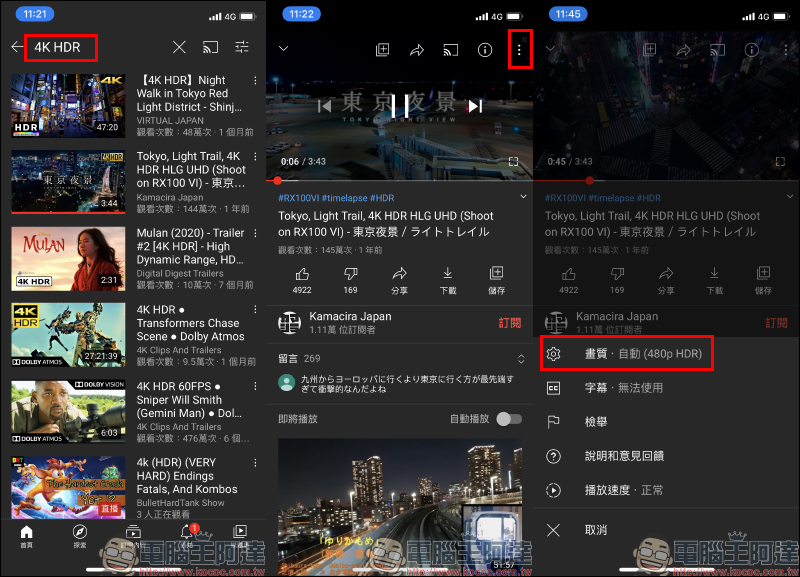
This article uses the iPhone 11 Pro that supports YouTube 4K as an example. The first way to search for videos that can be viewed on YouTube is to directly enter the 4K HDR keyword to search. Currently, only 4K HDR videos can be played in 4K on iPhone. If the video source is 4K or even 8K but does not support HDR, the 4K video resolution option will not be found. After clicking on the video, expand the function menu in the upper right corner of the player page, and then click “Image Quality”.
If the video supports 4K playback, you will see 2160p HDR in the video quality options:
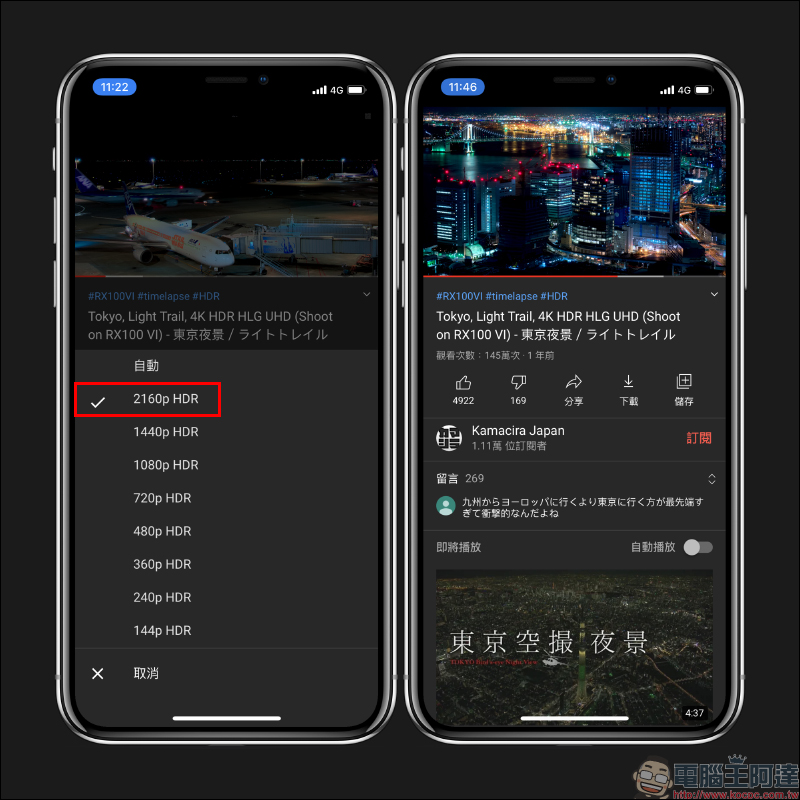
Then you can watch this YouTube video on your iPhone in 4K high quality. However, it should be emphasized here that this search method is actually “not entirely correct” because sometimes videos with 4K HDR in the title but not actually supported are found due to keyword factors. If you’re lucky, there’s a chance that the video you select can play 4K HDR video on your iPhone.

Next, let’s share the correct YouTube 4K video search skills for iPhone. In fact, just search for the keyword of the video you want to watch, expand the “Search Filter” in the upper right corner of the search results screen, and check the two options of “4K” and “High Dynamic Range (HDR)”, and then all the videos returned in the search results will support 4K HDR:
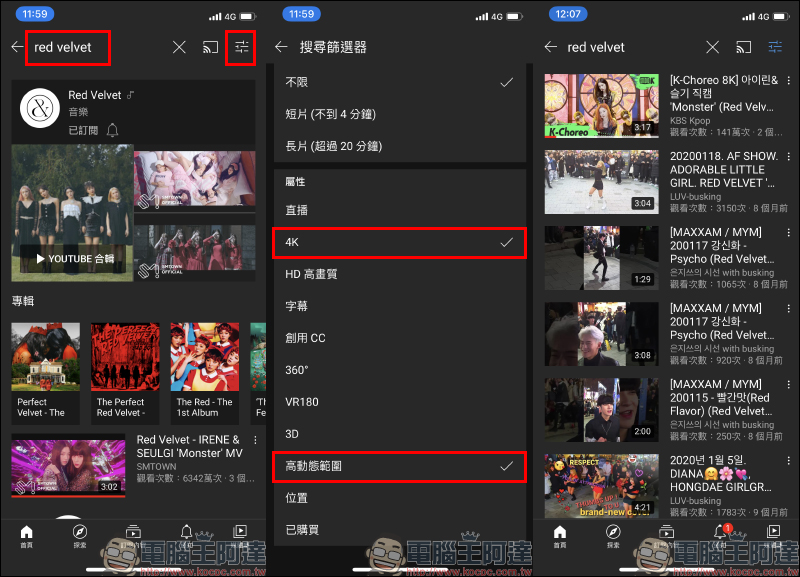
Take a video as an example. Select the highest 4K quality in the video player’s image quality menu. This video can play up to 2160p60 HDR (4K 60FPS HDR):
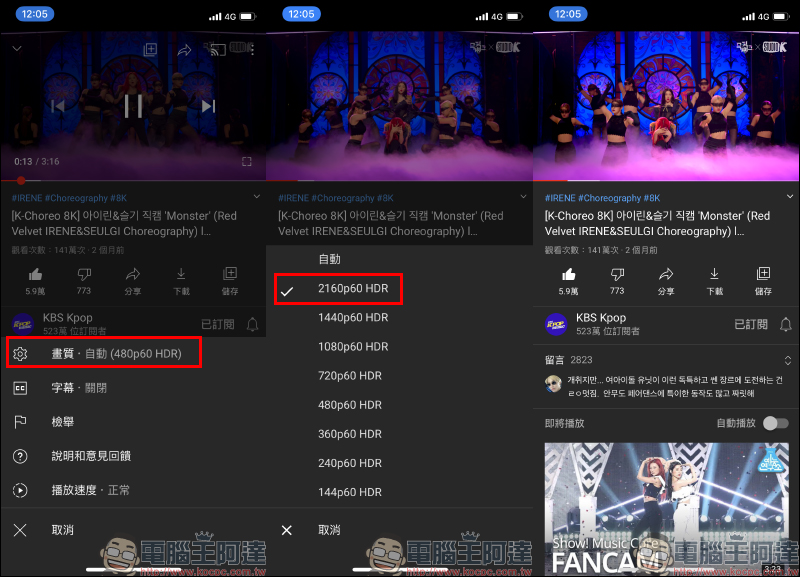
Then you can play YouTube 4K videos on your iPhone!

The above-mentioned demonstration video is actually not only 4K in quality, but has even reached 8K 60FPS HDR (4320p60 HDR), which can be played by opening the Chrome browser on a computer. However, the highest image quality that the iPhone can currently play is still 4K, so at most you can only find the 4K 60FPS HDR option of 2160p60 HDR:
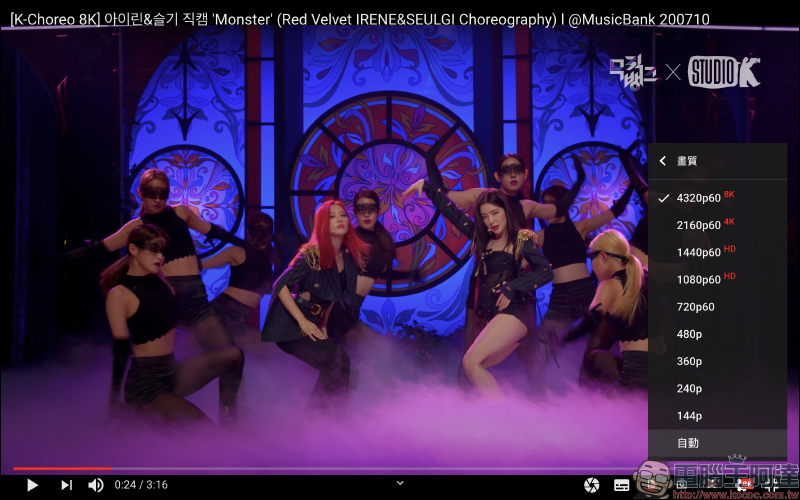
YouTube 4K 60FPS HDR (2160p60 HDR) sample video
Here are some videos that can be played in YouTube 4K on iPhone 11 Pro, iPhone 11 Pro Max, iPhone XS, and iPhone XS Max (some video sources can be played in 8K on the computer), so that readers using the above models can directly open and watch the YouTube App.
Further reading:
YouTube silently resumes free members and can also use the iOS 14 “Picture in Picture” function, which can be used without shortcuts and fees.
Source: KOCPC Chinese