


The “LINE Community” function, which LINE officially announced in early May, will finally be launched today (23rd)! This can be said to be a new type of online chat room. In addition to allowing users to join groups of different interests, using nicknames in the group instead of LINE accounts with personal information can protect users’ personal privacy. The group has an administrator mechanism to facilitate administrators to effectively manage the social chat environment. At the same time, each group can have up to 5,000 members participating in the group chat.

LINE community is officially launched: a new online chat room that can chat with up to 5,000 people! Hurry up and join the Computer King Ada Technology chat group!
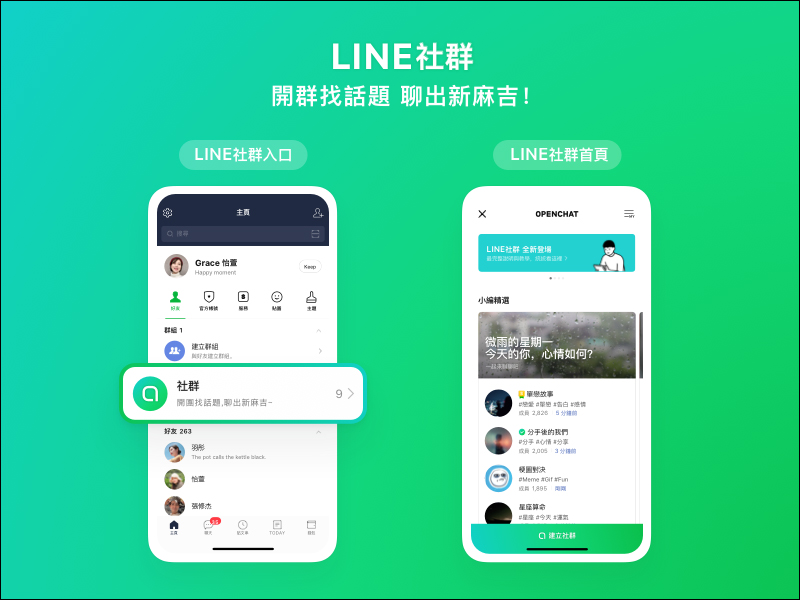
Where is the LINE community? How to join the community?
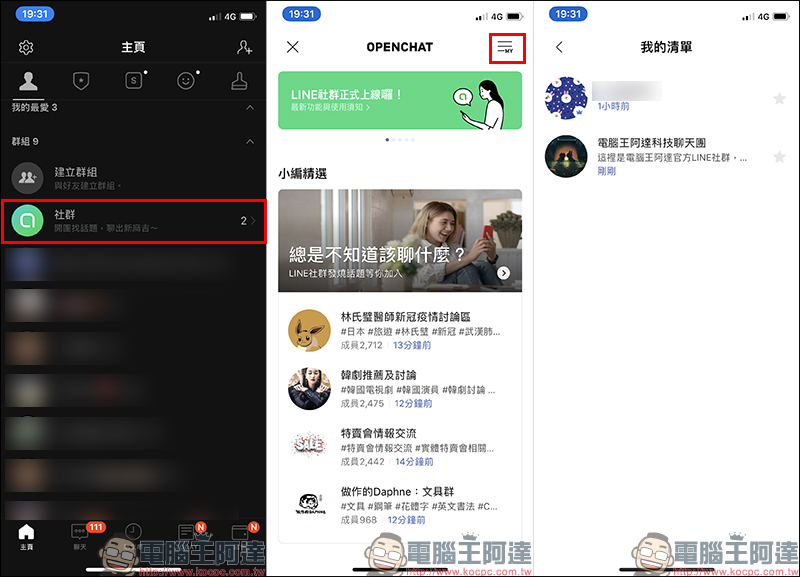
LINE communities are located in “Groups” on the LINE App homepage. Click “Communities” to enter the group homepage. In addition, you can also click on the icon in the upper right corner of the “Chat” tab to go to the community homepage. After entering the community homepage, you can see many LINE communities that have been established. If you want to see which communities you are currently participating in, you can select My List in the upper right corner of the group homepage to view:
Computer King Ada also has a LINE community! Scan the QR Code or click the link to join the community now!
“Computer King Ada Technology Chat Group” LINE community (click me to join the community)

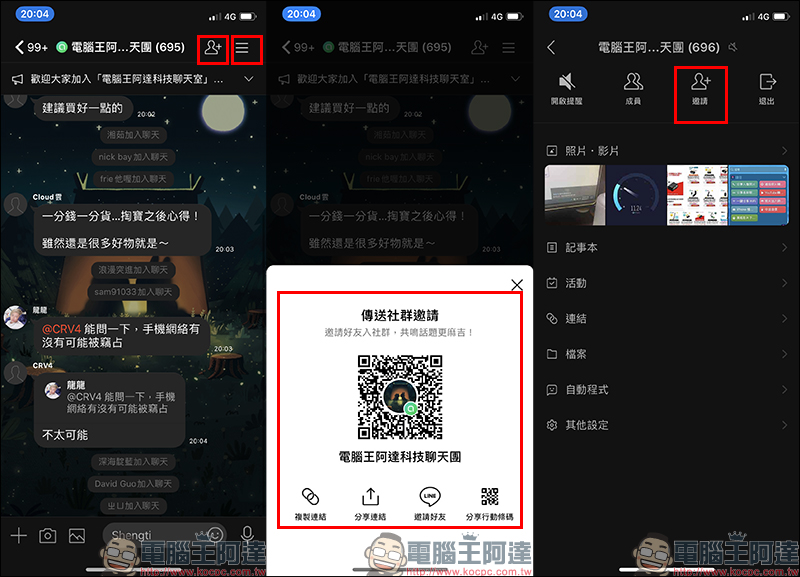
If you want to invite other friends to join a LINE community, just click the invite button in the upper right corner of the community chat room page to enable various invitation functions. In addition, you can also enter the community’s function list and click the “Invite” button to also enable the invitation function:
Build a community (gradually released in batches)
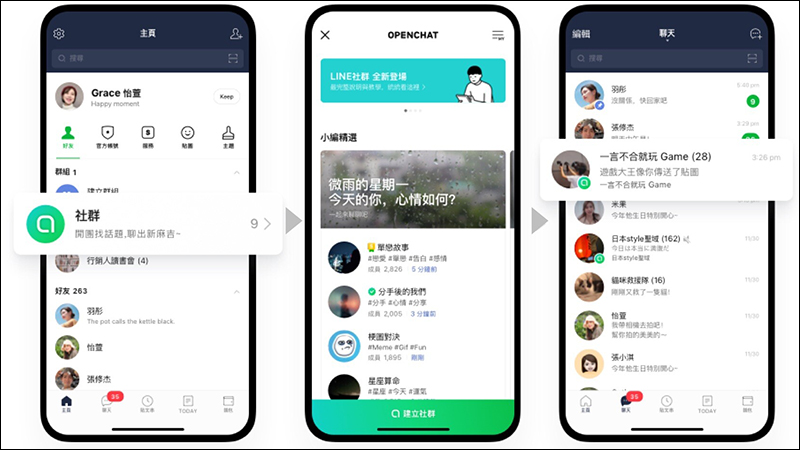
Organizing the launch schedule of various functions of LINE community
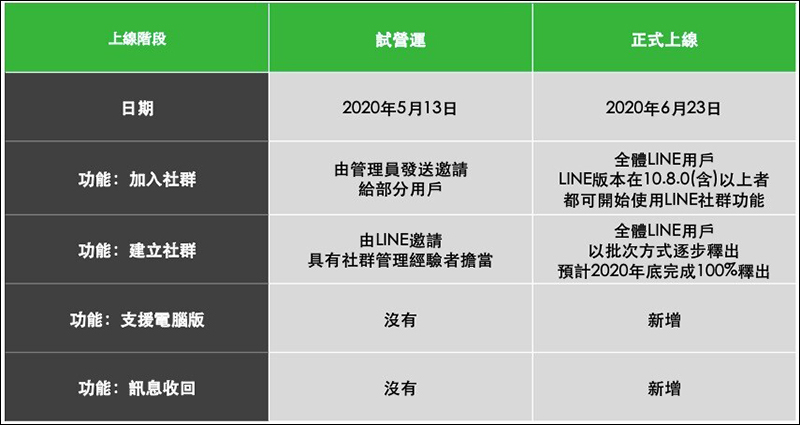
The “LINE Community” function will be released to LINE users across Taiwan starting from 10 a.m. on June 23, 2020! LINE officials have adjusted the current plan based on user needs, prompting the LINE community to meet the majority of LINE users as early as possible. However, the “Create Community” function is currently being gradually released in batches, and is expected to be 100% released by the end of 2020:
(Must learn) LINE social application tips: Do not display the number of unread messages
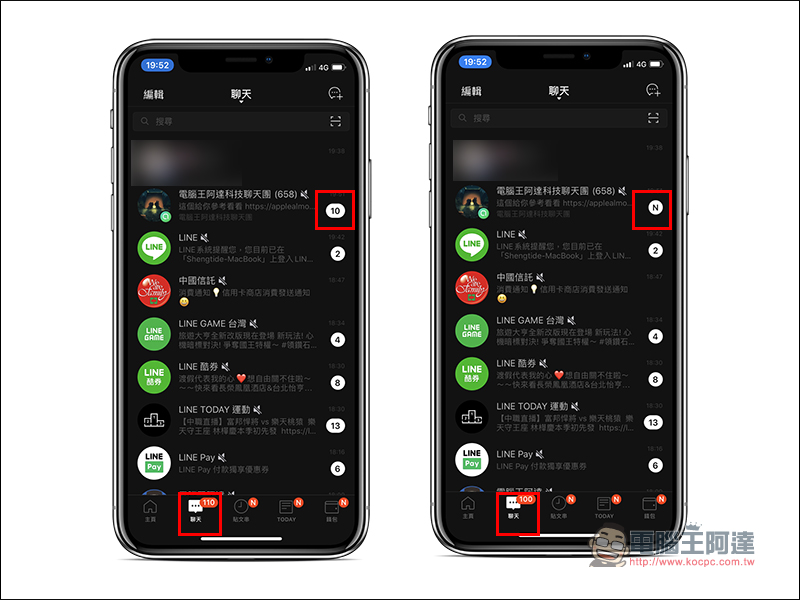
Each LINE community can have a maximum of 5,000 members. With a large number of people, of course, comes a large number of messages. When community members chat on it, it is easy for the number of unread messages to explode. If you are a LINE user who can’t stand seeing the number of unread messages, it is recommended to learn how to turn off the display of the number of unread messages in LINE communities. After enabling this option, unread messages will change from numbers to displaying a green N icon! In addition, and more importantly, after this feature is turned on, the total number of unread messages in LINE will not be included in the number of unread messages in the LINE community.
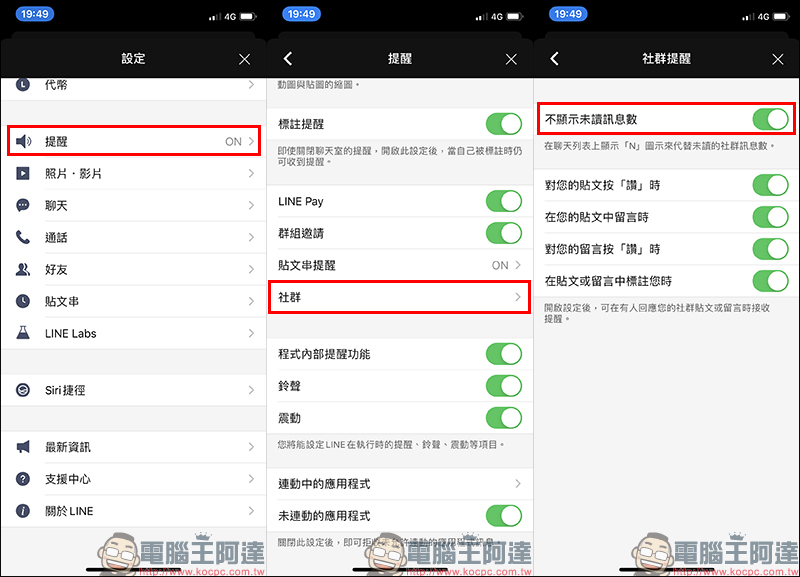
The setting method is very simple. First, enter the “Settings” page through the gear icon at the top of the LINE homepage, then select “Alerts” > “Community”, and then turn on the “Hide the number of unread messages” function for social reminders:
(Must learn) LINE community application tips: How to change nickname and photo?
When joining a LINE group, you need to first set a nickname to be used in the group. You can also upload the photo you want to display in the group in this step. However, after joining the group, users can still change their nickname and photo at any time. It is important to note that if the administrator or a co-administrator with authority wants to remove chat members from the community, the member who is forced out will be blacklisted. Even if he changes his nickname, he will not be able to join the group again. If he wants to join the group again, the administrator must first remove him from the blacklist set by the community.
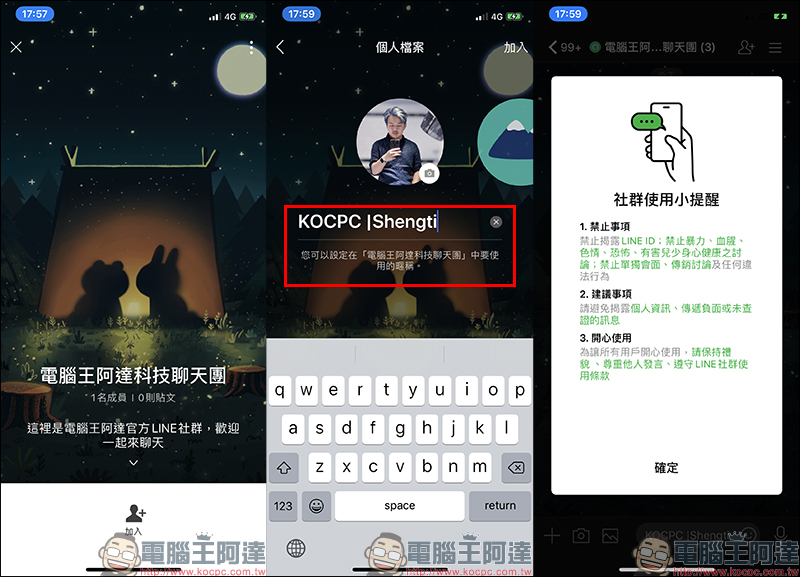
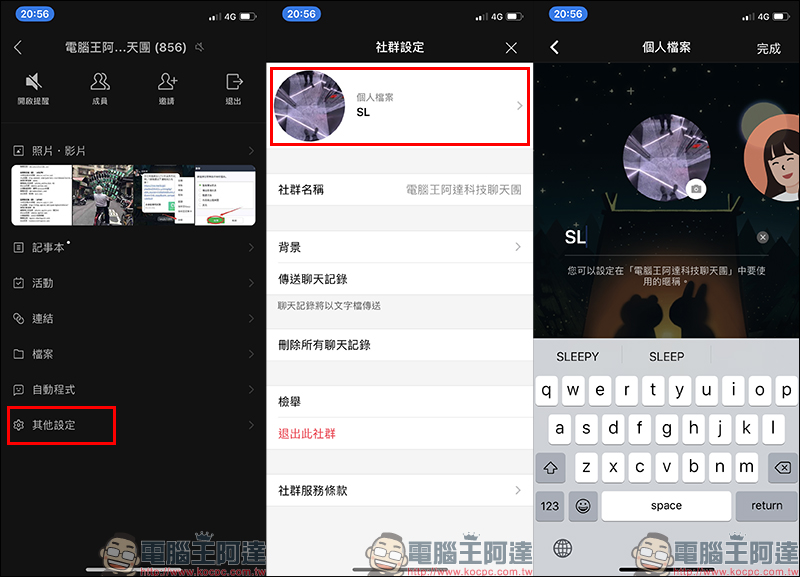
To change the nickname and photo in the group, just open the group function list, find “Other Settings” and click “Profile” to edit the group nickname and photo. Chatting in groups using nicknames can also avoid the trouble of being harassed privately by others. Of course, everyone should also be particularly careful not to arbitrarily disclose personal information in the group!
How to use LINE communities in LINE PC version?
With the official launch of LINE Community, LINE Community is also supported on the PC version of LINE! As long as you update the PC version of LINE to version 6.0 (inclusive) or above, or directly update to the latest version, you can see the LINE communities you have joined in the PC version of LINE, and you can use social chat in the PC version of LINE!
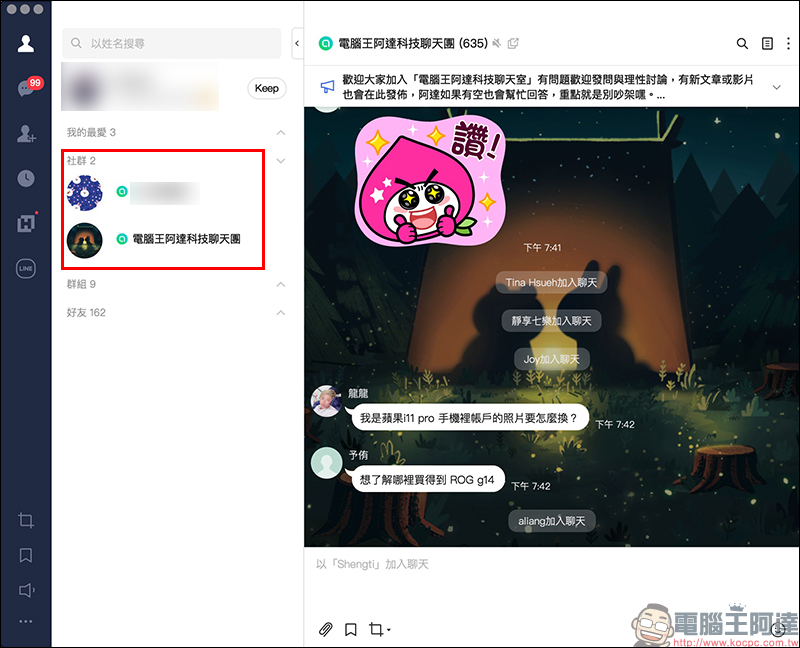
However, please note that if you want to browse the community homepage and join the community, you need to join the community on LINE mobile version first. After joining a community, you can see the community in the PC version of LINE! To put it simply, you can set the first device for LINE service as your mobile phone, and other devices such as computers and iPads as extended devices.
LINE social message recall function (expected to open on 6/25)
The “Recall Message” function has always been loved by LINE users. After all, sometimes swiping accidentally sends messages that should not be sent, which may cause unexpected consequences. The LINE community will also open this feature on June 25, 2020. Both the mobile version and the computer version will support this feature. Users only need to “long press” the message they want to retract as usual in the LINE chat room, and then click “Retract” in the menu. In addition, the message recall function of the LINE community requires updating the LINE iOS version to 10.9.0 (inclusive) or above, the LINE Android version 10.10.0 (inclusive), or directly updating to the latest version.
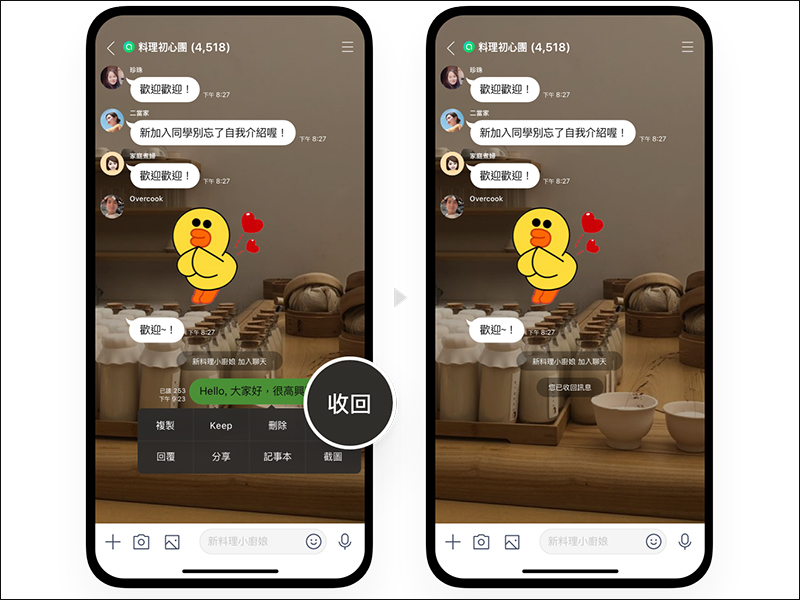
Rules for “message withdrawal” in the LINE community:
- It can be retrieved within 24 hours, regardless of whether it has been read or unread.
- Recalling will keep the track (the system message displays “You have retracted the message”)
- Types of messages that can be recalled: text, stickers, photos, videos, audio messages, URLs and URL previews, and location information.
What is the difference between LINE communities and LINE groups?
Before the LINE community was officially launched, weI also briefly introduced the positioning of the LINE community (you can click here to review), in order to make it easier for everyone to better understand the differences between LINE communities and LINE groups, you can refer to the following comparison table officially compiled by LINE:
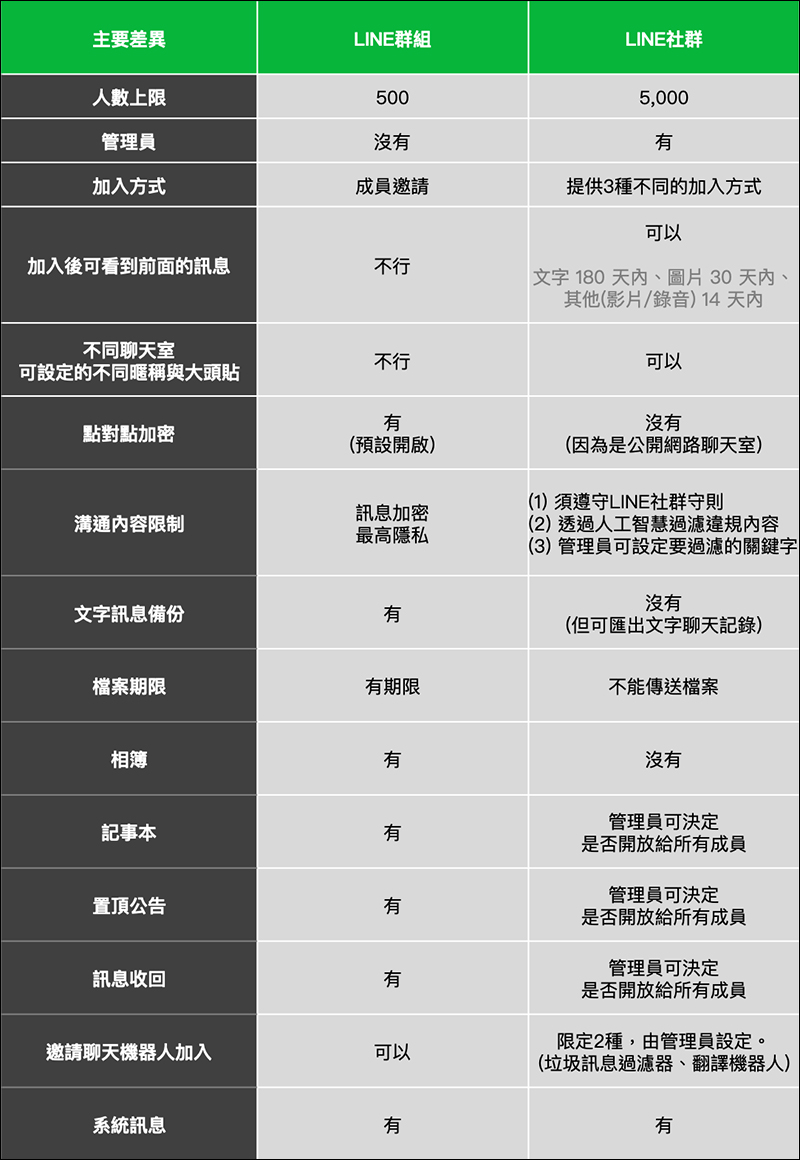
Simply put, the key features of LINE groups are:
- The maximum number of people is more:Can host up to 5,000 members
- With administrator mechanism:The person who created the group is the main community administrator. The main administrator can assign permissions to members in the community to become “co-administrators”, so there is no need to worry about encounters like LINE groups that are maliciously “turned over”.
- You can view past messages:Even new members can review the content of messages within a certain time range before joining the community.
- Public online chat rooms:Unlike groups that have message encryption, the LINE community is positioned as a “public online chat room.” In order to manage a large amount of chat content, it will need to rely on artificial intelligence technology and machine learning to filter illegal chat content.
- Add custom nickname:Different from groups, the first step to join a LINE community is to set your nickname and photo in the group. This also protects users from being privately harassed by other members of the group.
A must-see for newbies! Notes on LINE community
There are a variety of interesting topics in the LINE community, and you can also customize your nickname to join. Chatting is really fun! However, I have a very important reminder to everyone, that is, some content cannot be discussed in the LINE community! Every prohibited item is carefully formulated after being evaluated by the LINE community team from many angles. We hope to maintain a safe and secure chat environment so that everyone can not only chat freely, but also chat with peace of mind.
- It is prohibited to reveal personal LINE ID in chat content (it doesn’t matter if it is the ID of an official account).
- All conversations with “intention to meet alone” in LINE communities are prohibited.
- Discussions related to direct marketing are prohibited.
- Discussions and content related to violence, gore, pornography, horror, etc. that are “harmful to children’s physical and mental health” are prohibited.
- Discussions related to smoking (including cigars and e-cigarettes), alcohol, and betel nuts are prohibited.
- Any illegal conduct is prohibited.
- For more information on LINE’s community rules, see here:LINE Community Rules and Prohibited Matters (Click here to go)
Source:LINE Taiwan Official BLOG
Further reading:
LINE iOS version follows up with the launch of the “Silent Message” lab function, allowing users to send messages to friends quietly
Source: KOCPC Chinese