


Many LINE users also choose the PC version of LINE to connect with their friends when using computers. Recently, LINE has once again fully optimized the user experience of the LINE PC version. The LINE Windows 6.0.1 version was officially launched on May 20, 2020, and the LINE Mac version 6.0.2 will also be launched in the near future. Since there is quite a lot of content in this update, we have compiled a total of 10 updates that are interesting and practical for users.

LINE PC version has been significantly updated! Compilation of 10 interesting update and optimization projects
1. Browse window design for better reading
Although after the PC version of LINE has been updated, you may not notice the changes in the screen configuration at first glance, but in fact the layout of the window layouts has been adjusted to be neater, and the fonts have been enlarged to allow users to read more clearly and comfortably:

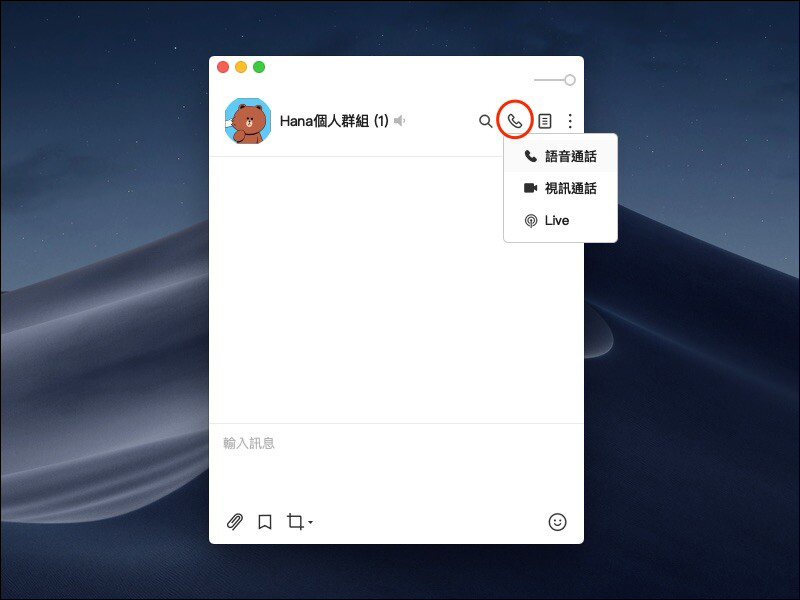
2. The call function key is adjusted to the upper left corner of the screen, and the floating button adds a group creation function.
Originally, the function buttons for voice calls and video calls in the PC version of LINE were designed in the upper right corner of the text input field. Sometimes, if you are not careful, you may accidentally touch them. However, after this update, the two call function keys have been adjusted to the upper right corner of the window compared to the LINE mobile version, and the call cases have been unified into a single small call icon, which can be expanded to select different call applications after clicking:
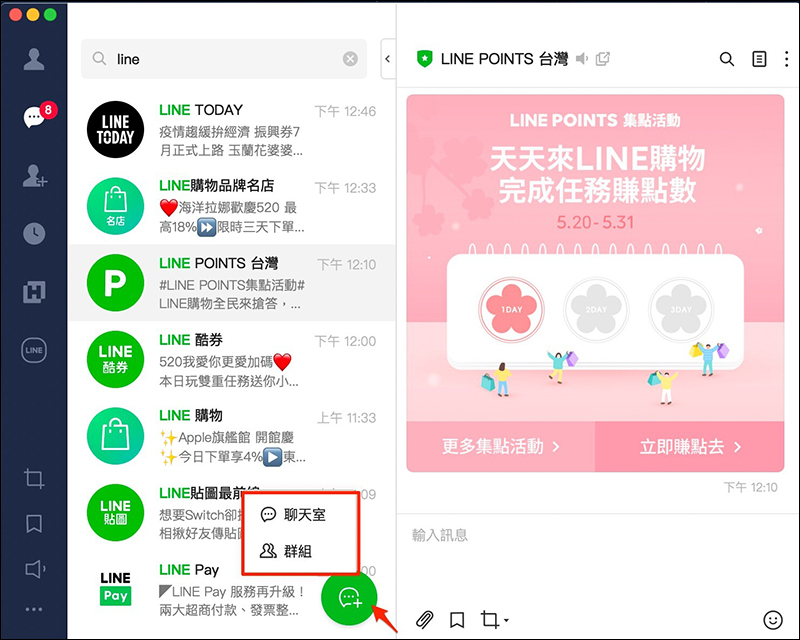
In addition, the original floating button on the computer version of LINE could only create a new chat room. However, after the update, in addition to the original chat room creation, the floating button also added the group creation function (the image is compared to the LINE mobile version):
3. Add more LINE service shortcuts to the main menu to make it more convenient to use.
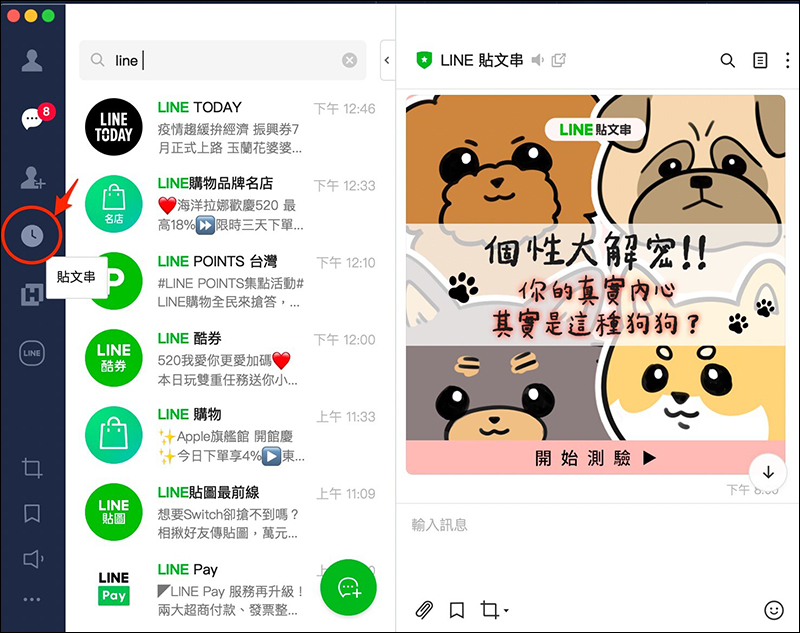
After the PC version of LINE is updated, in addition to adding more service shortcuts to the main menu on the left side of the original window, the web version of LINE post strings will be directly opened for LINE post strings. Changing to link to the web version has two benefits. It can add the complete or latest features of the post string without burdening the computer version. In addition, users do not have to constantly switch between post threads and chat pages, and can view the chat room at the same time:
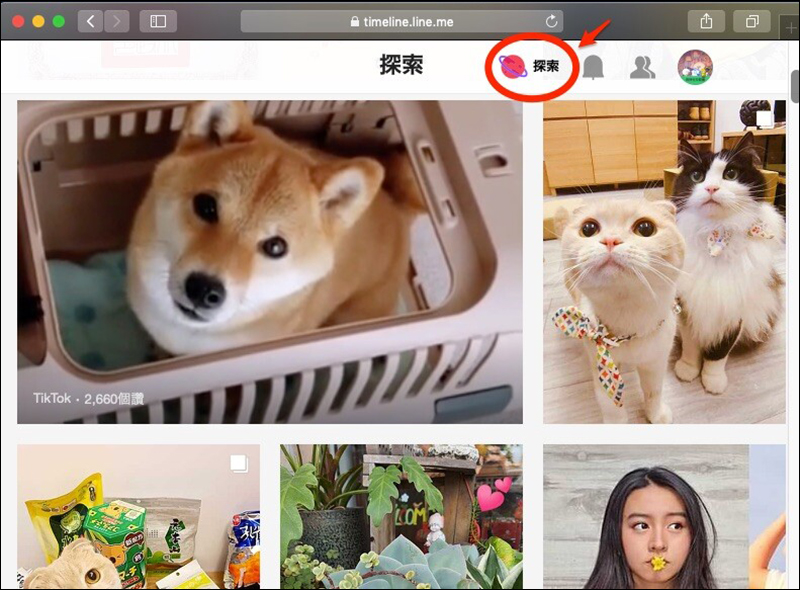
In addition, the new “Explore” function previously launched by LINE is also supported in the web version of LINE Posts:
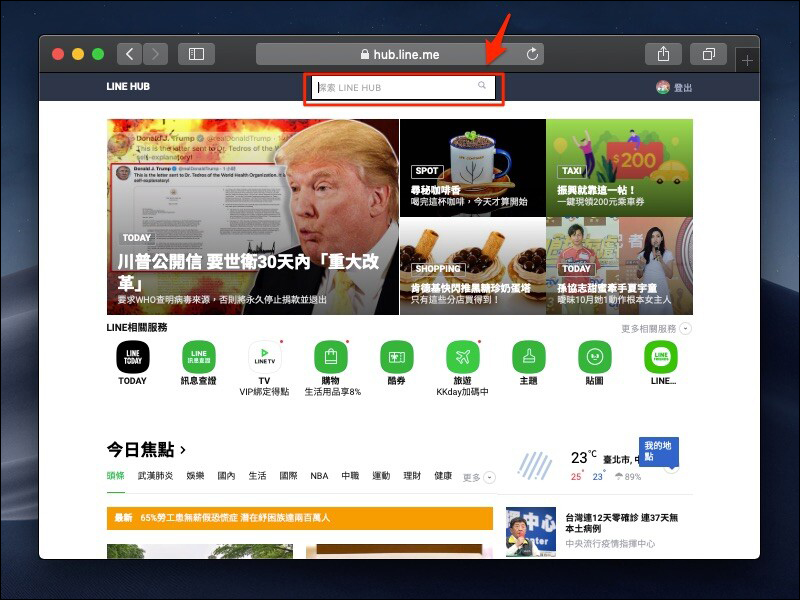
As for LINE HUB, which collects recommended content related to LINE TODAY, LINE TV, and LINE shopping, it has also been integrated into the main menu after the update:

LINE HUB is like a web version of the LINE homepage. It can also search for news related to LINE TODAY:
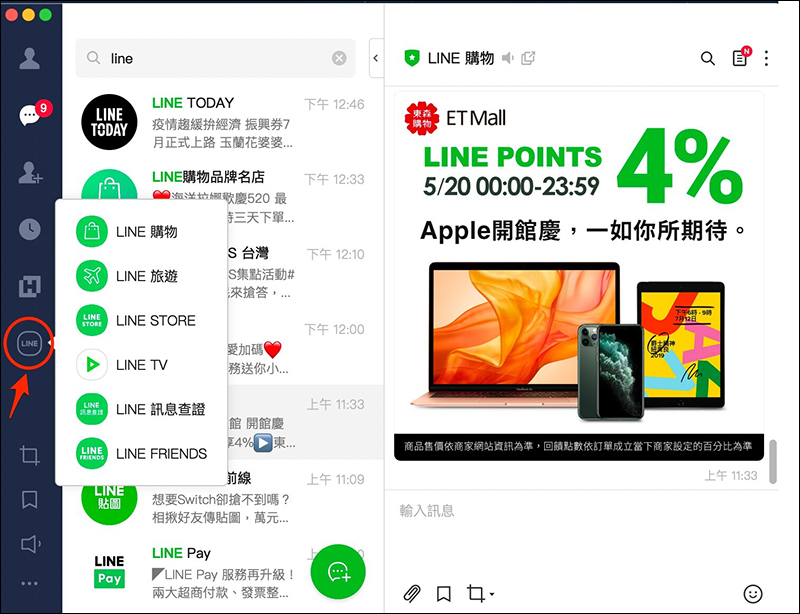
In addition, many other LINE services are also integrated in the “Service” button of the main menu function, including LINE shopping, LINE travel, LINE STORE, LINE TV, LINE message verification and LINE FREINDS mall:
4. The chat message window automatically expands with text input
Many users of the PC version of LINE enter more text at once. If they want to view the entire content at once, they often need to adjust the height of the text input box. However, after the PC version of LINE is updated, the height of the text input box will automatically expand according to the user’s typing content, and the user will be able to view the complete input content without having to manually adjust it:

5. Selecting a font will be applied to the overall display settings of LINE PC version simultaneously.
Previously, when selecting fonts in the settings of the PC version of LINE, the fonts would only be applied to the “Messages” section. However, after the update, the selected font will be applied to the fonts of the “all interfaces” of the computer version of LINE (this feature is currently limited to the computer version):
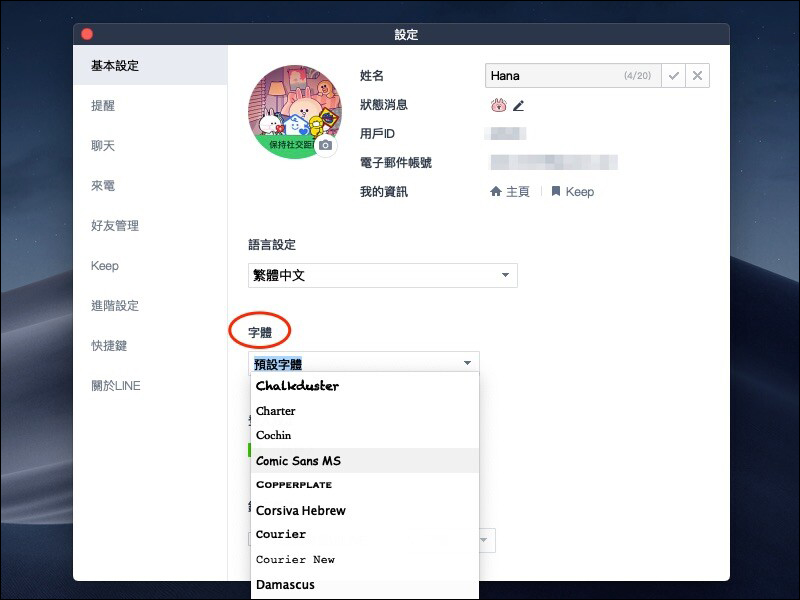
In this PC version update, more new font options have been added to the PC version settings of LINE:
- New fonts for Windows version:Black font (Microsoft JhengHei UI), standard font (kaiu), new fine font (mingliu)
- New fonts for Mac version:Standard Kai (kai), Ping Fang (PingFang)
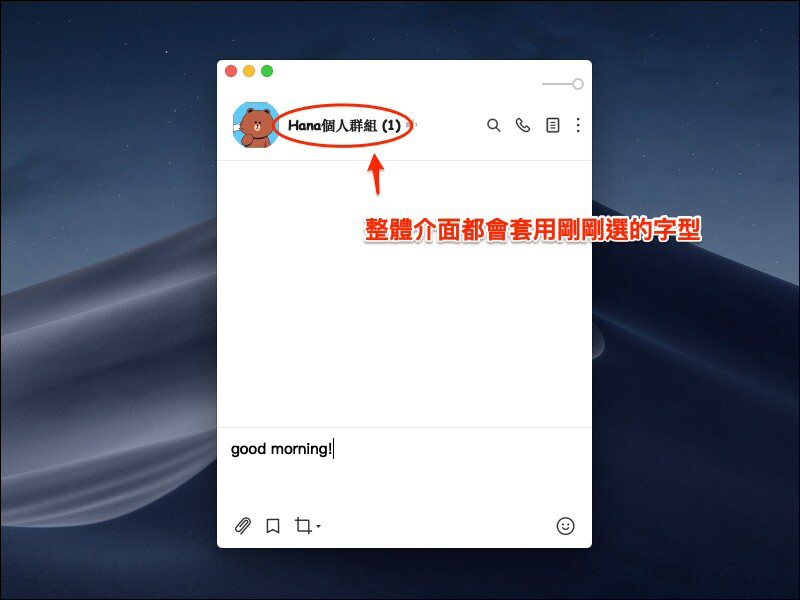
After the settings are adjusted, the font change effect of the overall interface of LINE PC version is as follows:
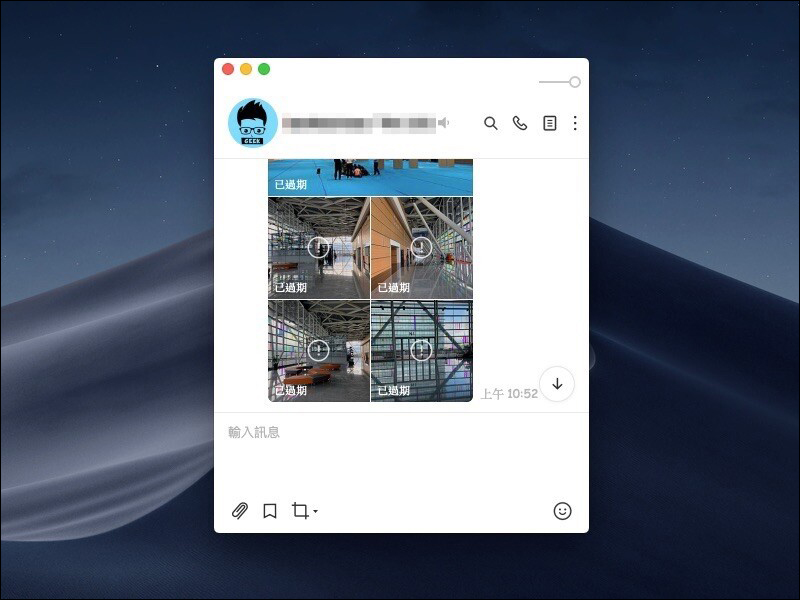
6. Expired photos and video preview thumbnails can be displayed to facilitate identification.
There will be a download deadline for sending photos, videos and files on LINE. However, after the PC version is updated, although expired content still cannot be opened, preview thumbnails can be viewed in the chat room installation, allowing users to avoid the embarrassment of sending content that has been sent in the past to the other party again. In addition, expired content will be clearly marked “Expired” on the preview thumbnail, so users do not need to know that the content has expired and cannot be viewed until they open it.
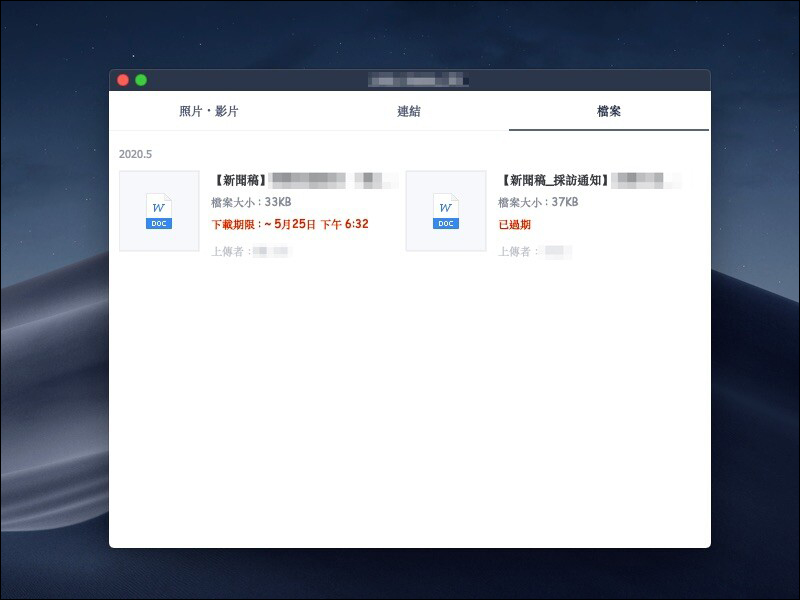
After updating, click the menu in the upper right corner of the window, and then click “File”. You can see that the “Download Period” originally marked has been changed to more eye-catching red text:
7. Chat message emphasis function icons are optimized and support Mac touch bar
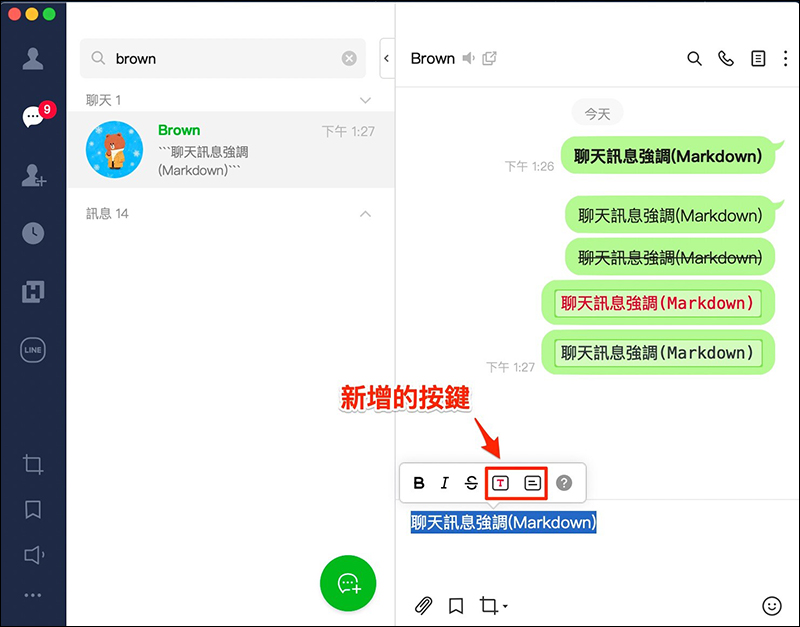
The PC version of LINE can use five chat message emphasis display effects, including bold, italics, strikethrough, red text box, and paragraph box. After the update, two new buttons are added to the menu that floats when highlighting text. A total of five message emphasis display effects have corresponding buttons:
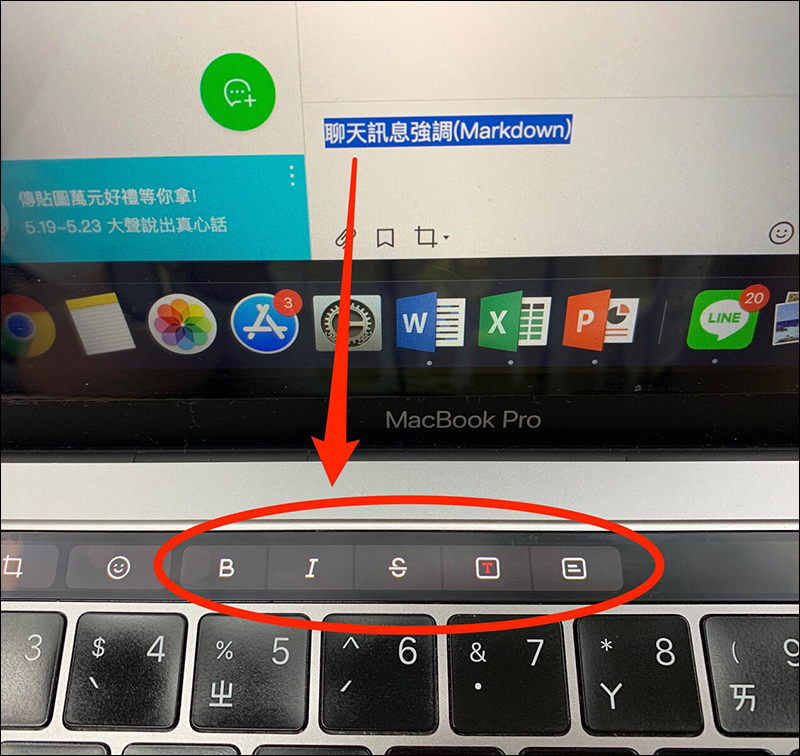
In addition, the chat message highlight function will also be directly controlled on the Mac touch bar (only supports Mac computer version):
8. The “Notification” icon in the main menu can turn off all reminders at once
In the past, in the PC version, to turn off message reminders, you had to manually turn off the reminder notifications for each chat room. After the update, an independent “Notification” icon was added to the main menu, allowing users to turn off reminders for all chat windows at once, and no longer worry about missing which chat rooms’ message notifications have not been closed. When the user clicks the “Close All Reminders” function, the chat room will be uniformly changed to the status of turning off reminders, regardless of whether the chat room originally had reminders to turn off.
If you click “Turn on all reminders” after closing, the chat room that has been closed before all reminders are closed will remain closed without the need to manually close it.

9. Support new “Message Stickers”
At the end of March this year, LINE launches a new “Message Sticker” (for details, click here to view past article introductions), after this update of the PC version of LINE, the PC version also fully supports the message sticker function! Users can also edit the text content of message stickers on the computer and send stickers:

10. Multiple updates to video calls
Many LINE users will also choose to use the video call function in the PC version of LINE. After the update, there are many practical updates for video calls. For example, users can preview how they will appear on the screen, apply filters, and then join the video call (this feature is first launched in the Mac version, and the Windows version will support it in the near future):

The background will inevitably be cluttered during video calls and live broadcasts. In addition to the option to blur the background to make the picture simpler, you can also apply background images after the update (this feature is first launched in the Mac version, and the Windows version will be supported in the near future):

The buttons on the incoming call screen of the PC version of LINE are also marked with text descriptions of “Turn off microphone”, “Start video”, and “Mute” to prevent users from not understanding the icons and causing the trouble of accidentally pressing them (LINE Windows 6.0.1 or Mac 6.0.2 already supports this):

Picture/Source:LINE Taiwan Official BLOG
Further reading:
LINE Lab launches a new feature called “Chat Room Classification” to make it easier to find chat messages! (Android version is the first to experience)

Source: KOCPC Chinese