


Because of the epidemic, many people wear masks for long periods of time when entering and exiting public places every day, but this also leads to the inconvenience of using Face ID to unlock iPhones. Even before we hadI have shared some private methods for unlocking Face ID while wearing a mask., but it is not always possible to successfully unlock while wearing a mask. In order to alleviate the time it takes for users to wear masks and unlock during this period,Previously, iOS 13.5 Beta has brought relief to this problem., and earlier today the official version update of iOS 13.5 was finally released.

iOS 13.5 official version update released: When wearing a mask, you can automatically skip Face ID and enter the password field unlock page
We have previously reported that Apple will enable faster unlocking for users wearing masks in iOS 13.5. Earlier today, Apple finally released updates to the official versions of iOS 13.5 and iPadOS 13.5. In the past, for models that support Face ID, after waking up the screen and sliding up to unlock according to the instructions, you must first go through the facial recognition process of Face ID. After waiting for a few seconds and still unable to complete the recognition, it will jump to the password field unlocking page (as shown below):

However, for users who always wear masks, it is quite troublesome to go through a Face ID waiting process every time they unlock (especially heavy mobile phone users should feel more troubled).

▲The picture above shows the process of unlocking with Face ID while wearing a mask on iOS 13.4.1
Among the many updates in the official version of iOS 13.5, the most interesting thing for users is that when the user wears a mask, iOS 13.5 can speed up access to the password field on devices equipped with Face ID. To put it simply, as long as the screen wakes up and swipes up to start Face ID recognition and it is detected that the user is currently wearing a mask, the Face ID recognition process will be accelerated and jump directly to the final password field unlocking page:
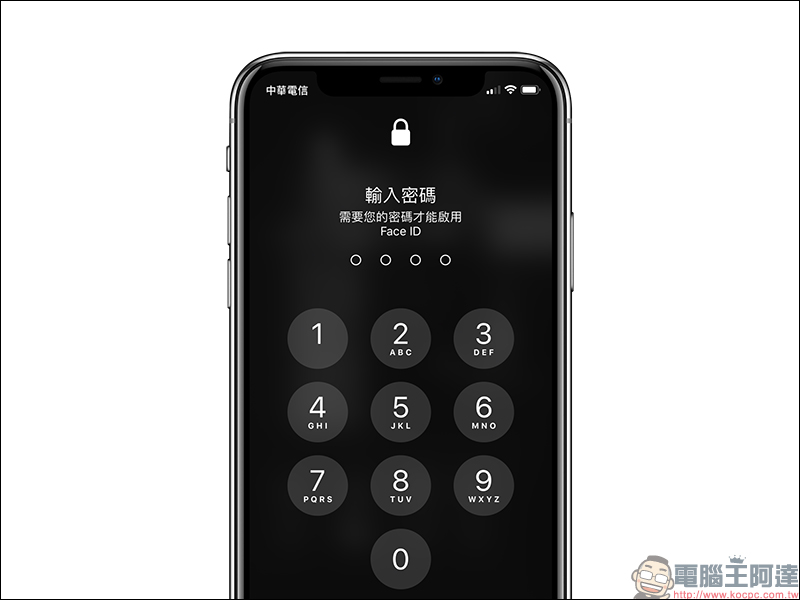
After the official version of iOS 13.5 is updated, you can refer to the following process of the author wearing a mask and testing the iPhone 11 Pro to wake up the screen and slide up to unlock. You will see that the Face ID screen no longer appears, but the password input page is immediately displayed. This change not only makes screen unlocking faster and more efficient, but also other applications that require FaceID authentication and login such as App Store, Apple Books, Apple Pay, iTunes, etc. will also be faster:

▲The picture above shows the process of unlocking with Face ID while wearing a mask on iOS 13.5
In addition to iPhone 11, iPhone 11 Pro, iPhone 11 Pro Max, iPhone XS, iPhone XS Max, iPhone XR, and iPhone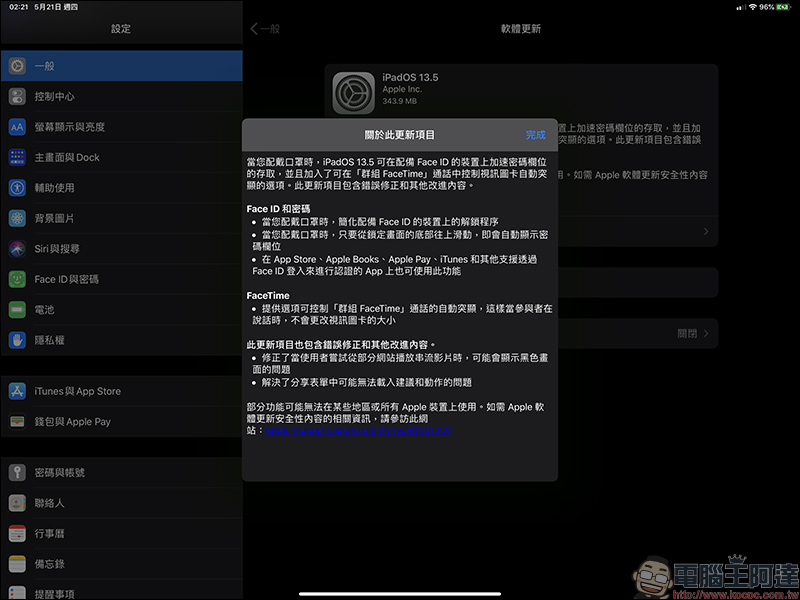
In addition, in addition to improving the unlocking experience of wearing a mask, the official version of iOS 13.5 has collaborated with Apple to develop an “Exposure Notification API” for COVID-19 contact tracing technology to support public health agencies’ COVID-19 contact tracing apps. If government departments use this tool to develop contact tracing apps, iOS 13.5 users can directly download, install and use it. However, it currently displays “Not available in your region.”

The complete update content of iOS 13.5 is summarized as follows:
iOS 13.5 speeds up access to passcode fields on devices equipped with Face ID when you’re wearing a mask, and adds an Exposure Notification API to support public health agencies’ COVID-19 contact tracing apps. This update also adds the option to control the automatic highlighting of the video card during Group FaceTime calls, as well as bug fixes and other improvements.
- Face ID and password:
Simplify unlocking on Face ID-equipped devices when you wear a mask
When you are wearing a mask, just swipe up from the bottom of the lock screen and the password field will automatically appear
This feature is also available on the App Store, Apple Books, Apple Pay, iTunes, and other apps that support authentication with Face ID sign-in - Exposure Notice:
Exposure Notification API supports public health agencies’ COVID-19 contact tracing apps - FaceTime:
Provides option to control automatic highlighting of Group FaceTime calls so that the video card size does not change while participants are speaking - This update project also contains bugfixes and other improvements:
Fixed an issue that could result in a black screen being displayed when users try to stream videos from some websites
Resolved an issue where suggestions and actions might not load in the share form - Some features may not be available in some regions or on all Apple devices. For information about the security content of Apple software updates, please visit this website:https://support.apple.com/zh-tw/HT201222
Source: KOCPC Chinese