


While ChatGPT’s voice feature was already pretty good in the past, after using it for extended periods, you probably still feel like the responses can be a bit daft and slow, and the conversation feels clunky rather than smooth.
With the earlier launch of OpenAI’s new voice model GPT-Live, this aspect has been significantly improved, shifting from a “you speak, then it responds” pattern to something much closer to real human conversation. In other words, GPT-Live no longer needs to wait until you finish speaking before it starts processing—it can continue listening to your additional input while responding, and you can even interrupt it or ask it to slow down.
More importantly, if encountering tasks that require web search, deep reasoning, or more complex operations, these will be delegated to OpenAI’s latest frontier model to handle. Currently, it’s powered by GPT-5.5, and it will be updated as new models become available.

Image source: OpenAI
What’s the difference between GPT-Live and the previous ChatGPT voice feature?
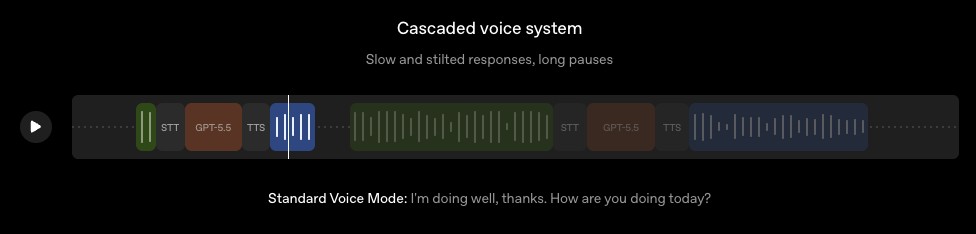
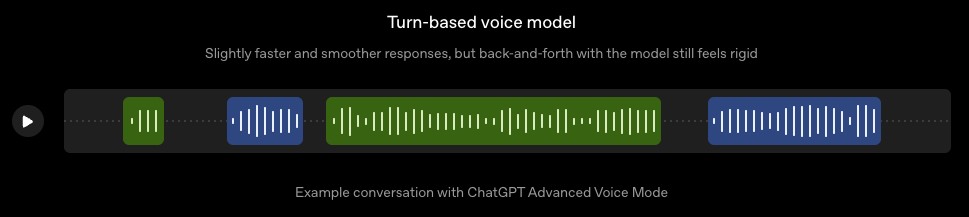
The development of ChatGPT’s voice features can roughly be divided into three stages: the earliest “chained voice system,” the later “Advanced Voice Mode,” and this time’s “GPT-Live.”
The earliest cascaded speech system workflow: user speaks → speech-to-text → large language model generates response → text-to-speech
Screenshot source: OpenAI
The benefit of this approach is that users can finally have a real voice conversation with a frontier AI model for the first time, without having to type every time. However, because there are multiple models and format conversions involved in the middle, the process is longer and latency is higher, so in practice it gives the feeling of “pausing, thinking, then answering.”
After entering “Advanced Voice Mode,” the conversation does flow more smoothly, but it’s still a back-and-forth “you talk, then I talk” process. So you often run into situations where you just pause for two seconds to think, or there’s background noise nearby, and the model assumes you’re done speaking and starts interjecting.
Screenshot source: OpenAI
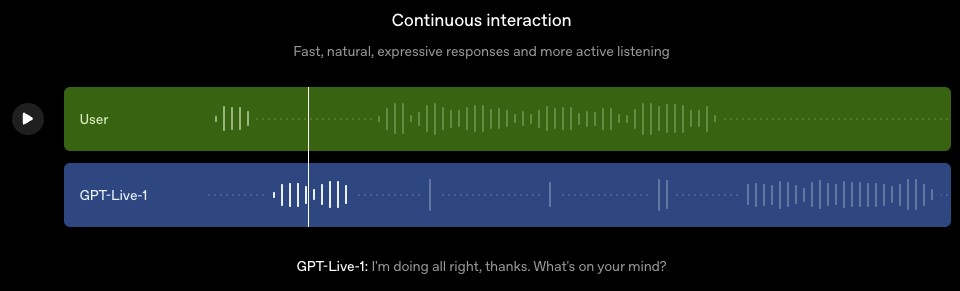
The key difference of the latest generation “GPT-Live” is that it uses a full-duplex architecture. In simpler terms, it no longer just waits for you to finish speaking before responding, but can continue listening to new content you add while it’s still talking.
Screenshot source: OpenAI
This enables GPT-Live to continuously make judgments during conversations, such as whether to keep listening, whether to pause, whether to interject, whether to respond, or whether to call tools in the background to handle more complex tasks. OpenAI also mentioned that this allows the model to engage in more natural back-and-forth interactions, even supporting continuous use cases like real-time translation.
| Type | How it works | Advantages | Restriction |
|---|---|---|---|
| Early ChatGPT voice mode | Three-stage pipeline: speech-to-text, language model, and text-to-speech | You can talk to AI using voice | High latency, noticeable stuttering, and noticeably unnatural |
| Advanced Voice Mode | Single model processes audio, but it’s still turn-based | Smoother and faster than before | Still needs to determine if the user has finished speaking, prone to interrupting |
| GPT-Live | Full-duplex architecture enables simultaneous listening and speaking | Listen while speaking, wait patiently, interject naturally, and interact more smoothly | Some features are still limited at launch. |
What are the features of GPT-Live?

As mentioned above, the biggest change in GPT-Live is that it can continuously receive the user’s voice while generating a response.
For example, when you ask ChatGPT to help plan a trip and it’s halfway through its response, you can jump in and say “Wait, make it suitable for kids,” and the new voice mode will handle this shift more naturally.
GPT-Live gives more human-like responses, not always so formal. OpenAI says it can use brief phrases like “mhmm” or “got it” to show it’s listening.
This change may seem small, but it’s actually important for the voice experience. In real conversations, we don’t wait for the other person to finish speaking before responding. We use responses like “mm-hmm,” “I get it,” or “yeah” to let them know we’re listening. With GPT-Live adding these interaction details, the conversation feels much more human-like.
Additionally, when you pause mid-sentence, it tends not to rush in to interrupt.
GPT-Live has better listening capabilities—it will wait if you need time to think. If you explicitly ask it to listen first before responding, it can do that too. OpenAI also mentioned that the new ChatGPT voice handles background noise better, such as road traffic or someone talking nearby, making it easier to focus on your voice rather than get distracted by environmental sounds.
There’s another very important design principle: separating natural voice interaction from complex task handling.
GPT-Live handles continuous listening, continuous speaking, and maintaining conversation rhythm. But if a query requires web searches, deep reasoning, or more agent-like tasks, it offloads the work to a more powerful background model like GPT-5.5. Once results are ready, it brings them back into the voice conversation.
GPT-Live-1 Instant and GPT-Live-1 Mini will use GPT-5.5 Instant as the underlying model, while GPT-Live-1 Medium and GPT-Live-1 High will use GPT-5.5 Thinking, with varying reasoning intensities.
Note: OpenAI’s GPT-Live comes in two versions: GPT-Live-1 and GPT-Live-1 mini. When using GPT-Live-1, you can also choose between different inference levels—Instant, Medium, or High—based on your task requirements.
Finally, if needed, the new ChatGPT voice will also display visual responses simultaneously. OpenAI gives the example that during voice conversations, it can show information cards for weather, stocks, sports games, and more, while continuing to support search, memory, and image and file uploads.
OpenAI shares test results: GPT-Live significantly outperforms Advanced Voice Mode
OpenAI also released multiple test results for GPT-Live and Advanced Voice Mode this time, showing significant improvements for GPT-Live over Advanced Voice Mode across human preference, conversational fluency, scientific reasoning, agentic search, and multi-turn voice customer service tasks.
First is human preference testing, with evaluation criteria including overall preference, turn-taking, interruptions, conversation fluency, and whether the interaction feels natural. GPT-Live-1 has a preference rate of 75.7%, while GPT-Live-1 mini has a preference rate of 69.2%, with 50% serving as the equal baseline. In other words, when conducting voice conversations under the same conditions, the majority of evaluators prefer GPT-Live’s conversational feel:
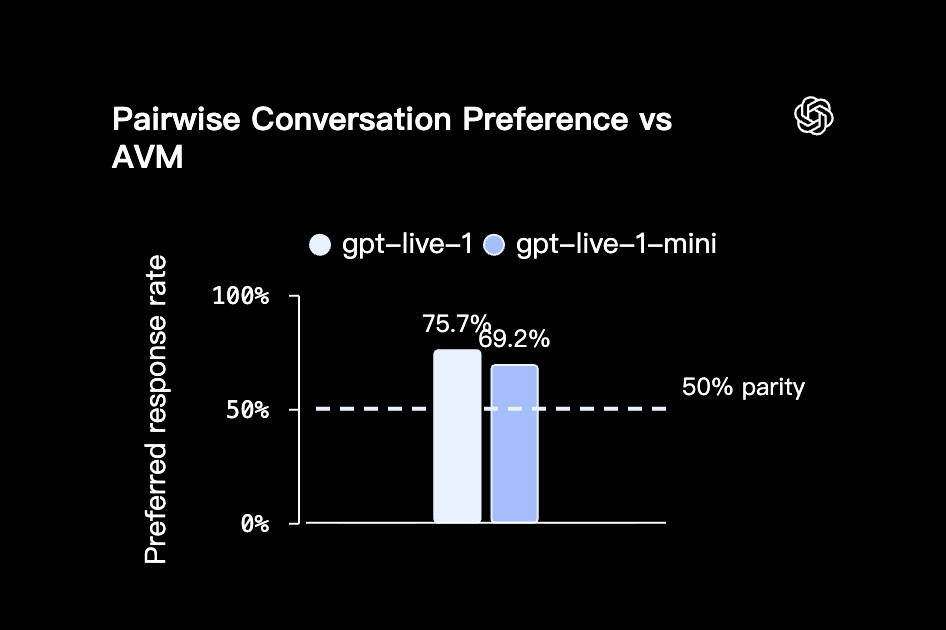
Image source: OpenAI
In the dialogue evaluation section, GPT-Live-1 received a score of 4.96 for “Dialogue Fluency,” GPT-Live-1 mini scored 4.33, and Advanced Voice Mode scored 3.80. For “Enjoyment Level,” GPT-Live-1 scored 5.19, GPT-Live-1 mini scored 4.47, and Advanced Voice Mode scored 3.82.
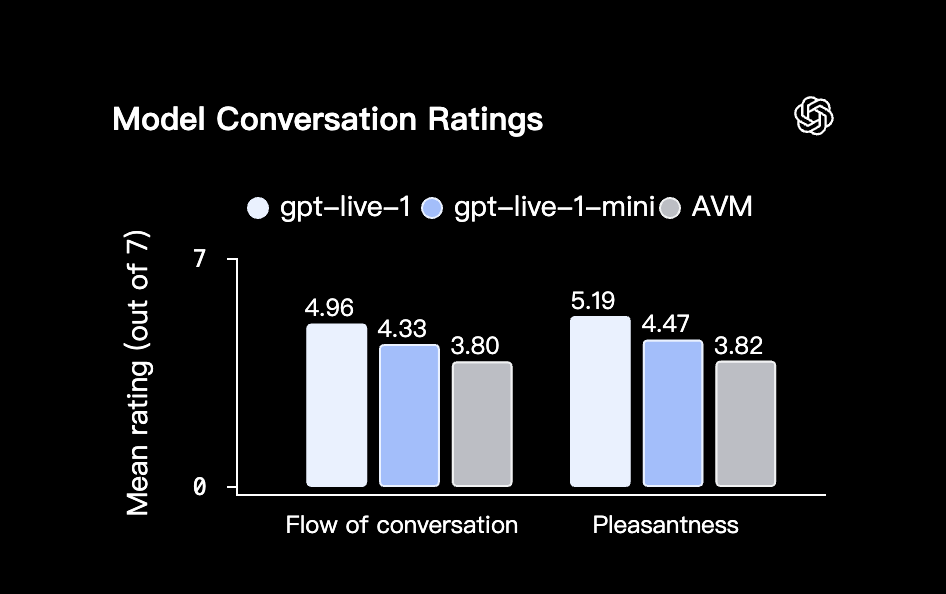
Image source: OpenAI
GPQA is a benchmark testing expert-level scientific reasoning in biology, chemistry, and physics. The chart shows that Advanced Voice Mode scored 45.3%, GPT-Live-1 mini scored 74.9%, GPT-Live-1 instant scored 76.5%, GPT-Live-1 medium scored 81.7%, and GPT-Live-1 high reached 84.2%, a significant improvement.
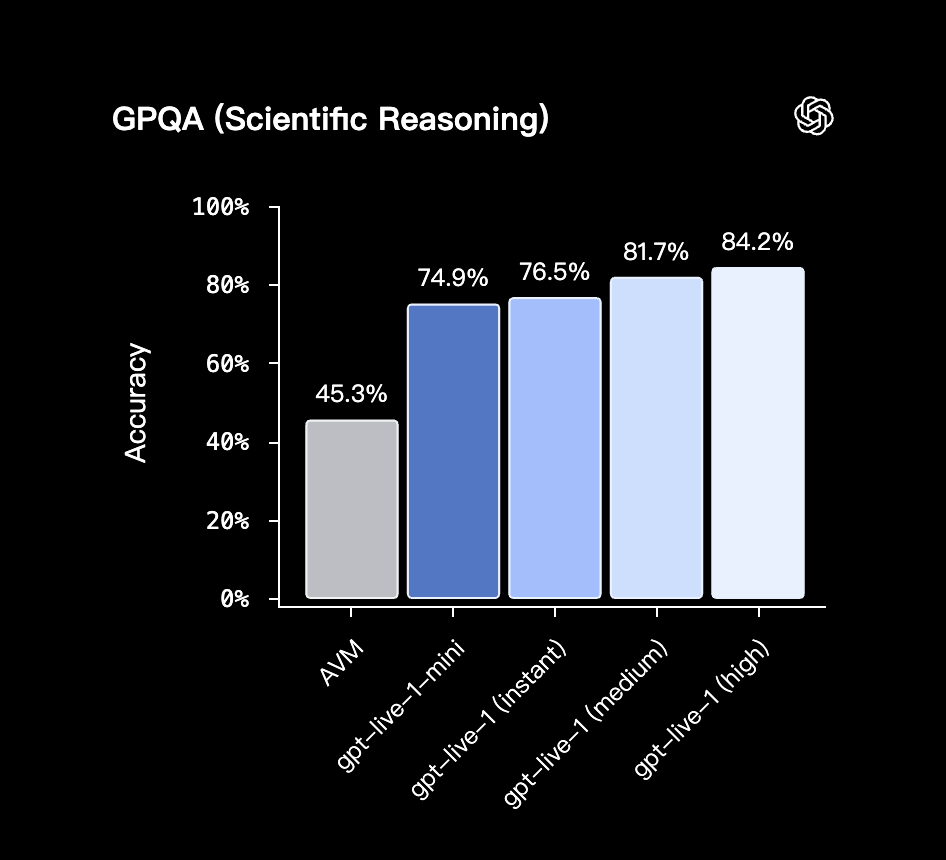
Image source: OpenAI
BrowseComp tests agent-based web search capabilities, and the gap is even more dramatic: the advanced voice mode only reaches 0.7%, GPT-Live-1 mini at 31.6%, GPT-Live-1 instant at 35.1%, GPT-Live-1 medium at 60.6%, and GPT-Live-1 high reaches 75.2%:
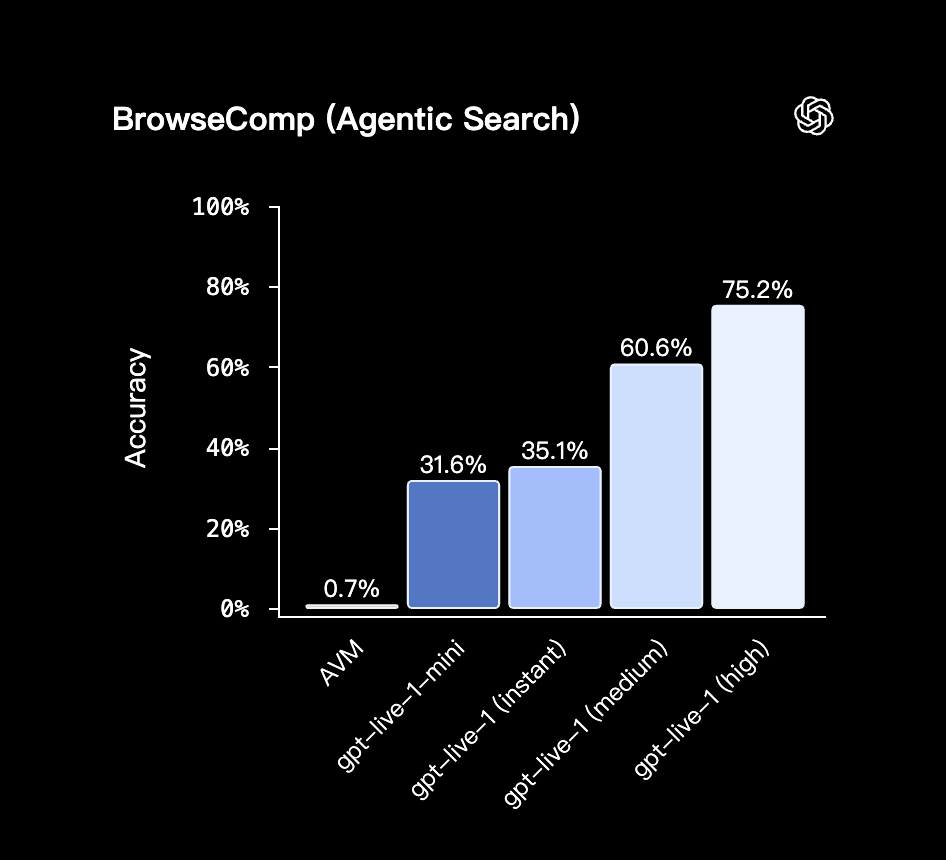
Image source: OpenAI
Finally, there’s τ³-Voice Telecom, which is used internally at OpenAI to test how voice agents perform in multi-turn telecom customer service tasks. Looking at the chart, both GPT-Live-1 medium and high have task success rates above approximately 60%, significantly higher than the Advanced Voice Mode’s level of around 30%; GPT-Live-1 mini and Instant also outperform AVM:
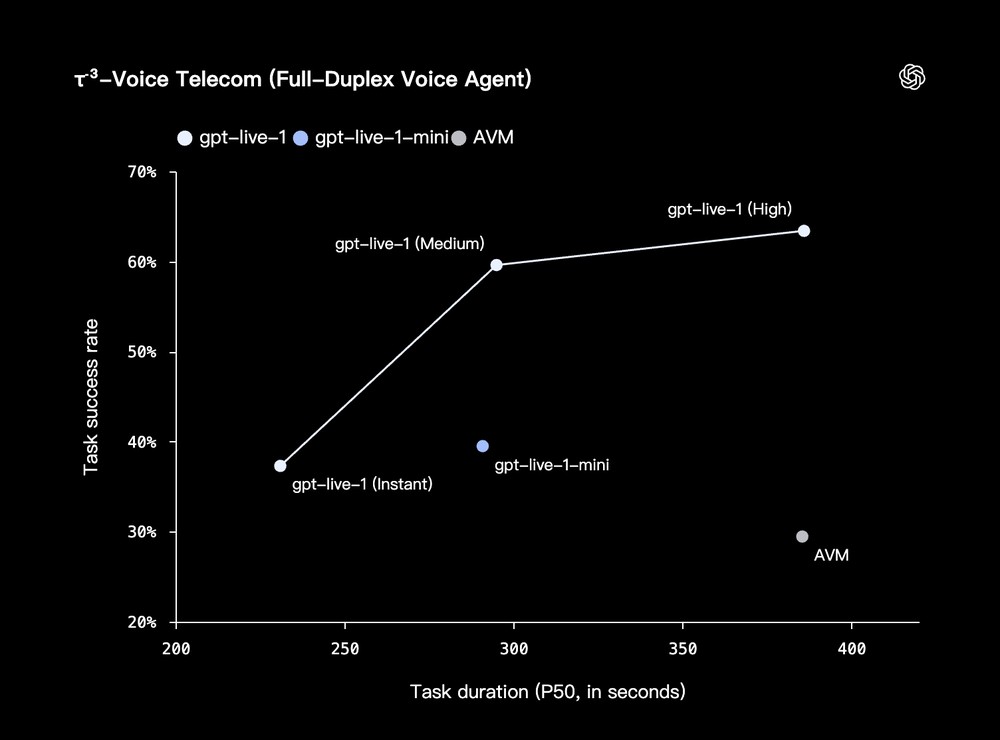
Image source: OpenAI
GPT-Live Launch Timeline and Available Platforms
OpenAI says that ChatGPT Go, Plus, and Pro users will default to using GPT-Live-1, while free users will default to GPT-Live-1 mini. OpenAI also plans to bring GPT-Live to the API soon, and developers and businesses can sign up for notifications first.
There’s another limitation to be aware of early on: GPT-Live doesn’t currently support the voice feature combined with video or screen sharing in ChatGPT. When you need video or screen sharing, you can use the legacy standard voice mode or advanced voice mode instead.
However, it hasn’t been fully rolled out yet, and mine still shows “coming soon.”

Source: KOCPC Chinese