


What do you usually do on long-haul flights with no internet access? Watch movies, sleep, or open your laptop to tackle unfinished work? One Chinese freelance engineer’s answer: without using the in-flight Wi-Fi, they used their own MacBook Pro M4 paired with a local AI model to knock out all their client cases in one go at 35,000 feet.
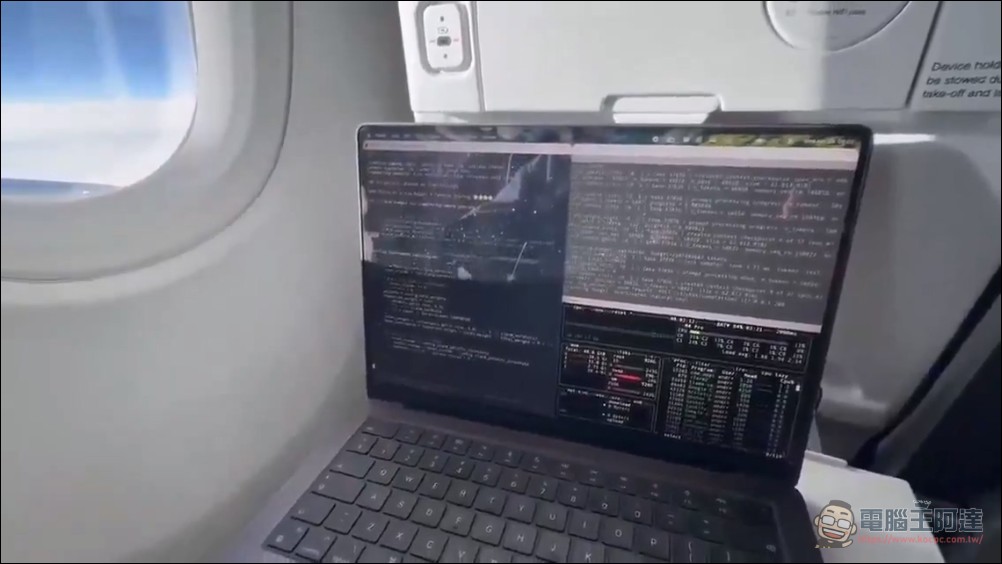
Based on videos and journal entries shared on social media, the flight he took was a long-haul transatlantic journey lasting over 11 hours. The in-flight Wi-Fi service offered by the airline cost $25 (approximately NT$810), but he chose to forgo it and instead used his MacBook Pro M4 to conduct a “fully local AI work experiment.”
His approach is quite simple: before takeoff, he sets up a local AI inference server, compiles all client cases into a job queue file (queue.jsonl), and then lets the AI handle everything automatically during the flight. From boarding to landing, he doesn’t need any internet connection or pay any API fees.
Este desarrollador chino ejecutó Llama 70B localmente en un MacBook en un avión y, durante 11 horas completas sin internet, gestionó proyectos de clientes.
Estaba sentado junto a la ventana en un vuelo transatlántico con un MacBook Pro M4 con 64 GB de memoria. El WiFi a bordo… pic.twitter.com/NctQgbAqfM
— Policar Bizar¡ (@PolicarBizar) May 1, 2026
Hardware configuration: MacBook Pro M4 with 64GB unified memory
Running the Llama 3.3 70B model with 70 billion parameters smoothly on a laptop naturally requires solid hardware specs. This engineer used a MacBook Pro equipped with the M4 Max chip and 64GB of unified memory.
He, on the laptop, through llama.cpp The framework loads Meta’s open-source Llama 3.3 70B model in GGUF format with Q4_K_M quantization. llama.cpp’s Metal backend fully leverages Apple Silicon’s unified memory architecture, allowing the GPU to directly access system memory without copying data back and forth between CPU and GPU—this is the key technical advantage that enables MacBooks to run large language models.
According to the log records, the Llama 3.3 70B model consumed approximately 48.6GB of memory during operation, with a context window of approximately 60K tokens, utilizing the vast majority of the available 64GB capacity. Under this configuration, the model still achieved approximately 71 tokens/sec The generation speed is quite practical for offline usage scenarios.
Custom Orchestrator: Enable AI to Work Autonomously in the Cloud
Besides the model and hardware, this engineer also wrote his own orchestration script to let AI automate task processing. Before takeoff, he wrote the system prompt, the gist of which was as follows:
「你是一個在單一台 MacBook 上運行的離線編排器。沒有網路。你擁有的資源只有本機檔案、位於 localhost:8080 的 Llama 70B 推理伺服器,以及 3 小時 21 分鐘的電池續航。處理 queue.jsonl 中的每個客戶案件,完成後存檔到 /done/ 目錄。每 12 個任務儲存一次 checkpoint,以便在更換行動電源後可以恢復。當佇列清空或電量低於 5% 時停止。」
This script’s workflow is as follows:
- Read queue.jsonl Case list (one JSON per line)
- Send requests to the local llama-server (localhost:8080) one by one
- After AI generates the draft, automatically execute local evaluation and save the output to /done/ Contents
- Save a KV cache checkpoint (file ~62.8 MiB) for every 12 tasks completed.
- Monitor battery level and auto-pause with progress saved when below 5%
Battery Management: 3-Hour Battery Life with Power Bank Strategy
Many netizens are skeptical about the authenticity of this post, after all, running large language models is a power-hungry computational task. Users estimate the MacBook Pro M4’s battery lasts only about 3 hours and 21 minutes at full load, which is clearly not enough to get through an 11-hour flight. The engineer’s strategy was to keep a power bank ready by the seat for relay charging (though theoretically, power banks are now prohibited after takeoff, so plugging into an outlet would be more likely), and the script would automatically pause and save a checkpoint when the battery drops below 5%, then resume from where it left off after switching to a power source.
The design of this checkpoint mechanism is quite clever: the 70B model’s KV cache occupies about 62.8 MiB at 60K context, making save and restore operations very cheap, while ensuring no progress is lost even if interrupted at any point during a long run.
Why is this such a big deal?
This story went viral on social platforms, reflecting several important trends in the current AI industry:
First, local AI is no longer a toy.Previously, most people believed that “running large models requires cloud GPUs,” but as Apple Silicon’s unified memory architecture matured and quantization technology advanced, a 64GB MacBook Pro can now handle 70B parameter-class models—a feat that was completely impossible just two years ago.
Second, privacy and offline needs are driving localization.Many businesses and individuals have concerns about uploading sensitive data (such as client proposals, business documents) to cloud-based APIs. This fully offline workflow ensures that data never leaves the local machine, making it highly attractive for freelancers and consultants who prioritize data security.
Third, the cost-effectiveness is significant.According to estimates, using cloud APIs like OpenAI or Anthropic to handle workloads of the same scale could cost over $7,000 USD (approximately NT$227,000) per year. A one-time hardware investment (MacBook Pro) combined with free open-source models is actually the more cost-effective choice in the long run. (But honestly, offline models still lag significantly behind cloud models in capability, unless the work is relatively simple.)
The relationship with Apple Silicon: Why Mac is the preferred choice
Apple’s Unified Memory Architecture (UMA) offers inherent advantages for local AI inference. Unlike traditional PCs that need to move data between system memory and graphics memory, Apple Silicon’s CPU and GPU can directly access the same memory pool. The M4 Max offers up to 128GB of unified memory options and over 600 GB/s of memory bandwidth, which is essential for running large language models.
In comparison, even the newly released NVIDIA RTX 6000 Ada Generation professional graphics card with 48GB VRAM costs over NT$150,000 and still requires pairing with a high-performance PC. Meanwhile, a MacBook Pro M4 Max (64GB) is priced at just over NT$100,000—a single purchase gives you both a computer and an AI workstation, one you can even take on a plane.
Controversies and Discussions
Of course, this story also sparked plenty of skepticism. Some netizens pointed out that running a 70B model with Q4 quantization on a 64GB machine would consume a significant amount of power, and whether it could realistically sustain a long-haul flight still needs more verification. Others argued that a 70B model shouldn’t run on a 64GB machine at all (31B would be the max). Some joked that someone who can afford a 64GB M4 MacBook probably isn’t short on cash for Wi-Fi. Still another view suggested the netizen was just doing it for the views. However, none of this discussion has erased the symbolic significance of what happened: local AI has moved from “theoretically feasible” into the “practically usable” stage.
Source: KOCPC Chinese