


Although Microsoft has successfully stuffed Copilot into almost every corner of Windows 11, adding a few more shortcut keys or a dedicated interface does not mean this AI assistant has actually become more useful. However, Microsoft has clearly heard users’ feedback and decided to start with the most frustrating pain point: system troubleshooting. For a long time, Windows users have been at a loss when faced with convoluted settings menus and official support pages that often are not helpful; now, Microsoft plans to have Copilot roll up its sleeves and solve the problems itself.
Microsoft injects system diagnostic capabilities into Windows 11 Copilot to tackle computer issues head-on.
In the recently launched Microsoft Ignite ConferenceMicrosoft announced that it will give Copilot in Windows 11 more practical new capabilities: automatically pinpointing the cause of computer problems and providing fixes. Through an upcoming diagnostic feature, the AI assistant will be able to thoroughly investigate common hardware and connectivity issues, so users no longer have to get lost in layer upon layer of settings or reluctantly call technical support.
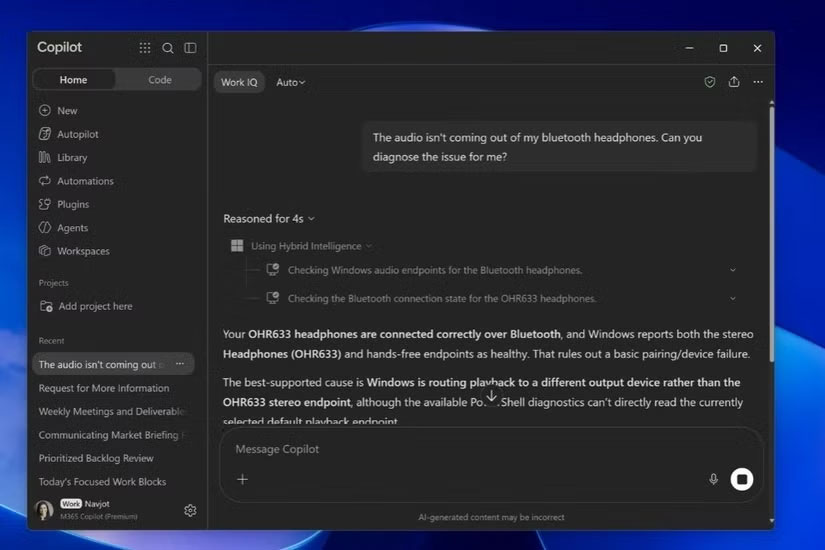
In an official demo, Microsoft recreated an all-too-common frustrating scenario: Bluetooth headphones clearly show as connected but have no sound at all. When the user asks Copilot to help “debug,” Copilot first requests permission to access files and read system information, then immediately identifies the real culprit: Windows 11 mistakenly routed the audio output to another device. Copilot then not only clearly explains the cause of the problem but also directly provides a solution.
The most critical breakthrough of this feature is that Copilot no longer only offers canned suggestions like “try restarting.” Microsoft’s approach is to have the AI first perform a “read-only scan” locally, directly reading underlying system information to pinpoint the root cause. This means Copilot diagnoses based on the device’s actual current operating state, rather than relying solely on partial textual descriptions from users in the chat box.
This diagnostic mechanism is actually part of Microsoft’s grand “Hybrid AI” strategy, aimed at seamlessly combining local computing with cloud models. Microsoft states that future Copilot+ PCs will be built on three core capabilities:
- Local Context: Once the user grants authorization, Copilot can gain real-time awareness of the local device state, including currently open files, running applications, and system health.
- Local Actions: Allow AI to perform substantive tasks directly in the Windows system, such as searching for, organizing, moving, copying, and even renaming files.
- Local Models: Handle suitable requests directly on-device, seamlessly switching to cloud processing only when greater computing power is needed.
As AI Agents gain increasingly elevated system permissions, security has also become a key focus of Microsoft’s strategy. To this end, Microsoft has introduced an isolated environment called “Execution Containers,” strictly limiting the local files and network scope that AI Agents can access, ensuring both intelligence and privacy security.
At present, the exact launch date for Copilot, this brand-new troubleshooting feature, has not yet been announced, and Microsoft has yet to reveal the full hardware requirements. What is certain, however, is that if these tools truly deliver on their promises, troubleshooting computer issues will become significantly easier in the future.
Source: KOCPC Chinese