


Many people may not know that the NVIDIA GeForce graphics card they are using is actually being throttled when running AI and can only reach half the performance of professional cards. In addition to what we previously covered, GPU UnlockRecently, a developer also released an open-source tool called nv-uefi-unlocker on GitHub. It does not require flashing the GPU BIOS; you only need to boot once from a USB flash drive to unlock this restriction. The developer shared that with their own RTX 4060 Laptop GPU, FP16 matrix computing performance improved by about 65%, and it works on both Windows and Linux. RTX 20, 30, and 40 series graphics cards are all supported.
Open-source tool lifts NVIDIA GPU’s half-speed AI limit: no BIOS flashing required, RTX 4060 laptop AI performance improves by 65%
nv-uefi-unlocker Its full name is “UEFI pre-driver NVIDIA GPU unlocker,” and it can remove the Tensor core speed limit on RTX 20, 30, and 40 series desktop and laptop GPUs. This tool needs to be placed on a FAT32-formatted USB flash drive. Simply put, it works by needing to be run once on each boot before the NVIDIA driver loads, after which it automatically hands control back to Windows or Linux to continue booting.
The developer’s own RTX 4060 laptop GPU saw FP16 matrix operations rise from 29.89 TFLOPS to 49.33 TFLOPS, about 1.65x. Another desktop RTX 2070 also rose from 36 TFLOPS to 60–63 TFLOPS.
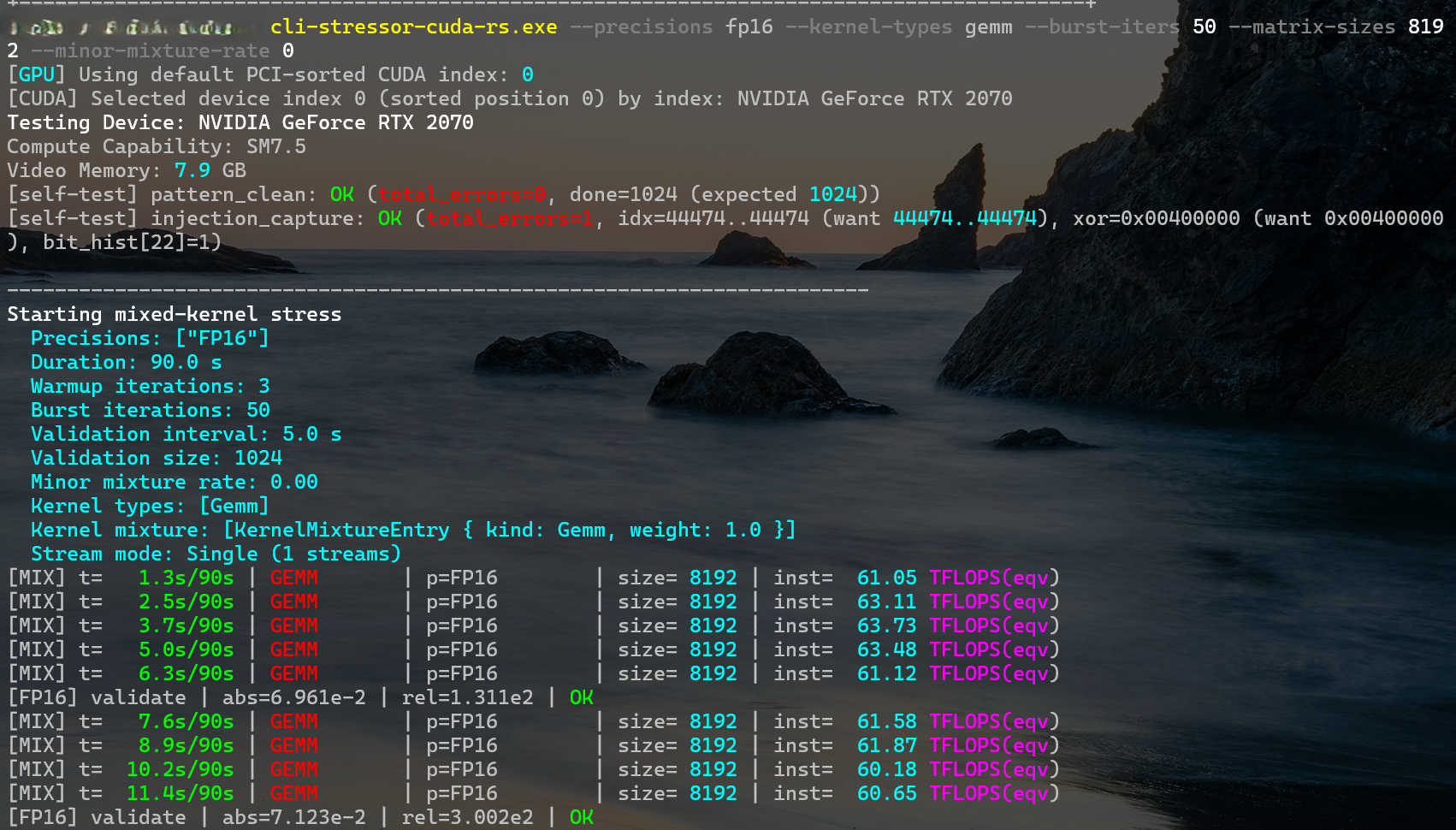
Image source:physicsdolphin/GitHub
It should be noted in particular that this is not traditional GPU overclocking, so it does not increase the graphics card’s clock speed or voltage, nor does it require modifying the graphics card’s VBIOS or drivers; once the computer is powered off, everything returns to its original state.
The developer also ran a control test using an RTX 4060 laptop version: with nvoc used to remove the voltage limit and overclock, but before removing the Tensor operation limit, the GPU clock reached 3.0 GHz and FP16 performance was 35.9 TFLOPS. Then, after removing the Tensor limit, the average clock instead dropped to 2.89 GHz, but performance increased to 64.30 TFLOPS; the clock decreased by about 3.7%, while throughput increased by about 79%.
The release package does not include any NVIDIA firmware. Instead, a script automatically downloads NVIDIA’s publicly available 610.43.03 driver package, verifies it, and rebuilds the required files locally. The project is open source under the GPL-2.0 license.
Below are matrix computation tests reported by developers and users on Windows, comparing the same card before and after unlocking:
| graphics card | Test Item | Before unlocking | After unlocking | extent of improvement | Tester |
|---|---|---|---|---|---|
| RTX 2070 | FP16 matrix multiplication | 36 | 60~63 | 67~75% | Developer |
| RTX 3060 12GB | FP16 matrix multiplication (4096) | 25.37 | 45.79 | Approximately 80% | User feedback |
| RTX 3070 laptop version | FP16 matrix multiplication (8192) | 35.43 | 56.04 | Approximately 58% | User report |
| RTX 4060 laptop version | FP16 matrix multiplication | 29.89 | 49.33 | Approx. 65% | Developer |
| RTX 4080 | BF16 matrix multiplication (4096) | 100.37 | 192.18 | Approx. 91% | User report |
| RTX 4090 | FP16 matrix multiplication (4096) | 118.42 | 171.52 | About 45% (limited by power consumption) | User report |
In the table, it can be noted that the RTX 4090 improves by only 45%, the least among all the cards. The developer initially thought this might be related to power limits, because that user’s graphics card had reached the 479 W cap. However, subsequent tests with lowered clock speeds found that even when power consumption was significantly below the cap, some compute paths still could not fully achieve the expected performance, so the actual cause may not be limited to power limits.
RTX 4060 Ti 8GB test results (Source:steppergg/GitHub)
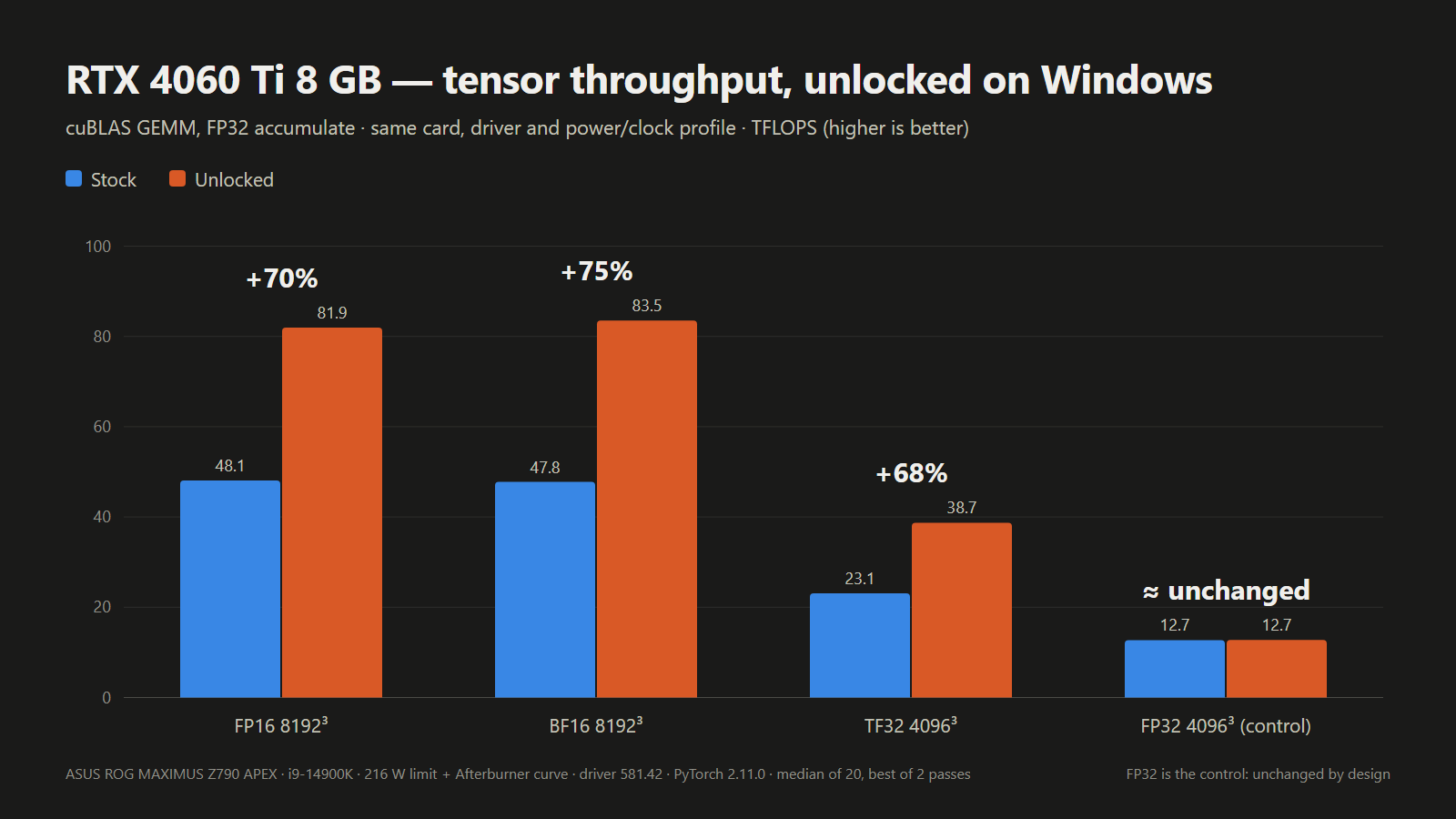
As for whether gaming will also get faster, as things stand, there won’t be a noticeable difference.
This method only unlocks the Tensor Core FP32 accumulation path; general FP32 operations remain largely unchanged before and after. Game graphics rely mainly on general shader operations, so game FPS will not increase proportionally.
According to the project’s compatibility notes, the entire RTX 30 and RTX 40 series are compatible, with support for both desktops and laptops. The entire RTX 20 series is also compatible, but some models have known issues. The GTX 16 series is theoretically compatible, pending verification on actual hardware. As for older cards from before the Pascal architecture, the A100 chip used in data centers, and the latest RTX 50 series, none are currently supported.
The development team also mentioned that the RTX 50 series has much tighter protections than they expected, and they are still investigating.
| Series | Confirmed to work on Windows. | Known issues or untested |
|---|---|---|
| RTX 20(Turing) | RTX 2070、RTX 2060 Super | Successful unlocks have been recorded for the RTX 2080, 2080 Ti, and 2080 Super, but startup or handoff issues may still occur with some drivers, dual-GPU configurations, and specific platforms. |
| RTX 30(Ampere) | RTX 3080 (including LHR), 3060 Ti, 3060 12GB, 3080 Ti laptop version, 3070 laptop version | RTX 3050 untested; Thunderbolt external GPU is not guaranteed to retain unlock. |
| RTX 40(Ada Lovelace) | RTX 4090, 4080, 4070 Ti Super, 4070 Super, 4070, 4060 Ti 8GB/16GB, 4060 Laptop GPU, 4050 Laptop GPU | RTX 4070 laptop version not tested. |
| RTX 50(Blackwell) | None | Not supported |
The workflow isn’t too complicated—from GitHub’s Releases Download the release package from the page and extract it. Run the make-usbroot script on the computer you want to unlock; it will automatically determine the GPU generation, download and verify the public NVIDIA driver, and generate the required firmware files. Next, prepare a USB flash drive formatted as FAT32, copy the files listed by the script to the root directory, and then place the boot program BOOTX64.EFI into the EFIBOOT folder.
After restarting Windows, enter the motherboard’s boot menu and select this USB flash drive. The version information will then appear on the screen; execution will only begin if you press the spacebar to confirm within 30 seconds. Pressing any other key or doing nothing will cancel it and boot directly into the system.
During the process, it is normal for the graphics card to temporarily show a black screen or for the screen to freeze; once completed, it will automatically return to Windows startup. After entering the system, you can use the ssdiag diagnostic tool included in the release package to verify the unlock status.
For details, please refer to the video below:
RTX 20 series users have an extra step: first, in Windows, run the enable-turing-unlock script included with the project with administrator privileges to switch the NVIDIA driver to GSP firmware mode and reboot; only after that can they create the USB drive. Laptop users are advised to first switch to discrete GPU direct connection (MUX) mode in the BIOS.
Although nv-uefi-unlocker significantly lowers the barrier to unlocking, it still has some drawbacks, such as needing to run it from a USB flash drive on every boot, having to disable Secure Boot when using it, or signing the EFI boot file yourself and setting it as trusted so it can run properly, among other things.
Source: KOCPC Chinese