


As online scam tactics become increasingly sophisticated, SMS filtering or call blocking alone can no longer fully protect users’ security. To strengthen fraud prevention, Apple has added a security feature called “Impersonation Risk Detection” in iOS 27, hoping to help users identify potential social engineering attacks through a system-level analysis mechanism. However, it is worth noting that this feature is not enabled by default and must be turned on by the user.

iOS 27 adds a new anti-fraud feature to iPhone called “Impersonation Risk Detection” — here’s how to enable it.
Nowadays, most fraud cases revolve around personal data and financial information. Scam groups often contact victims via text messages, emails, or phone calls, impersonating bank customer service, government agencies, courier companies, or even friends and family, in order to trick them out of account information, verification codes, or money transfers. Although iPhone has built-in protections such as caller ID and spam filtering, traditional safeguards often struggle to detect carefully designed social engineering scams in real time.
This is exactly why Apple introduced the “Impersonation Risk Detection” feature. Unlike general security mechanisms, this feature is primarily designed for “active social engineering attacks.” When attackers impersonate trusted organizations or individuals and use persuasive tactics to pressure users into transferring funds, changing account information, or sharing sensitive information, even protections such as two-factor authentication enabled on the account may not prevent users from making the wrong decision. Because in such cases, the person performing the operation is the account holder themselves.

To reduce this type of risk, iOS 27 will use system analysis of device- and Apple Account-related information to assess whether there are suspected fraudulent behavior patterns. After the analysis is complete, the system will not provide detailed data directly to apps; instead, it will pass the results in the form of a “risk level.” This means third-party apps can only obtain the final determination result and cannot access the personal information behind the analysis, thereby balancing security and privacy protection.
Once the application receives the risk assessment results, it can take appropriate measures depending on the circumstances. For example, it may require users to undergo additional identity verification, extend the transaction confirmation time, or display an anti-fraud warning message reminding users to recheck the operation details. Risk levels are currently divided into three tiers:
- Unknown: The system found no suspicious signs, so the risk is relatively low.
- Medium risk (Medium): Some abnormal activity detected; there may be a potential fraud risk.
- High risk (High): The system has detected clearly suspicious activity. Users should be more vigilant and verify the relevant actions again.
It should be noted that these risk levels serve only as reference indicators; how they are ultimately handled is still up to the application developer. Some apps may require additional identity verification, while others may temporarily restrict certain operations or send warning notifications to users.
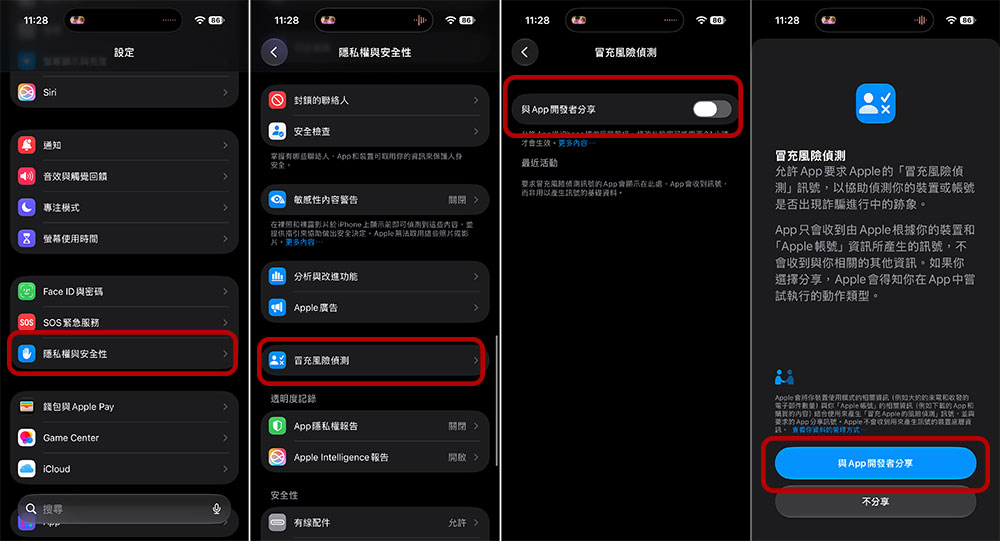
However, not all apps currently support this feature. Apple has not yet published a complete list of supported apps, so the actual scope of protection still depends on whether developers have implemented the relevant mechanism. In other words, even if impersonation risk detection is enabled in the system, if the app itself has not integrated this feature, it cannot use the risk assessment results to strengthen protection. If you want to enable this new feature, the process is quite simple:
- Go to Settings on your iPhone.
- Click to enter “Privacy & Security.”
- Scroll down to find “Impersonation Risk Detection.”
- Next, turn on the “Share with App Developers” option.
Overall, impersonation risk detection represents a new step by Apple in defending against social engineering scams. It cannot completely prevent all scams, but through on-device analysis and risk scoring, it can provide users with additional alerts at critical moments. As scam tactics become increasingly convincing, such proactive security features are likely to become an indispensable part of mobile devices in the future, helping users add an extra layer of reflection and verification when facing suspicious messages or transactions.
Source: KOCPC Chinese