


Starting today, the first wave of NVIDIA RTX Spark machines has just gone on sale, and more hands-on tests from overseas are already coming out. Yesterday, we covered Lenovo’s. YOGA Pro 15 RTX SparkToday, well-known overseas AI channel Alex Ziskind also received the MSI Prestige N16 Flip AI Plus, a 16-inch 360-degree convertible 2-in-1, also powered by the RTX Spark N1X: a 20-core Grace CPU, a 6,144-core Blackwell GPU, and 128GB LPDDR5 unified memory. MSI claims it delivers up to 1 PFLOPS of FP4 AI compute. MSI is making two promises for it: first, running a 120-billion-parameter model locally is no problem; second, it maintains peak performance throughout without throttling.
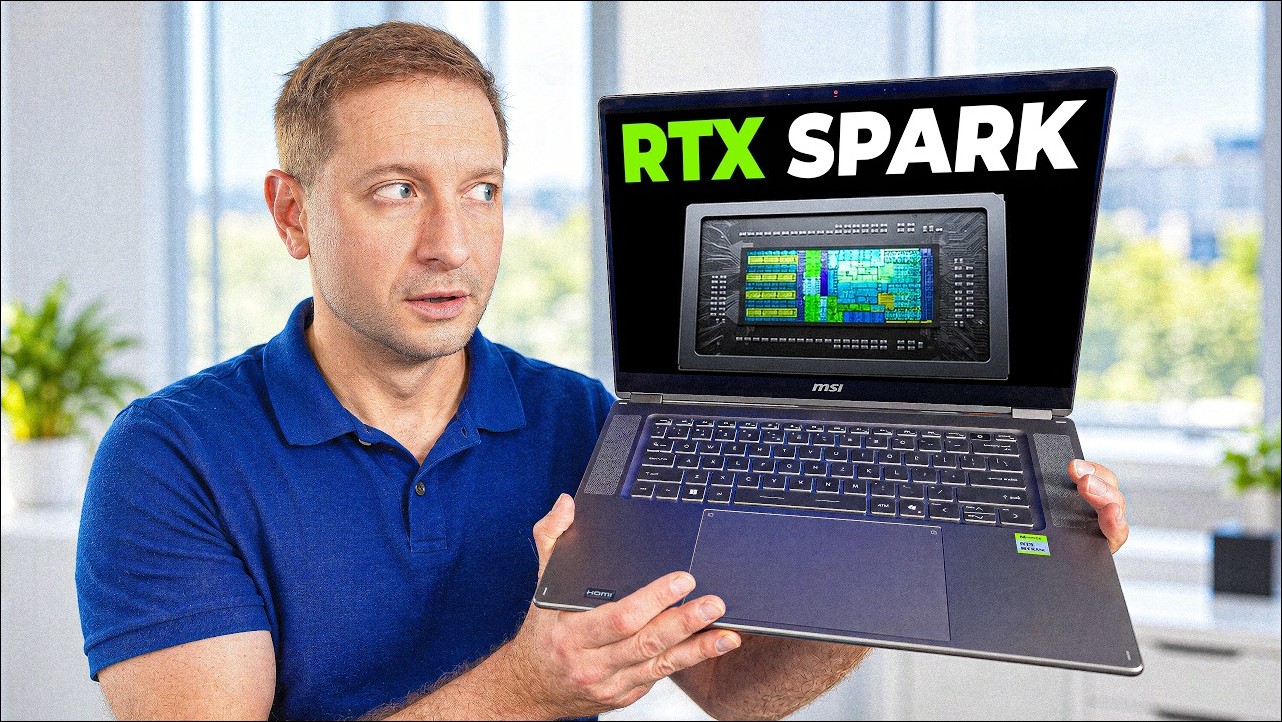
The conclusion first: both promises are fulfilled, and the marketing specs were written conservatively—this machine can handle larger models than advertised. As for the “almost” in the video title, it refers to the use case: for a single machine that has to handle both development tools and a 125B large model while still being portable, this laptop wins almost across the board; but for 24/7 always-on Agent workloads, the box form factor of the DGX Spark is still more suitable.
Body and Interface: 2-in-1 design, 1.9 kg (⏱️ 01:02-02:32)
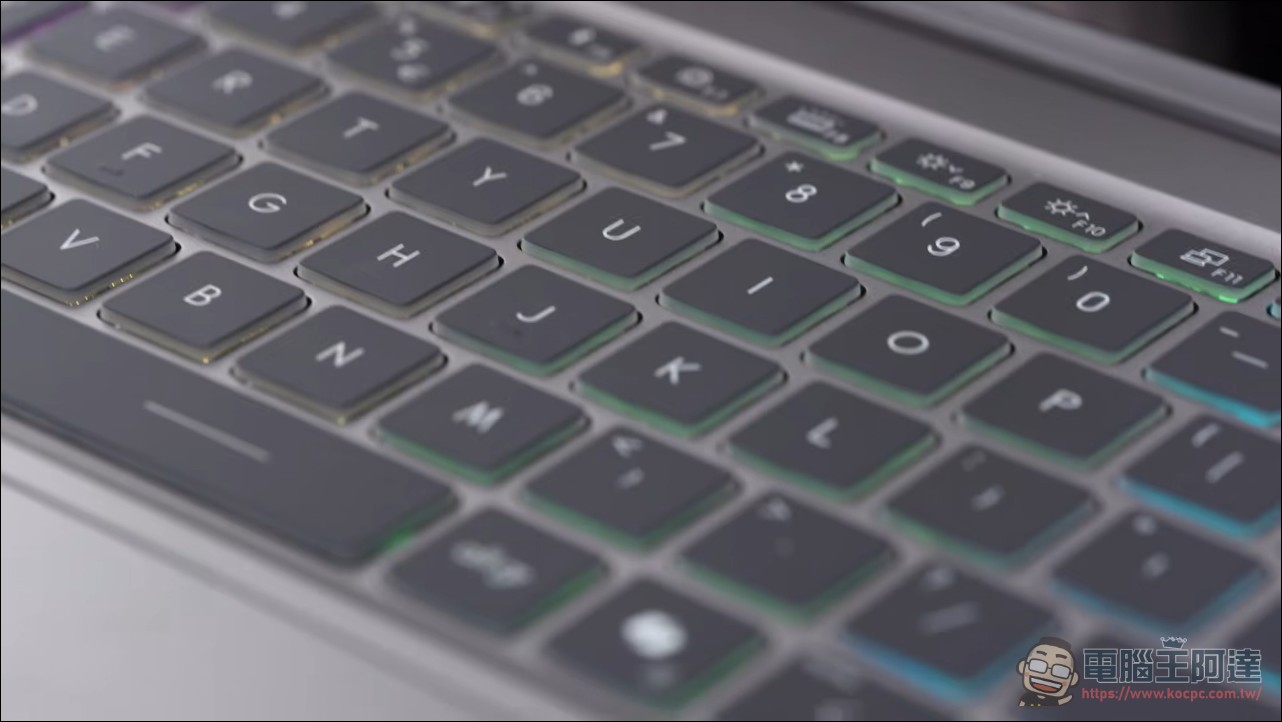
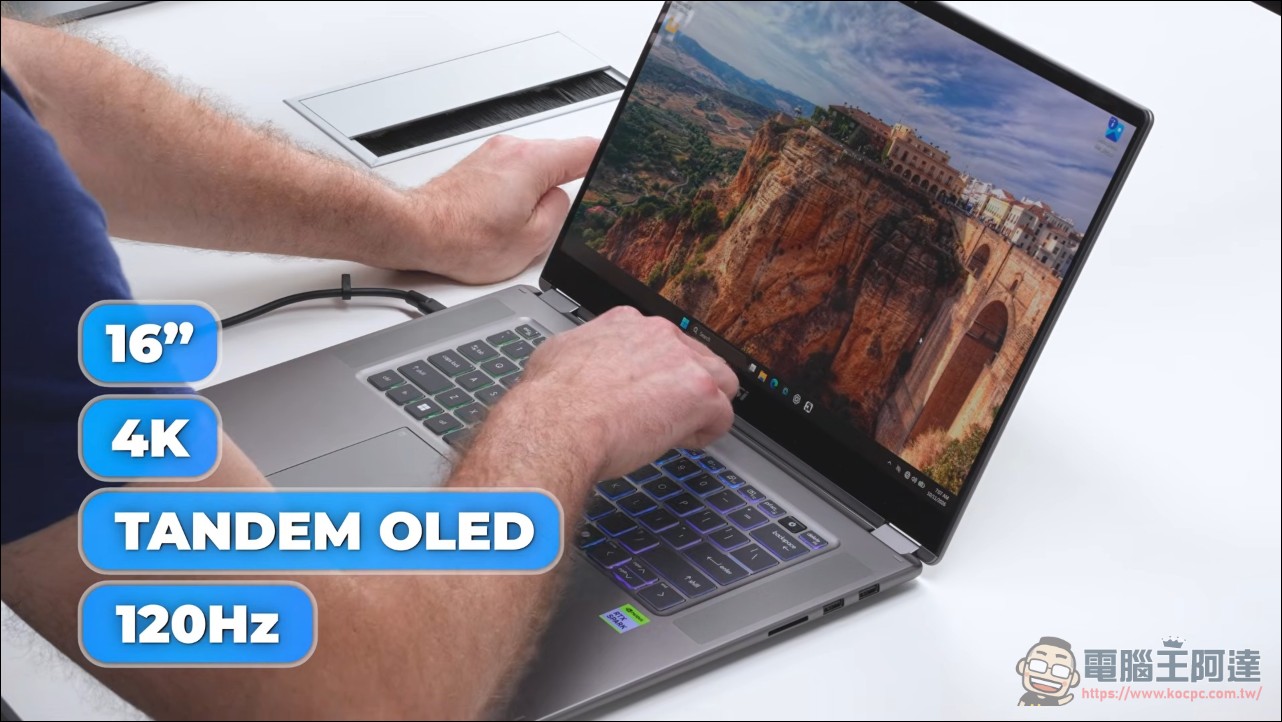
The device itself has a 360-degree convertible 2-in-1 design, and the screen can be flipped all the way to the back. After trying it, Ziskind admitted that this form factor was more reasonable than he had imagined. The 16-inch 4K tandem OLED touchscreen with a 120Hz refresh rate made him “almost reluctant to touch it, afraid of covering it in fingerprints.” The keyboard feels crisp, retains the Copilot key, and has no numeric keypad, which Ziskind appreciated (while also joking that he would get flamed in the comments). The touchpad is large and responsive, but uses a traditional seesaw mechanism rather than haptic feedback; his hope for MacBook-level haptic feedback was dashed.
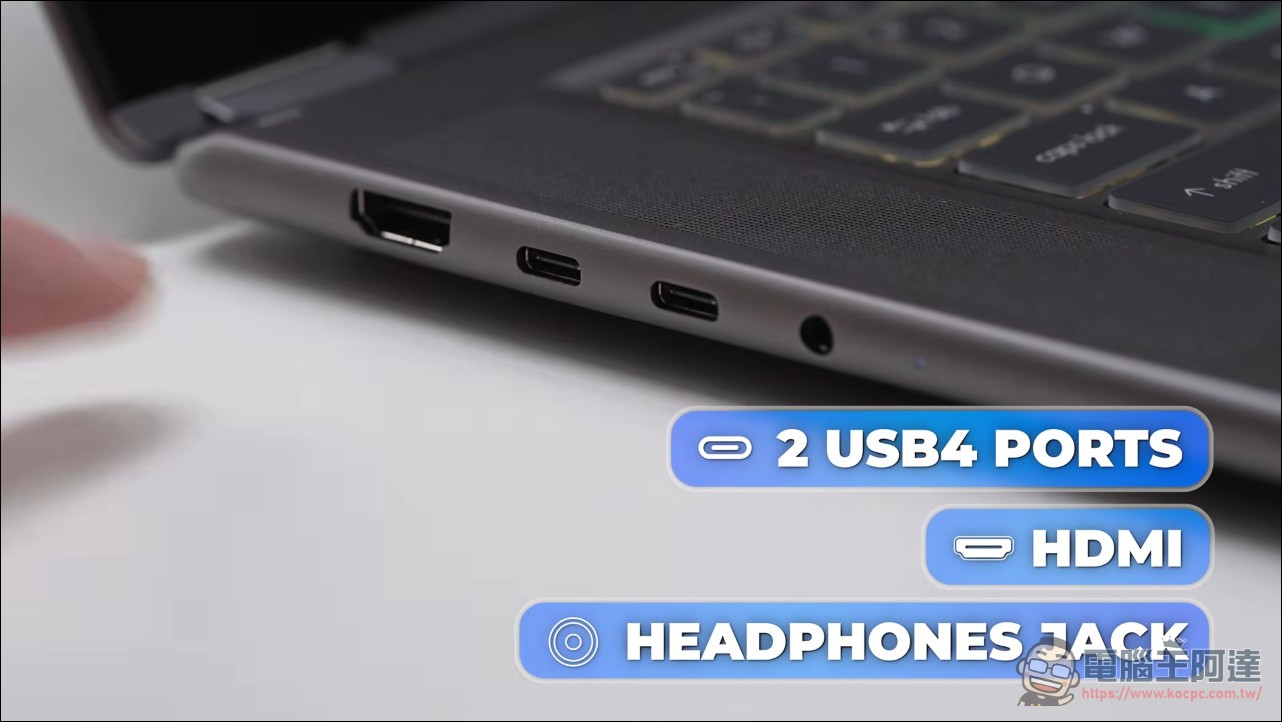
The body features a physical webcam shutter, fingerprint reader, and front-facing speakers; the ports include 2 USB4, HDMI, a headphone jack, an SD card reader, and 2 USB-A, so the mouse receiver doesn’t need to take up an adapter. The 140W charger is surprisingly small; when he compared it with the DGX Spark’s power adapter, the difference was obvious.
The official specifications have been updated with more details: the UHD+ version’s screen is 3840 × 2400, with a 30–120Hz variable refresh rate, 100% DCI-P3 color gamut, VESA DisplayHDR True Black 1000, brightness over 1,000 nits, and Delta E color accuracy under 1; chassis thickness is 13.9–16.9mm, weight 1.9 kg, battery 99.9Wh, supports 140W USB-C PD 3.1 charging, plus Wi-Fi 7 and Bluetooth 5.4. It is the only 2-in-1 among the first wave of RTX Spark laptops, comes with an MSI Nano Pen stylus, has a stylus storage slot at the bottom of the chassis that also charges it; the touchpad’s active area is 53% larger than the previous generation.
Windows on ARM compatibility
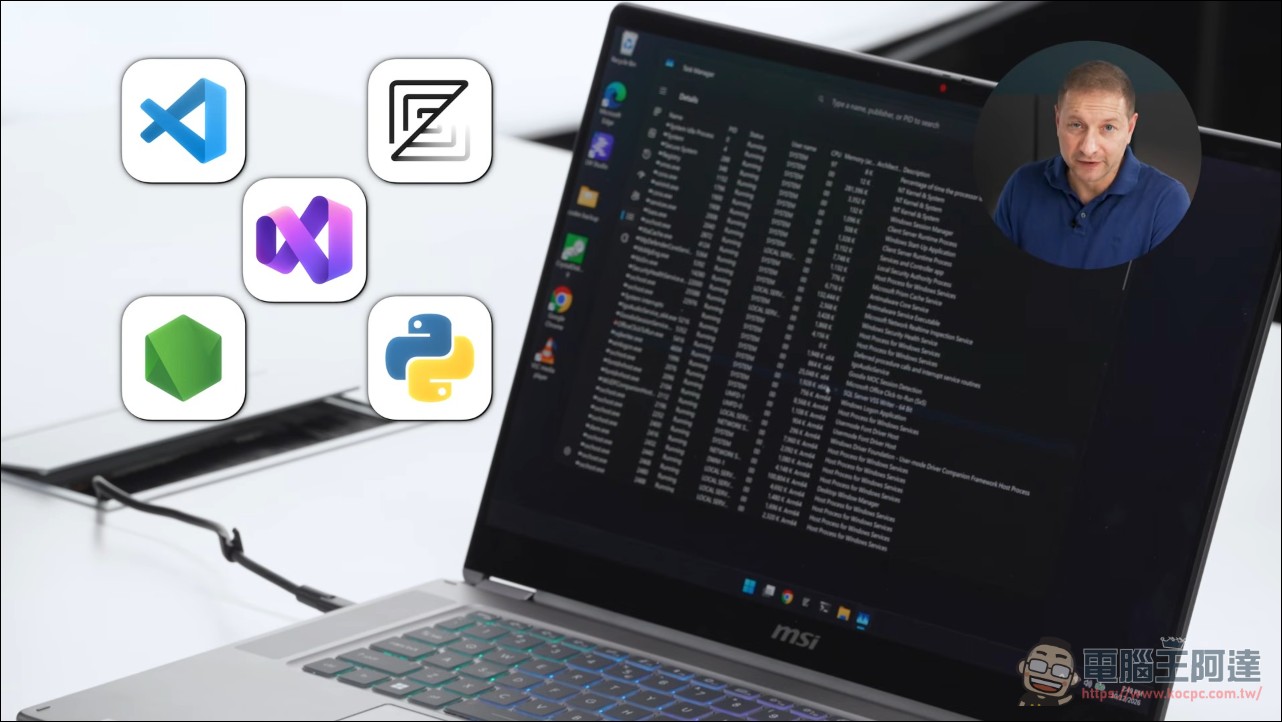
N1X is ARM-based and runs Windows on ARM. Ziskind has been tracking Windows on ARM for more than two years, and his first question was whether his own development tools could run on it. He started with the community-compiled Works on WOA compatibility list. His conclusion: apart from a few edge cases, mainstream development tools are almost all covered; Adobe’s entire suite has also gone native, with only Premiere Pro still running under translation.
He actually opened Task Manager to verify: Photoshop is native ARM64 (it runs fine even using 3 GB of memory), and of the machine’s 250-plus services and background processes, only 4 are still x64; Visual Studio, VS Code, Zed, Python, and Node are all native. After two years of ecosystem catch-up, it has now reached the stage where being able to run is no longer the issue—whether it runs fast is the real test.
CPU benchmark: Windows is slow because of Python, not the chip
For single-core, I first tested browser JavaScript performance with Speedometer 3.1, scoring 35.2 points, with all four runs falling between 35 and 37. For multi-core, I used a Mandelbrot set computation test with all 20 cores enabled: on Windows it averaged 22 seconds and the fans were audible, but the same test was noticeably faster in WSL (a Linux virtual machine inside Windows), roughly matching DGX Spark’s 16 seconds running native Linux.
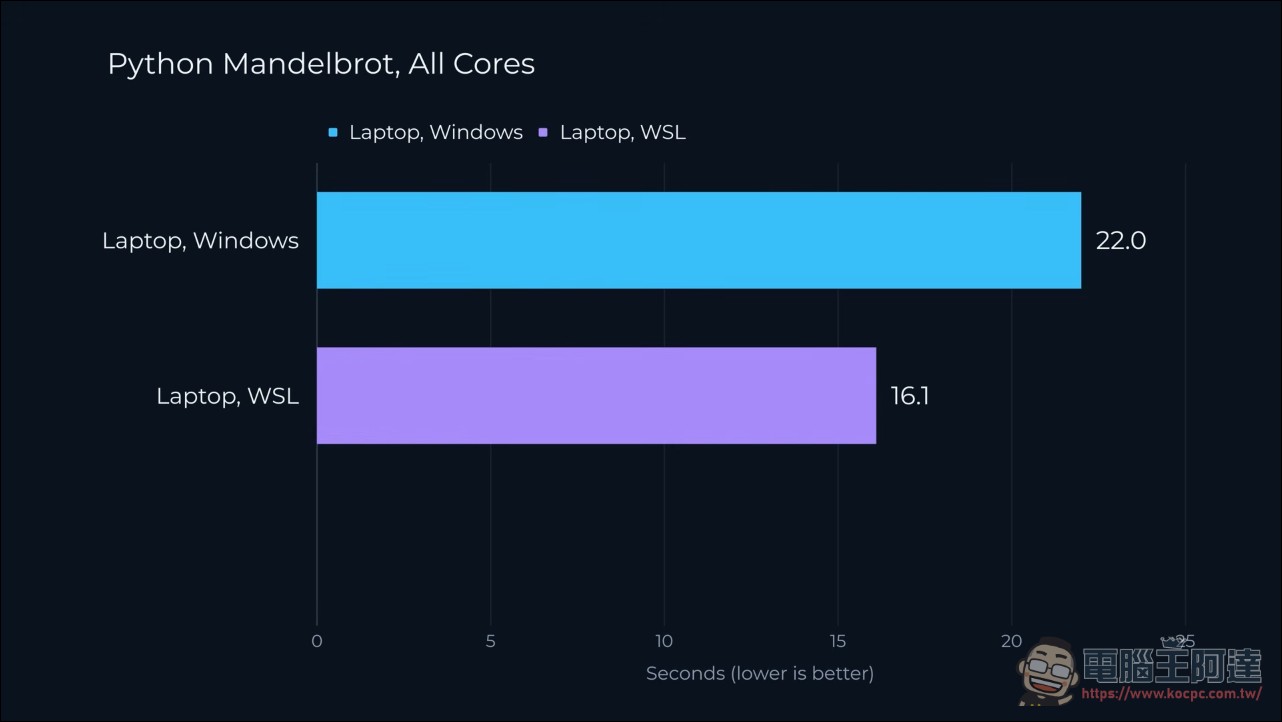
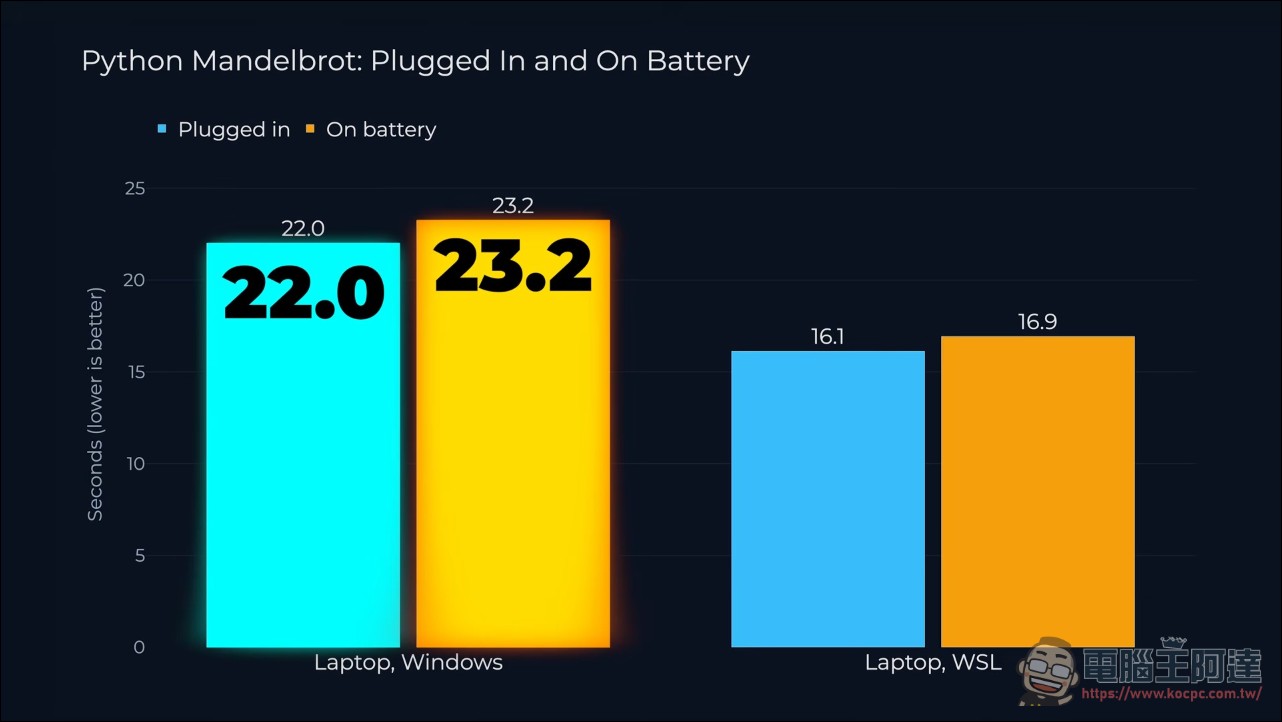
He first suspected Windows wasn’t using all cores, but all three environments maxed out 20 cores. So he removed the Python variable and used JavaScript to run the same math on a single core: Windows 1.24 seconds, Linux 1.24 seconds, exactly identical. The conclusion is clear: the chip is just as fast under Windows; what’s slow is the execution efficiency of Python on Windows, so heavy Python workloads should be thrown into WSL. The unplugged-power test was also stable: 22 seconds plugged in and 23.2 seconds on battery, with both set to best performance mode, a difference of only just over 1 second, sweeping away the old problem of Windows laptops slowing down on battery. MSI Center also has three modes—Performance, Balanced, and Silent. Silent mode is truly quiet, at the cost of some performance.
Memory Bandwidth Benchmark: Laptop Beats DGX Spark
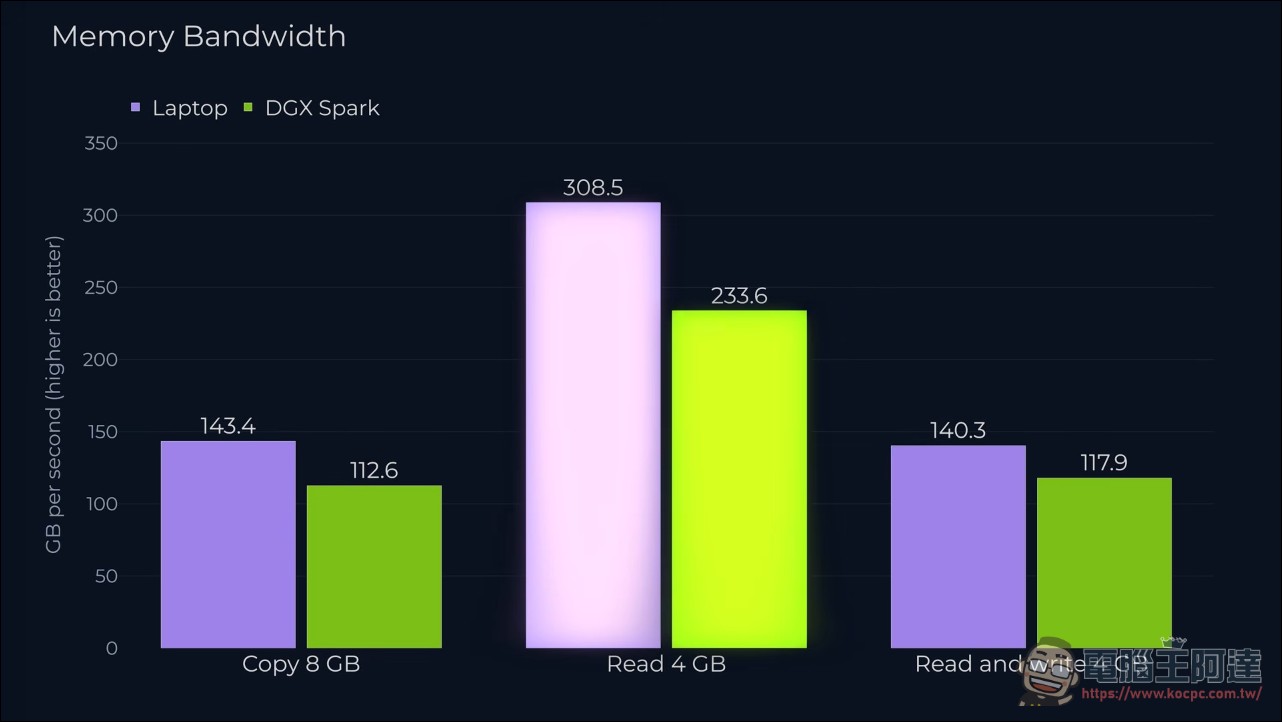
Before moving on to large-model testing, he first measured memory bandwidth, because token generation speed mainly depends on memory transfer capability. A custom test script copied and read multi-GB blocks on the GPU: copying 8GB, laptop 143 GB/s, DGX Spark 113 GB/s; reading 309 GB/s versus 234 GB/s, with the laptop leading across the board. The GPU matrix multiplication part responsible for compute was almost a tie: laptop 101, DGX Spark 97.
Local large model tested: claimed 120B, actually ran 125B
First, verify the claim: the 120-billion-parameter model really does run in the Zed editor’s Agent, entirely locally and never leaving the machine. He believes coding with local models will be the number one use case for this kind of laptop. The available GPU memory shows 98GB in nvidia-smi and can be adjusted in the Nvidia app. He tends to max it out at 96GB for the GPU, while people running smaller models can allocate more memory to the system to run the Agent.
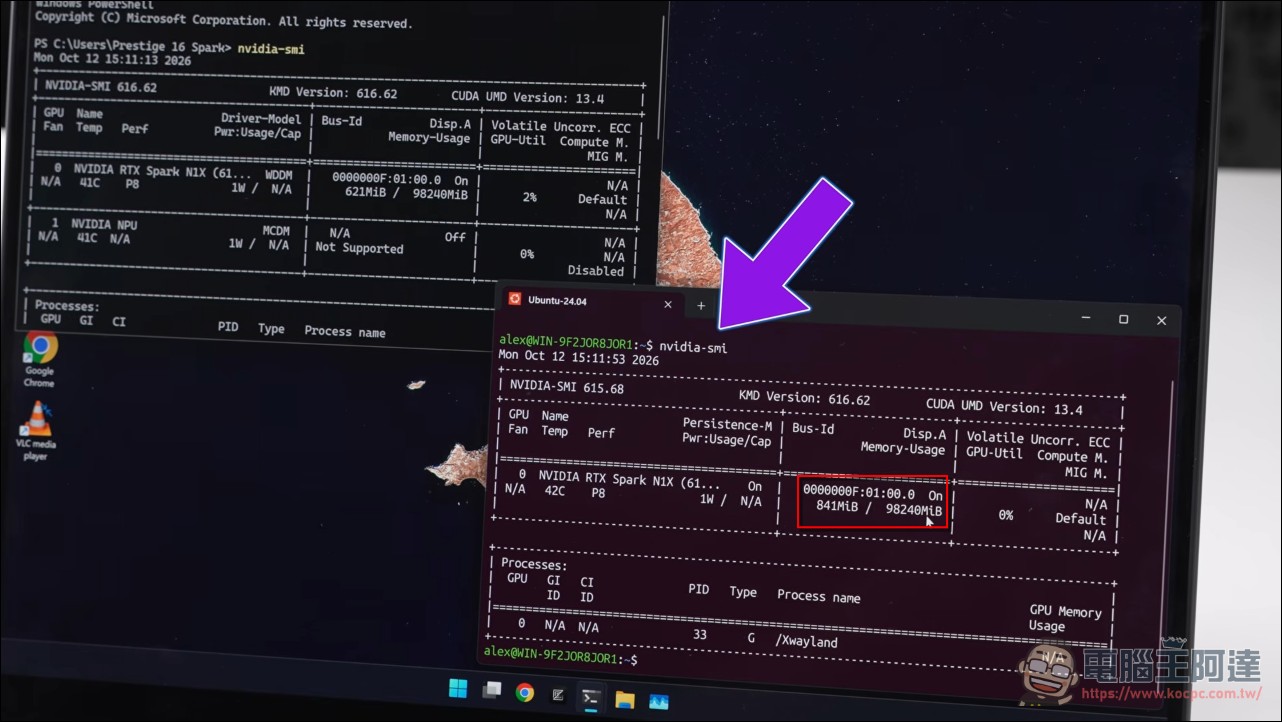
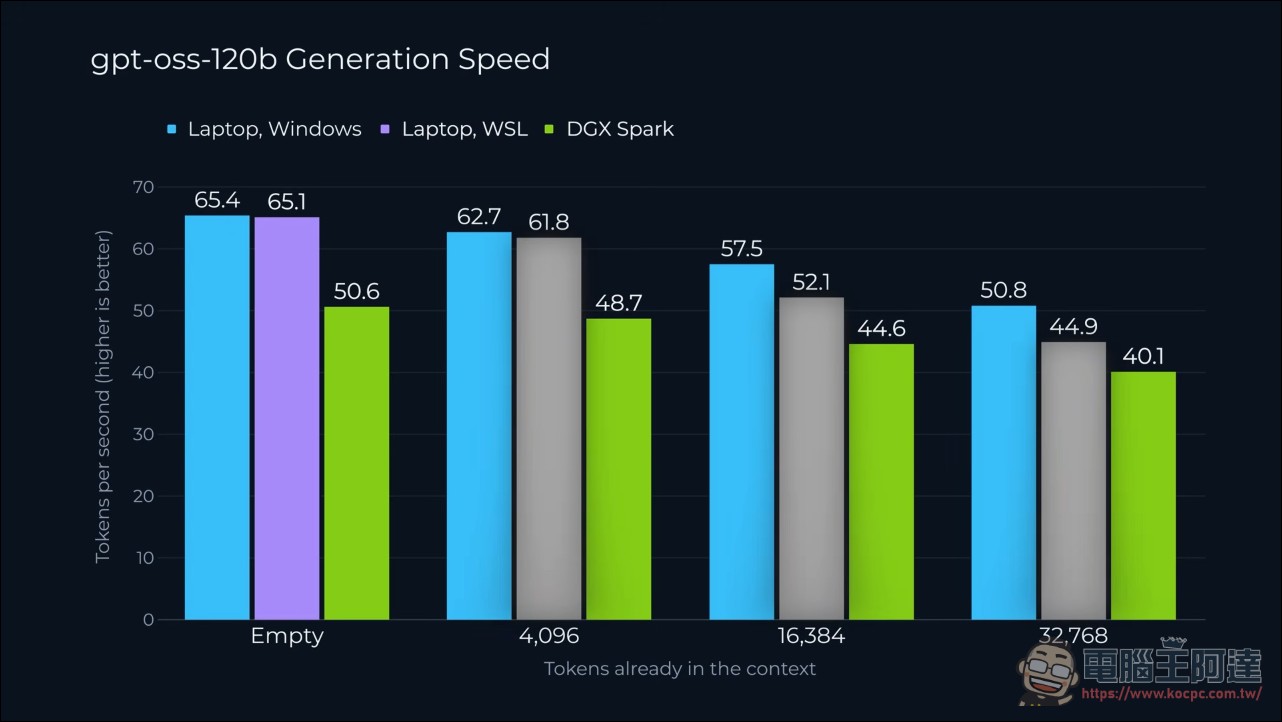
Benchmarked three models: the dense model Qwen 3 27B (about 22GB) runs at 13.4 token/s; every token has to use all parameters, so it is inherently slow. The mixture-of-experts model GPT-OSS 120B loads in 28 seconds and takes up 61GB out of 96GB, achieving 65.4 token/s, or 65.1 under WSL. The same model gets only 50.6 token/s on the DGX Spark, making the laptop about 30% faster, echoing the earlier bandwidth advantage. Once the context is filled, all environments slow down, with the Windows version dropping the least. In an unplugged test, it ran at 65.9 token/s, and GPU load does not slow down at all on battery.
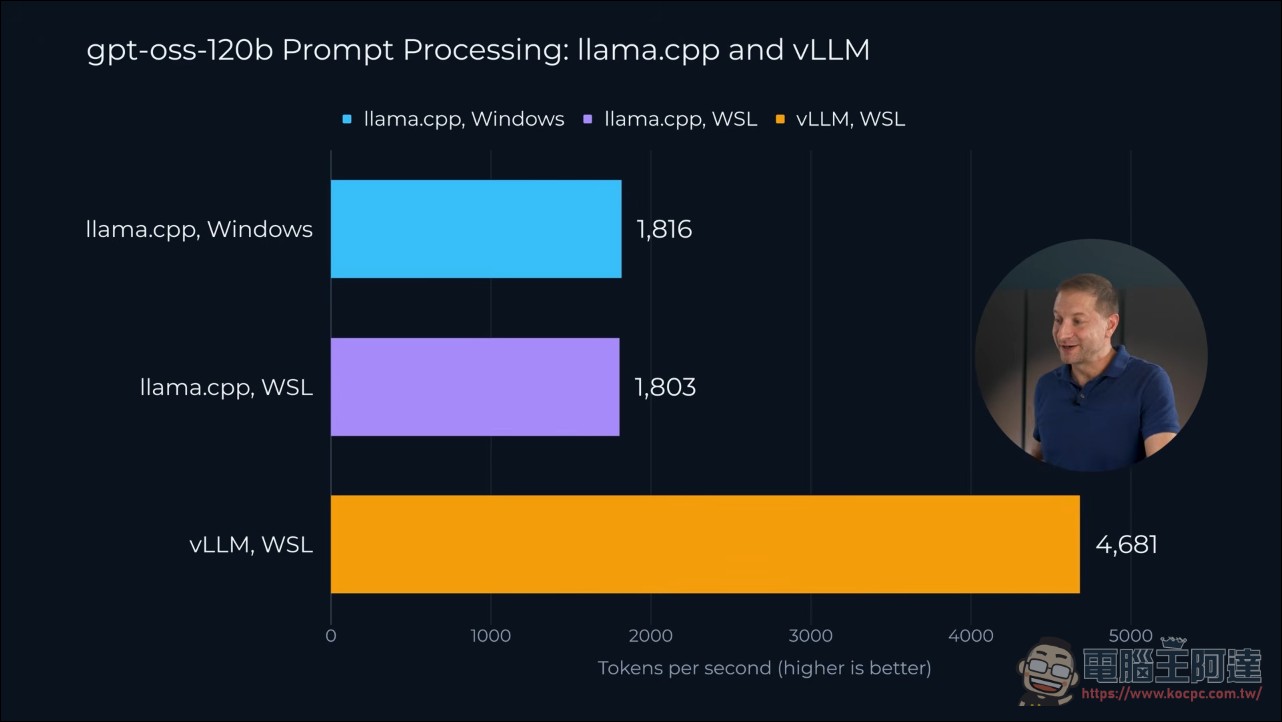
Data-center-grade vLLM can also take the field: thanks to CUDA, vLLM compiles and runs under WSL (the Windows version won’t compile). Prompt processing speed is 4,681 token/s, 2.5 times llama.cpp’s roughly 1,800; single-user generation is only 35 token/s, losing to llama.cpp’s 65. His analogy is a bus versus a private car: with one passenger, the private car arrives first, but the bus barely slows down when full. When 8 users or 8 agents come in at once, total throughput reaches 127.5 token/s—multi-agent workloads are vLLM’s home turf. The finale is the 125B Qwen 3.8 Flash Next: next-generation architecture, 36-second load time, 81GB consumed, running at 33.7 token/s on this thin laptop, exceeding MSI’s claimed 120B limit. The only complaint is an old Windows issue: overly long file paths throw errors, and long path support still has to be manually enabled.
20-minute stress test: 93°C without throttling
Finally, to verify the second check, he had the GPU generate a model while 20 CPU cores were fully loaded at the same time, stress-testing continuously for 20 minutes: about 50 token/s in the first 5 minutes, 52 token/s in the last 5 minutes, and the CPU test was 26.3 seconds at both the beginning and the end, with no slowdown throughout. The numbers are lower than the earlier 65 because the dual load was running simultaneously (the model alone runs at 68), which is resource contention rather than thermal throttling. The chip averaged 93 degrees and peaked at 98.6 degrees. It is genuinely hot, but the system did not report any thermal throttling.
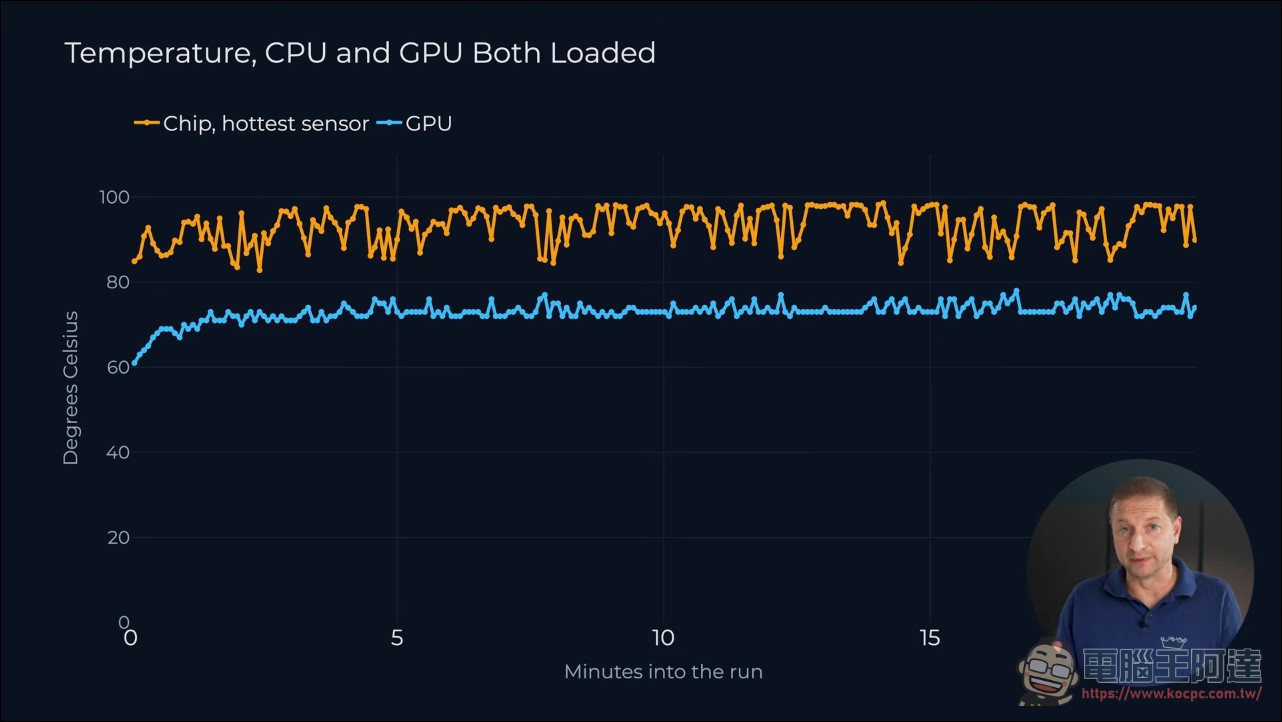
The cooling foundation is backed by official claims: MSI uses an Intra Flow vapor chamber cooling system in this machine, directing cool air straight to the processor. It claims this lowers temperatures and noise and prevents throttling under load, and our testing matches those claims.
Conclusion and Pricing: The Complete Answer to Mobile AI Development
Ziskind’s conclusion is very practical: if you want one machine that can handle both development tools and 120B/125B models and still be taken on a plane or to the park, this one can do it; if you want to run Agent 24/7, DGX Spark is still the right machine. MSI offers 128GB, 64GB, and 32GB memory versions, with overseas pre-order prices starting at $3,299.99, equivalent to about NT$107,000. Those interested can check out the video for themselves; it has CC subtitles:
Taiwan has opened preorders, with two configurations: the C1XMT-217TWY comes with 64GB of memory, a 1TB SSD, and a 2.8K OLED touchscreen, priced at NT$139,900; the C1XMT-209TWY comes with 128GB of memory, a 2TB SSD, and a UHD+ OLED touchscreen, priced at NT$239,900. From October 8 to November 30, purchase through designated channels and complete registration to receive a one-year extended warranty, one year of accidental damage protection, and a 128GB flash drive, worth over NT$6,000. The first wave of RTX Spark laptops will begin shipping on October 16, with the ASUS ProArt P16 and P14 also in the same batch; the only 2-in-1 model at present is this MSI one.
The two versions are NT$100,000 apart, with the difference entirely in memory, SSD, and screen resolution. To run 120B-class models, you can only choose the 128GB version; the 64GB version can still hold its own with 27B-class models. As for the 32GB version, that’s the price point for buying an “RTX Spark development environment admission ticket”—don’t use it to run flagship models.
Conclusion
The second set of hands-on results for the RTX Spark platform is more straightforward than the first: in laptop form factor, the N1X’s CPU holds its own against the DGX Spark, while its GPU memory bandwidth is actually higher. Its 128GB unified memory can fit a 125B model, it doesn’t throttle on battery, and it doesn’t throttle under burn-in. Windows on ARM compatibility issues have narrowed to toolchain details such as Python efficiency and long paths, all of which can be solved by switching to a different runtime environment. For developers who want a portable AI workstation, this is currently the most complete option; for 24/7 always-on agent server needs, the DGX Spark box remains irreplaceable.
Source: KOCPC Chinese